Process Starter
Using the Process Starter, users can initiate preconfigured processes.
Configurations are stored for various process steps, which in turn trigger different actions in INUBIT.
In response, the server can return a positive or negative response to indicate whether the process was successful.
It is also possible for the process to offer a file for download as a response (see Response to Process Submission).
Access Rights
For a user to use the Process Starter, they need the right bpcMonitor_startProcess.
If the system processing the Process Starter is accessed via a backend connection, the right loadModule_backendconnection is required for all users of the function.
General Settings
The following settings are configured for each monitor:
-
function_processStart
(boolean; default: false)
Shows or hides the Process Starter button in the monitor toolbar. The button is also displayed if this value is set to true and no configuration has been saved. -
function_processStartConfig
(json; default: [])
Configuration of the process starter popup. See Configuration.
Certain values (marked withlanguageKey) can be specified either using an existing LanguageKey (e.g.,"CORE_DESCRIPTION") or as objects containing language-specific translations (e.g.,{ "de": "Beschreibung", "en": "Description" }). -
vpsEndpointProcessor
(string; default: "")
Selection of the REST endpoint (Backend Connection) or processor (Flow) for executing a process starter.
Configuration
This section describes the options for configuring the process starter.
Syntax
-
windowWidth
(number, optional)
Sets the default window width for all processes. Minimum value: 800 -
windowHeight
(number, optional)
Sets the default window height for all processes. Minimum value: 300 -
processes
(array, 0..n)
Contains all processes configured in the process launcher.-
description
(string, languageKey)
Process description displayed in the window. -
key
(string)
Process keyword/ID. -
label
(string,, languageKey)
Display name of the process. -
bpcFormsId
(string, optional)
Loads a "BPC Form" with the corresponding ID.In this case, all other parameters are ignored.
-
hidden
(boolean)
Hides the process from the user. As a result, these processes can no longer be selected from the list of available processes. -
right
(array, optional)
See Restrictions Based on User Permissions. -
role
(array, optional)
See Restrictions Based on User Permissions. -
organisation
(array, optional)
See Restrictions Based on User Permissions. -
startWithContext
(boolean, optional)
If set to "true," the currently selected process is included. In addition, this process is displayed directly in the context menu and details pane. -
iconCls
(string, optional)
Icon for the process. Example: "x-fal fa-fire". -
labelWidth
(number, optional)
Sets a custom Label width (default 150). -
windowWidth
(number, optional)
Sets a custom Label width. Minimum value: 800 -
windowHeight
(number, optional)
Set a custom window height. Minimum value: 300 -
parametersEndpoint
(string, optional)
URL used to attempt to load parameters. This is only possible if parameters is not configured. See also Response to a query of the endpoint parameter -
dataEndpoint
(string, optional)
URL from which data for form fields can be loaded.
Example:“dataEndpoint”:”cxf/bpc-httpproxy/httpProxy/BACKEND_CONNECTION_ID/RESTLICHE_URL”
(In addition toinubit_VpcEndpoint, this provides the option to distribute the loading of data and the final submission of the form to different systems.) -
dataLoadInitial
(boolean, optional, default: false)
If set to "true": Data is reloaded via the URL specified atdataEndpointwhen the form is initially displayed. See also Response to Form Field Data Query -
dataLoadOnChange
(boolean, optional, Default: false)
When set to "true": Data is reloaded via the URL specified atdataEndpointwhenever the user makes changes to form fields. Change events are buffered (seechangeBufferTimeInMs). See also Response to Form Field Data Query -
dataLoadOnBlur
(boolean, optional, default: false)
When set to "true": Data is reloaded via the URL specified atdataEndpointwhenever the user switches between form fields. Change events are buffered (see changeBufferTimeInMs). See also Response to Form Field Data Query -
dataLoadMask
(boolean, optional, default: true)
When set to "true": The form is disabled while form data is loading. -
changeBufferTimeInMs
(number, optional)
Buffer period for change events.
All changes are aggregated within this period. This reduces the number of server requests.
Default value: 500 (milliseconds) -
hideFormValidator
(boolean, optional, default: false)
When set to "true": The form validator is hidden. -
notificationDisplayMode
(string, optional)
Can be "toast," "popup," or "silent," thereby overriding Function_ProcessNotificationDisplayMode for this process. -
metadata
(json, optional)
Any JSON object that is passed along with the starter to provide additional configuration values or context information. -
parameters
(array, 0..n, optional)
Parameters for the process.-
initialValue
(optional)
Initial value of the parameter. -
initialValueFrom
(optional)
Initial value of the parameter taken from the corresponding process field (when starting an existing process) — in uppercase. -
key
(string)
Keyword of the parameter. -
mode
(string, optional, for type = choice)
If set to "initialRemote": "options" is ignored and the value list is loaded from the server (see [url]). All previously entered values are passed along. -
reloadRemoteData
(boolean, optional, for typ = choice)
If set to "true": Whenever a field is changed, the list of values (mode=initialRemote) is reloaded. -
Label
(string, languageKey)
The display name of the Parameter. -
tooltip
(string, languageKey)
Additional information displayed to the user as a tooltip next to the field.
An information iconis also displayed to indicate to the user that additional information is available here. -
hideTooltipIcon
(boolean, optional, default: false)
If "true": The additional information icon, which is displayed when the `tooltip` option is set, is not displayed. -
type
(enum)
Type of the parameter (see Types (type)). -
increment
(number, optional, only for parameters of type "time")
Number of minutes that should elapse between individual values. -
minValue
(string or number, optional)
Minimum value. -
maxValue
(string or number, optional)
Maximum value. -
height
(number)
Height in pixels (only for the "textarea" type). -
right
(array, optional)
See Restrictions Based on User Permissions. -
role
(array, optional)
See Restrictions Based on User Permissions. -
organisation
(array, optional)
See Restrictions Based on User Permissions. -
optional
(boolean, optional, default: false)
If "true," the user does not need to enter a value. -
readOnly
(boolean, optional, default: false)
If set to "true," the field’s value cannot be changed. -
disabled
(boolean, optional, default: false)
If set to "true," the field’s value cannot be changed and the field is displayed as disabled. -
regex
(string, optional)
Must be a valid regular expression (JavaScript). The field content is validated against this expression. If the validation fails, the field is marked as invalid andregexTextis displayed as an error. Examples:-
\\w{3,}At least 3 alphanumeric characters. -
1{1,}Must contain the number 1 at least once.
-
-
regexText
(string, optional)
Error message displayed if validation againstregexfails. A language key (see Languages) can also be used. -
dataLoadEventIssuer
(boolean, optional, Default: true)
Defines whether changes or leaving the field trigger Loading Form Data via a Custom Backend System. -
anyMatch
(boolean, optional, default: false, only for Parameters of type "choice")
If set to "false," values from "options" that start with the same characters as the input are displayed. If set to "true," values that match any part of the input are also displayed. -
options
(array, 1..n, only for Parameters of type "choice")
Values for the combo box or options of the parameter.-
key
(string)
Key name of the option. -
label
(string, languageKey)
Display name of the option* [url]. -
url
(string, optional)
This URL is used to load the values for the selection lists (choice or modeinitialRemote) in combo boxes. The response from the server is expected to be in the format documented under “Response to Value List Query.”
(It is therefore not yet possible to determine here whether something should already be selected.dataEndpointis for loading the values themselves.)
-
-
-
Types (type)
Selection of types that can be set for the Parameters. Depending on these values, other parameters can be set (e.g., for "number," "maxValue" can be set)
-
number
Number field -
boolean
A checkbox is created. -
choice
Selection from multiple options (combo box) -
date
Date field, see [datumswerte_date_datefromto] -
month
Similar to "date," but You can only select months. -
dateFromTo
Two linked date fields; see [datumswerte_date_datefromto] -
time
Time; a 'timefield' is created -
text
Text; a 'textfield' is created -
spinner
Number field with fixed values within the selection range -
upload
[dateiupload_upload] Field -
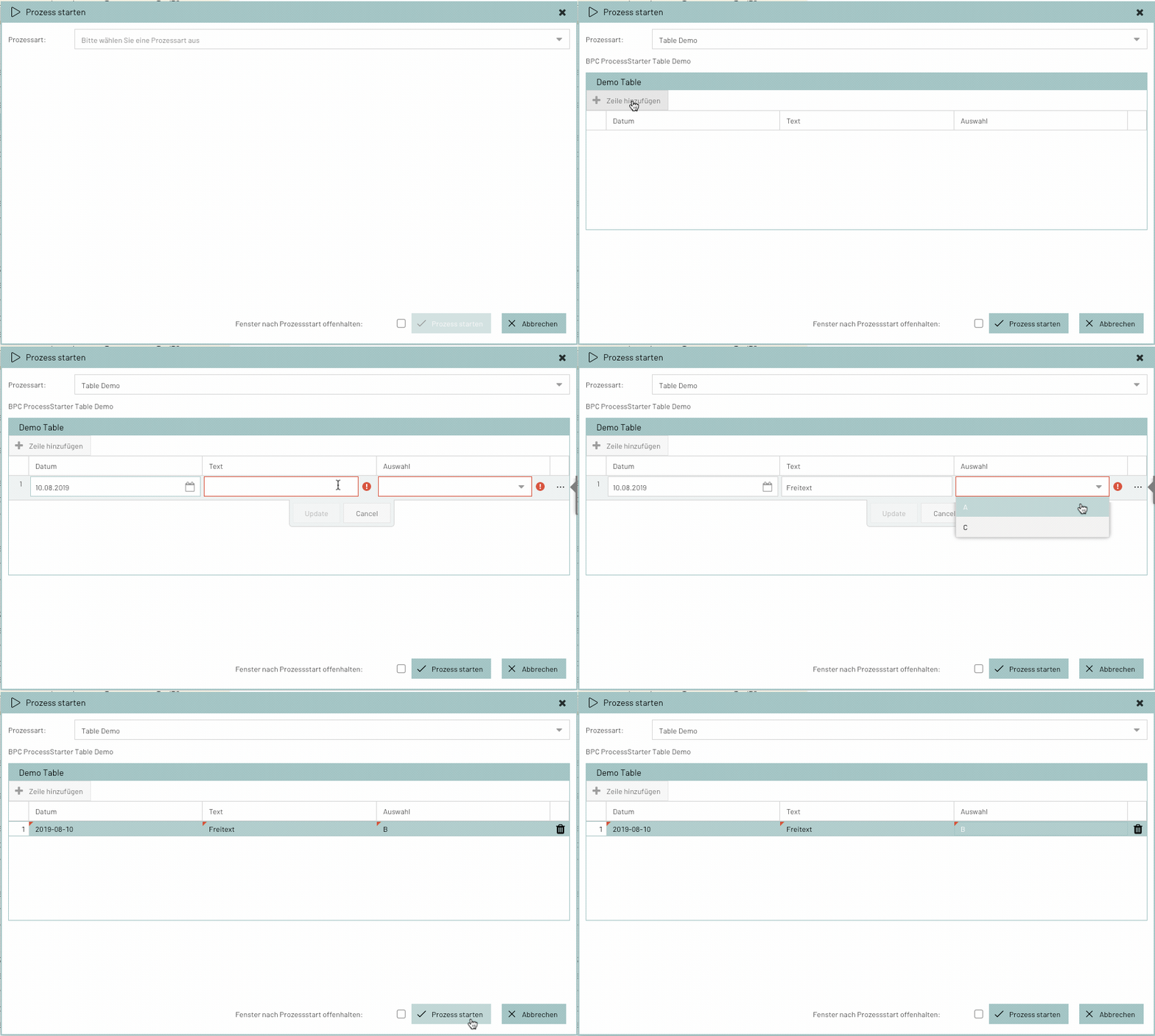
table
Table for entering multiple records. -
textarea
Multi-line input field. Height can be defined using "height".
File upload (upload):
A file upload field can be defined using the type upload.
{
          "tooltip": "Bitte Datei auswählen",
          "optional": true,
          "label": "Datei",
          "type": "upload",
          "key": "someupload1"
}
Date values (date, dateFromTo):
If the configured process contains a Parameter of type date or dateFromTo, the date can be assigned a fixed or relative value.
This applies to the following values:
-
initialValue (In the case of the "dateFromTo" field, you can alternatively define "initialDateFrom" and "initialDateTo".)
-
maxValue
-
minValue
Using dateFromTo creates two date fields that are linked to each other.
In this case, the value of the “from” field cannot be greater than the value of the “to” field, and vice versa.
For fixed date values, the YEAR-MONTH-DAY format (e.g., "2012-12-31") must be used. When specifying relative dates, the string must always begin with "CURRENT_DATE". If desired, this is followed by the number of days you want to add or subtract from the current date, using a plus or minus sign and the number of days.
Simplified expression:
CURRENT_DATE +/- <Anzahl-der-Tage>
or as a regular expression:
^CURRENT_DATE(\s*[-+]\s*[0-9]+){0,1}$
Examples:
|
Today |
|
Tomorrow |
|
Yesterday |
|
The day before yesterday |
The following is allowed:
-
omitting spaces, e.g.,
CURRENT_DATE+1 -
not specifying a number at all and using today’s date, i.e.,
CURRENT_DATE
The following is*not allowed*:
-
starting with a number, e.g., "1 + CURRENT_DATE"
-
Omitting CURRENT_DATE, e.g., "+1"
-
Setting both + and - at the same time, e.g., "CURRENT_DATE +- 12"
-
Appending a string after CURRENT_DATE, e.g., "CURRENT_DATE + test"
-
Append multiple numbers with plus or minus, e.g., "CURRENT_DATE + 1 + 2"
Table (table)
The table allows users to submit any number of data records. The available columns are configured, and You can then add rows to the table and enter data.
When configuring the columns, the data types can be set just as they are for individual fields.
{
  "processes": [
    {
      "description": "BPC ProcessStarter Table Demo",
      "label": "Table Demo",
      "parameters": [
        {
          "type": "table",
          "key": "table",
          "label": "Demo Table",
          "columns": [
            {
              "label": "Datum",
              "type": "date",
              "key": "date"
            },
            {
              "label": "Text",
              "type": "text",
              "initialValueFrom": "TEXT",
              "key": "text"
            },
            {
              "label": "Auswahl",
              "type": "choice",
              "key": "userChoice",
              "options": [
                {
                  "key": "B",
                  "label": "A"
                },
                {
                  "key": "D",
                  "label": "C"
                }
              ]
            }
          ]
        }
      ],
      "key": "bpcPsTableDemo"
    }
  ]
}
Loading Form Data via a Custom Backend System
It is possible to populate the Process Starter form with data from a backend system (e.g., INUBIT). To do this, [dataEndpoint] must be configured.
There are three different triggers for loading the data:
-
When the Process Starter is first opened → [dataLoadInitial]
-
When the user changes the data → [dataLoadOnChange]
-
When switching between form fields → [dataLoadOnBlur]
These can be combined as desired.
Individual fields can be excluded as triggers for loading via [dataLoadEventIssuer].
When the data is loaded, all current data is sent to the backend system. The backend system can return an appropriate response based on the data to modify the form data.
Restrictions Based on User Permissions
It is possible to restrict the visibility of processes or individual process fields based on organizations, roles, or permissions through the configuration.
To do this, you can add the following attributes to the object:
-
role
-
right
-
organization
If none of these attributes are specified, no access restrictions apply. For each attribute, an array of strings can be specified. In this case, the user must have at least one of these attributes:
r1 or r2.{
"right": ["r1","r2"]
}Examples
{
  "processes": [
    {
      "description": "BPC ProcessStarter Demo",
      "label": "PS Demo",
      "parameters": [
        {
          "label": "Status",
          "type": "text",
          "initialValueFrom": "STATUS",
          "key": "status"
        },
        {
          "label": "Text",
          "type": "text",
          "initialValueFrom": "TEXT",
          "key": "text"
        },
        {
          "label": "Tabellenprefix",
          "type": "text",
          "initialValue": "VIRTIMO_TESTDUMP_",
          "key": "table"
        }
      ],
      "key": "bpcPsDemo"
    }
  ]
}{
"processes": [
{
"description": "Abruf von Mengen- und Zustandswerten.",
"key": "Virtimo_WebserviceRequest",
"label": "Virtimo-Datenabruf",
"parameters": [
{
"initialValue": "2016-02-14",
"key": "startdate",
"label": "Start-Datum",
"maxValue": "2016-02-15T13:44:20.468+01:00",
"tooltip": "Startdatum der zu übermittelnden Daten",
"type": "date"
},
{
"initialValue": 1,
"key": "number",
"label": "Anzahl Tage",
"maxValue": 365,
"minValue": 1,
"tooltip": "Anzahl der Tage ab Start-Datum",
"type": "number"
}
]
},
{
"description": "Hiermit wird eine Anfrage an das interne System ausgelöst und die gelieferte TransparencyPublication an die Virtimo Kollektorstelle übermittelt.",
"key": "Virtimo-Kollektorstelle",
"label": "Virtimo-Kollektorstelle",
"parameters": [
{
"key": "mandant",
"label": "Mandant",
"options": [
{
"key": "VIRTIMO",
"label": "Virtimo"
},
{
"key": "TIMO",
"label": "Timo"
},
{
"key": "VIRT",
"label": "Virt"
}
],
"type": "choice"
},
{
"key": "typ",
"label": "Typ",
"options": [
{
"key": "AL5",
"label": "AL5"
},
{
"key": "AL6",
"label": "AL6"
}
],
"type": "choice"
},
{
"initialValue": "2016-02-14",
"key": "startdate",
"label": "Datum",
"maxValue": "2016-02-15T13:44:20.468+01:00",
"tooltip": "Datum der zu übermittelnden Daten",
"type": "date"
}
]
},
{
"description": "Manueller Start der Aktualisierung der Gaspreisdaten aus dem Webservice, für den Fall das aktuelle Daten hier fehlen oder der aktuelle Prozess auf einen Fehler gelaufen ist. Der Prozess ermittelt das jüngste in der DB vorhandene Datum und ruft nur neuere Daten vom Webservice zum Transfer ab.",
"key": "Gaspreisabfrage",
"label": "Gaspreisabfrage",
"parameters": [
{
"initialValue": "2016-02-14",
"key": "startdate",
"label": "Start-Datum",
"maxValue": "2016-02-15T13:44:20.468+01:00",
"tooltip": "Startdatum der zu übermittelnden Daten",
"type": "date"
}
]
},
{
"description": "Manueller Start der Aktualisierung der Listfilter des ProzessMonitors, für den Fall das aktuelle Daten hier fehlen. Anschließend muss ein neu Laden der Seite erfolgen um die neuen Filterwerte zu laden.",
"key": "PM_DynamicListFilterRefresh",
"label": "ListFilter-Aktualisierung"
},
{
"description": "Hier werden unterschiedliche mögliche Beispielparameter gelistet.",
"key": "Exampleparameters",
"label": "Beispielparameter",
"parameters": [
{
"key": "date",
"label": "Datum",
"maxValue": "2016-02-15T13:44:20.468+01:00",
"tooltip": "Startdatum der zu übermittelnden Daten",
"type": "date"
},
{
"increment": 60,
"key": "time",
"label": "Uhrzeit",
"tooltip": "Uhrzeit der ersten zu übermittelnden Stunde",
"type": "time"
},
{
"initialValue": 1,
"key": "number",
"label": "Anzahl Stunden",
"maxValue": 240,
"minValue": 1,
"tooltip": "Anzahl der Stunden ab Startzeit",
"type": "number"
},
{
"key": "text",
"label": "Bemerkung",
"type": "text"
},
{
"key": "choice",
"label": "Auswahl",
"options": [
{
"key": "B",
"label": "A"
},
{
"key": "D",
"label": "C"
}
],
"type": "choice"
},
{
"key": "boolean",
"label": "Boolean",
"type": "boolean"
}
]
}
],
"url": "/cxf/bpc-httpproxy/httpProxy?targetUrl=/ibis/servlet/IBISHTTPUploadServlet/VPS_Portal_Funktionen"
}BPC Form Integration
A BPC form can be integrated into the Process Starter form. To enable this, the ID of the BPC form must be specified in the Process Starter configuration.
When a form is used in a Process Starter form, the BPC form receives the data from the currently selected monitor entries after it is opened.
This data is treated as the form’s “ data ” and stored at data.records.
These can be linked to the values in form fields.
The following example configuration of a field in the BPC form allows you to link a field’s value to data from the selected monitor entry.
{
    "label": "Action",
    "type": "textfield",
    "value": "${/records/0/action}"
}
The monitor data looks as follows:
[
    {
        "action": "GET",
        "originator": "admin"
    },
    {
        "action": "POST",
        "originator": "admin"
    }
]
In this example, the value of the field Aktion is linked to the field action of the first selected entry (position zero in the array).
Expected Return Format
The client expects a JSON response from the server.
Response to Process Submission
{
    "success": "false",
    "message": "Fehlermeldung"
}{
"success": "true",
"message": "Prozess 4711 gestartet"
}{
"success": true,
"download": {
"data": "UHJvemVzc3N0YXJ0ZXIgRG93bmxvYWQh",
"fileName": "processStarter.txt",
"contentType": "text/plain"
}
}Response to Value List Query
{
    "success": true,
    "data": [
        {    "key": 1, "label": "eins" },
        {    "key": 2, "label": "zwei" },
        {    "key": 3, "label": "drei" }
    ]
}
Response to Form Field Data Query
In the object at data, the attributes must match the key values of the respective form fields.
{
  "success": true,
  "data": {
    "PARAMETER_KEY": "VALUE",
    "name": "Jane Dow",
    "date_field": "1990-12-24",
    "boolean_field": true,
    "dateFromTo_field_from": "2022-08-01",
    "dateFromTo_field_to": "2022-08-21",
    "month_field": "2022-04-01",
    "time_field": "13:36"
  }
}
Response to a query of the endpoint parameter
With the following configuration of the process starter in the monitor:
{
    "endPoint": "VPS_Portal_Funktionen",
    "processes": [
        {
            "description": "Der Prozess setzt einen Abschluss Status, damit Nachrichten für die vergangenen Zeitperioden nicht mehr automatisch importiert werden. Die Files müssen geprüft und bei Bedarf manuell freigegeben werden.",
            "parametersEndpoint": "/cxf/bpc-httpproxy/httpProxy/inubit_proxy/ibis/servlet/IBISHTTPUploadServlet/VPS_Portal_Funktionen",
            "label": "Abrechnungsschluss setzen",
            "key": "Abrechnungsabgrenzung"
        }
    ]
}
The server could return the following response:
[ {
  "maxValue" : "CURRENT_DATE",
  "tooltip" : "Nachrichten mit einem Begin vor diesem Tag werden angehalten",
  "label" : "Abrechnungsdatum",
  "type" : "date",
  "key" : "splitdate",
  "initialValue" : "2022-07-07"
} ][
{
"label": "Status",
"type": "text",
"initialValueFrom": "STATUS",
"key": "statusField"
},
{
"label": "Text",
"type": "text",
"initialValueFrom": "TEXT",
"key": "textField"
},
{
"label": "ID",
"type": "number",
"initialValueFrom": "PROCESSID",
"key": "idField"
},
{
"label": "Date",
"type": "date",
"initialValueFrom": "timestamp",
"key": "dateField"
}
]Plugin
A monitor’s process starter can also be integrated as a plugin in other parts of the BPC. See Process Starter Plugin
OpenAPI Specification
A detailed description of all endpoints can be found in our OpenAPI specification.
