OpenSearch Index View
Overview
The Index View in BPC provides a detailed overview of all existing indices. An index in OpenSearch is comparable to a database table and contains various metadata and configuration options. In this view, users can manage indices by:
-
Filtering indices
-
Updating indices (refreshing the table)
-
Managing indices:
-
Viewing an index’s mapping and settings
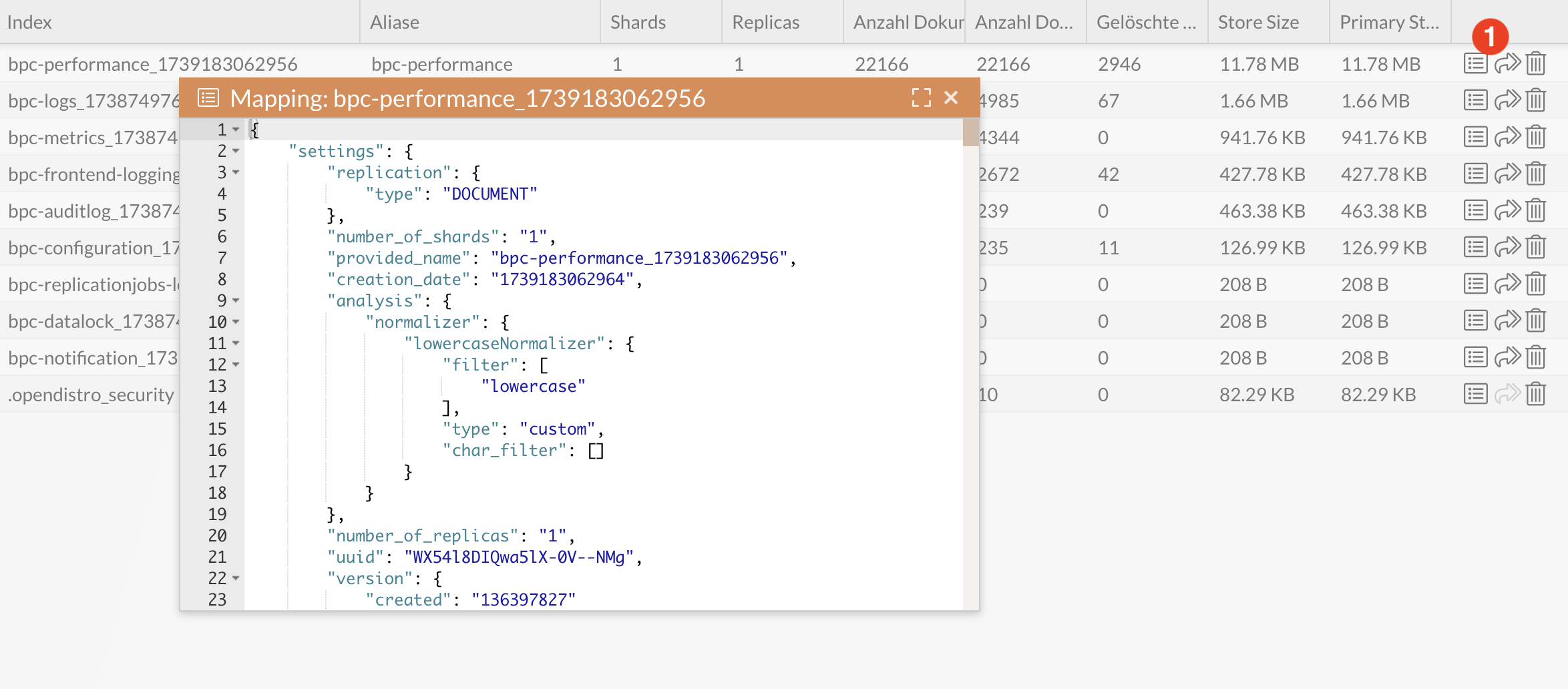
-
Reindexing indices
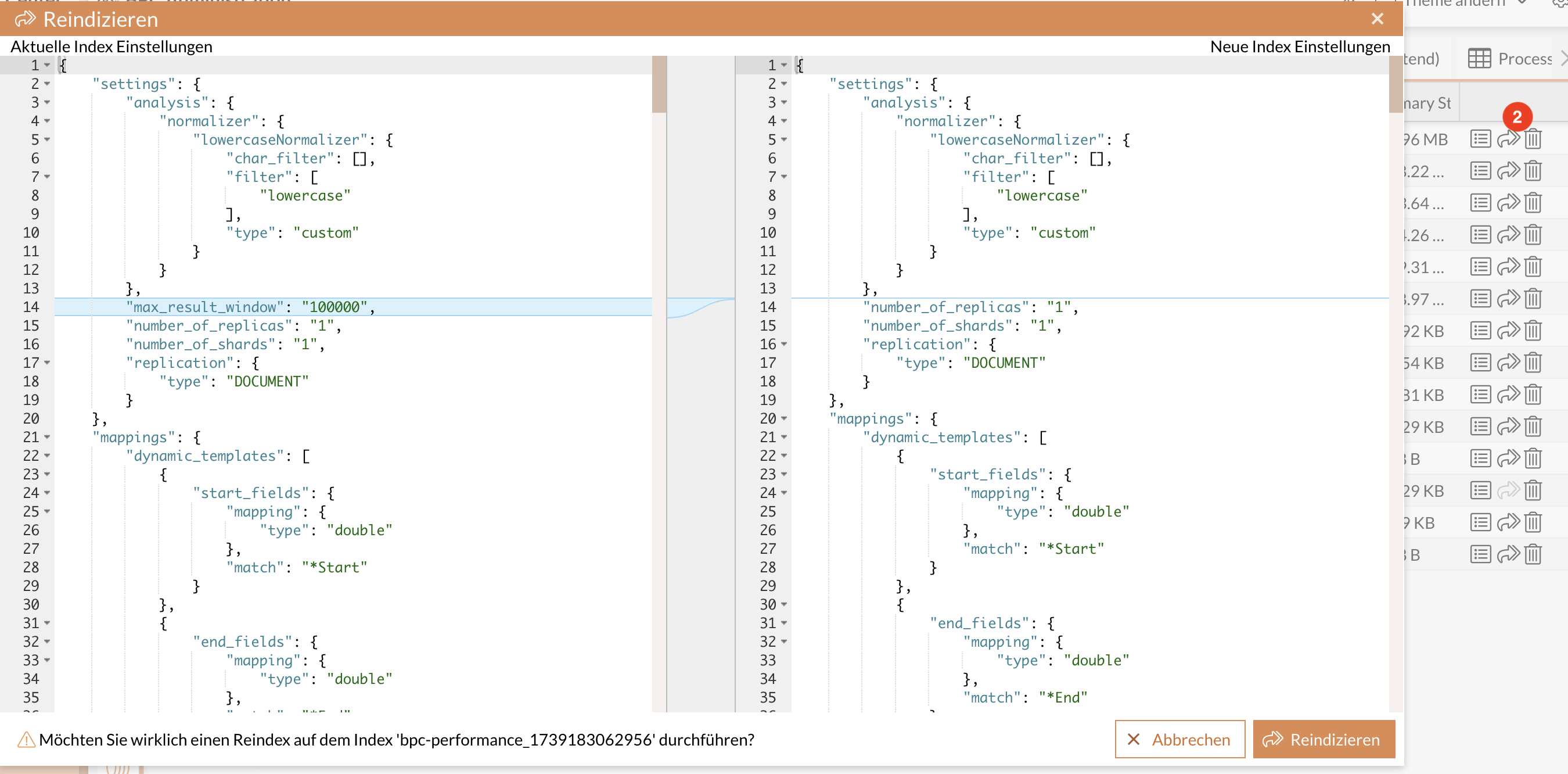
-
Exporting indices as a ZIP file. (This can be used to install a preconfigured BPC.)
-
Delete indices (Warning: this will result in data loss!)
-
In addition, the view displays various status information, including the index status (open or closed), and enables a detailed analysis of the indices.
|
A closed index (enabled by default) is locked for read and write operations and does not allow all operations available for open indices. It is not possible to index documents into a closed index or search for documents. As a result, closed indices do not need to maintain internal data structures for indexing or searching documents, which reduces the load on the cluster. |
Color Codes
The health status of the cluster, based on the status of its primary and replicated shards. Possible statuses are:
| Color Code | Meaning |
|---|---|
|
The green circle indicates that all shards are assigned. |
|
The orange circle indicates that all primary shards are assigned, but one or more replica shards are not assigned. If a node in the cluster fails, some data may be temporarily unavailable until the node is repaired. |
|
The red circle indicates that one or more primary shards are unassigned, causing some data to be unavailable. This may occur briefly during cluster startup while the primary shards are still being assigned. |



Columns in the Index View
-
Health: Displays the current status of the index (green, orange, or red)
-
Status: Indicates whether the index is set to “open” or “close”
-
Index: The name of the index
-
Aliases: Alias names that refer to the index
-
Shards: Number of shards in the index
-
Replicas: Number of replicas of an index
-
Number of Documents: The total number of stored documents
-
Deleted Documents: Number of documents marked as deleted
-
Store Size: Total storage space occupied by the index
-
Primary Store Size: Primary storage space
Overview of columns in the Indices view: image::core:admin/operation/indices_preview.png[]
Index Management
Reindexing
Reindexing allows you to transfer data from an existing index to a new index.
Reasons for reindexing:
-
To remove documents marked as deleted, since these are not included in the new index.
-
To reindex the documents in the index using a mapping that may have been adjusted.
When you call up the reindex feature, the dialog that appears compares the previous index settings and mappings with those intended for the new index. The new index settings and mappings are structured as follows:
-
The mappings from the existing index are adopted.
-
If available, the mappings for the new index are adopted from one of the
managed_indices.jsonfiles. -
BPC Administration → Core Services → Allgemein → Core_IndexCreationSettings(indexCreationSettings)Example JSON configuration:{ "analysis": { "normalizer": { "lowercaseNormalizer": { "type": "custom", "char_filter": [], "filter": [ "lowercase" ] } } } } -
BPC Administration → Core Services → Allgemein → Core_IndexDynamicTemplates(indexDynamicTemplates)Example JSON configuration:[ { "binaries": { "match_mapping_type": "string", "match": "_binary", "mapping": { "type": "binary" } } }, { "strings": { "match_mapping_type": "string", "match": "", "unmatch": "_binary", "path_unmatch": "bpc-attachment-.*", "mapping": { "type": "text", "fields": { "raw": { "type": "keyword" }, "lowercase": { "type": "keyword", "normalizer": "lowercaseNormalizer" } } } } } ]Depending on whether the index is populated via replication or a log service, there are various customization options:
Replication:
Up to three customization options can be used per replication job to influence the index settings and mapping:
-
targetIndexCreationSettings = Index Settings (optional): If set, the global indexCreationSettings (see above) are not used.
-
targetIndexMappings = Index Mappings (optional): Specific mappings can be defined here if OpenSearch’s automatic detection is insufficient.
-
targetIndexDynamicTemplates = Dynamic Templates (optional): If set, the global
indexDynamicTemplates(see above) are not used.
Log Service:
For these indices, the mapping is created based on the fields configuration there.
For more details, see the field name convention in the Log Service.
Shards and Replicas
Shards and replicas are central concepts for data distribution and security in OpenSearch (see also Shards and Replicas of Indices in OpenSearch).
Replica
Replicas are backup copies of shards that ensure data integrity in the event of a node failure.
The number of replicas can be set to 0, which is only recommended for single-node or development systems.
In an OpenSearch cluster with at least two nodes, this value should be set to at least 1 to ensure fault tolerance.
Shard
A shard contains the documents of an index and affects performance and scalability:
-
An index can consist of one or more shards.
-
A single shard can store up to approximately 50 GB of data and approximately 200 million documents.
-
Large shards can slow down search queries and prolong recovery after failures.
-
Each shard requires heap memory and uses its own thread.
Backups
To ensure data integrity, backups of the indices are created regularly. These enable recovery in the event of data loss or system failures.
