Security Cockpit
The Security Cockpit is located in the BPC administration area. It is designed to provide you with an overview of the application’s status from an IT security perspective. The BPC includes several security checks that are performed periodically or when configuration changes are made. The results of these checks are consolidated in a Overall Score. In addition, the latest results of the individual Security Tests are displayed. A Monitor is available for viewing all saved test results.
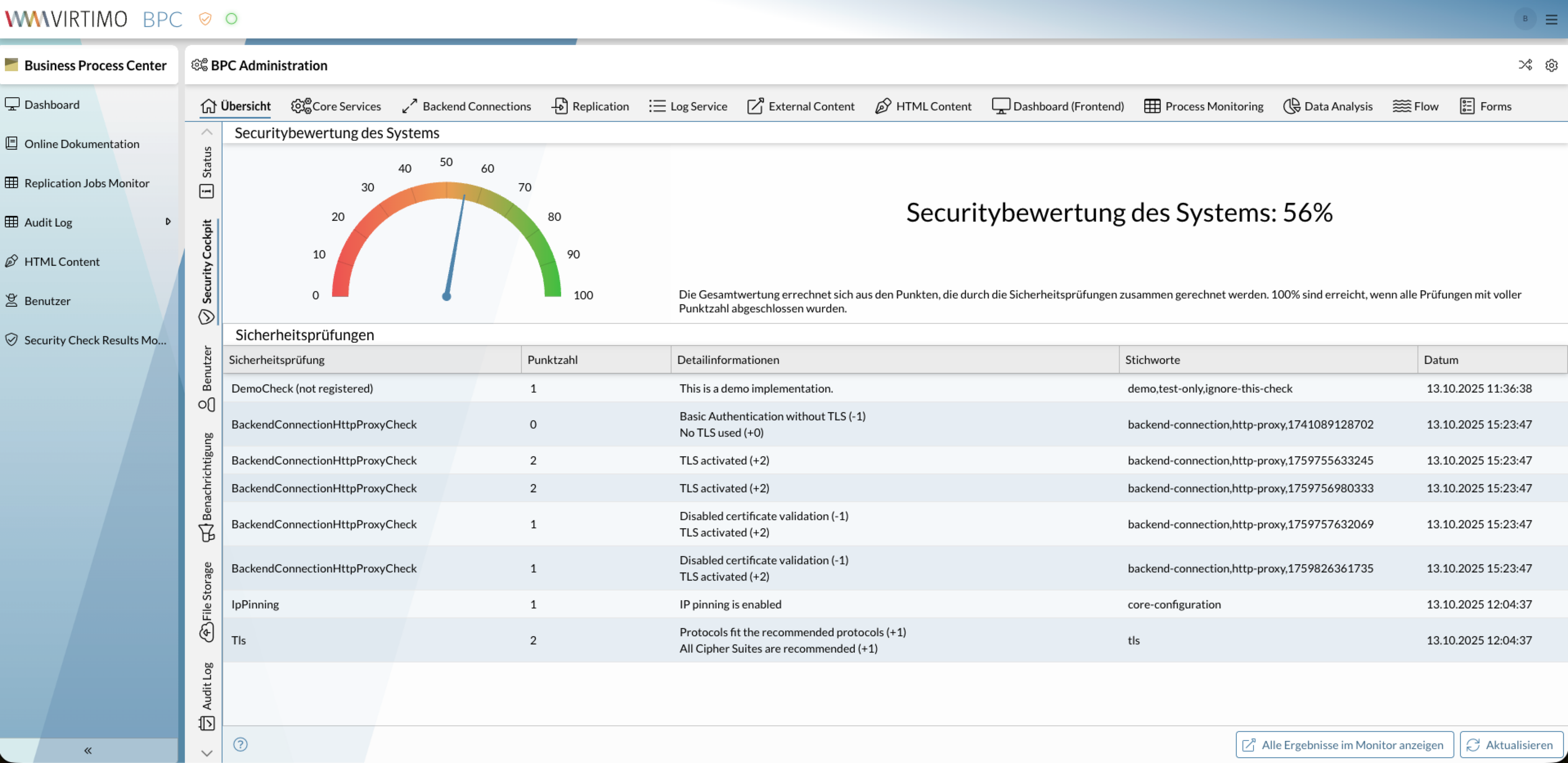
A plugin is also offered that provides a quick overview of the status even outside the administration page.
|
Assessing IT security is a very complex topic and should always be conducted by appropriate experts. The Security Tests do not provide a definitive assessment of IT security. The goal is to highlight insecure configurations and system conditions. |
Overall Score
The overall score is intended to serve as an indicator of the system’s overall condition.
It is calculated by summing the points from the Security Tests.
100% are achieved when all tests are completed with a perfect score.
Security Tests
In the BPC, various tests are used to examine and evaluate individual aspects of the application. Each test has a defined maximum score that can be achieved. In most cases, this maximum score is 1, since often only individual aspects are tested.
In addition, the test results contain detailed information that provides insight into potential issues.
Monitor
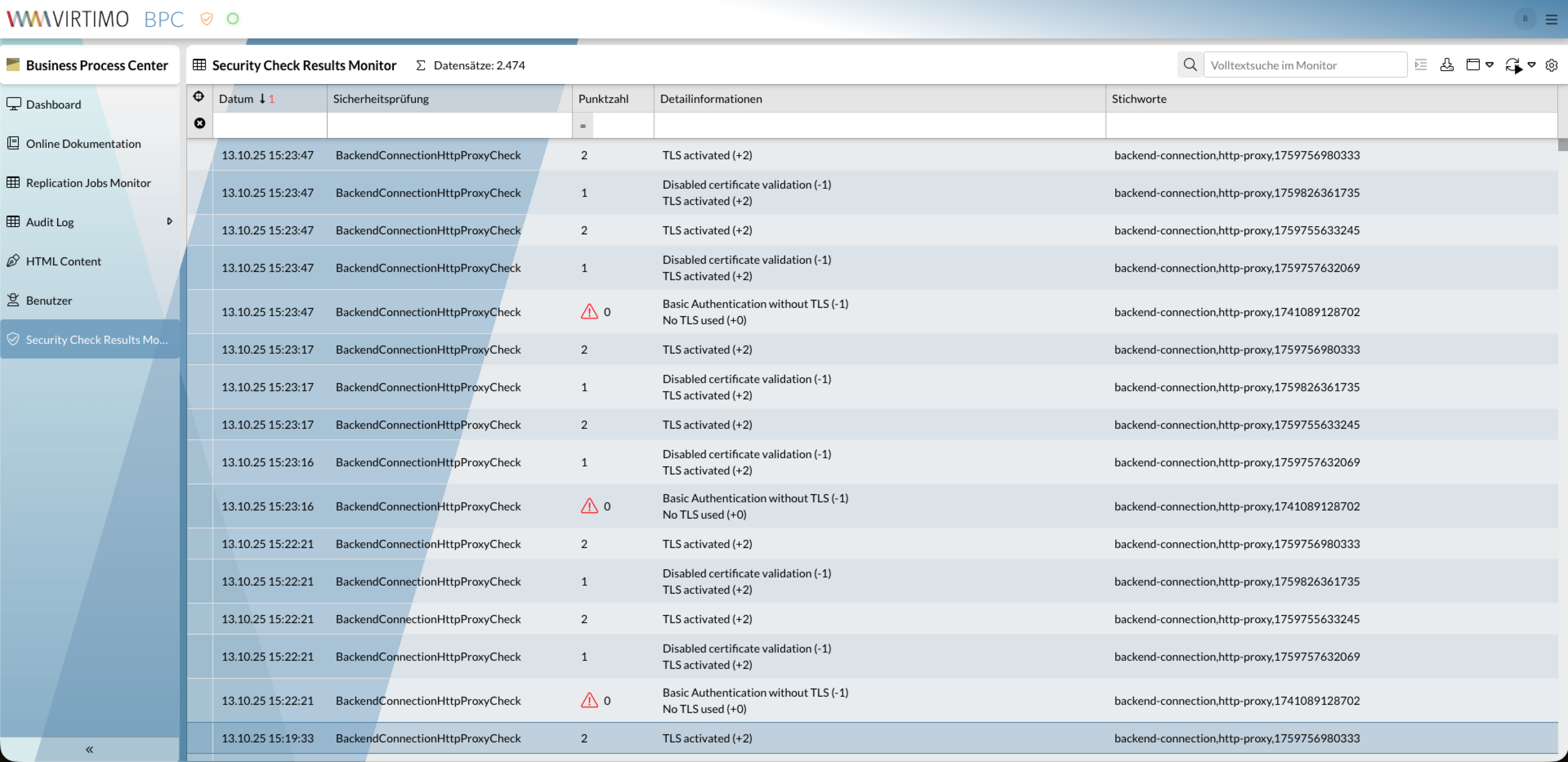
This monitor displays the current and past test results for the Security Tests. It is automatically created by the BPC and can also be found in the list of available monitors.
Exclude tests from the overall ranking
It is possible to exclude Security Tests from the overall ranking. This should only be done intentionally in individual cases if the aspects affected by the test are protected by other measures.
A test can be excluded from the overall ranking via the file <BPC-INSTALL-DIR>/karaf/etc/de.virtimo.bpc.core.security.checks.cfg.
To do so, create an entry there in the form of TEST_ID.ignoreInReport=true.
Excluded tests are no longer displayed in the list at Security Tests and are not included in the Overall Score. However, these tests continue to run, and their results can be found at Monitor.
<BPC-INSTALL-DIR>/karaf/etc/de.virtimo.bpc.core.security.checks.cfg# General Security Check Settings
deleteCheckResultsOlderThan=10 days ago
# Check Report Settings
IpPinningCheck.ignoreInReport=false
TlsCheck.ignoreInReport=false
HttpsCheck.ignoreInReport=false
BpcBaseUrlHttpsCheck.ignoreInReport=false
BackendConnectionHttpProxyCheck.ignoreInReport=false
APIKeySecurityCheck.ignoreInReport=false
OpenSearchTlsCheck.ignoreInReport=false
KarafFilePermissionsCheck.ignoreInReport=false
# TlsCheck Configuration
mozillaTlsRecommendationType=intermediate
#ApiKeyCheck Configuration
apiKeyMaxOrganisations=1
apiKeyMaxRoles=2
apiKeyMaxRights=15
apiKeyMaxDurationMonths=6
apiKeyMinLength=40
#KarafFilePermissionsCheck Configuration
allowGroupAccess=falseList of Security Checks
The following table describes all of the BPC’s security checks. A more detailed description and instructions on how to make the system more secure with regard to the test can be found on the corresponding page for each check.
| Name (Identifier) | Description |
|---|---|
TLS Check (TlsCheck) |
Checks whether only algorithms considered secure are allowed for TLS in the Java security configuration. This check is based on Mozilla’s recommendations. |
IP Pinning Check (IpPinningCheck) |
Checks whether IP pinning is enabled. |
HTTPS Check (HttpsCheck) |
Checks whether the BPC can only be accessed via HTTPS. |
BPC Base URL HTTPS Check (BpcBaseUrlHttpsCheck) |
Checks whether the configured BPC base URL uses HTTPS rather than HTTP. This is an indicator that external access is also encrypted. |
HTTP Proxy Check (BackendConnectionHttpProxyCheck) |
Checks whether the existing backend Connections of type |
