Module front-end interface
A BPC module should contain an interface class. This provides the BPC core with information about the module. This allows it to be integrated at various points in the BPC.
Requirements
The interface class must extend the BpcCommon.BpcInterface class.
The config block can then contain interface information.
Interface information
The class can provide the BPC with various information on how the module is to be used and which components can also be used outside the module.
moduleConfigurationComponents
xtypes of ExtJS components (derived from Ext.Component) can be specified here.
These components are provided as additional tabs in the configuration area of the module (see Administration area).
The components should have the attributes title and iconCls so that they can be displayed correctly in the table bar.
|
These components usually provide information or configuration options for BPC administrators. |
moduleInstanceConfigurationComponents
ExtJS components can be specified here in the same way as moduleConfigurationComponents.
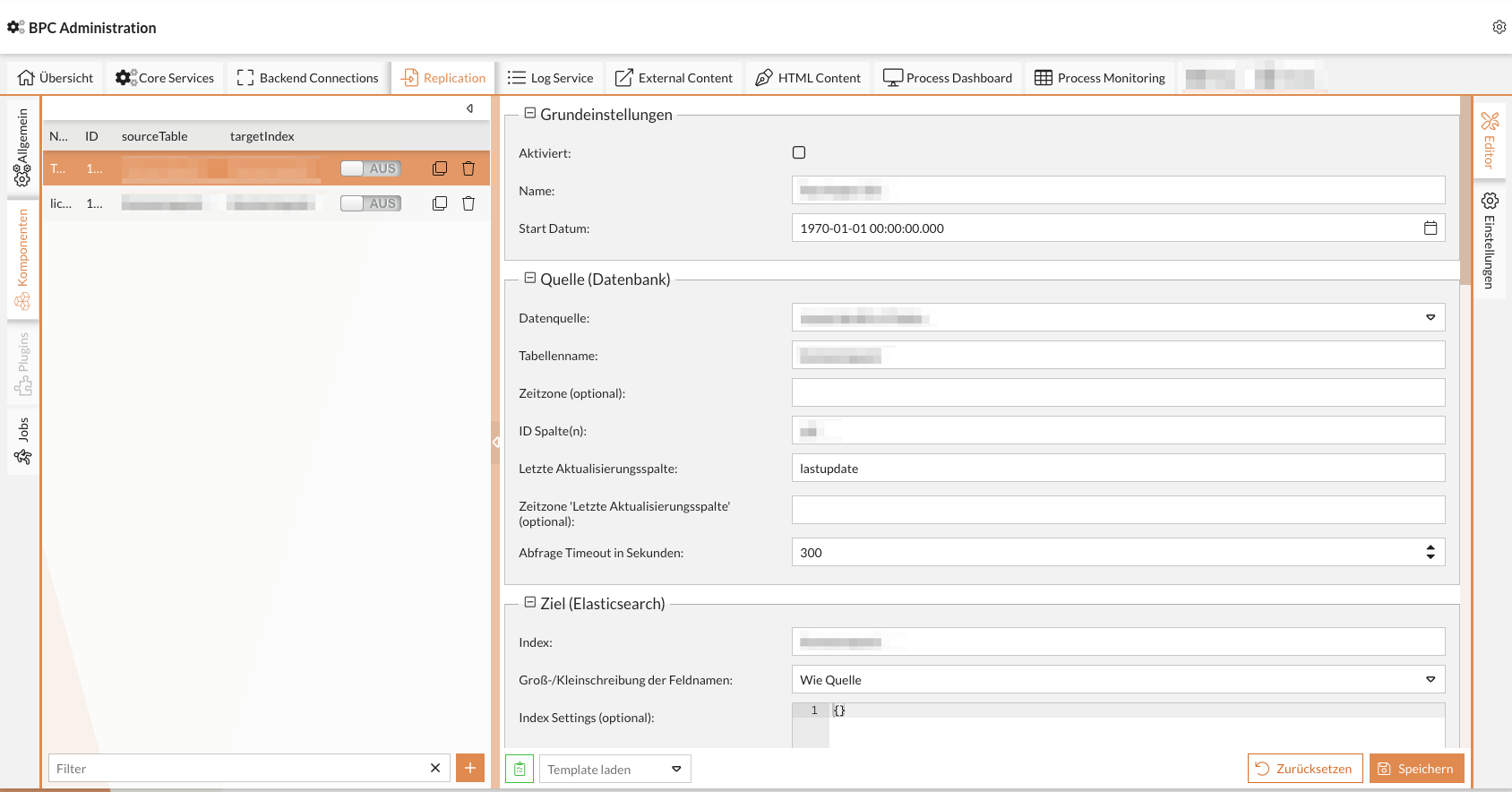
The difference to moduleConfigurationComponents is that these components relate to individual module instances and are therefore also displayed in the interface in the dialog in which the instances are selected and configured.
If such a component is configured on a module, it is also displayed in front of the standard "Settings" interface.
The following functions are available to the component here:
-
Access to the current instance (
Ext.data.Modelof the instance configuration) -
Extension of the action buttons in the list of instances
-
Addition of further columns to the instance list
-
Extension or replacement of buttons below the instance list
The component can access "{moduleInstance}" via its own ViewModel.
This always contains the data model of the currently selected instance.
moduleInstanceInterface
To expand the view, the components can provide further information via the moduleInstanceInterface attribute.
- additionalColumns
-
Columns (
Ext.grid.column.Column) configurations can be stored here. These are added to the instance list. - additionalActions
-
ExtJS components such as buttons can be configured here. These are added below the instance list.
If you add a component with the
itemId"addBtn", this replaces the existing button for adding new instances. - additionalInstanceActions
-
ExtJS components such as buttons can be configured here. These are added in the line of the individual instances.
If you add a component with the
itemId"addToNavBtn", "duplicateBtn", "deleteBtn" or "jumpTpoInstanceBtn", then this replaces the existing button.
Ext.define("MODULID.view.MyInstancePanel", {
   extend : "Ext.Panel",

   moduleInstanceInterface : {
      additionalColumns : [],
      additionalActions : [],
      additionalInstanceActions : []
   }

    // ...
});
defaultModuleInstanceConfigurationComponent
Hier kann die Standardkomponente zum Editieren einer Instanz definiert werden.
Diese muss in moduleInstanceConfigurationComponents enthalten sein.
Wird hier keine Komponente angegeben, so wird die Standard Komponente zum Editieren von Modulinstanzen angezeigt.
widgets
Hier können BPC Widgets für das Dashboard hinterlegt werden. Für die Implementierung von Widgets (siehe Develop BPC widgets)
|
Hier können keine |
Ext.define("MODULID.view.widget.MyWidget", {
   extend : "Ext.Panel",

   mixins : [
      "BpcCommon.mixin.Widget"
   ],

   statics : {
      WIDGET_NAME        : "Widget Name",
      WIDGET_DESCRIPTION : "Widget Beschreibung",
      WIDGET_ICON_CLS    : "x-fal fa-fire"
   }
});
baseModuleView
Class name for displaying the module.
Default: MODULEID.view.Main
Can be accessed via
BpcCommon.Api.showModule("MODULEID")
|
This representation is rarely used. |
Example
 Ext.define("MODULEID.BpcInterface", {
    extend: "BpcCommon.BpcInterface",

   config : {

      /**
         * An array of component-xtypes which will be added to the configuration GUI for this module. They
         * will get the Ext.data.Model of the corresponding module as parameter and can be used via this.module.
         */
      moduleConfigurationComponents : [],

      /**
       * An array of component-xtypes which will be added to the instance configuration GUI for this module. They
       * will get the Ext.data.Model of the corresponding module instance as parameter and can be used via this.moduleInstance.
       */
      moduleInstanceConfigurationComponents : [],

      /**
       * The default component to configure the instance. This must be one element from moduleInstanceConfigurationComponents. If no
       * default is defined the default configuration panel is initially shown.
       */
      defaultModuleInstanceConfigurationComponent : undefined,

      /**
         * A list of widgets (they should use the mixin BpcCommon.mixin.Widget), which will be offered to other modules.
         */
      widgets : [],

      /**
         * A string which points to the baseModuleView, ExtJS class, string
         */
      baseModuleView : null,


      /**
         * A string which points to the mainView, ExtJS class, string
         */
      mainView : null,

      /**
         * Array of global event names, which should be forwarded to the backend.
         */
      forwardedEvents : []
   }
});