Installation

Requirements
  • BPC server installed, configured and started

  • INUBIT Process Engine started

  • BPC configured as portal server in INUBIT. If BPC is not installed on the same computer as the INUBIT Process Engine, localhost:8181 should be replaced by the name and Port of the computer on which the BPC is installed.

  • WebApp modules have been deployed from INUBIT to BPChttps://docs.virtimo.net/de/inubit/8.0/administration-guide/general-settings/configuring-portal-deployment.html[(documentation])

  • BPC configured as process user server in INUBIThttps://docs.virtimo.net/de/inubit/8.0/administration-guide/general-settings/configuring-process-user-server.html[(documentation])

  • All task generator modules in INUBIT have been linked to at least one BPC process role

configuration overview

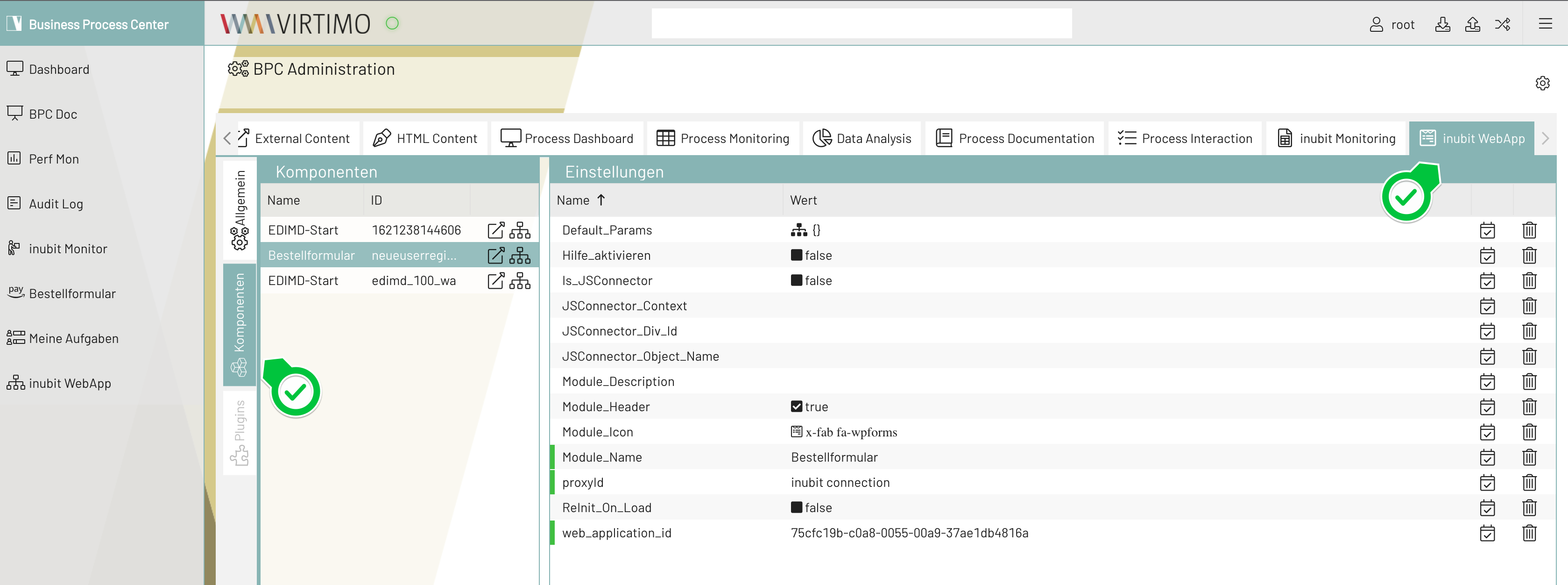
Loading the INUBIT WebApp module in BPC

  1. Logging into BPC via the URL http(s)://<portal hostname>:<port> e.g. http(s)://localhost:8181/

  2. After logging in, navigate to the administration area and select the INUBIT WebApp tab. The deployed WebApp modules are located under Components.

  3. Click on the icon in the Actions column in the component list to display the component as a test. For everyday use, add it as a navigation menu element, see Navigation settings.

  4. The "Reinit_On_Load" property creates a new web application instance in the INUBIT each time the component is loaded in the BPC by the user. It is switched off by default.