Application Examples
Here you will find examples of charts and reports that demonstrate how the Analysis module works, using a fictional company that manufactures and sells various products. The module is used to display and graphically present business-relevant information. The general procedure involves creating data sets, displaying them in charts, and summarizing these charts in reports.
To install these examples in a live system, you can follow the instructions in the section on the deployment operation, which can be found at Deployment. To do this, you must import the corresponding JSON file, which is provided under Analysis Examples.
Datasets
The first step in using the Analysis module is to create a dataset.
Several datasets have been created using JSON as the data source. In most use cases, however, this data comes from a backend system (see possible data sources).
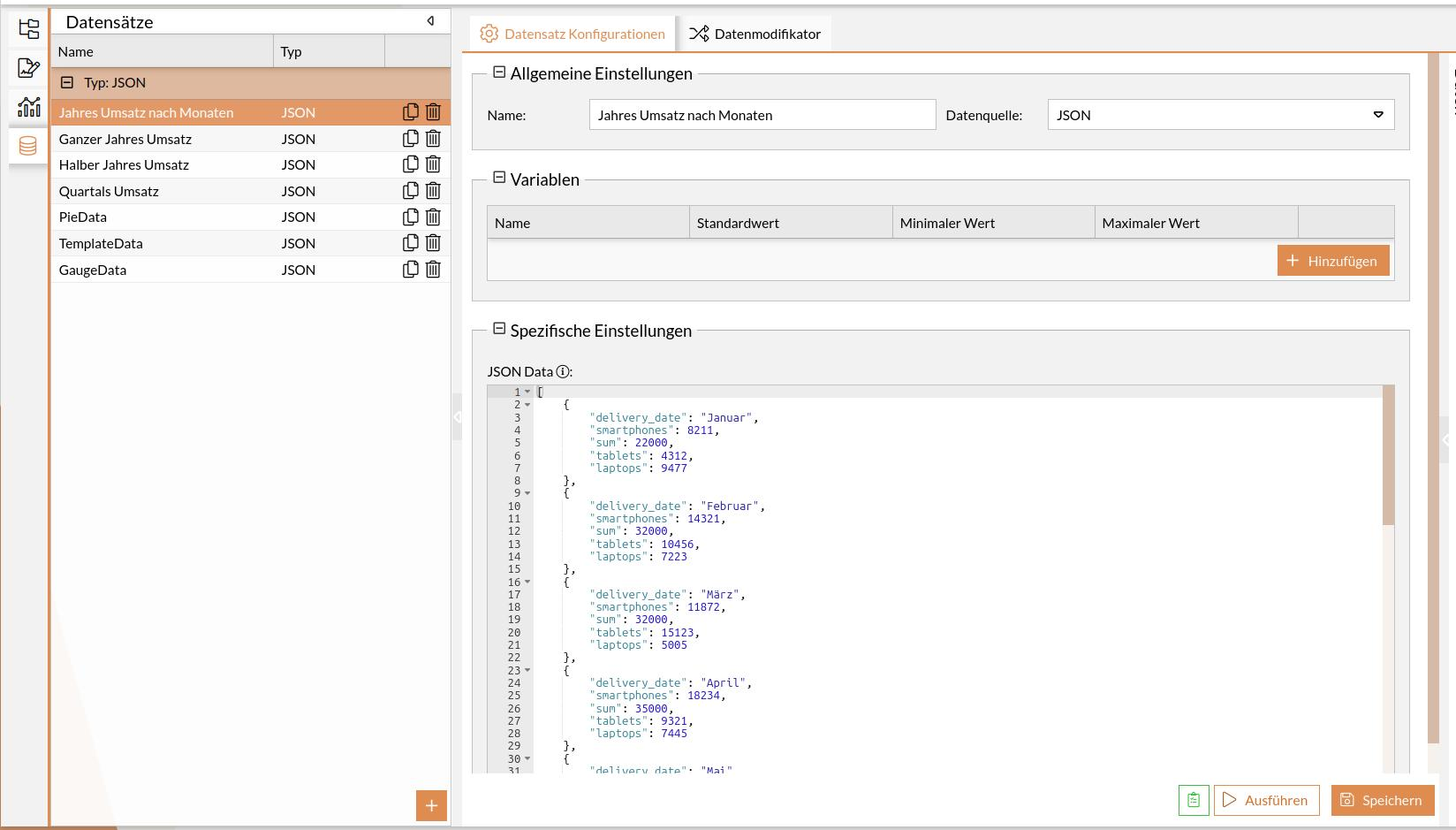
In the next step, this data will be visualized in charts and reports.
Charts
The next step in using the Analysis module is to create charts.
Revenue per Product as a Classic Line Chart
The revenue for three products is to be displayed in a line chart.
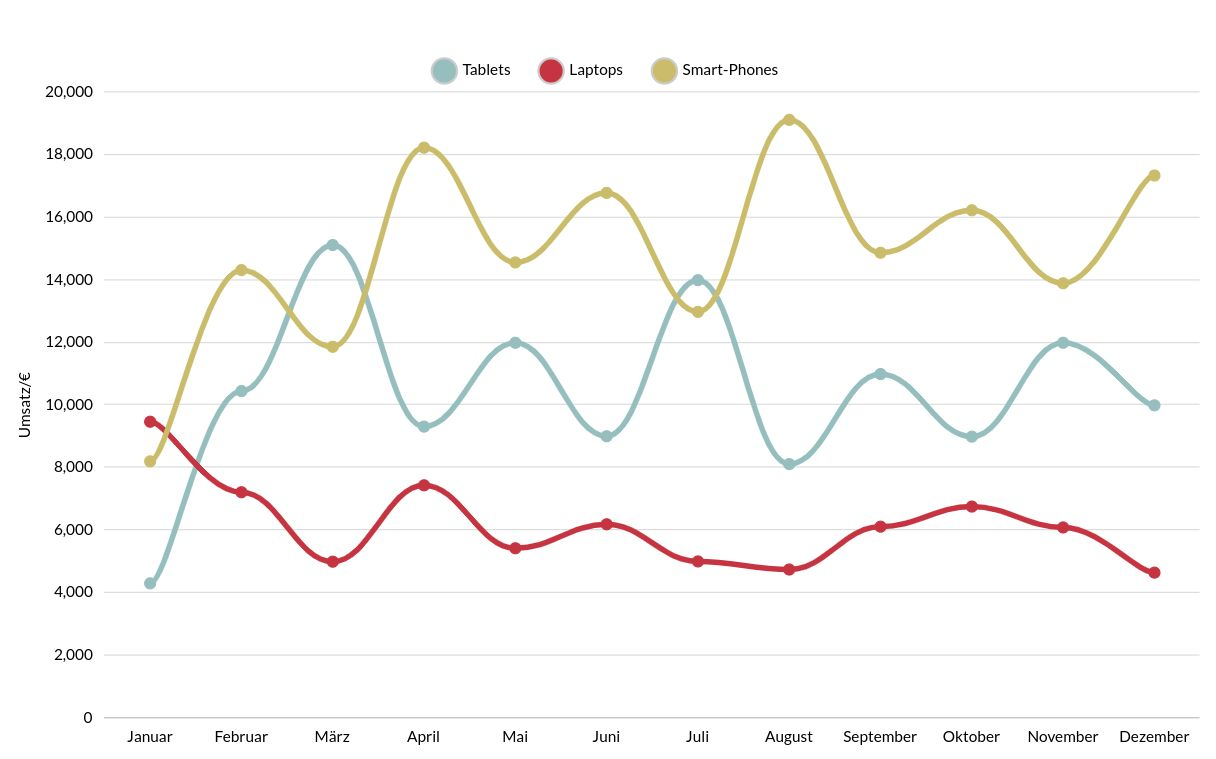
A dataset consists of a list of entries. The first entry for display in the chart might look like this:
 [
    {
        "delivery_date": "Januar",
        "smartphones": 8211,
        "sum": 22000,
        "tablets": 4312,
        "laptops": 9477
    }
]
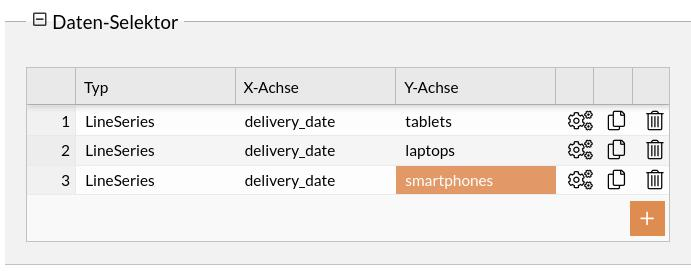
The attributes to be visualized, including the assignment of the X and Y axes, are referenced in the data selector.
View the entire chart configuration (classic bar chart)
{
  "dataSetId": "1630446788845456",
  "name": "Monats Umsatz",
  "chartType": "xy",
  "id": "1734426407287",
  "config": {
    "cursor": {
      "type": "XYCursor"
    },
    "data": [],
    "yAxes": [
      {
        "type": "ValueAxis",
        "title": {
          "text": "Umsatz/€"
        },
        "dataFields": {}
      }
    ],
    "series": [
      {
        "strokeWidth": 5,
        "stacked": true,
        "fillOpacity": 0,
        "name": "Tablets",
        "id": "s0",
        "type": "LineSeries",
        "tensionX": 0.8,
        "dataFields": {
          "dateX": "delivery_date",
          "id": "s0",
          "valueY": "tablets",
          "categoryX": "delivery_date"
        },
        "bullets": [
          {
            "children": [
              {
                "verticalCenter": "middle",
                "width": 10,
                "type": "Circle",
                "horizontalCenter": "middle",
                "height": 10
              }
            ]
          }
        ]
      },
      {
        "type": "LineSeries",
        "tensionX": 0.8,
        "id": "s1",
        "dataFields": {
          "categoryX": "delivery_date",
          "valueY": "laptops"
        },
        "name": "Laptops",
        "strokeWidth": 5,
        "bullets": [
          {
            "children": [
              {
                "verticalCenter": "middle",
                "width": 10,
                "type": "Circle",
                "horizontalCenter": "middle",
                "height": 10
              }
            ]
          }
        ]
      },
      {
        "type": "LineSeries",
        "id": "s2",
        "tensionX": 0.8,
        "dataFields": {
          "categoryX": "delivery_date",
          "valueY": "smartphones"
        },
        "strokeWidth": 5,
        "name": "Smart-Phones",
        "bullets": [
          {
            "children": [
              {
                "verticalCenter": "middle",
                "width": 10,
                "type": "Circle",
                "horizontalCenter": "middle",
                "height": 10
              }
            ]
          }
        ]
      }
    ],
    "background": {
      "fill": "rgba(255,255,255,1)"
    },
    "legend": {
      "hidden": false,
      "useDefaultMarker": true,
      "position": "top",
      "type": "Legend",
      "markers": {
        "children": [
          {
            "strokeWidth": 2,
            "cornerRadiusBottomRight": 12,
            "cornerRadiusTopRight": 12,
            "cornerRadiusBottomLeft": 12,
            "stroke": "#ccc",
            "cornerRadiusTopLeft": 12,
            "strokeOpacity": 1
          }
        ]
      },
      "labels": {
        "fontSize": 14
      }
    },
    "xAxes": [
      {
        "renderer": {
          "grid": {
            "disabled": true
          },
          "minGridDistance": 10
        },
        "dateFormatter": {
          "dateFormat": "MM"
        },
        "type": "CategoryAxis",
        "title": {
          "text": "Monat"
        },
        "dataFields": {
          "category": "delivery_date"
        }
      }
    ],
    "dateFormatter": {
      "inputDateFormat": "yyyy-MM-dd"
    },
    "titles": [
      {
        "fontSize": 25,
        "marginBottom": 30
      }
    ],
    "colors": {
      "saturation": 1,
      "list": [
        "#96bebe",
        "#c63441",
        "#cbbc6b"
      ]
    },
    "exporting": {
      "menu": {}
    }
  },
  "animationActive": true
}
Revenue per product as a stacked bar chart
The revenue for three products is to be displayed in a stacked bar chart.
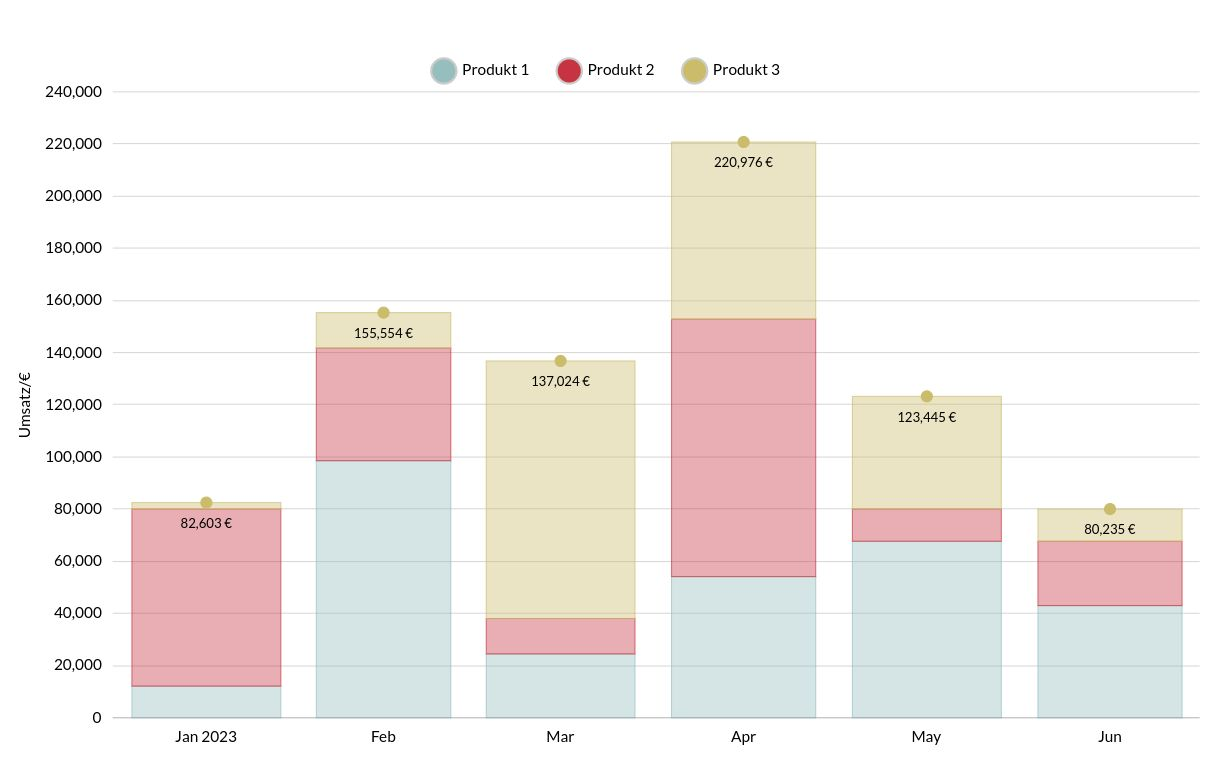
The first entry for the chart could look like this:
[
    {
        "produkt2": 67890,
        "produkt1": 12345,
        "delivery_date": "2023-01-01",
        "produkt3": 2468,
        "sum": 82603
    }
]
The attributes to be visualized, including the assignment of the X and Y axes, are referenced in the data selector.
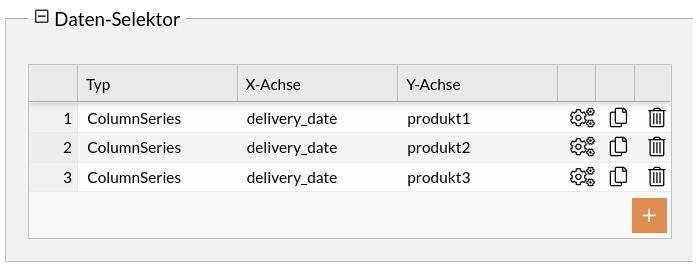
View the entire chart configuration (stacked bar chart)
{
    "dataSetId": "1630446788882",
    "name": "Halb-Jahres Umsatz Balken gestapelt",
    "chartType": "xy",
    "id": "1627025905499",
    "config": {
        "cursor": {
            "type": "XYCursor"
        },
        "data": [],
        "yAxes": [
            {
                "type": "ValueAxis",
                "title": {
                    "text": "Umsatz/€"
                }
            }
        ],
        "series": [
            {
                "strokeWidth": 0.5,
                "stacked": true,
                "fillOpacity": 0.4,
                "name": "Produkt A",
                "id": "s0",
                "type": "ColumnSeries",
                "dataFields": {
                    "dateX": "delivery_date",
                    "id": "s0",
                    "valueY": "produkt1"
                }
            },
            {
                "strokeWidth": 0.5,
                "stacked": true,
                "fillOpacity": 0.4,
                "name": "Produkt B",
                "id": "s1",
                "type": "ColumnSeries",
                "dataFields": {
                    "dateX": "delivery_date",
                    "id": "s0",
                    "valueY": "produkt2"
                }
            },
            {
                "strokeWidth": 0.5,
                "stacked": true,
                "fillOpacity": 0.4,
                "name": "Produkt C",
                "id": "s2",
                "type": "ColumnSeries",
                "dataFields": {
                    "dateX": "delivery_date",
                    "id": "s3",
                    "valueY": "produkt3"
                },
                "bullets": [
                    {
                        "type": "CircleBullet"
                    },
                    {
                        "label": {
                            "dy": 20,
                            "fontSize": 12,
                            "text": "{sum} €"
                        },
                        "type": "LabelBullet"
                    }
                ]
            }
        ],
        "background": {
            "fill": "rgba(255,255,255,1)"
        },
        "legend": {
            "useDefaultMarker": true,
            "position": "top",
            "type": "Legend",
            "markers": {
                "children": [
                    {
                        "strokeWidth": 2,
                        "cornerRadiusBottomRight": 12,
                        "cornerRadiusTopRight": 12,
                        "cornerRadiusBottomLeft": 12,
                        "stroke": "#ccc",
                        "cornerRadiusTopLeft": 12,
                        "strokeOpacity": 1
                    }
                ]
            },
            "labels": {
                "fontSize": 14
            }
        },
        "xAxes": [
            {
                "renderer": {
                    "grid": {
                        "disabled": true
                    },
                    "minGridDistance": 10
                },
                "dateFormatter": {
                    "dateFormat": "MM"
                },
                "type": "DateAxis",
                "title": {
                    "text": "Monat"
                },
                "dataFields": {
                    "date": "delivery_date"
                }
            }
        ],
        "dateFormatter": {
            "inputDateFormat": "yyyy-MM-dd"
        },
        "titles": [
            {
                "fontSize": 25,
                "marginBottom": 30
            }
        ],
        "colors": {
            "saturation": 1,
            "list": [
                "#96bebe",
                "#c63441",
                "#cbbc6b"
            ]
        }
    },
    "animationActive": true
}
Proportional sales per product as a pie chart
The proportional sales of various products are to be displayed in a pie chart.
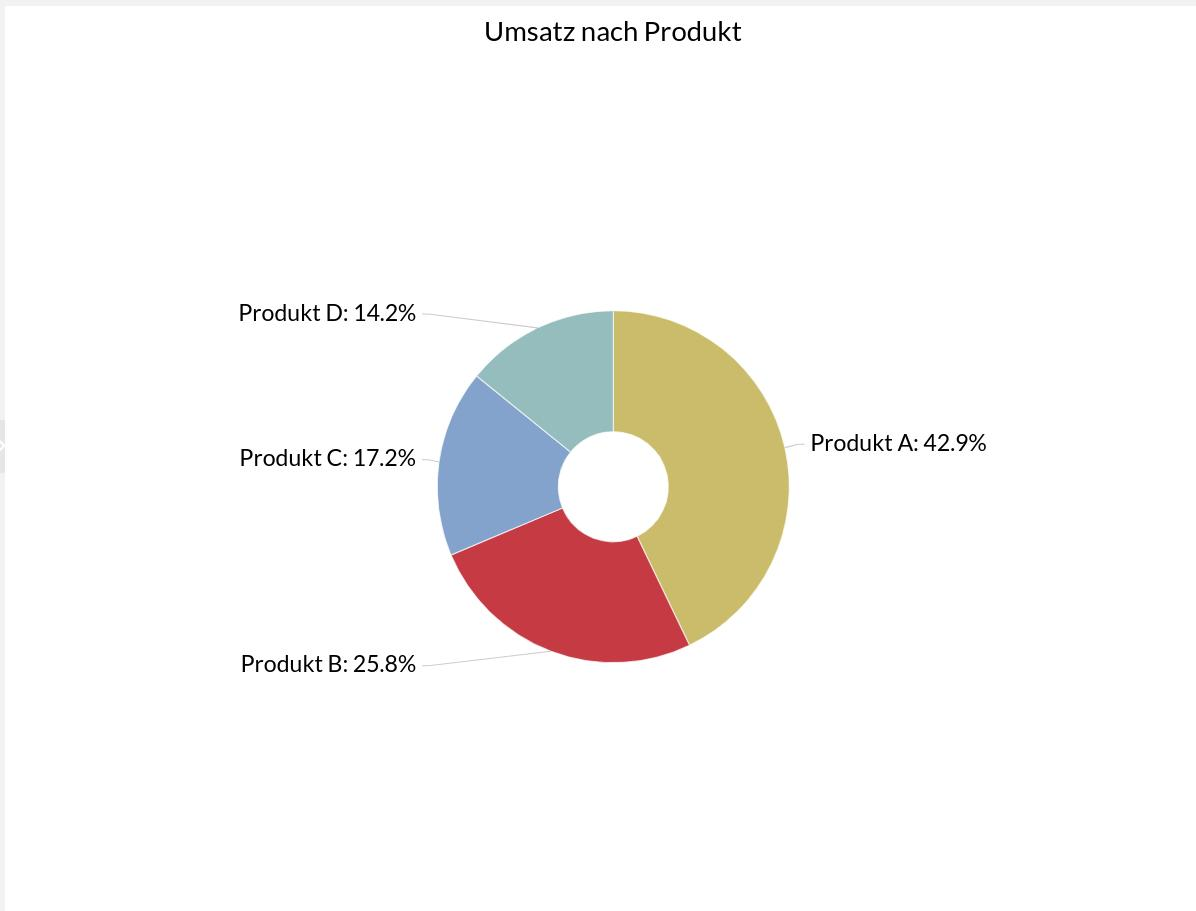
The data for the chart could look like this:
[
    {
        "litres": 501.9,
        "country": "Produkt A"
    },
    {
        "litres": 301.9,
        "country": "Produkt B"
    },
    {
        "litres": 201.1,
        "country": "Produkt C"
    },
    {
        "litres": 165.8,
        "country": "Produkt D"
    }
]
The attributes to be visualized are referenced in the data selector.
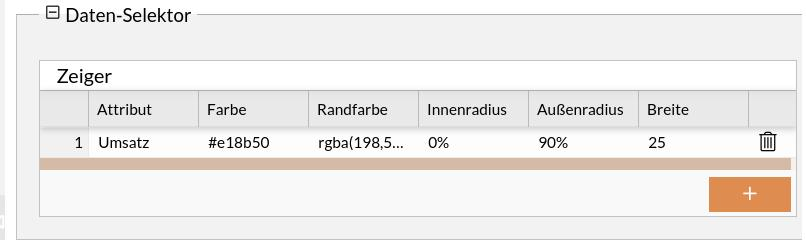
View the entire chart configuration (pie chart)
{
    "dataSetId": "1689056665616",
    "name": "Umsatz nach Produkt",
    "chartType": "pie",
    "id": "1689056665616",
    "enabled3D": false,
    "config": {
        "cursor": {},
        "depth": 30,
        "data": [],
        "series": [
            {
                "slices": {
                    "strokeWidth": 1,
                    "stroke": "#ffff",
                    "strokeOpacity": 0.7
                },
                "alignLabels": true,
                "id": "extModel2261-1",
                "category": "country",
                "type": "PieSeries",
                "value": "litres",
                "colors": {
                    "list": [
                        "#cbbc6b",
                        "#c63441",
                        "#81A2CC",
                        "#96bebe",
                        "#e18b50",
                        "#dcd9d2",
                        "#958f77"
                    ]
                },
                "dataFields": {
                    "depthValue": "value",
                    "category": "country",
                    "value": "litres"
                },
                "labels": {
                    "fontSize": 21
                }
            }
        ],
        "background": {
            "fill": "rgba(255,255,255,1)"
        },
        "legend": {
            "disabled": true
        },
        "angle": 45,
        "titles": [
            {
                "fontSize": 25,
                "text": "Umsatz nach Produkt"
            }
        ],
        "radius": 160,
        "innerRadius": 50
    }
}
Total Monthly Revenue - Line Chart/Bar Chart
The revenue from various products should be displayed in a bar chart, and the total as a line chart.
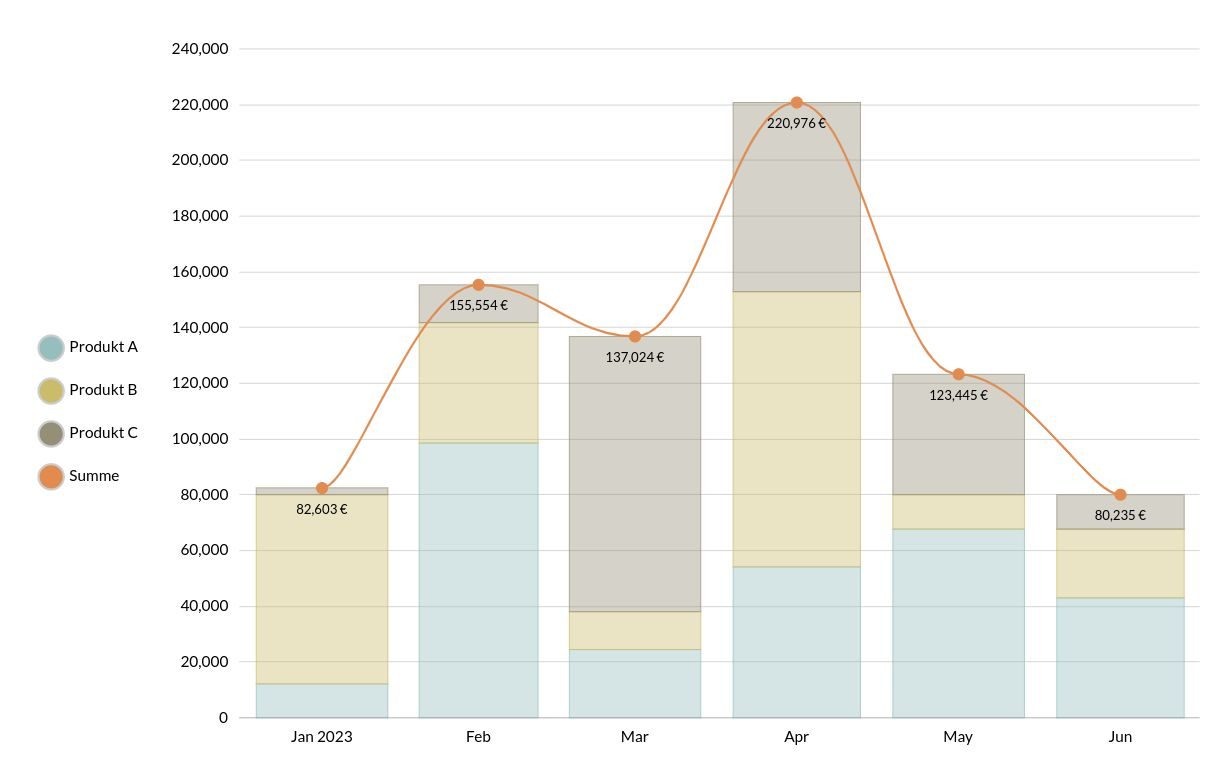
The first entry for the chart could look like this:
[
    {
        "produkt2": 67890,
        "produkt1": 12345,
        "delivery_date": "2023-01-01",
        "produkt3": 2468,
        "sum": 82603
    }
]
The attributes to be visualized, including the assignment of the X and Y axes, are referenced in the data selector.
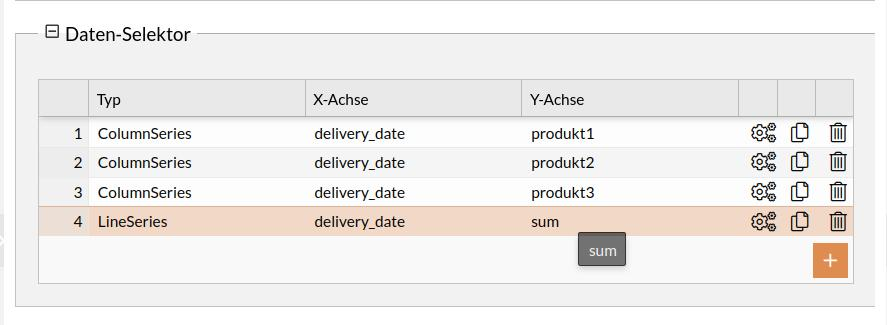
View the entire chart configuration (combined line/bar chart)
{
    "dataSetId": "1630446788882",
    "name": "Timeline Balken + Linie",
    "chartType": "xy",
    "id": "1627025905477",
    "config": {
        "cursor": {
            "type": "XYCursor"
        },
        "data": [],
        "yAxes": [
            {
                "type": "ValueAxis"
            }
        ],
        "series": [
            {
                "strokeWidth": 0.5,
                "stacked": true,
                "fillOpacity": 0.4,
                "name": "Produkt A",
                "id": "s0",
                "type": "ColumnSeries",
                "dataFields": {
                    "dateX": "delivery_date",
                    "id": "s0",
                    "valueY": "produkt1"
                }
            },
            {
                "strokeWidth": 0.5,
                "stacked": true,
                "fillOpacity": 0.4,
                "name": "Produkt B",
                "id": "s1",
                "type": "ColumnSeries",
                "dataFields": {
                    "dateX": "delivery_date",
                    "id": "s0",
                    "valueY": "produkt2"
                }
            },
            {
                "strokeWidth": 0.5,
                "stacked": true,
                "fillOpacity": 0.4,
                "name": "Produkt C",
                "id": "s2",
                "type": "ColumnSeries",
                "dataFields": {
                    "dateX": "delivery_date",
                    "id": "s3",
                    "valueY": "produkt3"
                }
            },
            {
                "strokeWidth": 2,
                "stacked": true,
                "fillOpacity": 0,
                "name": "Summe",
                "id": "s3",
                "type": "LineSeries",
                "tensionX": 0.8,
                "dataFields": {
                    "dateX": "delivery_date",
                    "id": "s3",
                    "valueY": "sum"
                },
                "bullets": [
                    {
                        "type": "CircleBullet"
                    },
                    {
                        "label": {
                            "dy": 20,
                            "fontSize": 12,
                            "text": "{sum} €"
                        },
                        "type": "LabelBullet"
                    }
                ]
            }
        ],
        "background": {
            "fill": "rgba(255,255,255,1)"
        },
        "legend": {
            "useDefaultMarker": true,
            "position": "left",
            "type": "Legend",
            "markers": {
                "children": [
                    {
                        "strokeWidth": 2,
                        "cornerRadiusBottomRight": 12,
                        "cornerRadiusTopRight": 12,
                        "cornerRadiusBottomLeft": 12,
                        "stroke": "#ccc",
                        "cornerRadiusTopLeft": 12,
                        "strokeOpacity": 1
                    }
                ]
            },
            "labels": {
                "fontSize": 14
            }
        },
        "xAxes": [
            {
                "renderer": {
                    "grid": {
                        "disabled": true
                    },
                    "minGridDistance": 10
                },
                "dateFormatter": {
                    "dateFormat": "MM"
                },
                "type": "DateAxis",
                "title": {
                    "text": "Monat"
                },
                "dataFields": {
                    "date": "delivery_date"
                }
            }
        ],
        "dateFormatter": {
            "inputDateFormat": "yyyy-MM-dd"
        },
        "titles": [
            {
                "fontSize": 25,
                "marginBottom": 30
            }
        ],
        "colors": {
            "saturation": 1,
            "list": [
                "#96bebe",
                "#cbbc6b",
                "#958f77",
                "#e18b50",
                "#c63441",
                "#dcd9d2"
            ]
        },
        "exporting": {
            "menu": {}
        }
    },
    "animationActive": true
}
Annual sales per product as a line chart
The sales figures for two different products should be displayed in a stacked line chart.
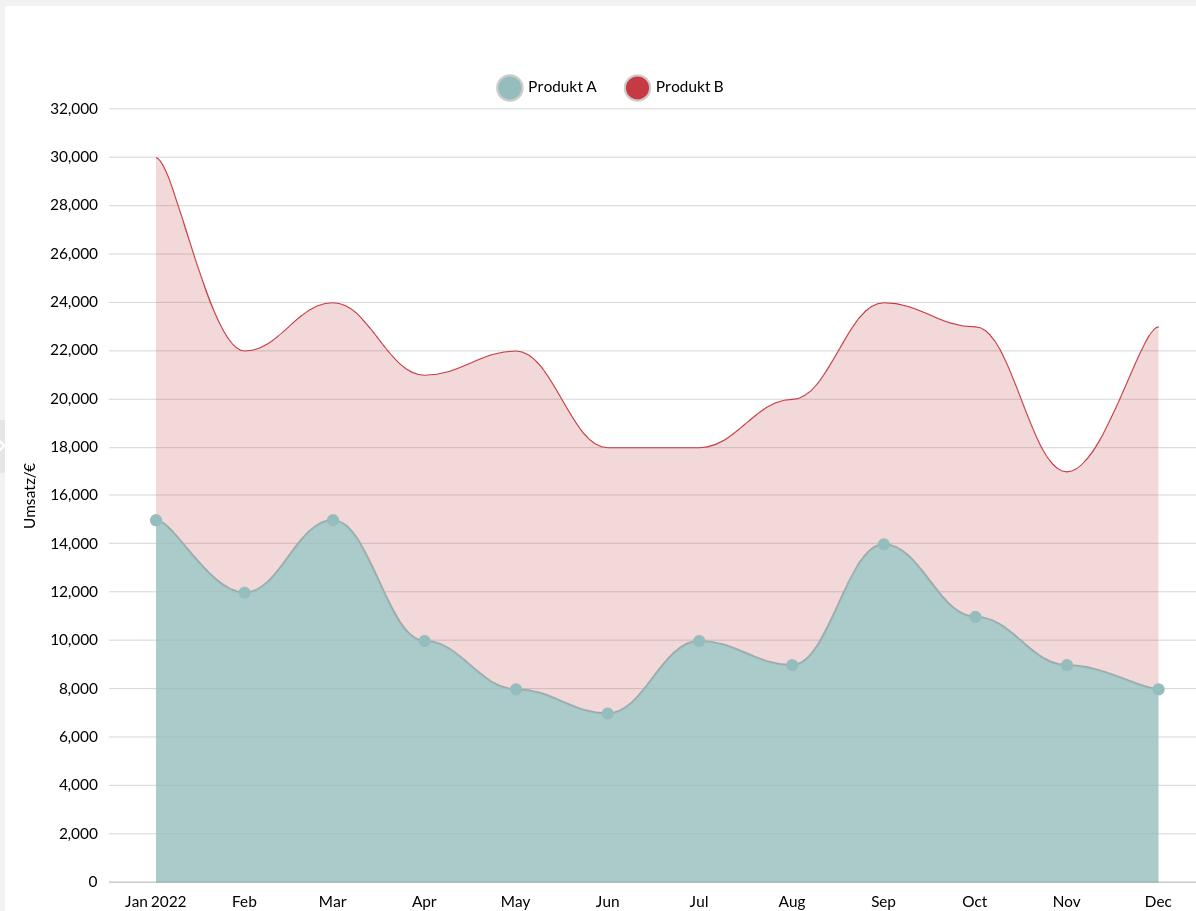
The first entry in the dataset for the chart could look like this:
 {
        "produkt2": 15000,
        "produkt1": 15000,
        "delivery_date": "2022-01-01",
        "produkt3": 2000,
        "sum": 32000
    }
The attributes to be visualized, including the assignment of the X and Y axes, are referenced in the data selector.
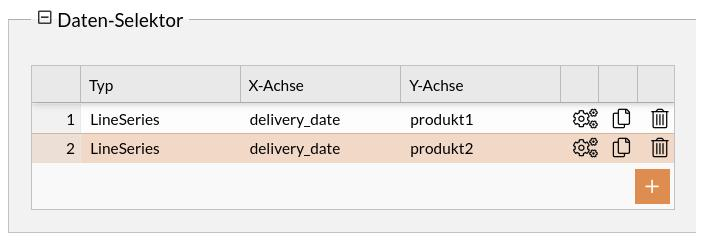
View the entire chart configuration
{
    "dataSetId": "1630446788833",
    "name": "Jahresumsatz Linien",
    "chartType": "xy",
    "id": "1627025905433",
    "config": {
        "cursor": {
            "type": "XYCursor"
        },
        "data": [],
        "yAxes": [
            {
                "type": "ValueAxis",
                "title": {
                    "text": "Umsatz/€"
                }
            }
        ],
        "series": [
            {
                "strokeWidth": 2,
                "stacked": true,
                "fillOpacity": 0.8,
                "name": "Produkt A",
                "id": "s0",
                "type": "LineSeries",
                "tensionX": 0.8,
                "dataFields": {
                    "dateX": "delivery_date",
                    "id": "s0",
                    "valueY": "produkt1"
                },
                "bullets": [
                    {
                        "type": "CircleBullet"
                    }
                ]
            },
            {
                "strokeWidth": 1,
                "stacked": true,
                "fillOpacity": 0.2,
                "name": "Produkt B",
                "id": "s1",
                "type": "LineSeries",
                "tensionX": 0.8,
                "dataFields": {
                    "dateX": "delivery_date",
                    "id": "s0",
                    "valueY": "produkt2"
                }
            }
        ],
        "background": {
            "fill": "rgba(255,255,255,1)"
        },
        "legend": {
            "useDefaultMarker": true,
            "position": "top",
            "type": "Legend",
            "markers": {
                "children": [
                    {
                        "strokeWidth": 2,
                        "cornerRadiusBottomRight": 12,
                        "cornerRadiusTopRight": 12,
                        "cornerRadiusBottomLeft": 12,
                        "stroke": "#ccc",
                        "cornerRadiusTopLeft": 12,
                        "strokeOpacity": 1
                    }
                ]
            },
            "labels": {
                "fontSize": 14
            }
        },
        "xAxes": [
            {
                "renderer": {
                    "grid": {
                        "disabled": true
                    },
                    "minGridDistance": 10
                },
                "dateFormatter": {
                    "dateFormat": "MM"
                },
                "type": "DateAxis",
                "title": {
                    "text": "Monat"
                },
                "dataFields": {
                    "date": "delivery_date"
                }
            }
        ],
        "dateFormatter": {
            "inputDateFormat": "yyyy-MM-dd"
        },
        "titles": [
            {
                "fontSize": 25,
                "marginBottom": 30
            }
        ],
        "colors": {
            "saturation": 1,
            "list": [
                "#96bebe",
                "#c63441",
                "#cbbc6b"
            ]
        }
    },
    "animationActive": true
}
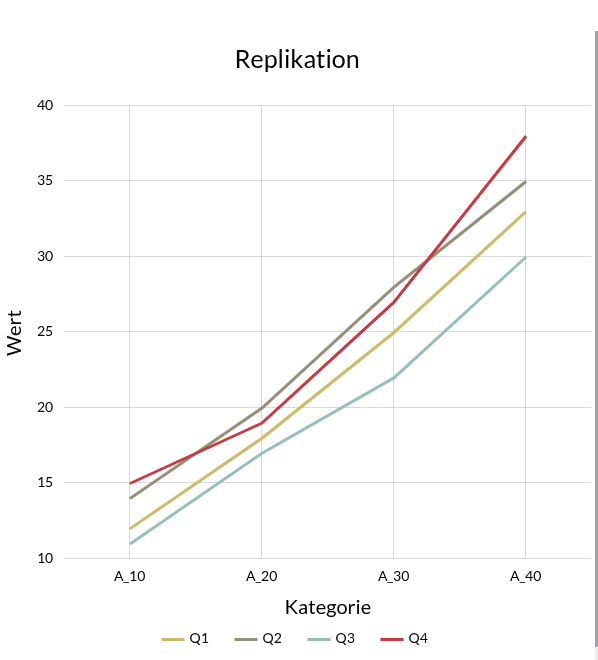
Displaying Data from a Replication
Data from a replication is to be displayed in a line chart.
The following input data is available:
[
    {
        "Q": 1,
        "A_10": 12,
        "A_20": 18,
        "A_30": 25,
        "A_40": 33
    },
    {
        "Q": 2,
        "A_10": 14,
        "A_20": 20,
        "A_30": 28,
        "A_40": 35
    },
    {
        "Q": 3,
        "A_10": 11,
        "A_20": 17,
        "A_30": 22,
        "A_40": 30
    },
    {
        "Q": 4,
        "A_10": 15,
        "A_20": 19,
        "A_30": 27,
        "A_40": 38
    }
]
Vorgehen zum Import der Daten:
-
Navigation zum Datensatz Editor
-
Erstellen eines neuen Datensatzes
-
Eindeutige Namensgebung
-
JSON als Datenquelle
-
Eingangsdaten per Copy&Paste in das JSON Data Feld einfügen
Um diese Daten sinnvoll in einem XY mit mehreren Linien darzustellen, müssen die Daten in folgender Form vorliegen:
[
    {
            "x": "A_10",
            "Q1": 12,
            "Q2": 14,
            "Q3": 11,
            "Q4": 15
    },
...
]
For this reason, a data modifier is used.
Procedure for modifying the data:
-
Switch to the Data Modifier tab
-
Click the plus icon to add a new modifier
-
Select JavaScript as the type
-
Insert the following script
function modify (data, vars) {
   const result = helper(data);
   return result;
}

function helper (inputData) {
   const xKeys = ["A_10", "A_20", "A_30", "A_40"];

   return xKeys.map(key => {
      const xValue = key;
      const obj = { x: xValue };

      inputData.forEach(row => {
        obj[`Q${row.Q}`] = row[key];
      });
      return obj;
    });
}
Damit werden die Daten in die gewünschte Form gebracht
|
Die Kategorien (A_10,A_20 …) sind fest kodiert und müssen je nach Anwendung angepasst werden. |
Im Nächsten Schritt wird das Chart erstellt
Vorgehen zur Erstellung des Charts:
-
Navigation zu Chart Editor
-
Neuen Chart erstellen
-
XYChart als Chart-Typ auswählen
-
Im ChartTyp Selektor auf das Zahnrad-Icon klicken
-
Folgende Chart Konfiguration einfügen
{
    "dataSetId": "1765747188364",
    "name": "Replizierte Daten",
    "chartType": "xy",
    "id": "1765746224249",
    "config": {
        "cursor": {
            "type": "XYCursor",
            "behavior": "zoomX"
        },
        "data": [],
        "yAxes": [
            {
                "type": "ValueAxis",
                "title": {
                    "fontSize": 20,
                    "text": "Wert"
                },
                "dataFields": {}
            }
        ],
        "series": [
            {
                "strokeWidth": 3,
                "name": "Q1",
                "id": "s0",
                "type": "LineSeries",
                "dataFields": {
                    "valueY": "Q1",
                    "categoryX": "x"
                }
            },
            {
                "strokeWidth": 3,
                "name": "Q2",
                "id": "s1",
                "type": "LineSeries",
                "dataFields": {
                    "valueY": "Q2",
                    "categoryX": "x"
                }
            },
            {
                "strokeWidth": 3,
                "name": "Q3",
                "id": "s2",
                "type": "LineSeries",
                "dataFields": {
                    "valueY": "Q3",
                    "categoryX": "x"
                }
            },
            {
                "strokeWidth": 3,
                "name": "Q4",
                "id": "s4",
                "type": "LineSeries",
                "dataFields": {
                    "valueY": "Q4",
                    "categoryX": "x"
                }
            }
        ],
        "background": {
            "fill": "rgba(255,255,255,0)"
        },
        "legend": {},
        "xAxes": [
            {
                "renderer": {
                    "minGridDistance": 10
                },
                "type": "CategoryAxis",
                "title": {
                    "fontSize": 20,
                    "text": "Kategorie"
                },
                "dataFields": {
                    "category": "x"
                }
            }
        ],
        "colors": {
            "list": [
                "#cbbc6b",
                "#958f77",
                "#96bebe",
                "#c63441"
            ]
        },
        "titles": [
            {
                "text": "Replikation",
                "fontSize": 25,
                "marginBottom": 30
            }
        ]
    }
}|
Die |
Das Chart sieht dann wie folgt aus:
Bewertung des Umsatzes - Tacho-Diagramm
Es sollen der aktuelle Jahresumsatz in einem Tachometer-Diagramm dargestellt werden.
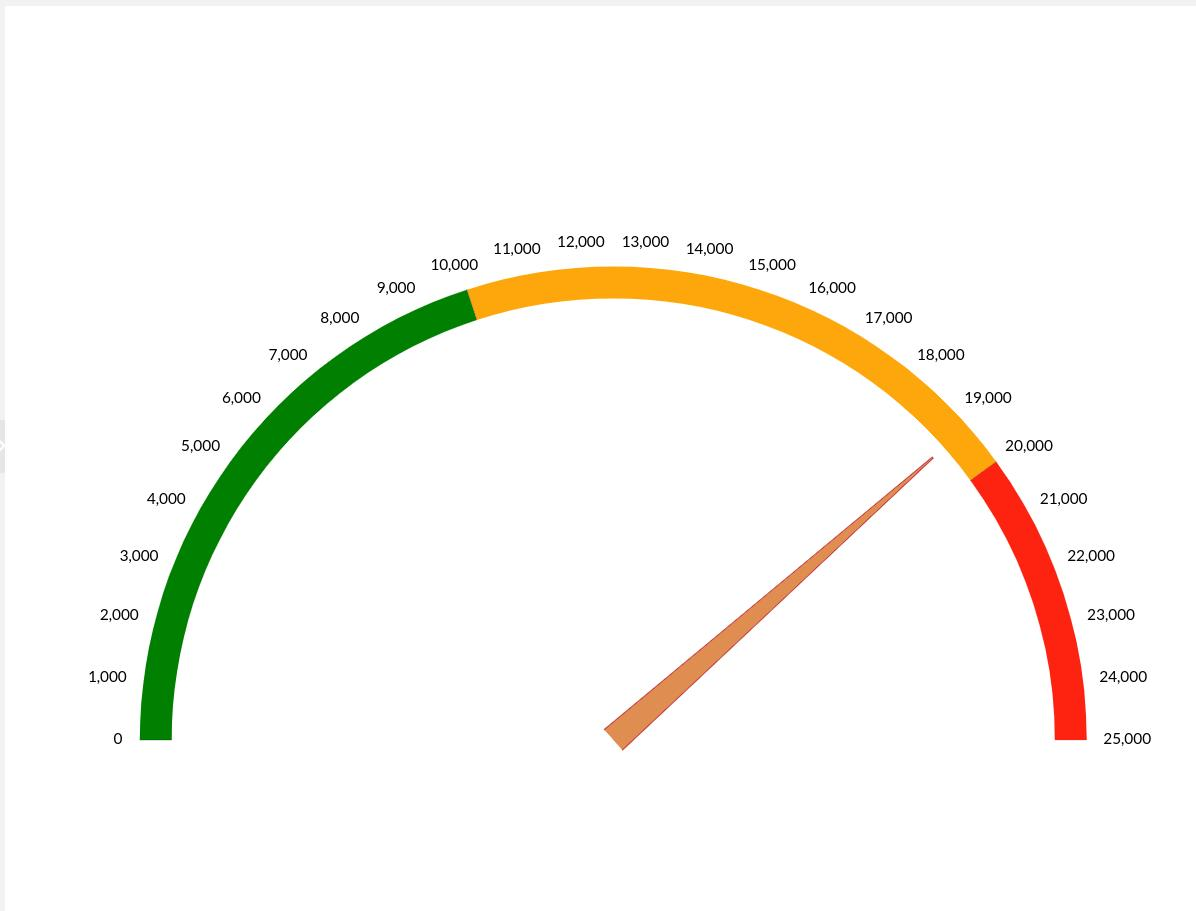
Die Daten für die Darstellung im Chart könnten wie folgt aussehen:
{
    "Umsatz": 19240
}
The attribute to be visualized is referenced in the data selector.
In addition, the colored axis ranges can be configured in the axis settings:
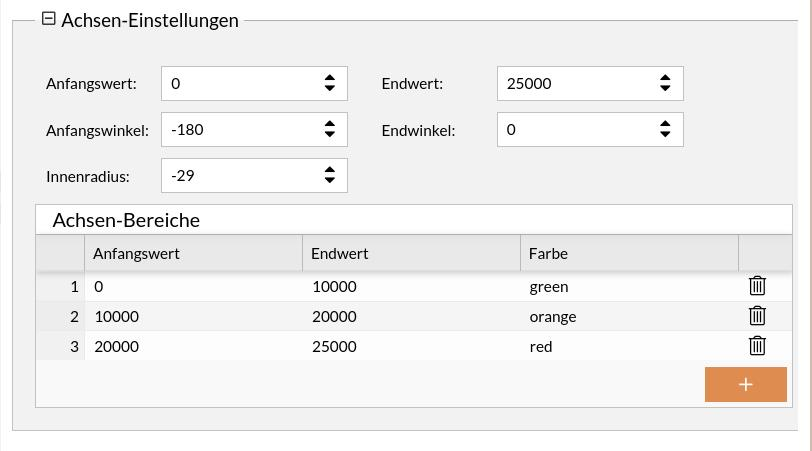
View the entire chart configuration
{
    "dataSetId": "1697797863548",
    "name": "Umsatz",
    "chartType": "gauge",
    "id": "1627025905488",
    "config": {
        "startAngle": -180,
        "gaugeSeries": [
            {
                "startWidth": 25,
                "pin": {
                    "disabled": true
                },
                "id": 1697798046911,
                "type": "ClockHand",
                "fill": "#e18b50",
                "innerRadius": "0%",
                "radius": "90%",
                "value": 0,
                "stroke": "rgba(198,52,65,1)",
                "dataAttribute": "Umsatz"
            }
        ],
        "background": {
            "fill": "rgba(255,255,255,1)"
        },
        "xAxes": [
            {
                "strictMinMax": true,
                "axisRanges": [
                    {
                        "endValue": 10000,
                        "axisFill": {
                            "fillOpacity": 1,
                            "fill": "green"
                        },
                        "opacitiy": 1,
                        "value": "0",
                        "color": "green",
                        "id": "extModel2614-1"
                    },
                    {
                        "endValue": 20000,
                        "axisFill": {
                            "fillOpacity": 1,
                            "fill": "orange"
                        },
                        "opacitiy": 1,
                        "value": 10000,
                        "color": "orange",
                        "id": "extModel2614-2"
                    },
                    {
                        "endValue": 25000,
                        "axisFill": {
                            "fillOpacity": 1,
                            "fill": "red"
                        },
                        "opacitiy": 1,
                        "value": 20000,
                        "color": "red",
                        "id": "extModel2614-3"
                    }
                ],
                "min": 0,
                "max": 25000,
                "type": "ValueAxis"
            }
        ],
        "endAngle": 0,
        "titles": [
            {
                "fontSize": 25,
                "marginBottom": 30,
                "text": ""
            }
        ],
        "innerRadius": -29
    }
}
Revenue per Product and Month - Table
The revenue for various products should be displayed in a table.
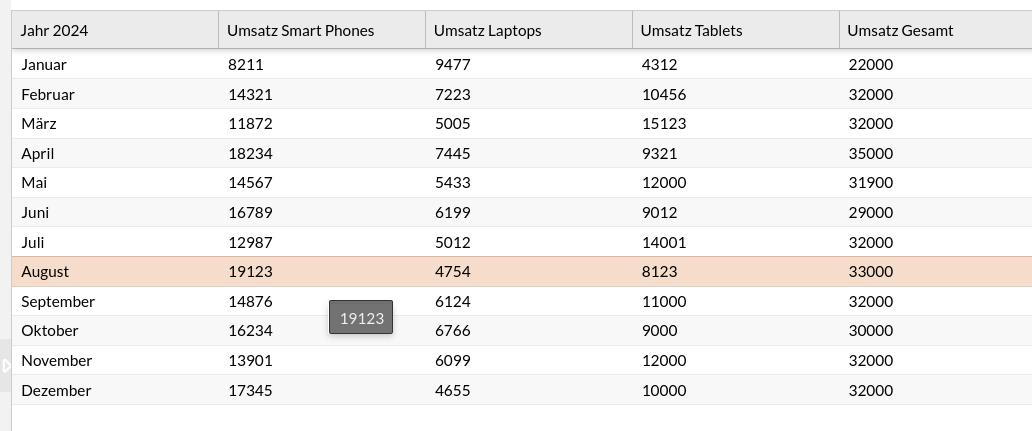
The first entry for display in the table could look like this:
[
    {
        "delivery_date": "Januar",
        "smartphones": 8211,
        "sum": 22000,
        "tablets": 4312,
        "laptops": 9477
    }
]
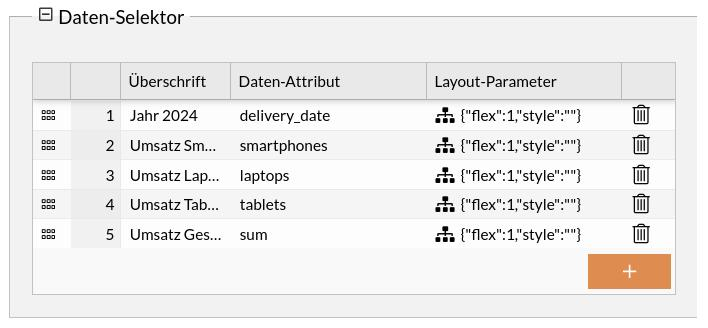
The columns to be visualized are referenced in the data selector.
Notice to Employees Regarding Annual Revenue - Template Diagram
The notice to the fictional employee Albert regarding annual revenue and its increase should be displayed.
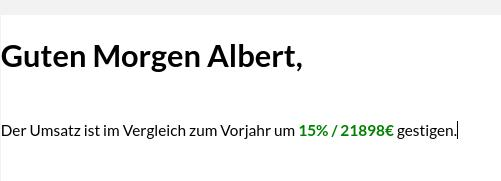
The underlying data might look like this:
{
    "umsatzVergleichProzentual": 15,
    "umsatzVergleichAbsolut": 21898,
    "Name": "Albert"
}
The message to be displayed is created using the template configurator.
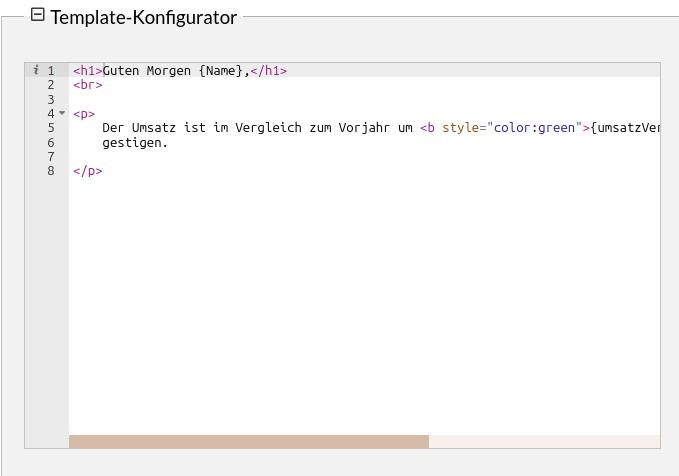
The underlying syntax is ExtJS XTemplate. Further information on its use can be found here.
Reports and Catalog
Various sample reports are available in the Report Editor. These reports contain various charts (from the previous section) that have been inserted in different layouts. For more details (see Report Editor) All reports can also be viewed in the catalog. For more details (see Catalog Editor)
