Maintenance Mode
The BPC is automatically put into maintenance mode when disk space becomes low. When maintenance mode is active, replication is stopped, among other things. Everything else continues to run normally. The limit is checked every 30 seconds, and only the free disk space on the machines where OpenSearch is installed is checked. More specifically: The partitions where OpenSearch stores its data are checked.
|
Maintenance mode must be disabled manually. |
What happens when maintenance mode is enabled?
-
Replication is stopped
-
No backups of the OpenSearch indices are performed
-
The Log Service endpoints cannot be used
Status Query
There are several ways to check the status:
-
via the BPC web interface on the status page
-
via the Karaf console command:
bpc:maintenance-mode status -
via the JSON status page (
http://localhost:8181/cxf/bpc-core/status). There, the value ofmaintenanceModeEnabledis eithertrueorfalse. -
via the status code page (
http://localhost:8181/cxf/bpc-core/status/maintenance). This returns either the HTTP status code200(disabled) or503(enabled). -
the Prometheus interface returns an
bpc_maintenance_mode_enabledmetric (1=enabled; 0=disabled)
Manual activation/deactivation
Maintenance mode can be enabled or disabled via the status page.
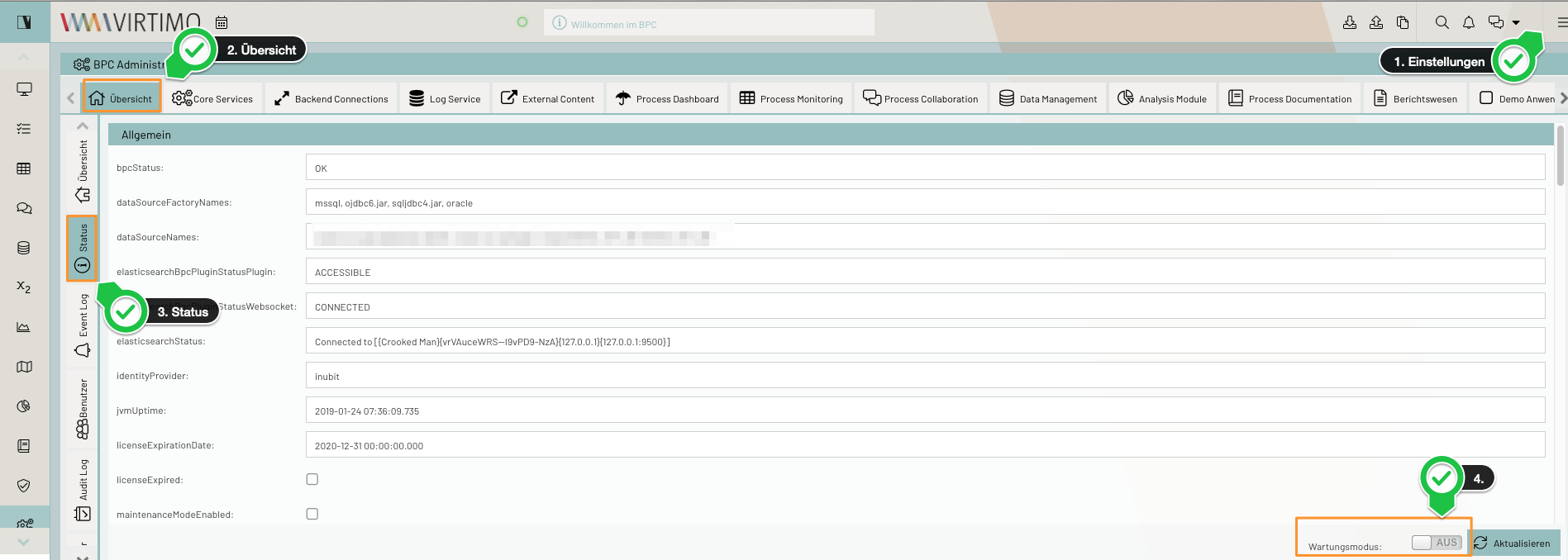
Alternatively, maintenance mode can also be enabled/disabled via the Karaf console:
virtimo@virtimo()> bpc:maintenance-mode onvirtimo@virtimo()> bpc:maintenance-mode offConfiguration Options
Disk Space Limit
The unit is MB, and the default value is 10240.
If less disk space is available, maintenance mode is activated and replication is stopped.
You can adjust this setting via the Karaf console.
The steps below set the limit to 4096 MB.
virtimo@virtimo()> config:edit de.virtimo.bpc.core
virtimo@virtimo()> config:property-set de.virtimo.bpc.core.maintenancemode.fileSystemLimitInMB 4096
virtimo@virtimo()> config:update
It has been determined that de.virtimo.bpc.core.maintenancemode.fileSystemLimitInMB should be set to the same value as the OpenSearch option cluster.routing.allocation.disk.watermark.low in the <OPENSEARCH-CONFIG-DIR>/opensearch.yml.
Message
Optionally, a maintenance mode message can be set to be displayed to the user upon login.
|
If OIDC or Keycloak is used as the identity provider, the message will not be displayed. |
virtimo@virtimo()> config:edit de.virtimo.bpc.core
virtimo@virtimo()> config:property-set de.virtimo.bpc.core.maintenancemode.message "Achtung, noch bis 14:30 Uhr werden Wartungsarbeiten durchgeführt."
virtimo@virtimo()> config:update
Or when activating maintenance mode via a Karaf console command.
virtimo@virtimo()> bpc:maintenance-mode -m "Achtung, noch bis 14:30 Uhr werden Wartungsarbeiten durchgeführt." onInterval
The interval is set to 30 seconds by default and can be adjusted as needed. After that, Karaf must currently be restarted. The adjustment can be made via the Karaf console. The steps below set the interval to 60 seconds.
virtimo@virtimo()> config:edit de.virtimo.bpc.core
virtimo@virtimo()> config:property-set de.virtimo.bpc.core.systemchecker.interval 60
virtimo@virtimo()> config:update
Check settings
virtimo@virtimo()> config:edit de.virtimo.bpc.core
virtimo@virtimo()> config:property-list
  ...
   de.virtimo.bpc.core.maintenancemode = false
   de.virtimo.bpc.core.maintenancemode.fileSystemLimitInMB = 10240
   de.virtimo.bpc.core.maintenancemode.message =
  ...
virtimo@virtimo()> config:cancel