Central configuration file
You can configure settings such as the BPC’s network Ports and memory via a central bpc.env file (bpc.env.sh for Unix systems and bpc.env.cmd for Windows systems).
This file must be located in the same directory (<BPC-INSTALL-DIR>) as Karaf and OpenSearch.
|
We recommend marking your own configurations with comments and, if necessary, documenting them directly in this way. This makes future updates easier. |
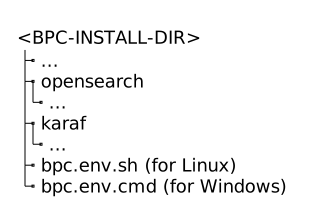
You can find the BPC.env file appropriate for your version on the download page.
To update an existing BPC.env file, please refer to the Update Guide.
-
Unix systems (bpc.env.sh)
-
Windows systems (BPC.env.cmd)
#!/bin/bash

# This file should be placed in the same directory as Karaf and OpenSearch.
# It will automatically be loaded by Karaf and OpenSearch on startup.

### Java Home
# The 'java_home_path_setter.sh' (inubit installer) gets called to set the Java home path.
# In case the file does not exist or you want to use a different Java home, you can overwrite it here.
#export JAVA_HOME="<path to jvm>"


### RAM

# OpenSearch
# To avoid multiple xmx/xms params in your process list you could remove these params from opensearch/config/jvm.options
export OPENSEARCH_JAVA_OPTS="$OPENSEARCH_JAVA_OPTS -Xms1g -Xmx1g"

# Karaf
export EXTRA_JAVA_OPTS="$EXTRA_JAVA_OPTS -Xms128m -Xmx512m"


### Network

# To change all ports by an offset you can change the PORT_OFFSET. For example PORT_OFFSET=10000 will add 10000 to all ports.
# So the port 8181 will be 18181.
export PORT_OFFSET=0

export ORG_APACHE_KARAF_SHELL_SSHPORT=$(($PORT_OFFSET + 8101))
export ORG_APACHE_KARAF_MANAGEMENT_RMIREGISTRYPORT=$(($PORT_OFFSET + 1099))
# we use the port 4444 instead of default 44444 to give room for port offsetting
export ORG_APACHE_KARAF_MANAGEMENT_RMISERVERPORT=$(($PORT_OFFSET + 4444))
export ORG_OPS4J_PAX_WEB_ORG_OSGI_SERVICE_HTTP_PORT=$(($PORT_OFFSET + 8181))
export ORG_OPS4J_PAX_WEB_ORG_OSGI_SERVICE_HTTP_PORT_SECURE=$(($PORT_OFFSET + 8282))
export DE_VIRTIMO_BPC_CORE_DE_VIRTIMO_BPC_CORE_OPENSEARCH_TRANSPORT_PORT=$(($PORT_OFFSET + 9300))
export DE_VIRTIMO_BPC_CORE_DE_VIRTIMO_BPC_CORE_OPENSEARCH_WEBSOCKET_PORT=$(($PORT_OFFSET + 9203))
export DE_VIRTIMO_BPC_CORE_DE_VIRTIMO_BPC_CORE_OPENSEARCH_PORT=$(($PORT_OFFSET + 9200))

export DE_VIRTIMO_BPC_CORE_DE_VIRTIMO_BPC_CORE_OPENSEARCH_HOSTS="https://localhost:$DE_VIRTIMO_BPC_CORE_DE_VIRTIMO_BPC_CORE_OPENSEARCH_PORT"

# We need to explicitly set SERVICEURL in order for the JMX+RMI ports to be active
export ORG_APACHE_KARAF_MANAGEMENT_SERVICEURL="service:jmx:rmi://\${rmiServerHost}:${ORG_APACHE_KARAF_MANAGEMENT_RMISERVERPORT}/jndi/rmi://\${rmiRegistryHost}:${ORG_APACHE_KARAF_MANAGEMENT_RMIREGISTRYPORT}/karaf-\${karaf.name}"

# enable/disable HTTP (org.osgi.service.http.enabled)
#export ORG_OPS4J_PAX_WEB_ORG_OSGI_SERVICE_HTTP_ENABLED=false
# enable/disable HTTPS (org.osgi.service.http.secure.enabled)
#export ORG_OPS4J_PAX_WEB_ORG_OSGI_SERVICE_HTTP_SECURE_ENABLED=true

# By default Karaf ssh connections are restricted to localhost.
# To allow external ssh connections, set ORG_APACHE_KARAF_SHELL_SSHHOST to 0.0.0.0 by uncommenting the following line.
#export ORG_APACHE_KARAF_SHELL_SSHHOST=0.0.0.0

#### OpenSearch Config Directory
# by default, the configuration directory is in opensearch/config
# You can change the config directory by setting this env variable (rel to OpenSearch-Home BPC_DIR/opensearch/)
# export OPENSEARCH_PATH_CONF=../opensearch_config

### pax-jdbc Features to install

# Usually they must be installed from the Karaf Shell, e.g.: feature:install pax-jdbc-oracle
#
# You can automate this by providing the pax-jdbc features to install by a comma separated list.
#
# Some of these pax-jdbc features try to download and install jdbc-drivers for you.
# This is not always the driver version you need. In case you provide your own jdbc-driver,
# then mark those entries with (*). Then those pax-jdbc features get installed when
# your provided jdbc-driver is already installed as a wrapped bundle.

#export KARAF_PAX_JDBC_FEATURES_TO_INSTALL='pax-jdbc-oracle (*), pax-jdbc-sqlite, pax-jdbc-mssql (*), pax-jdbc-mariadb (*)'


### Set custom jetty configuration, like HTTP headers

# You can modify the jetty configuration and keep them active during Karaf updates.
# copy the KARAF/etc/jetty.xml to the same folder as bpc.env and uncomment the following line
# export ORG_OPS4J_PAX_WEB_ORG_OPS4J_PAX_WEB_CONFIG_FILE=\${karaf.base}/../jetty.xml

### Karaf Log
# Changes for KARAF/etc/de.virtimo.bpc.decanter.appender.opensearch.cfg
# See also https://docs.virtimo.net/de/bpc-docs/latest/core/admin/operation/karaf_log.html

#export DE_VIRTIMO_BPC_DECANTER_APPENDER_OPENSEARCH_ENABLED=true
#export DE_VIRTIMO_BPC_DECANTER_APPENDER_OPENSEARCH_CLEANUPPERIODINMINUTES=60
#export DE_VIRTIMO_BPC_DECANTER_APPENDER_OPENSEARCH_DELETEENTRIESOLDERTHAN="7 days ago"


### Override Karaf Properties

# You can override any configuration using either environment variables or system properties.
# You can use PID_PROPERTY=VALUE syntax for environment variable
# For instance, the following statement will override value sshPort in etc/org.apache.karaf.shell.cfg:
# export ORG_APACHE_KARAF_SHELL_SSHPORT=8102
# see also https://karaf.apache.org/manual/latest/#_environment_variables_system_properties

### Additional Karaf JVM Options
export EXTRA_JAVA_OPTS="$EXTRA_JAVA_OPTS -Djava.security.properties=../custom.java.security"
### Additional OpenSearch JVM Options
export OPENSEARCH_JAVA_OPTS="$OPENSEARCH_JAVA_OPTS -Djava.security.properties=../custom.java.security"

### Keystore and Truststore

# it is recommended to move your customized Keystore and Truststore files out of the Karaf and OpenSearch folders

# Default Karaf locations:
#   ./bpc/karaf/etc/virtimo/ssl/virtimo_keystore.jks
#   ./bpc/karaf/etc/virtimo/ssl/virtimo_truststore.jks

# Default OpenSearch locations:
#   ./bpc/opensearch/config/virtimo/ssl/virtimo_keystore.jks
#   ./bpc/opensearch/config/virtimo/ssl/virtimo_truststore.jks

# Recommended new locations:
#   ./bpc/ssl/virtimo_keystore.jks
#   ./bpc/ssl/virtimo_truststore.jks

# afterwards uncomment the following for Karaf
#export ORG_OPS4J_PAX_WEB_ORG_OPS4J_PAX_WEB_SSL_KEYSTORE=../ssl/virtimo_keystore.jks
#export ORG_OPS4J_PAX_WEB_ORG_OPS4J_PAX_WEB_SSL_TRUSTSTORE=../ssl/virtimo_truststore.jks

# and create a symbolic link for OpenSearch
#cd bpc/opensearch/config/virtimo && ln -s ../../../ssl ssl
@echo off
rem This file should be placed in the same directory as Karaf and OpenSearch.
rem It will automatically be loaded by Karaf and OpenSearch on startup.
rem *****************
rem *** Java Home ***
rem *****************
rem The 'java_home_path_setter.cmd' (inubit installer) gets called to set the Java home path.
rem In case the file does not exist or you want to use a different Java home, you can overwrite it here.
rem set JAVA_HOME=<path to jvm>
rem ***********
rem *** RAM ***
rem ***********
rem *** OpenSearch ***
rem To avoid multiple xmx/xms params in your process list you could remove these params from opensearch/config/jvm.options
SET OPENSEARCH_JAVA_OPTS=%OPENSEARCH_JAVA_OPTS% -Xms1g -Xmx1g
rem *** Karaf ***
SET EXTRA_JAVA_OPTS=%EXTRA_JAVA_OPTS% -Xms128m -Xmx512m
rem ***************
rem *** Network ***
rem ***************
rem To change all ports by an offset you can change the PORT_OFFSET. For example PORT_OFFSET=10000 will add 10000 to all ports.
rem So the port 8181 will be 18181.
SET PORT_OFFSET=0
SET /a ORG_APACHE_KARAF_SHELL_SSHPORT=%PORT_OFFSET% + 8101
SET /a ORG_APACHE_KARAF_MANAGEMENT_RMIREGISTRYPORT=%PORT_OFFSET% + 1099
rem # We use the port 4444 instead of default 44444 to give room for port offsetting
SET /a ORG_APACHE_KARAF_MANAGEMENT_RMISERVERPORT=%PORT_OFFSET% + 4444
SET /a ORG_OPS4J_PAX_WEB_ORG_OSGI_SERVICE_HTTP_PORT=%PORT_OFFSET% + 8181
SET /a ORG_OPS4J_PAX_WEB_ORG_OSGI_SERVICE_HTTP_PORT_SECURE=%PORT_OFFSET% + 8282
SET /a DE_VIRTIMO_BPC_CORE_DE_VIRTIMO_BPC_CORE_OPENSEARCH_TRANSPORT_PORT=%PORT_OFFSET% + 9300
SET /a DE_VIRTIMO_BPC_CORE_DE_VIRTIMO_BPC_CORE_OPENSEARCH_WEBSOCKET_PORT=%PORT_OFFSET% + 9203
SET /a DE_VIRTIMO_BPC_CORE_DE_VIRTIMO_BPC_CORE_OPENSEARCH_PORT=%PORT_OFFSET% + 9200
SET DE_VIRTIMO_BPC_CORE_DE_VIRTIMO_BPC_CORE_OPENSEARCH_HOSTS=https://localhost:%DE_VIRTIMO_BPC_CORE_DE_VIRTIMO_BPC_CORE_OPENSEARCH_PORT%
rem We need to explicitly set SERVICEURL in order for the JMX+RMI ports to be active
SET ORG_APACHE_KARAF_MANAGEMENT_SERVICEURL=service:jmx:rmi://${rmiServerHost}:%ORG_APACHE_KARAF_MANAGEMENT_RMISERVERPORT%/jndi/rmi://${rmiRegistryHost}:%ORG_APACHE_KARAF_MANAGEMENT_RMIREGISTRYPORT%/karaf-${karaf.name}
rem enable/disable HTTP (org.osgi.service.http.enabled)
rem SET ORG_OPS4J_PAX_WEB_ORG_OSGI_SERVICE_HTTP_ENABLED=false
rem enable/disable HTTPS (org.osgi.service.http.secure.enabled)
rem SET ORG_OPS4J_PAX_WEB_ORG_OSGI_SERVICE_HTTP_SECURE_ENABLED=true
rem By default Karaf ssh connections are restricted to localhost.
rem To allow external ssh connections, set ORG_APACHE_KARAF_SHELL_SSHHOST to 0.0.0.0 by uncommenting the following line.
rem SET ORG_APACHE_KARAF_SHELL_SSHHOST=0.0.0.0
rem *** OpenSearch Config Directory ***
rem by default, the configuration directory is in opensearch\config
rem You can change the config directory by setting this env variable (rel to OpenSearch-Home BPC_DIR\opensearch)
rem SET OPENSEARCH_PATH_CONF=..\opensearch_config
rem ****************************
rem pax-jdbc Features to install
rem ****************************
rem Usually they must be installed from the Karaf Shell, e.g.: feature:install pax-jdbc-oracle
rem You can automate this by providing the pax-jdbc features to install by a comma separated list.
rem Some of these pax-jdbc features try to download and install jdbc-drivers for you.
rem This is not always the driver version you need. In case you provide your own jdbc-driver,
rem then mark those entries with (*). Then those pax-jdbc features get installed when
rem your provided jdbc-driver is already installed as a wrapped bundle.
rem SET KARAF_PAX_JDBC_FEATURES_TO_INSTALL=pax-jdbc-oracle (*), pax-jdbc-sqlite, pax-jdbc-mssql (*), pax-jdbc-mariadb (*)
rem ****************************
rem Set custom jetty configuration, like HTTP headers
rem ****************************
rem You can modify the jetty configuration and keep them active during Karaf updates.
rem copy the KARAF/etc/jetty.xml to the same folder as bpc.env and uncomment the following line
rem SET ORG_OPS4J_PAX_WEB_ORG_OPS4J_PAX_WEB_CONFIG_FILE=${karaf.base}/../jetty.xml
rem ****************************
rem Karaf Log
rem ****************************
rem Changes for KARAF/etc/de.virtimo.bpc.decanter.appender.opensearch.cfg
rem See also https://docs.virtimo.net/de/bpc-docs/latest/core/admin/operation/karaf_log.html
rem SET DE_VIRTIMO_BPC_DECANTER_APPENDER_OPENSEARCH_ENABLED=true
rem SET DE_VIRTIMO_BPC_DECANTER_APPENDER_OPENSEARCH_CLEANUPPERIODINMINUTES=60
rem SET DE_VIRTIMO_BPC_DECANTER_APPENDER_OPENSEARCH_DELETEENTRIESOLDERTHAN=7 days ago
rem ****************************
rem Override Karaf Properties
rem ****************************
rem You can override any configuration using either environment variables or system properties.
rem You can use PID_PROPERTY=VALUE syntax for environment variable
rem For instance, the following statement will override value sshPort in etc/org.apache.karaf.shell.cfg:
rem SET ORG_APACHE_KARAF_SHELL_SSHPORT=8102
rem see also https://karaf.apache.org/manual/latest/#_environment_variables_system_properties
:: ****************************
:: Additional Karaf JVM Options
:: ****************************
SET EXTRA_JAVA_OPTS=%EXTRA_JAVA_OPTS% -Djava.security.properties=..\custom.java.security
:: ****************************
:: Additional OpenSearch JVM Options
:: ****************************
SET OPENSEARCH_JAVA_OPTS=%OPENSEARCH_JAVA_OPTS% -Djava.security.properties=..\custom.java.security
rem ****************************
rem Keystore and Truststore
rem ****************************
rem it is recommended to move your customized Karaf Keystore and Truststore files out of the Karaf and OpenSearch folders
rem Default Karaf locations:
rem ./bpc/karaf/etc/virtimo/ssl/virtimo_keystore.jks
rem ./bpc/karaf/etc/virtimo/ssl/virtimo_truststore.jks
rem Default OpenSearch locations:
rem ./bpc/opensearch/config/virtimo/ssl/virtimo_keystore.jks
rem ./bpc/opensearch/config/virtimo/ssl/virtimo_truststore.jks
rem Recommended new locations:
rem ./bpc/ssl/virtimo_keystore.jks
rem ./bpc/ssl/virtimo_truststore.jks
rem afterwards uncomment the following for Karaf
rem SET ORG_OPS4J_PAX_WEB_ORG_OPS4J_PAX_WEB_SSL_KEYSTORE=../ssl/virtimo_keystore.jks
rem SET ORG_OPS4J_PAX_WEB_ORG_OPS4J_PAX_WEB_SSL_TRUSTSTORE=../ssl/virtimo_truststore.jks
rem and create a symbolic link for OpenSearch (start the shell as administrator)
rem cd bpc && rmdir /s opensearch\config\virtimo\ssl && mklink /J opensearch\config\virtimo\ssl ssl|
The Karaf Service Wrapper ignores this file. It is recommended to use the service without a wrapper (see Services). |
Java Runtime Environment
The environment variable JAVA_HOME can also be set in this file.
This ensures that both OpenSearch and Karaf use the Java version defined there.
By default, JAVA_HOME is not set in the BPC.env files.
Memory (RAM)
By setting the variables OPENSEARCH_JAVA_OPTS and EXTRA_JAVA_OPTS, you can configure the memory allocation for OpenSearch and Karaf.
See also System Requirements
JVM System Properties
System properties can also be set using the variables OPENSEARCH_JAVA_OPTS for OpenSearch and EXTRA_JAVA_OPTS for Karaf.
Such system properties are set as follows -D<name>=<wert>.
For example, if you want to set the default time zone of the JVM (Java Virtual Machine) to 'Europe/Berlin', add -Duser.timezone=Europe/Berlin to the existing value of the variable.
-
Unix systems
-
Windows systems
export OPENSEARCH_JAVA_OPTS="$OPENSEARCH_JAVA_OPTS -Xms1g -Xmx1g -Duser.timezone=Europe/Berlin"SET OPENSEARCH_JAVA_OPTS=%OPENSEARCH_JAVA_OPTS% -Xms1g -Xmx1g -Duser.timezone=Europe/Berlin-
Unix systems
-
Windows systems
export EXTRA_JAVA_OPTS="$EXTRA_JAVA_OPTS -Xms128m -Xmx512m -Duser.timezone=Europe/Berlin"SET EXTRA_JAVA_OPTS=%EXTRA_JAVA_OPTS% -Xms128m -Xmx512m -Duser.timezone=Europe/BerlinNetwork Ports
Within the file, all ports can be changed at once by setting the PORT_OFFSET variable.
Alternatively, individual ports can be configured by setting individual variables.
|
We recommend configuring Secure Connection (TLS/HTTPS) and disabling the HTTP Port. |
Keystore and Truststore
It is recommended to store the keystore and truststore files outside of Karaf and OpenSearch, in a central location. This simplifies future updates, as it allows OpenSearch and Karaf to be updated without having to reconfigure TLS.
Default location for Karaf |
|
Default location for OpenSearch |
|
Recommended new location |
|
The BPC.env file must be adjusted so that Karaf can find the files and a suitable link is created for OpenSearch. Unfortunately, the link for OpenSearch is necessary because the process is not allowed to access files outside its folder.
-
Unix systems
-
Windows systems
export ORG_OPS4J_PAX_WEB_ORG_OPS4J_PAX_WEB_SSL_KEYSTORE=../ssl/virtimo_keystore.jks
export ORG_OPS4J_PAX_WEB_ORG_OPS4J_PAX_WEB_SSL_TRUSTSTORE=../ssl/virtimo_truststore.jkscd <OPENSEARCH-CONFIG-DIR>/virtimo
ln -s ../../ssl sslSET ORG_OPS4J_PAX_WEB_ORG_OPS4J_PAX_WEB_SSL_KEYSTORE=../ssl/virtimo_keystore.jks
SET ORG_OPS4J_PAX_WEB_ORG_OPS4J_PAX_WEB_SSL_TRUSTSTORE=../ssl/virtimo_truststore.jksrmdir /s <OPENSEARCH-CONFIG-DIR>\virtimo\ssl
mklink /J <OPENSEARCH-CONFIG-DIR>\virtimo\ssl ssl|
Administrator privileges are required to create the symlink on Windows. |
Note that with this configuration, OpenSearch and Karaf use the same keystore and truststore files. This means that all necessary certificates with the appropriate aliases required for both system components must be stored there.
See also: Secure Connection (TLS/HTTPS)
Java Security Settings
In bpc.env, the environment variable EXTRA_JAVA_OPTS references an additional file for java.security.properties.
This file is named custom.java.security and should be located in the same directory as bpc.env.
In the file custom.java.security, the security.properties settings can be overridden.
This makes it possible, for example, to change DNS settings or TLS Parameters.
The provided custom.java.security already contains some settings for hardening TLS connections.
Default custom.java.security
#networkaddress.cache.ttl=10
#networkaddress.cache.negative.ttl=10

# Extended JDK (25) default configuration
# The last line differs from the default configuration,
# We use the 'moderate' configuration by Mozilla (https://github.com/mozilla/server-side-tls) as guidelines.
# This provides reasonable security while also supporting most servers.
jdk.tls.disabledAlgorithms=SSLv3, TLSv1, TLSv1.1, DTLSv1.0, RC4, DES, \
    MD5withRSA, DH keySize < 1024, EC keySize < 224, 3DES_EDE_CBC, anon, NULL, \
    ECDH, TLS_RSA_*, rsa_pkcs1_sha1 usage HandshakeSignature, \
    ecdsa_sha1 usage HandshakeSignature, dsa_sha1 usage HandshakeSignature, \
    X448, secp521r1, SHA1, \
    TLS_DHE_DSS_WITH_AES_256_GCM_SHA384, TLS_DHE_DSS_WITH_AES_128_GCM_SHA256, TLS_ECDHE_ECDSA_WITH_AES_256_CBC_SHA384, \
    TLS_ECDHE_RSA_WITH_AES_256_CBC_SHA384, TLS_ECDHE_ECDSA_WITH_AES_128_CBC_SHA256, TLS_ECDHE_RSA_WITH_AES_128_CBC_SHA256, \
    TLS_DHE_RSA_WITH_AES_256_CBC_SHA256, TLS_DHE_DSS_WITH_AES_256_CBC_SHA256, TLS_DHE_RSA_WITH_AES_128_CBC_SHA256, \
    TLS_DHE_DSS_WITH_AES_128_CBC_SHA256, TLS_RSA_WITH_AES_256_GCM_SHA384, TLS_RSA_WITH_AES_128_GCM_SHA256, \
    TLS_RSA_WITH_AES_256_CBC_SHA256, TLS_RSA_WITH_AES_128_CBC_SHA256, TLS_EMPTY_RENEGOTIATION_INFO_SCSV

# alternativley, you can use the following jdk.tls.disabledAlgorithms statements
# following the 'modern' configruation by Mozilla
# this support only TLS 1.3 and a few Cypher Suites
#jdk.tls.disabledAlgorithms=SSLv3, TLSv1, TLSv1.1, TLSv1.2, DTLSv1.0, RC4, DES, \
#    MD5withRSA, DH keySize < 1024, EC keySize < 224, 3DES_EDE_CBC, anon, NULL, \
#    ECDH, TLS_RSA_*, rsa_pkcs1_sha1 usage HandshakeSignature, \
#    ecdsa_sha1 usage HandshakeSignature, dsa_sha1 usage HandshakeSignature, \
#    X448, secp521r1, SHA1, \
#    TLS_DHE_DSS_WITH_AES_256_GCM_SHA384, TLS_DHE_DSS_WITH_AES_128_GCM_SHA256, TLS_ECDHE_ECDSA_WITH_AES_256_CBC_SHA384, \
#    TLS_ECDHE_RSA_WITH_AES_256_CBC_SHA384, TLS_ECDHE_ECDSA_WITH_AES_128_CBC_SHA256, TLS_ECDHE_RSA_WITH_AES_128_CBC_SHA256, \
#    TLS_DHE_RSA_WITH_AES_256_CBC_SHA256, TLS_DHE_DSS_WITH_AES_256_CBC_SHA256, TLS_DHE_RSA_WITH_AES_128_CBC_SHA256, \
#    TLS_DHE_DSS_WITH_AES_128_CBC_SHA256, TLS_RSA_WITH_AES_256_GCM_SHA384, TLS_RSA_WITH_AES_128_GCM_SHA256, \
#    TLS_RSA_WITH_AES_256_CBC_SHA256, TLS_RSA_WITH_AES_128_CBC_SHA256, TLS_EMPTY_RENEGOTIATION_INFO_SCSV, \
#    TLS_ECDHE_ECDSA_WITH_AES_256_GCM_SHA384, TLS_ECDHE_ECDSA_WITH_AES_128_GCM_SHA256, TLS_ECDHE_ECDSA_WITH_CHACHA20_POLY1305_SHA256, \
#    TLS_ECDHE_RSA_WITH_AES_256_GCM_SHA384, TLS_ECDHE_RSA_WITH_CHACHA20_POLY1305_SHA256, TLS_ECDHE_RSA_WITH_AES_128_GCM_SHA256, \
# TLS_DHE_RSA_WITH_AES_256_GCM_SHA384, TLS_DHE_RSA_WITH_CHACHA20_POLY1305_SHA256, TLS_DHE_RSA_WITH_AES_128_GCM_SHA256|
These properties refer to the default settings of the JVM. It is possible that Karaf or OpenSearch offer different configuration options and do not take the JVM configuration into account. |
Oracle Database
If an Oracle database is used, the location of the tnsnames.ora configuration file can be specified.
Configuration is performed via the environment variable ` oracle.net.tns_admin`, which is added to ` KARAF_SYSTEM_OPTS `, e.g.:
-
Unix systems
-
Windows systems
export KARAF_SYSTEM_OPTS="$KARAF_SYSTEM_OPTS -Dlog4j2.formatMsgNoLookups=true -Doracle.net.tns_admin=/etc/"SET KARAF_SYSTEM_OPTS=%KARAF_SYSTEM_OPTS% -Dlog4j2.formatMsgNoLookups=true -Doracle.net.tns_admin=C:\oracle\network\adminAutomatically install Karaf 'pax-jdbc' features
Ensure that the PAX JDBC Feature Installer module is installed.
After copying the JDBC driver you want to use to the <KARAF-INSTALL-DIR>/deploy directory, you usually need to manually install the pax-jdbc features via the Karaf shell (see also Databases).
Example: feature:install pax-jdbc-oracle
When you run the feature:install command, some of the pax-jdbc features attempt to download and install JDBC drivers for you.
However, this is not always the driver version you need.
You can automate the installation using the environment variable ` KARAF_PAX_JDBC_FEATURES_TO_INSTALL ` by specifying the ` pax-jdbc` features to be installed in a comma-separated list.
If you provide your own JDBC drivers via the ` <KARAF-INSTALL-DIR>/deploy features will not be installed unless your provided JDBC driver is already available as a so-called wrapped bundle. directory, mark these entries with ` `(*).
In this case, the associated `pax-jdbc
Example:
In this scenario, the BPC is supposed to access Oracle, SQLite, Microsoft SQL Server, and MariaDB databases. To do this, the necessary pax-jdbc features should be installed automatically.
-
Unix systems
-
Windows systems
export KARAF_PAX_JDBC_FEATURES_TO_INSTALL='pax-jdbc-oracle (*), pax-jdbc-sqlite, pax-jdbc-mssql (*), pax-jdbc-mariadb (*)'SET KARAF_PAX_JDBC_FEATURES_TO_INSTALL=pax-jdbc-oracle (*), pax-jdbc-sqlite, pax-jdbc-mssql (*), pax-jdbc-mariadb (*)Here, pax-jdbc-sqlite is installed immediately, if it hasn’t already been done.
pax-jdbc-oracle, pax-jdbc-mssql, and pax-jdbc-mariadb, on the other hand, are only installed once the corresponding JDBC driver is available from Karaf as a so-called “wrapped bundle.”
|
If you only need to access a single database, then you only need to specify one pax-jdbc feature to install. If no database needs to be accessed, then the environment variable does not need to be set. |
Customize jetty.xml
If you need to customize jetty.xml, for example, to change HTTP Headers, proceed as follows.
-
Copy the existing file
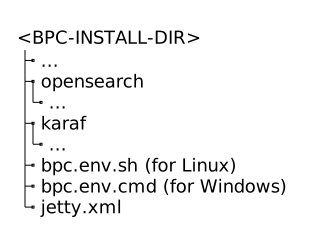
<BPC-INSTALL-DIR>/karaf/etc/jetty.xmlto<BPC-INSTALL-DIR> -
Make the necessary changes to
<BPC-INSTALL-DIR>/jetty.xml -
Set the environment variable
ORG_OPS4J_PAX_WEB_ORG_OPS4J_PAX_WEB_CONFIG_FILEvia Central configuration file so that the modifiedjetty.xmlis taken into account-
Unix systems
-
Windows systems
export ORG_OPS4J_PAX_WEB_ORG_OPS4J_PAX_WEB_CONFIG_FILE=\${karaf.base}/../jetty.xmlSET ORG_OPS4J_PAX_WEB_ORG_OPS4J_PAX_WEB_CONFIG_FILE=${karaf.base}/../jetty.xml -
Afterward, your <BPC-INSTALL-DIR> should look like this:
jetty.xmlOverwrite values from etc files
Karaf’s configuration settings are distributed across various files in the <KARAF-INSTALL-DIR>/etc directory.
During a Karaf update, it’s easy to lose track of what was previously customized and needs to be reconfigured in the new version.
Simply overwriting all these configuration files is not advisable, as this may result in newly added options not being set correctly.
Environment variables can be used to override specific values in the configuration files.
The name of the environment variable must follow this format: (NAME DER KONFIGURATIONSDATEI)_(NAME DER OPTION).
Please note the capitalization and replace spaces and special characters with underscores.
See also the Karaf documentation.
For clarification, see Example 1: Setting the SSH Port and Example 2: Setting the OpenSearch hosts.
|
The set values are available at runtime and are not written to the respective configuration files.
Using the Karaf shell, you can display the currently set values via ` |
Example 1: Setting the SSH Port
Excerpt from the file <KARAF-INSTALL-DIR>/etc/org.apache.karaf.shell.cfg:
#
# Using sshPort and sshHost, you define the address you can use to log in to Karaf.
#
sshPort = 8101
The value of the sshPort option should be set to 18202 via an environment variable:
export ORG_APACHE_KARAF_SHELL_SSHPORT=18102
Example 2: Setting the OpenSearch hosts
Excerpt from the file <KARAF-INSTALL-DIR>/etc/de.virtimo.bpc.core.cfg:
de.Virtimo.BPC.core.opensearch.hosts = https://localhost:9200
The default export in BPC.env is for
-
Unix systems
-
Windows systems
export DE_VIRTIMO_BPC_CORE_DE_VIRTIMO_BPC_CORE_OPENSEARCH_PORT=$(($PORT_OFFSET + 9200))
export DE_VIRTIMO_BPC_CORE_DE_VIRTIMO_BPC_CORE_OPENSEARCH_HOSTS="https://localhost:$DE_VIRTIMO_BPC_CORE_DE_VIRTIMO_BPC_CORE_OPENSEARCH_PORT"
SET /a DE_VIRTIMO_BPC_CORE_DE_VIRTIMO_BPC_CORE_OPENSEARCH_PORT=%PORT_OFFSET% + 9200
SET DE_VIRTIMO_BPC_CORE_DE_VIRTIMO_BPC_CORE_OPENSEARCH_HOSTS=https://localhost:%DE_VIRTIMO_BPC_CORE_DE_VIRTIMO_BPC_CORE_OPENSEARCH_PORT%and thereby overrides the configuration from <KARAF-INSTALL-DIR>/etc/de.virtimo.bpc.core.cfg with the same value https://localhost:9200, taking into account the PORT_OFFSET variable.
If you want to add another OpenSearch node with a port offset, you can do so as follows, for example:
-
Unix systems
-
Windows systems
export DE_VIRTIMO_BPC_CORE_DE_VIRTIMO_BPC_CORE_OPENSEARCH_PORT=$(($PORT_OFFSET + 9200))
export DE_VIRTIMO_BPC_CORE_DE_VIRTIMO_BPC_CORE_OPENSEARCH_HOSTS="https://localhost:$DE_VIRTIMO_BPC_CORE_DE_VIRTIMO_BPC_CORE_OPENSEARCH_PORT, https://otherhost:$DE_VIRTIMO_BPC_CORE_DE_VIRTIMO_BPC_CORE_OPENSEARCH_PORT"
SET /a DE_VIRTIMO_BPC_CORE_DE_VIRTIMO_BPC_CORE_OPENSEARCH_PORT=%PORT_OFFSET% + 9200
SET DE_VIRTIMO_BPC_CORE_DE_VIRTIMO_BPC_CORE_OPENSEARCH_HOSTS=https://localhost:%DE_VIRTIMO_BPC_CORE_DE_VIRTIMO_BPC_CORE_OPENSEARCH_PORT%, https://otherhost:%DE_VIRTIMO_BPC_CORE_DE_VIRTIMO_BPC_CORE_OPENSEARCH_PORT%