Services - Windows Systems
The following describes how to set up OpenSearch and Karaf as Windows services.
OpenSearch
|
If an OpenSearch service is already installed on this machine, you may need to rename the new service in the file
|
Install Windows Service
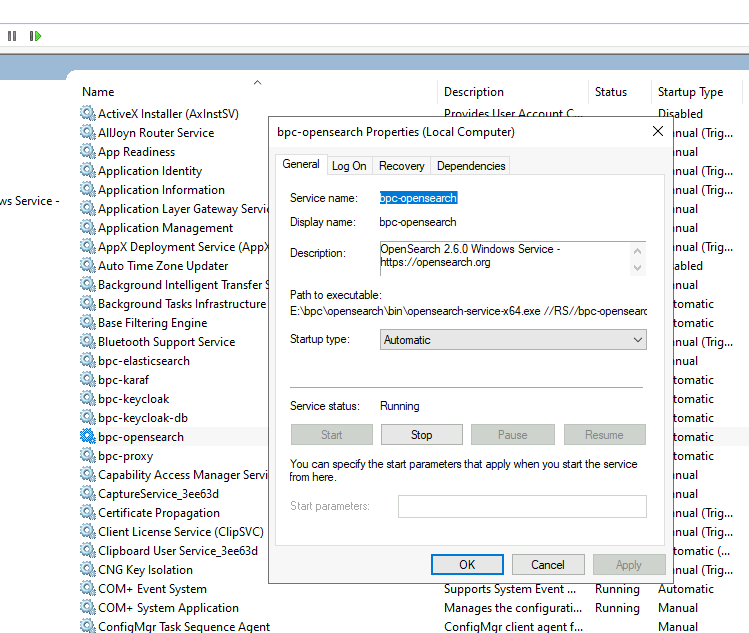
The following command installs the service.
<BPC-INSTALL-DIR>\opensearch\bin\opensearch-service.bat install bpc-opensearch
Karaf
The Karaf directory <BPC-INSTALL-DIR>\karaf\bin\contrib contains the files karaf-service-win.exe and karaf-service-win.xml.
You can use the file karaf-service-win.exe to install, uninstall, start, and stop the Service.
In karaf-service-win.xml, you must customize the placeholders for the Service.
Replace the following placeholders:
-
%KARAF_SERVICE_NAME%- Name of the Service under Windows. Example: "Karaf" -
%KARAF_SERVICE_PATH%- Base path of the Karaf installation. Example: "C:\BPC\karaf" -
%KARAF_SERVICE_EXECUTABLE%- Name of the file in the directorybinused to start Karaf. Example: "karaf.bat"
Alternatively, you can leave the placeholders as they are. In that case, set the following environment variables for the system or the operating system user who is to start the Karaf service:
[[environment variables]]
KARAF_SERVICE_NAME=Karaf
KARAF_SERVICE_PATH=C:\BPC\karaf
KARAF_SERVICE_EXECUTABLE=karaf.batkaraf-service-win.xml mit Platzhaltern für Umgebungsvariablen<!--
Licensed to the Apache Software Foundation (ASF) under one or more
contributor license agreements. See the NOTICE file distributed with
this work for additional information regarding copyright ownership.
The ASF licenses this file to You under the Apache License, Version 2.0
(the "License"); you may not use this file except in compliance with
the License. You may obtain a copy of the License at
http://www.apache.org/licenses/LICENSE-2.0
Unless required by applicable law or agreed to in writing, software
distributed under the License is distributed on an "AS IS" BASIS,
WITHOUT WARRANTIES OR CONDITIONS OF ANY KIND, either express or implied.
See the License for the specific language governing permissions and
limitations under the License.
-->
<service>
<!--
This script is provided as a template you can quickly customize by replacing
the following variables:
KARAF_SERVICE_NAME
KARAF_SERVICE_PATH
KARAF_SERVICE_EXECUTABLE
For a detailed overview of the configuration options, please visit winsw home
page (https://github.com/kohsuke/winsw)
-->
<!-- Required. Has to be unique among all the services installed in a system. Should consist entirely out of alpha-numeric characters. -->
<id>%KARAF_SERVICE_NAME%</id>
<!-- Optional. Has to be unique among all the services installed in a system. Short display name of the service, which can contain spaces and other characters. -->
<name>%KARAF_SERVICE_NAME%</name>
<!-- Optional. Long human-readable description of the service. -->
<description>Apache Karaf Service mit ID "%KARAF_SERVICE_NAME%" für BPC</description>
<!-- start -->
<executable>%KARAF_SERVICE_PATH%\bin\contrib\%KARAF_SERVICE_EXECUTABLE%</executable>
<startargument>daemon</startargument>
<!-- stop -->
<stopexecutable>%KARAF_SERVICE_PATH%\bin\contrib\%KARAF_SERVICE_EXECUTABLE%</stopexecutable>
<stopargument>stop</stopargument>
<stoptimeout>10sec</stoptimeout>
<!-- log into the same directory as karaf. Size is in kbyte. -->
<logpath>%KARAF_SERVICE_PATH%\data\log</logpath>
<log mode="roll-by-size">
<sizeThreshold>2048</sizeThreshold>
<keepFiles>3</keepFiles>
</log>
</service>Install Windows Service
The following command installs the service in Windows. It can then be started and stopped via the Windows Services interface.
|
This command usually requires an administrator account. Afterward, a service user with limited privileges should be created to start the service. |
<BPC-INSTALL-DIR>\karaf\bin\contrib\karaf-service-win.exe installOther possible operations include:
-
uninstall
-
stop
-
start
-
status
-
restart
If, in the section Karaf, the environment variables were set for the operating system user rather than system-wide, the command must be executed here using that operating system user. Since this user likely lacks the necessary permissions, the environment variables listed above must also be temporarily set again in the respective command prompt window.
<BPC-INSTALL-DIR>\karaf\bin\contrib\karaf-service-win.exe start
For more information , see the Apache Karaf Container Documentation - Windows.
