Secure Connection (TLS/HTTPS)
To ensure secure operation of the BPC, only secure connections should be used whenever possible.
Proper configuration requires knowledge of TLS in general and the configuration of Java-based applications using a truststore and keystore.
By default, HTTPS (port 9200) is used for communication with OpenSearch.
For general network configuration of the BPC, see Network.
|
In production environments, at least the incoming connections should be secured with a dedicated certificate. This is described in the section Securing Incoming Connections with Your Own Certificate. |
Overview of BPC Network Connections
These diagrams show the network connections for the BPC in single-node and cluster operation.
|
The network port used is always specified after the colon in the connection names.
For example, Network ports can also be configured differently. See Network for more information. |
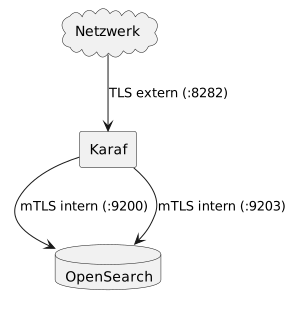
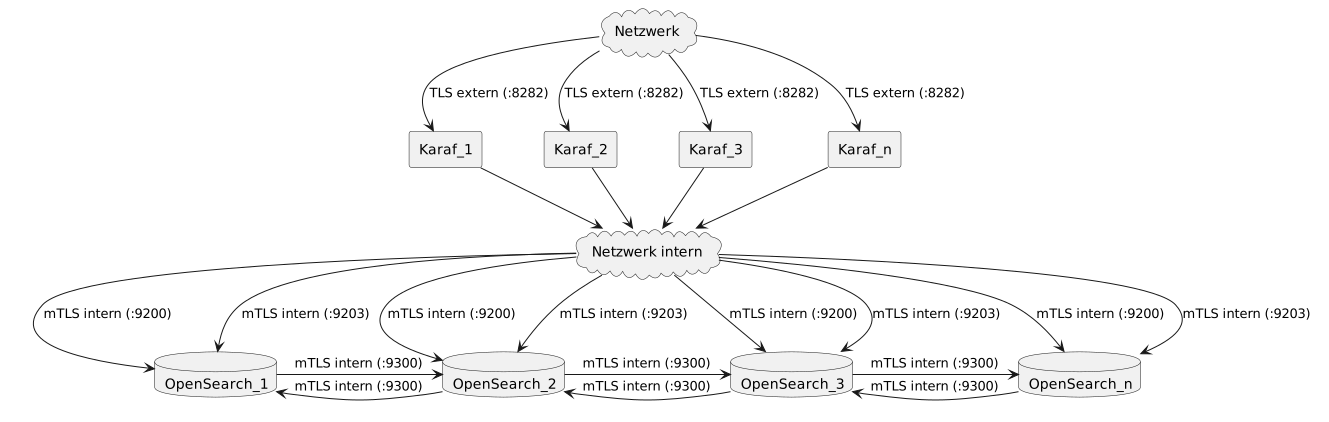
Network connections can be categorized as external or incoming connections (see Securing Incoming Connections with Your Own Certificate) and internal connections (Securing internal connections with your own certificate). These can be configured separately.
General information on network configuration can be found at Network.
Keystores and Truststores
Keystores and truststores are important files for configuring TLS.
Keystores contain private certificates (private keys). These are used either as server certificates to provide TLS/HTTPS connections or as client certificates to authenticate to the server when using mutual TLS authentication (mTLS). These certificates contain sensitive information. Therefore, they are typically protected by passwords.
Trust stores contain public certificates (public keys). This makes it possible to verify the server’s authenticity when establishing a secure connection to it. When using mTLS, you can verify the authenticity of the client establishing the connection.
These two files are used in Karaf, as well as in OpenSearch, to secure various connections.
|
To create certificates and work with keystore/truststore files, you can use the command-line tools |
Centralizing Keystore and Truststore Files
It is recommended to store the keystore and truststore files outside of Karaf and OpenSearch, in a central location. This simplifies future updates, as it allows OpenSearch and Karaf to be updated without having to reconfigure TLS.
Default location for Karaf |
|
Default location for OpenSearch |
|
Recommended new location |
|
The BPC.env file must be adjusted so that Karaf can find the files and a suitable link is created for OpenSearch. Unfortunately, the link for OpenSearch is necessary because the process is not allowed to access files outside its folder.
-
Unix systems
-
Windows systems
export ORG_OPS4J_PAX_WEB_ORG_OPS4J_PAX_WEB_SSL_KEYSTORE=../ssl/virtimo_keystore.jks
export ORG_OPS4J_PAX_WEB_ORG_OPS4J_PAX_WEB_SSL_TRUSTSTORE=../ssl/virtimo_truststore.jkscd <OPENSEARCH-CONFIG-DIR>/virtimo
ln -s ../../ssl sslSET ORG_OPS4J_PAX_WEB_ORG_OPS4J_PAX_WEB_SSL_KEYSTORE=../ssl/virtimo_keystore.jks
SET ORG_OPS4J_PAX_WEB_ORG_OPS4J_PAX_WEB_SSL_TRUSTSTORE=../ssl/virtimo_truststore.jksrmdir /s <OPENSEARCH-CONFIG-DIR>\virtimo\ssl
mklink /J <OPENSEARCH-CONFIG-DIR>\virtimo\ssl ssl|
Administrator privileges are required to create the symlink on Windows. |
Note that with this configuration, OpenSearch and Karaf use the same keystore and truststore files. This means that all necessary certificates with the appropriate aliases required for both system components must be stored there.
Java Truststore cacerts
Every Java installation includes a default truststore with the filename cacerts.
This truststore contains all root CAs that the distributor of the Java installation considers relevant.
In theory, all public certificates could simply be stored there.
However, we advise against this, since Java itself must also be updated regularly.
In this case, the cacerts file would have to be transferred from the old installation, or the new cacerts file would have to be modified.
This poses a potential risk of errors and involves unnecessary effort.
Out-of-the-Box Configuration
The BPC comes preconfigured out of the box with keystores (virtimo_keystore.jks) and truststores (virtimo_truststore.jks).
These contain self-signed certificates and are stored in OpenSearch (<OPENSEARCH-CONFIG-DIR>/virtimo/ssl) and Karaf (karaf/etc/virtimo/ssl).
The files are identical in both folders, even though this is not strictly necessary.
Script used to create the default keystore and truststore
#!/bin/sh

rm -rf certs
mkdir certs && cd certs

# ---------------------------------------------------------------------
# ROOT Zertifikat, hat eine Gültigkeitsdauer von 10 Jahren (~ 3650 Tage)
# ----------------------------------------------------------------------

openssl genrsa -out root-ca-key.pem 4096

openssl req \
  -new \
  -x509 \
  -sha256 \
  -key root-ca-key.pem \
  -subj "/DC=com/DC=example/O=Example Com Inc./OU=Example Com Inc. Root CA/CN=Example Com Inc. Root CA" \
  -addext "basicConstraints = critical,CA:TRUE" \
  -addext "keyUsage = critical, digitalSignature, keyCertSign, cRLSign" \
  -addext "subjectKeyIdentifier = hash" \
  -addext "authorityKeyIdentifier = keyid:always,issuer:always" \
  -days 3650 \
  -out root-ca.pem

keytool -import \
  -file root-ca.pem \
  -alias root-ca \
  -keystore virtimo_keystore.jks \
  -storepass virtimo \
  -noprompt

keytool -import \
  -file root-ca.pem \
  -alias root-ca \
  -keystore virtimo_truststore.jks \
  -storepass virtimo \
  -noprompt

# -------------------------------------------------
# Für den Jetty/Karaf/PAX Web mit dem Alias 'karaf'
# -------------------------------------------------

openssl genrsa -out karaf-key-temp.pem 4096

openssl pkcs8 \
  -inform PEM \
  -outform PEM \
  -in karaf-key-temp.pem \
  -topk8 \
  -nocrypt \
  -v1 PBE-SHA1-3DES \
  -out karaf-key.pem

openssl req \
  -new \
  -key karaf-key.pem \
  -subj "/C=DE/L=Berlin/O=Virtimo AG/OU=karaf/CN=karaf.example.com" \
  -out karaf.csr

cat > karaf.extfile << EOF
subjectAltName = DNS:karaf.example.com, DNS:localhost, IP:::1, IP:127.0.0.1
keyUsage = digitalSignature, nonRepudiation, keyEncipherment
extendedKeyUsage = serverAuth, clientAuth
basicConstraints = critical,CA:FALSE
EOF

openssl x509 \
  -req \
  -in karaf.csr \
  -out karaf.pem \
  -CA root-ca.pem \
  -CAkey root-ca-key.pem \
  -CAcreateserial \
  -days 3650 \
  -extfile karaf.extfile

openssl pkcs12 -export \
  -name karaf \
  -in karaf.pem \
  -inkey karaf-key.pem \
  -certfile root-ca.pem \
  -out karaf.p12 \
  -password pass:virtimo

keytool \
  -importkeystore \
  -destkeystore virtimo_keystore.jks \
  -deststoretype jks \
  -deststorepass virtimo \
  -srckeystore karaf.p12 \
  -srcstoretype pkcs12 \
  -srcstorepass virtimo \
  -alias karaf

rm karaf.csr
rm karaf.extfile

# -------------------------------------------------------
# Für den OpenSearch Node mit dem Alias 'opensearch_node'
# -------------------------------------------------------

openssl genrsa -out opensearch_node-key-temp.pem 4096

openssl pkcs8 \
  -inform PEM \
  -outform PEM \
  -in opensearch_node-key-temp.pem \
  -topk8 \
  -nocrypt \
  -v1 PBE-SHA1-3DES \
  -out opensearch_node-key.pem

openssl req \
  -new \
  -key opensearch_node-key.pem \
  -subj "/C=DE/L=Berlin/O=Virtimo AG/OU=node/CN=node-0.example.com" \
  -out opensearch_node.csr

cat > opensearch_node.extfile << EOF
subjectAltName = RID:1.2.3.4.5.5, DNS:node-0.example.com, DNS:localhost, IP:::1, IP:127.0.0.1
keyUsage = digitalSignature, nonRepudiation, keyEncipherment
extendedKeyUsage = serverAuth, clientAuth
basicConstraints = critical,CA:FALSE
EOF

openssl x509 \
  -req \
  -in opensearch_node.csr \
  -out opensearch_node.pem \
  -CA root-ca.pem \
  -CAkey root-ca-key.pem \
  -CAcreateserial \
  -days 3650 \
  -extfile opensearch_node.extfile

openssl pkcs12 -export \
  -name opensearch_node \
  -in opensearch_node.pem \
  -inkey opensearch_node-key.pem \
  -certfile root-ca.pem \
  -out opensearch_node.p12 \
  -password pass:virtimo

keytool \
  -importkeystore \
  -destkeystore virtimo_keystore.jks \
  -deststoretype jks \
  -deststorepass virtimo \
  -srckeystore opensearch_node.p12 \
  -srcstoretype pkcs12 \
  -srcstorepass virtimo \
  -alias opensearch_node

rm opensearch_node.csr
rm opensearch_node.extfile

# ---------------------------------------------------------
# Für den OpenSearch ADMIN mit dem Alias 'opensearch_admin'
# ---------------------------------------------------------

openssl req \
  -new \
  -newkey rsa:4096 \
  -keyout opensearch_admin-key.pem \
  -out opensearch_admin.csr \
  -nodes \
  -subj "/C=DE/L=Berlin/O=Virtimo AG/OU=Dev/CN=opensearch_admin"

cat > opensearch_admin.extfile << EOF
basicConstraints = critical,CA:FALSE
keyUsage = critical,digitalSignature,nonRepudiation,keyEncipherment
extendedKeyUsage = critical,clientAuth
authorityKeyIdentifier = keyid,issuer:always
subjectKeyIdentifier = hash
EOF

openssl x509 \
  -req \
  -in opensearch_admin.csr \
  -CA root-ca.pem \
  -CAkey root-ca-key.pem \
  -CAcreateserial \
  -out opensearch_admin.pem \
  -days 3650 \
  -extfile opensearch_admin.extfile

rm opensearch_admin.csr
rm opensearch_admin.extfile

# ----------------------------------------------------------------------------------------
# Für den OpenSearch BPC User mit dem Alias 'bpc'. Karaf / OpenSearch Client -> OpenSearch
# Unser OpenSearch ist so konfiguriert, dass der Wert aus CN (= bpc) der Username ist.
# ----------------------------------------------------------------------------------------

openssl req \
  -new \
  -newkey rsa:4096 \
  -keyout opensearch_bpc-key.pem \
  -out opensearch_bpc.csr \
  -nodes \
  -subj "/C=DE/L=Berlin/O=Virtimo AG/OU=client/CN=bpc"

cat > opensearch_bpc.extfile << EOF
basicConstraints = critical,CA:FALSE
keyUsage = critical,digitalSignature,nonRepudiation,keyEncipherment
extendedKeyUsage = critical,clientAuth
authorityKeyIdentifier = keyid,issuer:always
subjectKeyIdentifier = hash
EOF

openssl x509 \
  -req \
  -in opensearch_bpc.csr \
  -CA root-ca.pem \
  -CAkey root-ca-key.pem \
  -CAcreateserial \
  -out opensearch_bpc.pem \
  -days 3650 \
  -extfile opensearch_bpc.extfile

openssl pkcs12 -export \
  -name opensearch_bpc \
  -in opensearch_bpc.pem \
  -inkey opensearch_bpc-key.pem \
  -certfile root-ca.pem \
  -out opensearch_bpc.p12 \
  -password pass:virtimo

keytool \
  -importkeystore \
  -destkeystore virtimo_keystore.jks \
  -deststoretype jks \
  -deststorepass virtimo \
  -srckeystore opensearch_bpc.p12 \
  -srcstoretype pkcs12 \
  -srcstorepass virtimo \
  -alias opensearch_bpc

rm opensearch_bpc.csr
rm opensearch_bpc.extfile

# ----------------------------------------------------------------------------------------
# Für den Prometheus Benutzer welcher die OpenSearch Metriken abruft.
# ----------------------------------------------------------------------------------------

openssl req \
  -new \
  -newkey rsa:4096 \
  -keyout prometheus_scraper-key.pem \
  -out prometheus_scraper.csr \
  -nodes \
  -subj "/C=DE/L=Berlin/O=Virtimo AG/OU=client/CN=prometheus-scraper"

cat > prometheus_scraper.extfile << EOF
basicConstraints = critical,CA:FALSE
keyUsage = critical,digitalSignature,nonRepudiation,keyEncipherment
extendedKeyUsage = critical,clientAuth
authorityKeyIdentifier = keyid,issuer:always
subjectKeyIdentifier = hash
EOF

openssl x509 \
  -req \
  -in prometheus_scraper.csr \
  -CA root-ca.pem \
  -CAkey root-ca-key.pem \
  -CAcreateserial \
  -out prometheus_scraper.pem \
  -days 3650 \
  -extfile prometheus_scraper.extfile

openssl pkcs12 -export \
  -name prometheus_scraper \
  -in prometheus_scraper.pem \
  -inkey prometheus_scraper-key.pem \
  -certfile root-ca.pem \
  -out prometheus_scraper.p12 \
  -password pass:virtimo

keytool \
  -importkeystore \
  -destkeystore virtimo_keystore.jks \
  -deststoretype jks \
  -deststorepass virtimo \
  -srckeystore prometheus_scraper.p12 \
  -srcstoretype pkcs12 \
  -srcstorepass virtimo \
  -alias prometheus_scraper

rm prometheus_scraper.csr
rm prometheus_scraper.extfile
Keystore virtimo_keystore.jks
The default password for the keystore virtimo_keystore.jks is virtimo.
The following keys/certificates are stored in the keystore virtimo_keystore.jks.
| Alias | Password | Purpose |
|---|---|---|
|
Server certificate for external connections ( |
|
|
Client certificate for the Karaf → OpenSearch connection ( See also Certificates for mTLS authentication with OpenSearch. |
|
|
Client certificate for the OpenSearch → OpenSearch connection ( |
|
|
Client certificate for the Prometheus → OpenSearch connection ( |
Keystore configuration in Karaf
It is recommended to configure the keystore and certificate settings for Karaf via environment variables in the central configuration file bpc.env:
-
Unix-based systems (bpc.env.sh)
-
Windows-based systems (bpc.env.cmd)
# Keystore path, password, and type
export ORG_OPS4J_PAX_WEB_ORG_OPS4J_PAX_WEB_SSL_KEYSTORE="${karaf.etc}/virtimo/ssl/virtimo_keystore.jks"
export ORG_OPS4J_PAX_WEB_ORG_OPS4J_PAX_WEB_SSL_KEYSTORE_PASSWORD="virtimo"
export ORG_OPS4J_PAX_WEB_ORG_OPS4J_PAX_WEB_SSL_KEYSTORE_TYPE="JKS"

# TLS server certificate (external TLS)
export ORG_OPS4J_PAX_WEB_ORG_OPS4J_PAX_WEB_SSL_KEY_ALIAS="karaf"
export ORG_OPS4J_PAX_WEB_ORG_OPS4J_PAX_WEB_SSL_KEY_PASSWORD="virtimo"

# Client certificate for connection to OpenSearch (internal mTLS)
export DE_VIRTIMO_BPC_CORE_DE_VIRTIMO_BPC_CORE_OPENSEARCH_PRIVATEKEY_ALIAS="opensearch_bpc"
export DE_VIRTIMO_BPC_CORE_DE_VIRTIMO_BPC_CORE_OPENSEARCH_PRIVATEKEY_PASSWORD="virtimo"
:: Keystore path, password, and type
SET ORG_OPS4J_PAX_WEB_ORG_OPS4J_PAX_WEB_SSL_KEYSTORE=${karaf.etc}/virtimo/ssl/virtimo_keystore.jks
SET ORG_OPS4J_PAX_WEB_ORG_OPS4J_PAX_WEB_SSL_KEYSTORE_PASSWORD=virtimo
SET ORG_OPS4J_PAX_WEB_ORG_OPS4J_PAX_WEB_SSL_KEYSTORE_TYPE=JKS
:: TLS server certificate (external TLS)
SET ORG_OPS4J_PAX_WEB_ORG_OPS4J_PAX_WEB_SSL_KEY_ALIAS=karaf
SET ORG_OPS4J_PAX_WEB_ORG_OPS4J_PAX_WEB_SSL_KEY_PASSWORD=virtimo
:: Client certificate for connection to OpenSearch (internal mTLS)
SET DE_VIRTIMO_BPC_CORE_DE_VIRTIMO_BPC_CORE_OPENSEARCH_PRIVATEKEY_ALIAS=opensearch_bpc
SET DE_VIRTIMO_BPC_CORE_DE_VIRTIMO_BPC_CORE_OPENSEARCH_PRIVATEKEY_PASSWORD=virtimo|
It is strongly recommended not to make configuration changes directly in the Karaf configuration files under |
Alternatively, the keystore is referenced in the configuration file karaf/etc/org.ops4j.pax.web.cfg via the following settings:
karaf/etc/org.ops4j.pax.web.cfgorg.ops4j.pax.web.ssl.keystore = ${karaf.etc}/virtimo/ssl/virtimo_keystore.jks
org.ops4j.pax.web.ssl.keystore.password = virtimo
org.ops4j.pax.web.ssl.keystore.type = JKSThe certificate required for TLS/HTTPS (TLS extern (:8282)) is also defined here.
karaf/etc/org.ops4j.pax.web.cfg# TLS Keys
org.ops4j.pax.web.ssl.key.alias = karaf
org.ops4j.pax.web.ssl.key.password = virtimo|
The setting |
|
For Karaf, it is absolutely necessary that the keystore password and the password for the ssl.key match. Otherwise, unpredictable problems will occur. |
To access the client certificate for connecting to OpenSearch (mTLS intern (:9200) and mTLS intern (:9203)), additional configuration parameters are available in the file karaf/etc/de.virtimo.bpc.core.cfg (see also BPC Configuration File).
karaf/etc/de.virtimo.bpc.core.cfgde.virtimo.bpc.core.opensearch.privatekey.alias = opensearch_bpc
de.virtimo.bpc.core.opensearch.privatekey.password = virtimoKeystore Configuration in OpenSearch
In <OPENSEARCH-CONFIG-DIR>/opensearch.yml, the keystore is referenced using the following settings:
<OPENSEARCH-CONFIG-DIR>/opensearch.yml for mTLS intern (:9200) and mTLS intern (:9203)plugins.security.ssl.http.keystore_filepath: virtimo/ssl/virtimo_keystore.jks
plugins.security.ssl.http.keystore_password: virtimo
plugins.security.ssl.http.keystore_alias: opensearch_node
plugins.security.ssl.http.keystore_type: jks
plugins.security.ssl.http.keystore_keypassword: virtimo<OPENSEARCH-CONFIG-DIR>/opensearch.yml for mTLS intern (:9300)plugins.security.ssl.transport.keystore_filepath: virtimo/ssl/virtimo_keystore.jks
plugins.security.ssl.transport.keystore_password: virtimo
plugins.security.ssl.transport.keystore_alias: opensearch_node
plugins.security.ssl.transport.keystore_type: jks
plugins.security.ssl.transport.keystore_keypassword: virtimoFurther information can be found in the official OpenSearch documentation.
Truststore virtimo_truststore.jks
The default password for the truststore virtimo_truststore.jks is virtimo.
The following keys/certificates are stored in the truststore virtimo_truststore.jks.
Alias |
Password |
Purpose |
|
Server certificate for external connections ( |
|
This is the trusted root certificate used to sign the other certificates.
It is required to run OpenSearch security tools such as the |
Truststore configuration in Karaf
It is recommended to configure truststore settings for Karaf via environment variables in the central configuration file bpc.env:
-
Unix-based systems (bpc.env.sh)
-
Windows-based systems (bpc.env.cmd)
export ORG_OPS4J_PAX_WEB_ORG_OPS4J_PAX_WEB_SSL_TRUSTSTORE="${karaf.etc}/virtimo/ssl/virtimo_truststore.jks"
export ORG_OPS4J_PAX_WEB_ORG_OPS4J_PAX_WEB_SSL_TRUSTSTORE_PASSWORD="virtimo"
export ORG_OPS4J_PAX_WEB_ORG_OPS4J_PAX_WEB_SSL_TRUSTSTORE_TYPE="JKS"
SET ORG_OPS4J_PAX_WEB_ORG_OPS4J_PAX_WEB_SSL_TRUSTSTORE=${karaf.etc}/virtimo/ssl/virtimo_truststore.jks
SET ORG_OPS4J_PAX_WEB_ORG_OPS4J_PAX_WEB_SSL_TRUSTSTORE_PASSWORD=virtimo
SET ORG_OPS4J_PAX_WEB_ORG_OPS4J_PAX_WEB_SSL_TRUSTSTORE_TYPE=JKSAlternatively, the truststore is referenced in karaf/etc/org.ops4j.pax.web.cfg via the following settings:
org.ops4j.pax.web.ssl.truststore = ${karaf.etc}/virtimo/ssl/virtimo_truststore.jks
org.ops4j.pax.web.ssl.truststore.password = virtimo
org.ops4j.pax.web.ssl.truststore.type = JKS
Truststore Configuration in OpenSearch
In <OPENSEARCH-CONFIG-DIR>/opensearch.yml, the truststore is referenced via the following settings:
<OPENSEARCH-CONFIG-DIR>/opensearch.yml# mTLS intern (:9200) / mTLS intern (:9203)
plugins.security.ssl.http.truststore_filepath: virtimo/ssl/virtimo_truststore.jks
plugins.security.ssl.http.truststore_password: virtimo
plugins.security.ssl.http.truststore_type: jks
# not set means all certificates in the truststore are trusted
# plugins.security.ssl.http.truststore_alias
# mTLS intern (:9300)
plugins.security.ssl.transport.truststore_filepath: virtimo/ssl/virtimo_truststore.jks
plugins.security.ssl.transport.truststore_password: virtimo
plugins.security.ssl.transport.truststore_type: jks
# not set means all certificates in the truststore are trusted
# plugins.security.ssl.transport.truststore_aliasFurther information can be found in the official OpenSearch documentation.
Aliases
If you want to use aliases other than those used in the Out-of-the-Box Configuration (see Keystore Aliases and Truststore Aliases), be sure to also note the corresponding alias configurations in OpenSearch (Truststore, Keystore) and Karaf (Truststore, Keystore).
Aliases in the truststore are generally not relevant, since all certificates are considered trusted. In OpenSearch, however, you can also restrict this to a specific alias (Truststore Configuration in OpenSearch). In the Out-of-the-Box Configuration, all certificates in the truststore are trusted.
Securing Incoming Connections with Your Own Certificate
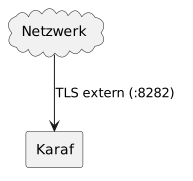
Access to the BPC is via the Karaf system component and occurs on port 8282 (see also Network). These are declared in the Diagram (Overview of BPC Network Connections) as TLS extern (:8282).
To configure your own certificate, you must modify or replace the default keystore (Keystore virtimo_keystore.jks).
You will need:
-
A TLS certificate signed by the root certificate
You must configure the following:
-
Add the TLS certificate to the Keystore
virtimo_keystore.jksin Karaf -
Configure the alias and password for the TLS certificate in the
karaf/etc/org.ops4j.pax.web.cfg.Excerpt from the TLS certificate configuration atkaraf/etc/org.ops4j.pax.web.cfg# TLS Keys org.ops4j.pax.web.ssl.key.alias = karaf org.ops4j.pax.web.ssl.key.password = virtimo -
Restart Karaf
For the connection TLS extern (:8282) to work correctly, all systems establishing a connection (browsers, servers, etc.) must trust the root certificate.
If you replace the keystore, you must also add the client certificate (default alias opensearch_bpc).
See also Securing internal connections with your own certificate.
|
It is absolutely essential that the keystore password ( |
|
Make sure that the HTTP port (default 8181) is disabled as soon as the HTTPS connection has been established. See Network |
Securing internal connections with your own certificate
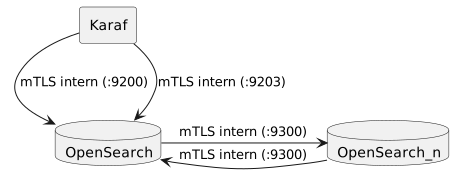
To operate the BPC, Karaf establishes a secure connection to OpenSearch (mTLS intern (:9200)) and a WebSocket connection to the BPC OpenSearch plugin (mTLS intern (:9203)).
If you are running the BPC in a cluster, the OpenSearch nodes also establish connections with each other (mTLS intern (:9300)).
Mutual TLS authentication (mTLS) is used for these internal connections.
This means that, in addition, the client establishing the connection requires a certificate for authentication, and the server requires a certificate to verify the client’s certificate.
The client certificate is stored in Keystore virtimo_keystore.jks.
The certificate used for verification is stored in Truststore virtimo_truststore.jks.
This applies to Karaf when connecting to OpenSearch (mTLS intern (:9200) and mTLS intern (:9203)) and to OpenSearch when connecting to other OpenSearch nodes (mTLS intern (:9300)).
There are a few things to keep in mind if you want to replace the existing certificates with your own. Since mTLS is used, you’ll need both the client certificate (see Certificates for mTLS authentication with OpenSearch) and a certificate that can be used to verify the client certificate. This is usually issued directly by the root CA (Certificate Authority).
You will need:
-
Root certificate for validating issued certificates
-
Client certificate signed by the root certificate
-
TLS certificate signed by the root certificate
You must configure the following:
-
Add the client certificate to the Keystore
virtimo_keystore.jksin Karaf -
Add the TLS certificate to the Keystore
virtimo_keystore.jksin OpenSearch -
Add the root certificate to the Truststore
virtimo_truststore.jksin OpenSearch and Karaf to verify the client certificate. -
In the file
karaf/etc/de.virtimo.bpc.core.cfg, configure the corresponding alias and the associated password for the added client certificate (see also BPC Configuration File)Excerpt from the keystore configuration inkaraf/etc/de.virtimo.bpc.core.cfgde.virtimo.bpc.core.opensearch.privatekey.alias = opensearch_bpc de.virtimo.bpc.core.opensearch.privatekey.password = virtimo -
In the file
<OPENSEARCH-CONFIG-DIR>/opensearch.yml, configure the corresponding alias and the associated password for the added TLS certificate.Excerpt from the keystore configuration at<OPENSEARCH-CONFIG-DIR>/opensearch.ymlformTLS intern (:9200)andmTLS intern (:9203)plugins.security.ssl.http.keystore_filepath: virtimo/ssl/virtimo_keystore.jks plugins.security.ssl.http.keystore_password: virtimo plugins.security.ssl.http.keystore_alias: opensearch_node plugins.security.ssl.http.keystore_type: jks plugins.security.ssl.http.keystore_keypassword: virtimo -
Restart Karaf and OpenSearch.
If you are using an OpenSearch cluster, you should also secure the connection between the cluster nodes (mTLS inter (:9300)).
In the following, we assume that the same root certificate is being used.
You will need:
-
A client certificate signed by the root certificate
You must configure the following:
-
Add the client certificate to the Keystore
virtimo_keystore.jksin OpenSearch -
In the file
<OPENSEARCH-CONFIG-DIR>/opensearch.yml, configure the corresponding alias and the associated password for the added client certificate.Excerpt from the keystore configuration at<OPENSEARCH-CONFIG-DIR>/opensearch.ymlformTLS intern (:9300)plugins.security.ssl.transport.keystore_filepath: virtimo/ssl/virtimo_keystore.jks plugins.security.ssl.transport.keystore_password: virtimo plugins.security.ssl.transport.keystore_alias: opensearch_node plugins.security.ssl.transport.keystore_type: jks plugins.security.ssl.transport.keystore_keypassword: virtimo -
Restart Karaf and OpenSearch.
|
Always ensure that the aliases and passwords you use are specified correctly. |
Certificates for mTLS authentication with OpenSearch
The certificate entry also contains the name of the user accessing OpenSearch.
The value in the “ Antragsteller ” field is, for example, set to opensearch_bpc set to CN=bpc,OU=client,O=Virtimo AG,L=Berlin,C=DE.
The OpenSearch Security Plugin uses the CN value (bpc) as the user for access.
Accordingly, the user bpc also appears in OpenSearch.
In the configuration file <OPENSEARCH-CONFIG-DIR>/opensearch-security/roles_mapping.yml, the user bpc is assigned to the role all_access.
For more information, see the official OpenSearch documentation.
The OpenSearch Security Plugin provides these features. The extensive configuration options are described in the OpenSearch Security documentation.
Prometheus certificate for mTLS authentication with OpenSearch
For the certificate with the alias prometheus_scraper , the value in the ` Antragsteller ` field is set to ` CN=prometheus-scraper,OU=client,O=Virtimo AG,L=Berlin,C=DE `.
As mentioned earlier, the OpenSearch Security Plugin uses the CN value (prometheus-scraper) as the user for access.
The user ` prometheus-scraper ` is therefore also present in OpenSearch.
In the configuration file ` <OPENSEARCH-CONFIG-DIR>/opensearch-security/roles_mapping.yml , the user ` `prometheus-scraper ` is assigned to the role ` prometheus_metrics .
The role `prometheus_metrics is defined in the configuration file <OPENSEARCH-CONFIG-DIR>/opensearch-security/roles.yml and allows access only to the https://localhost:9200/_prometheus/metrics endpoint.
Temporarily enabling HTTP between Karaf and OpenSearch
To rule out other issues, the connection can be temporarily switched back to HTTP. Here are the necessary steps for OpenSearch and Karaf. After making these changes, both systems must be restarted.
-
In the
<OPENSEARCH-CONFIG-DIR>/opensearch.yml, disable the OpenSearch Security Plugin (the setting already exists in the file).<OPENSEARCH-CONFIG-DIR>/opensearch.ymlplugins.security.disabled: true -
In the central configuration file, you must change the schema for the OpenSearch hosts from
httpstohttp(the line should already exist withhttps):bpc.env.shexport DE_VIRTIMO_BPC_CORE_DE_VIRTIMO_BPC_CORE_OPENSEARCH_HOSTS="http://localhost:$DE_VIRTIMO_BPC_CORE_DE_VIRTIMO_BPC_CORE_OPENSEARCH_PORT"or BPC.env.cmdSET DE_VIRTIMO_BPC_CORE_DE_VIRTIMO_BPC_CORE_OPENSEARCH_HOSTS=https://localhost:%DE_VIRTIMO_BPC_CORE_DE_VIRTIMO_BPC_CORE_OPENSEARCH_PORT%
|
This setting should only be used temporarily for testing purposes. In this state, the OpenSearch REST API provides unrestricted administrative access to all callers. |
Test access to OpenSearch via HTTPS
The OpenSearch page describes how to establish direct access and test your configuration.
Obfuscate Passwords
You can specify the passwords for org.ops4j.pax.web.ssl.keystore.password and org.ops4j.pax.web.ssl.key.password as an "obfuscated" string.
This has the advantage that the password is not stored in plain text.
To obtain an obfuscated form of a password, you can run the following:
password> java -cp <BPC-INSTALL-DIR>/karaf/system/org/eclipse/jetty/jetty-util/9.4.22.v20191022/jetty-util-9.4.22.v20191022.jar org.eclipse.jetty.util.security.Password "password"
password
OBF:1v2j1uum1xtv1zej1zer1xtn1uvk1v1v
MD5:5f4dcc3b5aa765d61d8327deb882cf99In this example, OBF:1v2j1uum1xtv1zej1zer1xtn1uvk1v1v can be used interchangeably with password in the configuration.
|
The Jetty version number in your installation may differ. You can find this information on the Karaf console as follows: |
|
This is merely a way to obscure/mask the password; it is not encryption. |
Enable the Secure Flag for Cookies
The Secure Flag can be set for the BPC session cookie. When enabled, the browser sends the session cookie to the server only over secure connections. This increases security and prevents the session cookie from being intercepted on the network.
It is recommended to enable the secure flag via the central configuration file bpc.env:
-
Unix-based systems (bpc.env.sh)
-
Windows-based systems (bpc.env.cmd)
export DE_VIRTIMO_BPC_CORE_DE_VIRTIMO_BPC_CORE_COOKIESECURE="true"SET DE_VIRTIMO_BPC_CORE_DE_VIRTIMO_BPC_CORE_COOKIESECURE=true|
It is strongly recommended not to make configuration changes directly in the Karaf configuration files under |
Alternatively, set the following value in the file <BPC-INSTALL-DIR>/karaf/etc/de.virtimo.bpc.core.cfg:
de.virtimo.bpc.core.cookieSecure = true|
If the BPC is not provided via a secure connection, this option must not be enabled. Otherwise, the client will not be able to authenticate after logging in. |
