Automatic creation of module components
It happens from time to time that when delivering/deploying your bundle/module, you want to offer a module component that the end user can work with or use immediately without having to create it first.
Procedure in brief
-
create a
irgend_ein_name.jsonin theresources/autocreate/moduleinstancesdirectory of your own bundle -
this JSON must contain all the settings of the module component to be created
|
This works with both backend and frontend bundles. Storing the JSON in the backend bundle is the recommended location. |
Background info
Your bundle/module is loaded by the BPC core and this is searched for JSON files in the resources/autocreate/moduleinstances directory. If one is found, it is loaded and the module instance is created if it does not already exist. This is done every time you load/start your bundle.
Implementation
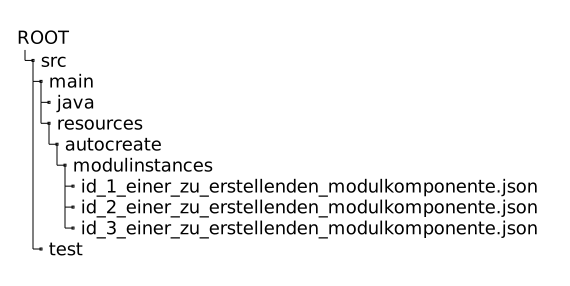
First make sure that the directory structure autocreate/moduleinstances is available in your bundle at resources. You must therefore create the directory autocreate below resources and the directory moduleinstances below it.
Create a JSON file in the moduleinstances directory that contains the information of the component to be created.
It is clearest if the ID of the module component to be created is used as the file name. And the file must have the file name extension .json.
Otherwise it will not be considered.
If several module components are to be created, then several JSON files must be created.
The content of the JSON files must have the following structure.
{
  "moduleId": "<ID deines Moduls>",
  "instanceId": "<ID der anzulegenden Modulkomponente>",
  "settings": {
    "internalInstance": true,
    "module_name": "Performance Monitor",
    "module_iconCls": "x-fal fa-fighter-jet",
    ...
    "<Name deines Setting>": <Wert deines Setting>
    ...
}-
moduleId- the ID that you have defined in yourModule.getModuleId()implementation -
instanceId- the ID of the module component to be created. Please ensure uniqueness yourself. -
settings- the values of each individual setting with which the module component to be created is to be defined here.
