Advanced Search
Dynamic Placeholders
The following placeholders can be used in filters and searches anywhere in the monitor. These are replaced accordingly when the data is queried.
| Placeholder | Example Replacement | Description |
|---|---|---|
|
max.mustermann |
The current user’s login name. |
Full-text search in the monitor
The full-text search provides the central search functionality across all fields of the currently selected monitor. In the input field, you can not only enter individual search terms but also construct complex searches using operators.

A window for full-text search is available to the user in the information and function area. The full-text search is performed across all monitoring data. It works across columns and can optionally be preset to include all process details as well as referenced messages.
To find data, the user enters the search term into the full-text search field in the function bar. Multiple search terms can be combined using operators.
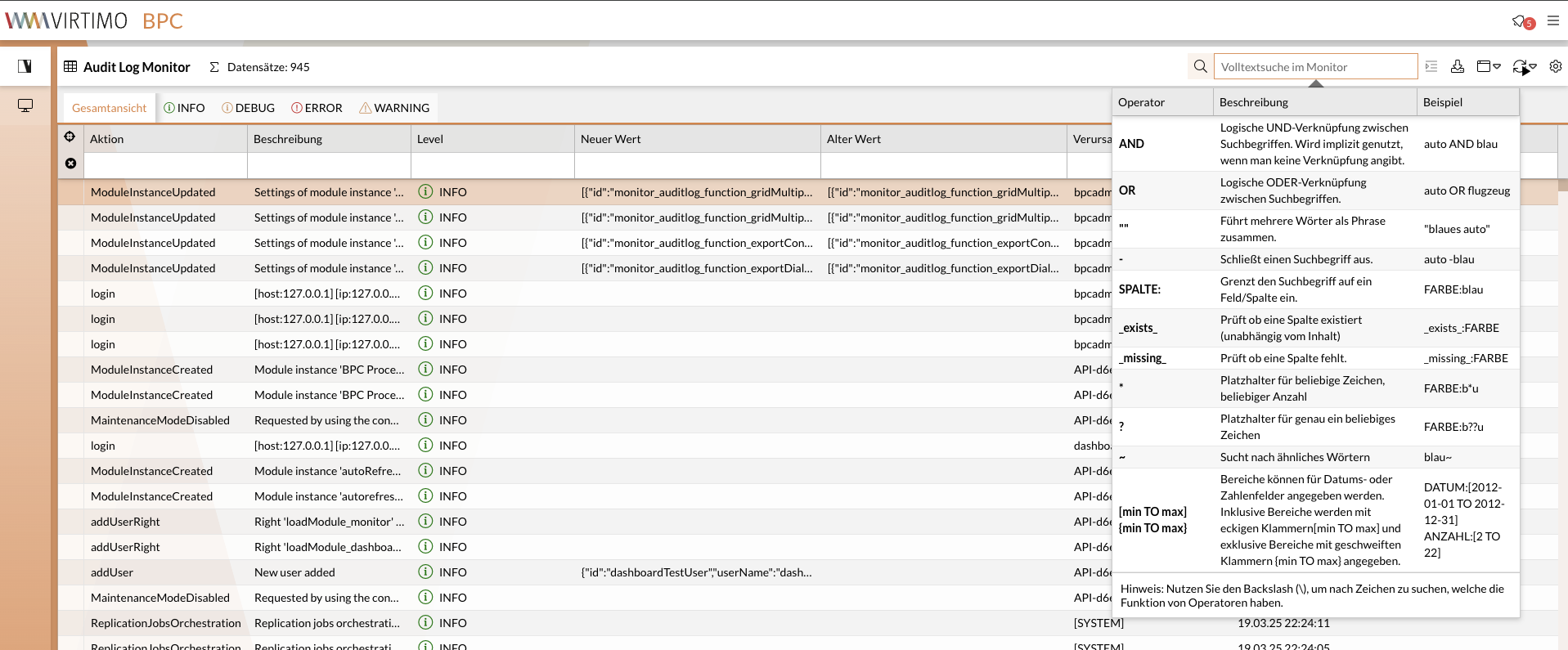
If no operator is specified, the terms are linked with AND.
Linking Search Terms
If you do not use quotation marks ("), the space syntactically separates two words and treats them as distinct terms.
In this case, the logical AND (AND) is used as the operator.
If you want to use the logical OR, you must explicitly specify OR.
| Example | Explanation |
|---|---|
|
Searches for documents that contain "car" in any field and "blue" in one (possibly different) field. |
|
Searches for documents that contain "car" or "blue" in any field. |
|
For more complex logical operators, you can use parentheses. |
Narrowing the Search Scope
If you want to narrow the search to a specific field, you can do so by prefixing the field name (column name) with a colon.
| Example | Explanation |
|---|---|
|
Searches for documents in which the value "auto" appears in the VEHICLE_TYPE field and the value "blue" appears in the COLOR field. |
Excluding Search Terms
You can also negate or exclude the search or parts of the search.
| Example | Explanation |
|---|---|
|
Searches for documents in which the value "auto" appears in the VEHICLE_TYPE field and the value "blue" does not appear in the COLOR field. |
Searching for (non-)existing fields
If you want to find documents in which certain fields are present or explicitly missing, you can use the keywords _missing_ and _exists_.
| Example | Explanation |
|---|---|
|
Searches for documents containing the KAEUFER field (regardless of its content) but lacking the SONDERAUSSTATTUNG field. |
Wildcard Search
For fields that contain text, you can also use wildcards. There are two different wildcards.
The ? stands for any single character, and * stands for an unspecified number of any characters.
| Example | Explanation |
|---|---|
|
Searches for colors that start with "gr," such as "green," "gray," and "gray-blue." |
|
This search would also find "green" and "gray," but not "gray-blue." |
Search for similar words / Fuzzy search
For fields containing text, you can search for "similar" words. This allows you to find, for example, words that contain typos.
| Example | Explanation |
|---|---|
|
Also finds the color "blua". |
|
Changes the distance value after the operator. |
Range Search
Intervals can be specified for date or number fields.
Inclusive intervals (which include the boundaries) are specified with square brackets [min TO max], and exclusive intervals (which do not include the boundaries) with curly brackets {min TO max}.
Curly and square brackets can be combined.
Alternatively, the operators <, >, <=, and >= can be used if there is a restriction on only one side.
| Example | Explanation |
|---|---|
|
All days in the year 2012 |
|
Numbers 1 through 5 |
|
Numbers 10 and up |
|
Dates before 2012 |
|
Numbers 1 through 4 |
|
Ranges with a single page and no limit |
Special characters in the search term
If the search term contains special characters that would normally act as operators in the search, these must be escaped with a \.
This escaped text is then treated as normal text rather than as an operator.
| Example | Explanation |
|---|---|
|
Uses the entire sentence as the search term and ignores |
Limitations for Complex Search Queries
By default, OpenSearch limits the number of concatenated search terms to 1024.
A text search that does not refer to a specific field internally generates one search term per field.
For indices with many fields and multiple logical operators (AND, OR), the limit of 1024 terms can therefore be reached quickly.
In this case, the following error message appears: too_many_nested_clauses.
If this error occurs, the search query should be optimized by using a targeted field search (column search).
If it is absolutely necessary to use more complex search queries, the limit can be adjusted in the configuration file <OPENSEARCH-CONFIG-DIR>/opensearch.yml by adding the following line:
indices.query.bool.max_clause_count: 2048The value (2048 in this case) can be adjusted as needed. After making the change, OpenSearch must be restarted.
|
Increasing this limit is not recommended, as very complex search queries can significantly impact system performance. |
Overview of Search Parameters/Operators
| Operator | Function | Example |
|---|---|---|
|
combines multiple words into a phrase |
|
|
groups operators to combine them with other searches via AND/OR |
|
|
Indicates a substring search with any number of wildcard characters |
|
|
Indicates a substring search with one wildcard character |
|
|
Fuzzy search |
|
|
Treats reserved operators as normal text. |
|
|
Boolean AND function |
|
|
Boolean OR function |
|
|
excludes phrase |
|
|
Column search |
|
|
Entries without a value in Column1 |
|
|
Entries with a value in Column1 |
|
|
Interval search with inclusive boundaries for numeric and date fields |
|
|
Interval search with exclusive boundaries for numeric and date fields |
|
|
Filter operators for numerical comparisons: less than, greater than, less than or equal to, greater than or equal to |
|
