Process Status Change
To manually change the status of one or more processes, a central function for changing the status is available in the process action menu.
The user should first select the process or processes whose status they wish to change (with a simple mouse click). Right-clicking opens the context menu, which contains the "Actions" button. The "Change Status" button is visible in the submenu (see screenshot).
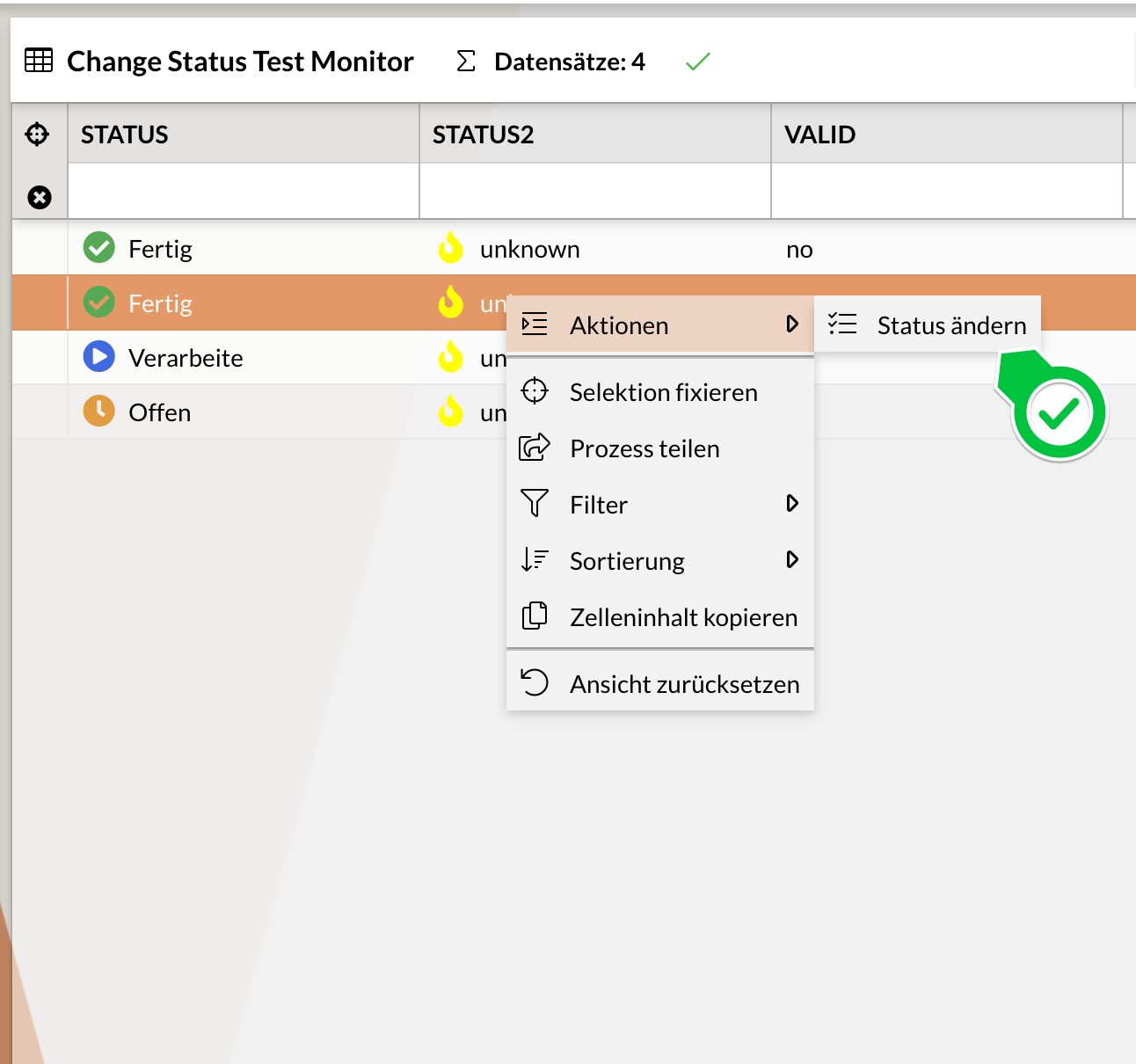
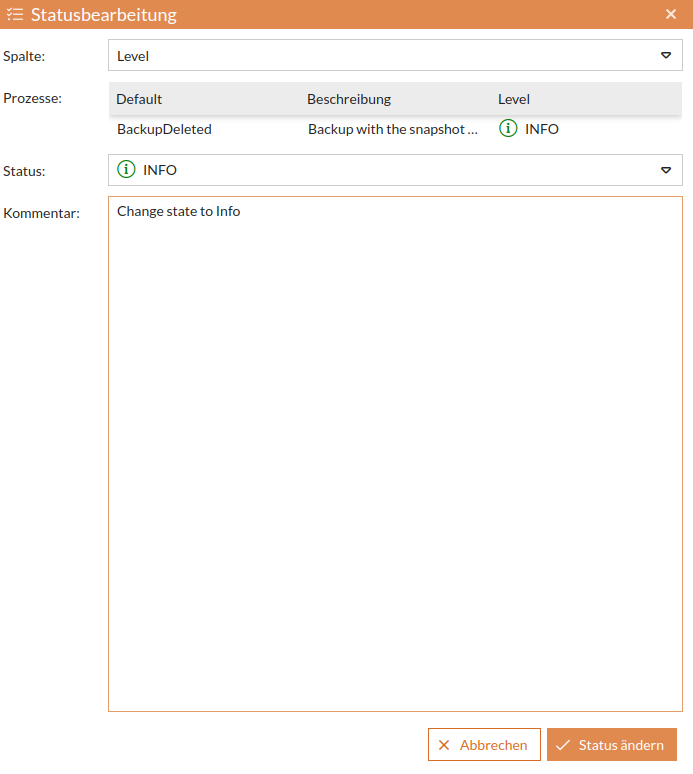
After clicking this menu item, a new window opens for editing the status of the previously selected processes. The processes for which a status change is to be performed manually are listed by their process ID.
-
You can now set the new status for the selected processes using drop-down menus.
-
Additionally, you can enter any necessary information regarding the status change as a comment in the field for remarks, notes, or similar.
-
The status change must be implemented using the relevant process engine (e.g., IGUASU or INUBIT).
Access Rights
For a user to be able to use process status changes, they need the right bpcmonitor_changeprocessstate.
To grant a user the right for selected components, they need specified rights with the component’s ID: bpcmonitor_changeprocessstate_{MONITORID}.
If the system processing the status change is accessed via a backend Connection, the right loadModule_backendconnection is required for all users of the function.
General Settings
The following settings are configured for each monitor:
-
Active: (
function_changeState)
(boolean; default: true)
Enables the use of the manual status change function. -
Endpoint or Processor: (
changeStateEndpointProcessor)
(string; default: "")
Selection of the REST endpoint (Backend Connection) or processor (Flow) to execute a process status change. -
Settings (
function_changeStateConfig)
(json)
Function parameter settings for the status change See Configuration.
[
    {
        "dataIndex": "STATUS",
        "useDistinctValues": true
    }
]
Configuration
This section describes the options for configuring process status changes.
Syntax
-
dataIndex
(string)
The dataIndex of the column in which the status is to be changed. -
useDistinctValues
(boolean, default: true)
If true, all distinct values from the column are automatically offered as options. If false, the options can be defined using thestatesattribute. -
states
(array)
Defines the options for the new status (used only ifuseDistinctValuesanduseRendererValuesare false). Each element in the array is an object with the following attributes:-
settable
(boolean, default: true)
Specifies whether the status is offered as an option. -
state
(string)
The value to be set as the new status.
-
{
    "dataIndex": "STATUS",
    "states": [
        {
            "state": "Offen"
        },
        {
            "state": "In Arbeit"
        },
        {
            "state": "Archiviert",
            "settable": false
        }
    ],
    "useDistinctValues": false
}-
useRendererValues
(boolean, default: false)
If true, the rendered values of the column are used (instead of the raw values). -
preselectState
(string)
Allows a specific status to be preselected in the dropdown menu.
"preselectState": "<Suchwert>": Selects the first entry that contains the specified text (case-sensitive). Both raw values and display names (from Custom Renderer) can be used.
"preselectState": "_first": Always selects the first available value from the dropdown. -
metadata
(object)
Any JSON object for additional metadata passed to the endpoint or processor to provide additional configuration values or context information.
{
    "metadata": {
        "childStatus": "Info",
        "tablePrefix": "foo"
    },
    "dataIndex": "STATUS"
}
Expected Return Format
The client expects a JSON response from the server.
|
Ensure that the
|
OpenAPI Specification
A detailed description of all endpoints can be found in our OpenAPI Specification.
