Backend Connections
In Backend Connections, you manage the BPC’s connections to external systems and services. These Connections enable data exchange, authentication with third-party providers, or access to cloud storage. The various configuration options for Backend Connections are presented and described below.
Prerequisites
To manage Backend Connections, the following prerequisites must be met:
-
You have the necessary administrative rights in BPC.
-
The appropriate module for the desired connection type is installed (e.g., File Storage Module for cloud storage).
Create a Backend Connection
This section describes how to create and configure a new Backend Connection.
-
Navigate to the Backend Connections tab.
-
Click the plus icon to add a new component.
-
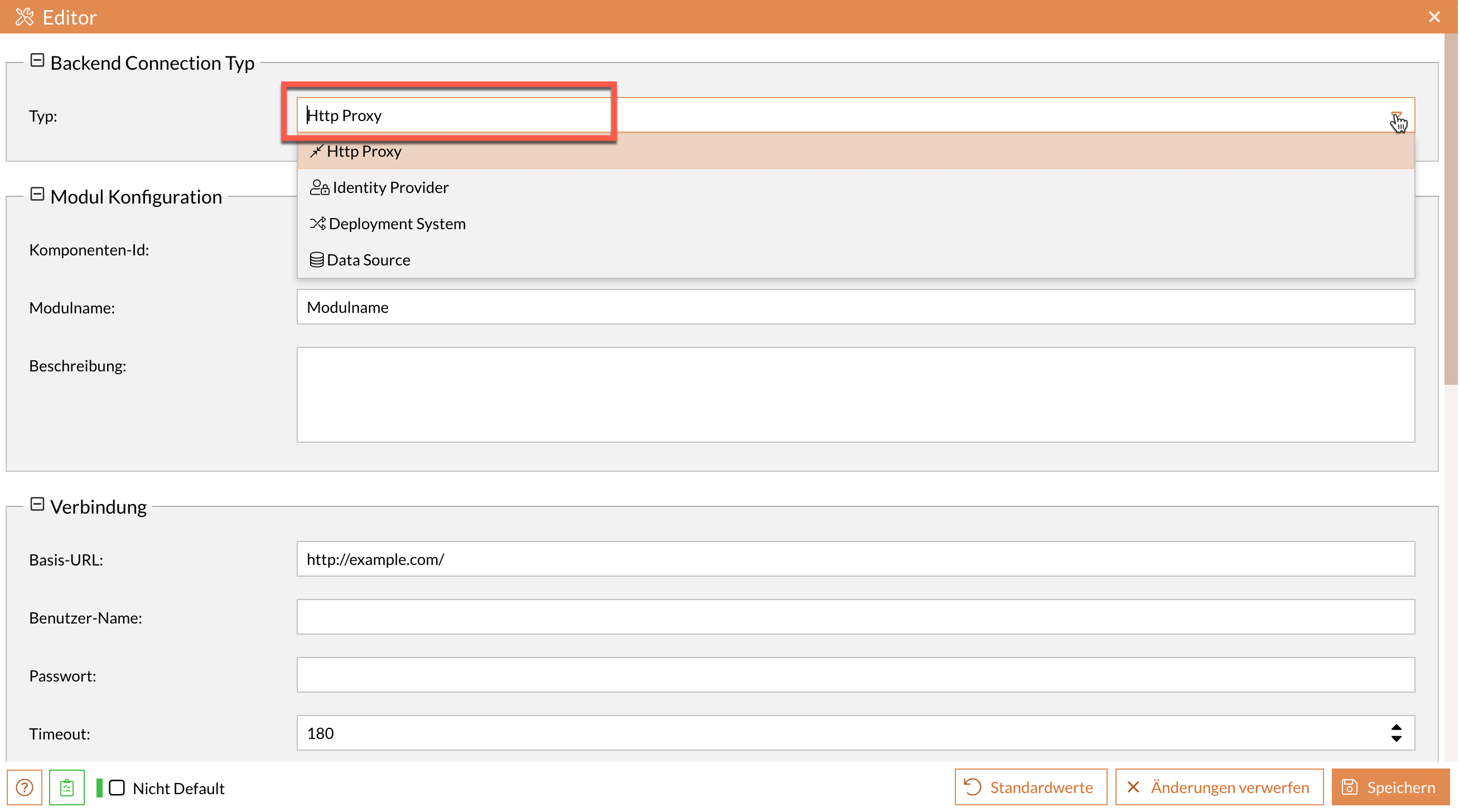
In the Type input field, select the desired type of backend Connection.
Depending on the type you select, the specific configuration options will be displayed.
-
Fill in the displayed fields according to the configuration of your external system.
-
Click Save () to create the new backend Connection.
The new backend Connection has been successfully created and appears in the component overview.
UI Description of the Toolbar
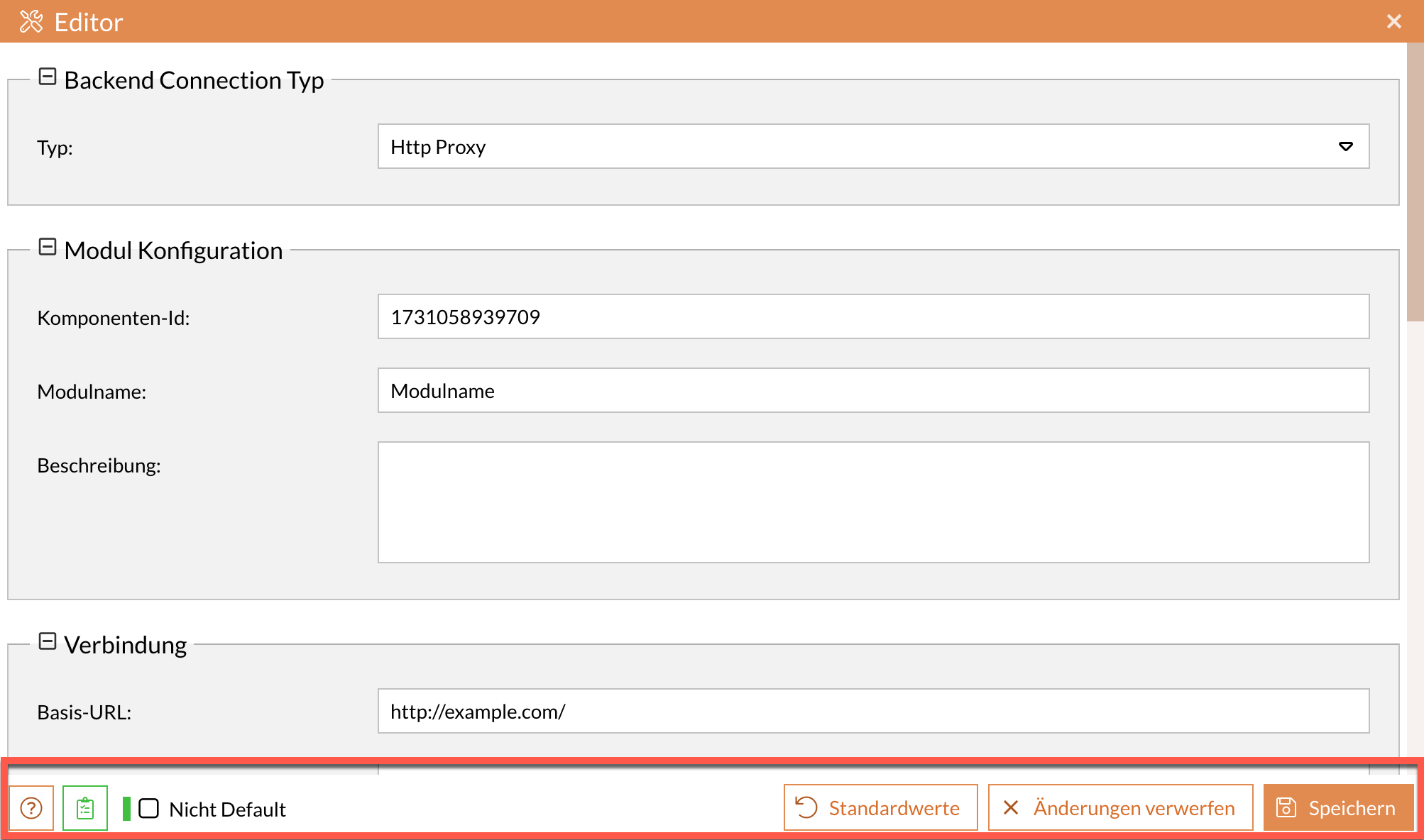
Various help tools are available in the module component toolbar for editing the individual fields and settings, both initially and later.
-
Help Texts
Shows or hides help texts for the individual fields. -
Validate
Validates the code in the relevant fields. Displays the number of any errors and a corresponding error message. -
Non-Default
When this feature is enabled, only settings that differ from the default values are displayed. -
Default Values
Resets all fields and settings to their default values. -
Discard Changes
Resets all values to the last saved state. When creating a new backend Connection, the values are reset to their default state. -
Save
Saves the backend connection with all entries and settings. This component then appears in the component overview under the corresponding group.
Connection Types
There are various connection types for backend connections, each covering different requirements and use cases.
HTTP Proxy
This type allows you to set up an internal proxy for HTTP connections through the BPC. This allows, for example, access via the External Content module component to a server that requires BasicAuth authentication or is accessible exclusively via a proxy.
Module
General module settings
Name (ID) |
Description |
|---|---|
Icon |
Individually selectable icon that is displayed before the title. |
Target
Settings for the target system
Name (ID) |
Description |
|---|---|
This parameter defines the base URL to the target system. If an additional path is specified when the HTTP proxy API is called, the path is added to the URL. |
Proxy
Proxy settings
Name (ID) |
Description |
|---|---|
Hostname |
The hostname of the network proxy server to be used. Leave empty if a direct connection to the target server is possible. |
Port |
The port at which the proxy server can be reached. |
Connection
Settings for establishing a backend connection
Name (ID) |
Description |
|---|---|
Username |
Username for authentication of the connection |
Password |
Password for authentication of the connection (BasicAuth on the target server) |
Timeout |
Timeout of the connection in seconds. |
HTTP Header Filter |
List of header names to be filtered out. For security purposes the BPC API key header ("X-APIKey") is always filtered out. |
HTTP-Header |
Additional HTTP headers that are sent when the target system is called. It is possible to use placeholders such as "${license.KeyID}" or "${config.de.virtimo.bpc.core.karaf.uuid}" in the values. |
Security
Module-specific settings
Name (ID) |
Description |
|---|---|
Inject OIDC ID-Token |
An OIDC ID-Token is set in the header ("X-Bpc-Session"), which contains the user information. |
Send BPC session id |
If active, a session id is passed (in the header "X-Bpc-SessionId") that allows to query for the user information including roles and rights, but without allowing to use the API-endpoints. |
Disable TLS Certificate Checks |
The server's certificate is not checked when the TLS connection is established. |
CSRF Token Check |
Enables the CSRF token check. |
The BPC session cookie is filtered through an HTTP proxy for every forwarded request.
This prevents a recipient from using the BPC in the user’s context.
If it is necessary to verify the user’s identity and validity on the recipient’s side, this can be done using the options sendSessionId or injectUserSessionJWT.
In the case of sendSessionId, the user’s session ID is included in the X-Bpc-SessionId header.
The session can then be verified via the GET endpoint at /cxf/bpc-core/authentication/session/{sessionid} (see Authentication API).
In the case of injectUserSessionJWT, the OpenID Connect provider’s ID token is included in the X-Bpc-Session header.
The signature must be validated using the OIDC provider’s public key.
If additional authorizations based on roles, permissions, and organizations need to be verified, the OIDC provider must be configured so that these are included in the ID token.
Identity Provider
This connection type allows you to configure the identity provider being used. The configuration parameters for the various IdP types are described in “Configuring Identity Providers.”
This is a list of all available options without distinguishing between the individual types:
Module
General module settings
Name (ID) |
Description |
|---|---|
Icon |
Individually selectable icon that is displayed before the title. |
Configuration
Module-specific settings
Name (ID) |
Description |
|---|---|
Type |
Identity provider type |
Additional Authorization Control |
This setting can be used to assign further organizations, roles or rights to individual organizations, roles or rights. This allows the information coming from the identity provider to be further enriched. |
Health Check Endpoint |
Optional health check endpoint of the identity provider. If this is set, the status is provided via the BPC Status API. |
Session Expiration |
The maximum duration (in minutes) that a user remains logged in. The user is automatically logged out after this time. |
Password Validation Pattern |
Regular expression for validating passwords. For example, with .{8,} the password must be at least 8 characters long. |
Database (JDBC) Configuration
This connection type is used for configuring database connections. For these connections, the appropriate database driver must be installed beforehand.
Name (ID) |
Description |
|---|---|
Database Connection |
Database connection (Backend Connection of type Data Source) used for the identity provider |
OIDC Configuration
Settings for the OpenID Connect interface
Name (ID) |
Description |
|---|---|
Client ID |
ID of the client configured in the OIDC provider via which the BPC accesses the identity provider |
Client Secret |
Secret of the client configured in the OIDC provider via which the BPC accesses the identity provider. |
OIDC scopes requested during authentication with the OIDC provider. If scopes are requested that do not exist or are not permitted for the client, authentication errors may occur. |
|
Roles Claim Names |
Comma-separated list of all claim names from which the user's roles are extracted. |
Organizations Claim Names |
Comma-separated list of all claim names from which the user's organizations are extracted. |
Rights Claim Names |
Comma-separated list of all claim names from which the user's rights are extracted. |
Metadata URL |
The URL where the OpenID Connect metadata can be retrieved. |
Redirect URL |
The user will be redirected to this address after a login has been performed. |
Logout Redirect URL |
The user will be redirected to this address after a logout has been performed. |
PKCE Method |
The PKCE method (Proof Key for Code Exchange) of the OIDC provider. If PKCE is not configured on the identity provider, then choose "none". We recommend to use "S256". |
Add Roles as Realm Roles |
If activated, new roles are added as realm roles in Keycloak, otherwise they are added as client roles in the used client. |
Only show BPC Organizations |
If set, only organizations that have set the attribute 'bpcgroup'=true are listed as available organizations (Keycloak groups). |
API authentication via access tokens |
Enables the authentication at the API through access tokens issued by the OIDC provider. |
Check access token at the introspection endpoint |
If activated, the access token is checked at the OIDC providers introspection endpoint. This can detect whether the token has been revoked (session has ended) at the identity provider. Otherwise only the signature of the token is validated, which is enough in most cases for short token validity periods. |
Frontend
Settings for customizing the BPC frontend
Name (ID) |
Description |
|---|---|
Change Password |
Enables the password to be changed. Must be supported by the respective identity provider. |
Change organization |
Allows you to change the active organization. |
Additional Information
Settings for the additional info endpoint
Name (ID) |
Description |
|---|---|
Enrich User Session |
If this option is activated, additional information is retrieved via the stored URL when a user logs in and stored in the session. |
This URL is used to retrieve the additional data for the session. |
|
Username |
Username, in case the Additional-Info-Endpoint is secured by Basic Auth |
Password |
The password if the Additional-Info-Endpoint is secured by Basic Auth. |
Data Prefix |
Prefix for the data of the Additional-Info-Endpoint. |
Deployment System
This connection type allows you to configure the BPC systems that are to be addressed as sources and destinations during the Deployment.
Module
General module settings
Name (ID) |
Description |
|---|---|
Icon |
Individually selectable icon that is displayed before the title. |
Target
Settings for the target system
Name (ID) |
Description |
|---|---|
Deployment System URL |
Complete URL to the target system. |
Disable TLS Certificate Checks |
The server's certificate is not checked when the TLS connection is established. |
API Key |
The API Key required to authenticate with the Deployment System. |
Configuration
Module-specific settings
Name (ID) |
Description |
|---|---|
Sort Priority |
The priority that this deployment system has compared to others when sorting. |
Data Source
This connection type is used to configure database connections. The appropriate database driver must be installed beforehand for these connections.
Module
General module settings
Name (ID) |
Description |
|---|---|
Icon |
Individually selectable icon that is displayed before the title. |
Data Source
Settings for the data source
Name (ID) |
Description |
|---|---|
Database Driver Name |
Name of database drivers such as oracle, mysql, mariadb |
URL |
JDBC connection URL to the database. |
Username |
Name of the database user |
Password |
Password of the database user |
Additional Configuration |
Additional configuration options that are not covered by the other parameters. |
|
In most cases, only a read-only connection is required to connect to the database. To prevent security issues, it is recommended to use a database user with read-only privileges in accordance with the Principle of Least Privilege. |
Data Source Configuration
The configuration parameter Additional Configuration is primarily used to configure the pool of data connections. A data source maintains a pool of n connections to the database. Each replication job acquires one such connection and returns it to the pool once its work is complete.
The pool size should be chosen appropriately. A value that is too high (> 8 or > 16) is often not beneficial and can lead to errors if the database (e.g., Oracle) does not allow that many concurrent connections. If in doubt, ask your database administrator for the optimal number. For additional pool settings, see the PAX-JDBC Documentation.
| Setting | Type | Example | Description |
|---|---|---|---|
pool |
String |
dbcp2 |
The pool to be used. |
xa |
String |
true |
Defines the resource as an XA resource.
This enables distributed transactions (JDBC XA).
The value ` |
pool.minIdle |
String |
2 |
The minimum number of connections that can remain idle in the pool. |
pool.maxIdle |
String |
5 |
The maximum number of connections that can remain idle in the pool. |
pool.maxTotal |
String |
10 |
The maximum number of database connections in the pool. |
If " `Closed Connection`" errors occur repeatedly with Oracle databases, the following settings should also be configured.
| Setting | Type | Example | Description |
|---|---|---|---|
pool.testOnBorrow |
String |
true |
Validates the database connection when it is retrieved from the pool. |
pool.testOnReturn |
String |
true |
Validates the database connection when it is returned to the pool. |
factory.validationQuery |
String |
select 1 from dual |
SQL query that returns exactly one row.
This is used to test the connection. |
factory.validationQueryTimeout |
String |
15 |
Timeout in seconds for executing the specified validation query. |
{
    "pool.testOnBorrow": "true",
    "pool.testOnReturn": "true",
    "factory.validationQuery": "select 1 from dual",
    "factory.validationQueryTimeout": "15"
}
For more information on the Parameters, see the documentation on BasicDataSource Configuration Parameters.
|
Contrary to the Apache documentation, the |
File Storage
This connection type is used to configure connections to cloud storage providers. This requires that the corresponding file storage modules for the desired cloud services have been installed beforehand.
Supported services include AWS S3 (including API-compatible services such as MinIO), Azure Blob Storage, and Google Cloud Storage. The type of cloud storage provider is specified via the File Storage Type setting. The available options are AWS S3, Azure Blob Storage, and Google Cloud Storage.
Depending on the provider, different settings must be configured. Ensure that the access credentials used (access keys, account keys, or service accounts) have the required read, write, and delete permissions.
|
Changing or deleting file storage backend Connections may interrupt ongoing downloads or uploads. This can occur, for example, when replacing access keys during operation. |
Module
General module settings
Name (ID) |
Description |
|---|---|
Icon |
Individually selectable icon that is displayed before the title. |
Configuration
Module-specific settings
Name (ID) |
Description |
|---|---|
File Storage Type |
The type of the File Storage. Currently supported are AWS S3 (incl. API compatible services), Azure Blob Storage (incl. API compatible services) and Google Cloud Storage. |
Default Bucket |
The default bucket (or container) name to use for file operations if no bucket is explicitly specified. If a default bucket is specified, it will also be used for connection tests. |
Route Downloads via BPC |
Streams files through the BPC. Enable this if direct cloud storage links are blocked by client firewalls. |
AWS S3
Connection settings for the S3 service.
Name (ID) |
Description |
|---|---|
Endpoint URL |
The full URL of the S3-compatible storage endpoint. Can be omitted for AWS S3 connections. |
Region |
The region of the S3 service. For S3-compatible providers, this may be optional (default 'us-east-1') or a custom value. |
Automatic AWS Authentication |
Credentials (such as IAM roles or environment variables) are automatically read from the pod or system. |
Access Key |
The access key used for authentication with the S3 service. Acts as the username for accessing the storage. |
Secret Key |
The secret key corresponding to the access key. Required for secure authentication. |
Azure Blob Storage
Connection settings for the Azure Blob Storage service.
Name (ID) |
Description |
|---|---|
Endpoint URL |
The full URL of the Azure service. |
Account Name |
The Azure account name. |
Account Key |
The account key to access Azure Blob Storage. |
Google Cloud Storage
Connection settings for the Google Cloud Storage service.
Name (ID) |
Description |
|---|---|
Project ID |
The project ID of the Google Cloud Account. |
Service Account |
The service account JSON content. The service account needs read, write and delete permissions on the Google Cloud Storage. |
Custom host |
A custom API host to use for the Google Cloud Storage. Leave empty to use the default host. |
