API keys
An API key corresponds to a static session in the BPC. Like a user session, this contains attributes such as assigned organizations, roles and rights. Each API key contains a defined validity period. In addition, it can be specified by whom and for whom this API key was issued.
Using the API key
API keys are used both when calling API endpoints and when configuring deployment systems.
Calling an API endpoint
In addition to the normal user login, there is also the option of using an API key to access the BPC API. This enables direct authentication when calling the API. Without an API key, a separate authentication call must be made before accessing an API function.
For the BPC to accept the API key for authentication, it must be sent in the HTTP header X-APIKey.
curl --header "X-APIKey: bed3a955ce73feb7186bd3f4a689a6f46b7b6264c30d0236dde87a26fc5acdbf" 'http://localhost:8181/cxf/bpc-core/status'Deployment system
Deployment systems must be created as Backend Connections of type deployment_system (see Backend Connections) so that the deployment function can be used.
An API key must be stored for each of these deployment systems.
Administration of API keys
The API keys are administered via a system setting in which both the technical parameters and the individual access authorizations are defined. An editor is available for convenient editing.
Editor
Administration via the API Keys Editor takes place under Settings → Core Services → API Keys.
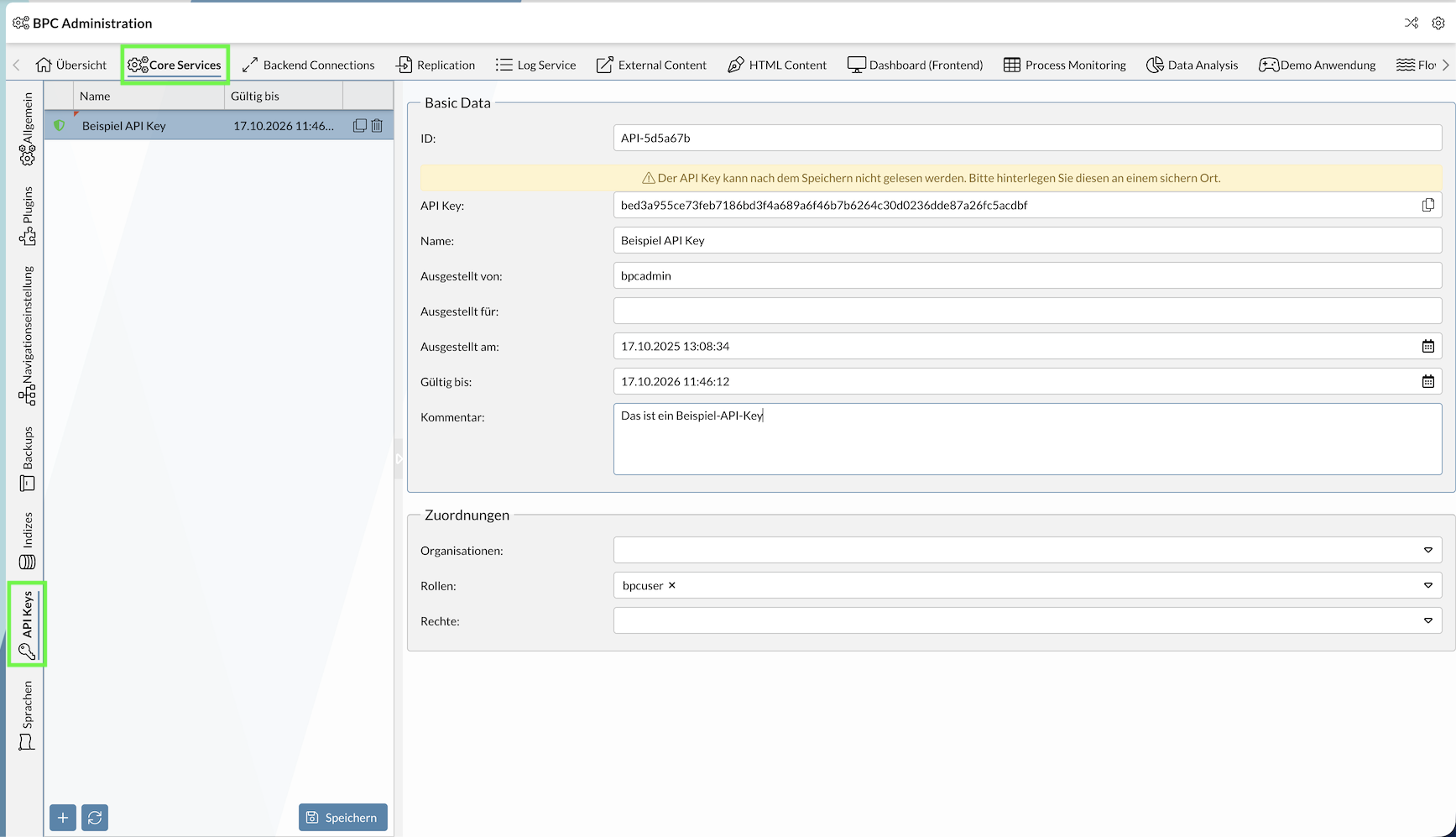
Setting
API keys can also be configured directly via the core setting API_Keys.
[
  {
    "id": "API-5d5a67b",
    "apiKey": "bed3a955ce73feb7186bd3f4a689a6f46b7b6264c30d0236dde87a26fc5acdbf",
    "name": "Beispiel API Key",
    "issuedBy": "bpcadmin",
    "issuedFor": "",
    "issuedOn": "2025-10-17T11:08:34Z",
    "expiresOn": "2026-10-17T09:46:12Z",
    "description": "Das ist ein Beispiel-API-Key",
    "assignedOrganisations": [],
    "assignedRoles": [
      "bpcuser"
    ],
    "assignedRights": []
  }
]
Configuration parameters of an API key
The various parameters and associated functions are described below.
| Setting (Key) | Type | Description |
|---|---|---|
ID |
text |
The ID of the API key. |
API Key |
text |
The API key that must be used when calling an API endpoint, for example. |
Name |
text |
A freely assignable name, e.g. for the intended use. |
Issued by |
text |
Name of the user who created the API key. |
Issued for |
text |
Name of the user for whom the API key was issued. |
Issued on |
text |
Date on which the API key was issued. Date format "yyyy-MM-dd’T’HH:mm:ssZ" |
Valid until |
text |
Date from which the API key becomes invalid. Date format "yyyy-MM-dd’T’HH:mm:ssZ" |
Comment |
text |
Additional information on the API key. |
Assignments / Organizations |
array |
API key belongs to this organization. |
Assignments / Roles |
array |
API key belongs to these roles. |
Assignments / rights |
array |
API key has these rights. |
|
After the date specified under |
Assignments
The assignments assignedOrganisations, assignedRoles and assignedRights can be used to assign fine-grained call rights for the API keys.
For example, according to the API documentation, either the role BACKUPS_ADMIN or the right BACKUPS_CREATE is required to call this backup API endpoint.
If the user of the API key should only be able to call this individual API endpoint, only set the right BACKUPS_CREATE at assignedRights.
If all backup endpoints should be callable instead, set the role BACKUPS_ADMIN at assignedRoles.
