Frontend Interface Module
A BPC module should contain an interface class. This provides the BPC Core with information about the module. This allows it to be integrated into various parts of the BPC.
Requirements
The interface class must extend the class BpcCommon.BpcInterface.
The config block can then contain interface information.
Interface Information
The class can provide the BPC with various details on how the module should be used and which components can also be used outside the module.
moduleConfigurationComponents
Here, xtypes of ExtJS components (derived from Ext.Component) can be specified.
These components are provided as additional tabs in the module’s configuration area (see Administration Area).
The components should have the attributes title and iconCls so that they can be displayed correctly in the tab bar.
|
These components typically provide information or configuration options for BPC administrators. |
moduleInstanceConfigurationComponents
Here, ExtJS components can be specified in the same way as at moduleConfigurationComponents.
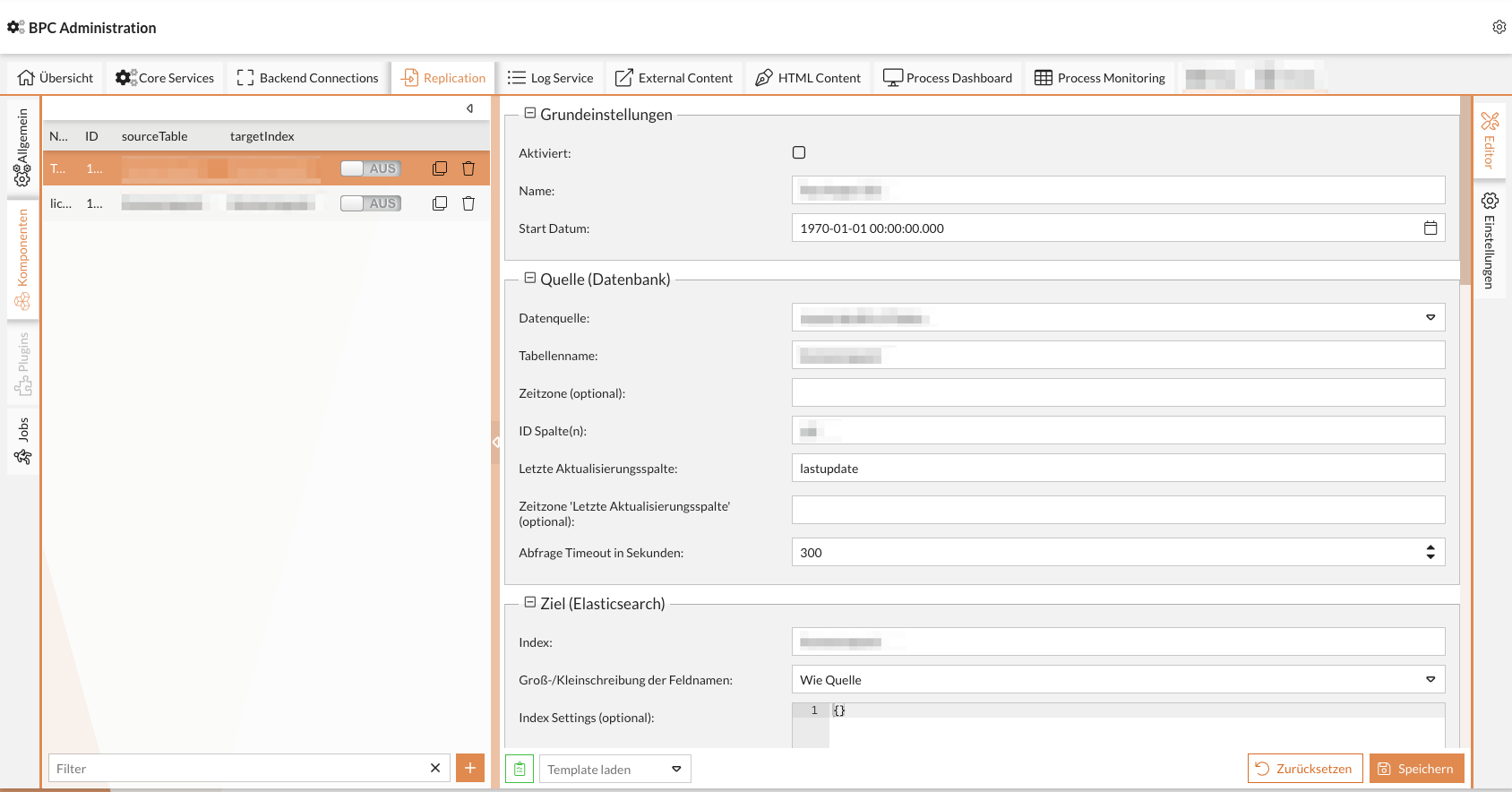
The difference from the moduleConfigurationComponents is that these components refer to individual module instances and are therefore also displayed in the interface within the dialog where the instances are selected and configured.
If such a component is configured for a module, it is also displayed before the standard “Settings” interface.
The following functions are available for the component here:
-
Access to the current instance (
Ext.data.Modelof the instance configuration) -
Extending the action buttons in the list of instances
-
Adding additional columns to the instance list
-
Extending or replacing buttons below the instance list
The component can access "{moduleInstance}" via its own ViewModel.
This always contains the data model of the currently selected instance.
moduleInstanceInterface
To extend the view, components can provide additional information via the moduleInstanceInterface attribute.
- additionalColumns
-
Column configurations (
Ext.grid.column.Column) can be defined here. These are added to the instance list. - additionalActions
-
ExtJS components, such as buttons, can be configured here. These are added to the bottom of the instance list.
If you add a component with the
itemId"addBtn", it replaces the existing button for adding new instances. - additionalInstanceActions
-
Here, ExtJS components such as buttons can be configured. These are added to the row of the individual instances.
If you add a component with the
itemId"addToNavBtn", "duplicateBtn", "deleteBtn", or "jumpToInstanceBtn", it will replace the existing button.
Ext.define("MODULID.view.MyInstancePanel", {
   extend : "Ext.Panel",

   moduleInstanceInterface : {
      additionalColumns : [],
      additionalActions : [],
      additionalInstanceActions : []
   }

    // ...
});
defaultModuleInstanceConfigurationComponent
The default component for editing an instance can be defined here.
This must be included in moduleInstanceConfigurationComponents.
If no component is specified here, the default component for editing module instances will be displayed.
widgets
BPC widgets for the dashboard can be stored here. For implementing widgets (see Developing BPC Widgets)
|
|
Ext.define("MODULID.view.widget.MyWidget", {
   extend : "Ext.Panel",

   mixins : [
      "BpcCommon.mixin.Widget"
   ],

   statics : {
      WIDGET_NAME        : "Widget Name",
      WIDGET_DESCRIPTION : "Widget Beschreibung",
      WIDGET_ICON_CLS    : "x-fal fa-fire"
   }
});
baseModuleView
Class name for displaying the module.
Default: MODULEID.view.Main
Can be accessed via
BpcCommon.Api.showModule("MODULEID")
|
This representation is rarely used. |
Example
 Ext.define("MODULEID.BpcInterface", {
    extend: "BpcCommon.BpcInterface",

   config : {

      /**
         * An array of component-xtypes which will be added to the configuration GUI for this module. They
         * will get the Ext.data.Model of the corresponding module as parameter and can be used via this.module.
         */
      moduleConfigurationComponents : [],

      /**
       * An array of component-xtypes which will be added to the instance configuration GUI for this module. They
       * will get the Ext.data.Model of the corresponding module instance as parameter and can be used via this.moduleInstance.
       */
      moduleInstanceConfigurationComponents : [],

      /**
       * The default component to configure the instance. This must be one element from moduleInstanceConfigurationComponents. If no
       * default is defined the default configuration panel is initially shown.
       */
      defaultModuleInstanceConfigurationComponent : undefined,

      /**
         * A list of widgets (they should use the mixin BpcCommon.mixin.Widget), which will be offered to other modules.
         */
      widgets : [],

      /**
         * A string which points to the baseModuleView, ExtJS class, string
         */
      baseModuleView : null,


      /**
         * A string which points to the mainView, ExtJS class, string
         */
      mainView : null,

      /**
         * Array of global event names, which should be forwarded to the backend.
         */
      forwardedEvents : []
   }
});