Backend Connections
The various configuration options for Backend Connections are presented and described below.
Creating a Backend Connection
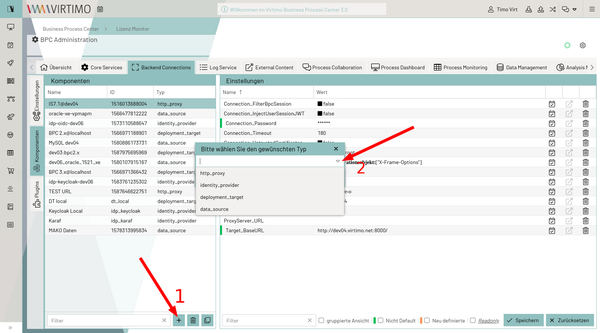
In the Backend Connections tab, add a new component.
The type of backend connection is selected using the "Type" input field.
Depending on the type selected, the specific configuration options are displayed.
General Module Configuration
These are the configuration parameters that are available for all backend Connections.
| Setting (Key) | Group | Type | Description |
|---|---|---|---|
ModuleHeader |
Module |
bool |
Enables/disables the ModuleHeader |
Module_Description |
Module |
text |
Allows you to enter a short description of the module. Can be displayed, for example, in the ModuleHeader. |
Module_Icon |
Module |
text |
FontAwesome icon displayed for the Backend Connection instance. |
Module_Name |
Module |
text |
Name of the module |
Connection Types
There are various connection types, which are described below.
http_proxy
This enables the setup of an internal proxy for HTTP connections through the BPC. This allows, for example, access via the External Content module component to a server that requires BasicAuth authentication or is not directly accessible but only via a proxy.
| Setting (Key) | Group | Type | Description |
|---|---|---|---|
Connection_Password |
Module |
text |
Password for connection authentication (BasicAuth on the target server) |
Connection_Username |
Connection |
text |
Username for connection authentication |
Connection_Timeout |
Connection |
number |
Maximum connection timeout. |
Security |
bool |
Enables or disables the CSRF token check. |
|
Connection_FilterBpcSession |
Security |
bool |
Enables or disables the session filter. |
Connection_InjectUserSessionJWT |
Security |
bool |
A JWT containing the session information is set in the header. Example callGET /?_dc=1569249450661 HTTP/1.1 X-Bpc-Session: SESSIONID. Cookie: oidc.userInfoJWT=eyJhbGciOiJIUzUxMiIsInR5cCIgOiAiSldUIiwia2lkIiA6ICIyODA0MTg3MS00M2EzLTQ0NDAtYWUyZS1hNGFiZTM1NDViMzIifQ.eyJzdWIiOiI3ZmEwMWYxYS0wNzY5LTQ4Y2UtOTQzMS1hODU4Yjk5Y2ExN2EiLCJhdWQiOiJicGMtY29yZSIsImFkZHJlc3MiOnt9LCJlbWFpbF92ZXJpZmllZCI6dHJ1ZSwiYnBjX3JvbGVzIjpbImJwY2FkbWluIiwiYnBjdXNlciIsImFDbGllbnRSb2xlIl0sIm5hbWUiOiJUaW1vIFZpcnQiLCJpc3MiOiJodHRwOi8vZGV2MDYudmlydGltby5uZXQ6ODA5MS9hdXRoL3JlYWxtcy9icGMiLCJwcmVmZXJyZWRfdXNlcm5hbWUiOiJicGNhZG1pbiIsImdpdmVuX25hbWUiOiJUaW1vIiwiZmFtaWx5X25hbWUiOiJWaXJ0IiwiZW1haWwiOiJicGNhZG1pbkBleGFtcGxlLmNvbSJ9.tP3jJo86ONW0lbM47ne_Z0KgMIXCt645hkwK1Why4MtB1Z8e9Lxw4I76n-4zYkLGgADka1G6LkWI4nCDjbtJ7g; oidc=7fa01f1a-0769-48ce-9431-a858b99ca17a Accept: */*,* Accept-Language: de-DE,de;q=0.9,en;q=0.8,en-US;q=0.7 accept-encoding: gzip, deflate, br Host: xyz.local:1234 Connection: keep-alive In this configuration, we have two different pieces of user session information:
|
Connection_UntrustedCertificates |
Security |
text |
All certificates are trusted, and the Common Name (CN) check is skipped. |
Http_Header_Filter |
Proxy |
json |
List of header names to be filtered out.
For security reasons, the BPC API key header ( Default: |
ProxyServer_Port |
Proxy |
number |
The port on which the proxy server is accessible. |
ProxyServer_URL |
Proxy |
text |
The address of the proxy server to be used. Left blank if a direct connection to the target server is possible. |
Target_BaseURL |
Target |
text |
This parameter defines the base URL for the target system and is prepended to every request. |
identity_provider
This connection type allows you to configure the identity provider being used.
The exact configuration parameters are described under "Configuring Identity Providers."
deployment_system
This connection type allows you to configure the BPC systems that are to be addressed as sources and targets in the Deployment.
| Setting (Key) | Group | Type | Description |
|---|---|---|---|
DeploymentSystem_SortPriority |
Config |
number |
Adjustment of the sort order (drop-down box in the Deployment dialog). Default: 1000 |
DeploymentSystem_URL+
( |
Target |
text |
Base URL for the target system; it is prepended each time it is used. |
DeploymentSystem_AllowUntrustedConnections |
Connection |
bool |
Allow untrusted connections. |
DeploymentSystem_ApiKey |
Connection |
text |
API key of the target system |
data_source
This connection type is used to configure database connections. For these connections, the appropriate database driver must be installed beforehand.
| Setting (Key) | Group | Type | Description |
|---|---|---|---|
DataSource_Configuration |
Datasource |
json |
Additional data source configuration options not covered by the general settings (DataSource_User, …). Default: |
DataSource_DriverName |
DataSource |
text/combobox |
Database drivers such as oracle, mysql, MariaDB |
DataSource_Password |
DataSource |
text |
Database user password |
DataSource_URL |
DataSource |
text |
JDBC connection URL to the database. |
DataSource_User |
Datasource |
text |
Name of the database user |
|
In most cases, only a read-only connection is required to connect to the database. To prevent security issues, it is recommended—in accordance with the principle of least privilege —to use a database user who has read-only access. |
DataSource_Configuration
The "DataSource_Configuration" configuration parameter is primarily used to configure the pool of database connections. A data source maintains a pool of n connections to the database. Each replication job acquires one such connection and returns it to the pool once its work is complete. It is therefore important to choose the size wisely. Setting this value too high (>8 or >16) is not necessarily beneficial and may even lead to errors if, for example, the Oracle database does not allow that many concurrent connections (= ask the DB admin for a reasonable number). Additional pool settings can be found HERE.
| Setting | Type | Example | Description |
|---|---|---|---|
pool |
String |
dbcp2 |
the pool to be used |
xa |
String |
true |
Set as an XA resource. Enables distributed transactions (JDBC XA). The recommended setting here is true. |
pool.minIdle |
String |
2 |
The minimum number of Connections that can remain idle in the pool without additional Connections being created, or zero to create none. |
pool.maxIdle |
String |
5 |
The maximum number of Connections that can remain idle in the pool without additional ones being released, or a negative value for no limit. |
pool.maxTotal |
String |
10 |
Maximum number of database Connections in the pool |
If " Closed Connection " errors occur repeatedly in Oracle, include the following settings as well.
| Setting | Type | Example | Description |
|---|---|---|---|
pool.testOnBorrow |
String |
true |
Validates the DB connection when a connection is taken from the pool. |
pool.testOnReturn |
String |
true |
Validates the DB connection when a connection is returned to the pool. |
factory.validationQuery |
String |
select 1 from dual |
SQL query that returns exactly one result.
This is used to test the connection. |
factory.validationQueryTimeout |
String |
15 |
Execution timeout in seconds for the specified validation query. |
{

    "pool.testOnBorrow": "true",
    "pool.testOnReturn": "true",
    "factory.validationQuery": "select 1 from dual",
    "factory.validationQueryTimeout": "15"

}
Documentation on the Parameters: BasicDataSource Configuration Parameters
|
|
