Permissions Management
Permissions management can be accessed in the administration area () under the Overview > Users > Permissions tab.
It lists all available permissions. The following functions are also available:
-
to delete permissions, and
-
to edit users who have this permission.
Permission management is available for the identity providers Karaf and Keycloak . In the case of an OIDCidentity provider or a database as an IdP , this feature is not available.
Neither of these Identity Providers supports individual permissions, so the BPC uses a fallback mapping via the ` identityProvider_Mappings ` Parameter of the IdP backend Connection.
Permissions cannot be created explicitly. To create a permission, it must be assigned to a user via user management.
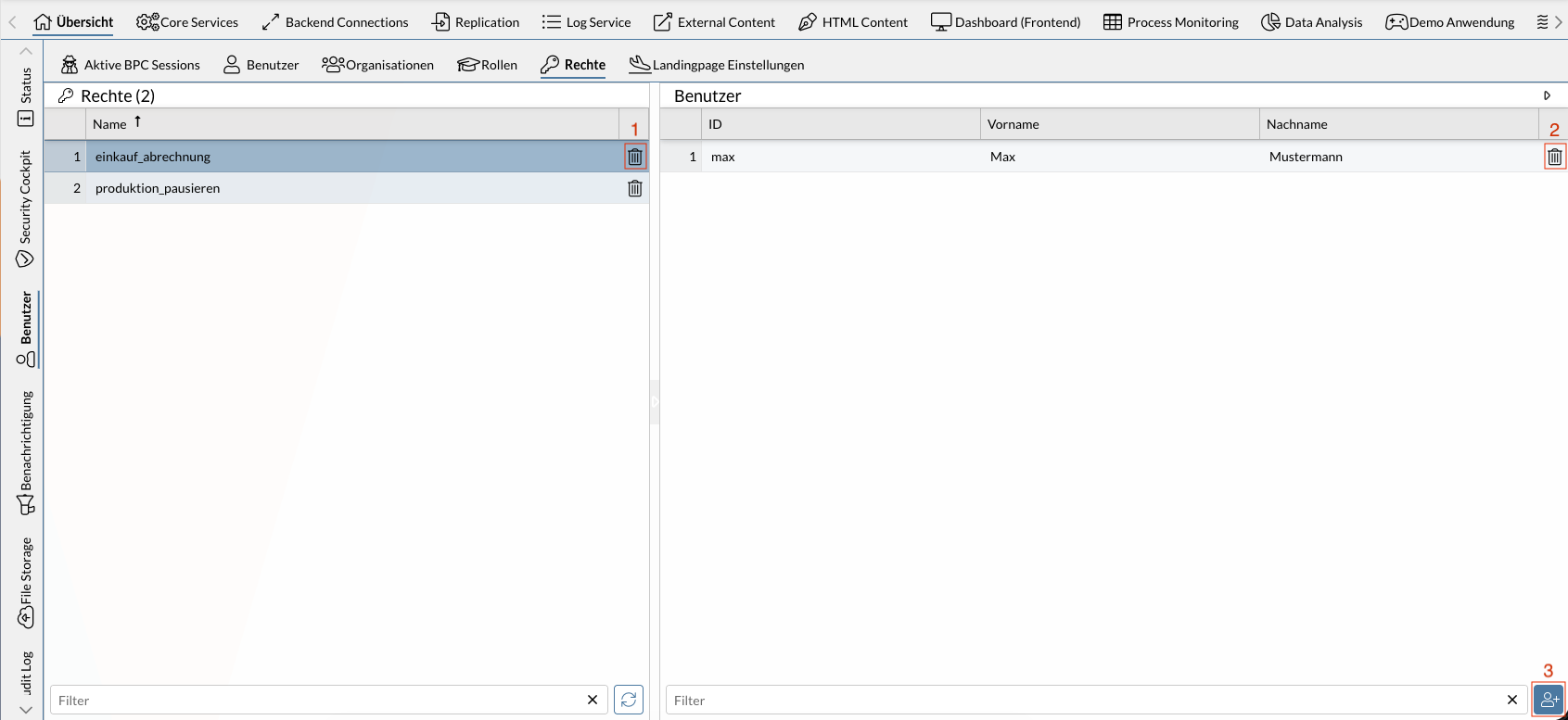
The screenshot shown displays two permissions. The selected role " einkauf_abrechnung " is assigned to exactly one user (Max).
The numbers in the screenshot correspond to the following functions:
Functions
The following sections describe the individual functions and the required permissions (in BPC) needed to use them in more detail. If multiple required permissions are listed, only at least one of them is needed—not all of them together.
The functions described are also available via API; see Identity Management API.
Delete Permission
The permission can be deleted using the icon.
Required BPC permissions
-
Role
bpcadmin, -
Role
IDENTITY_MANAGER_ADMIN, -
Permission
IDENTITY_MANAGER_RIGHTS_UPDATE
View users who have the permission
Lists all users who have the selected permission.
Required BPC permissions
-
Role
bpcadmin, -
Role
IDENTITY_MANAGER_ADMIN, -
Permission
IDENTITY_MANAGER_RIGHTS_USERS_READ
