Organization Management
User management can be accessed in the administration area () under the Overview > Users > Organizations tab.
It lists all available organizations of the identity provider. The following functions are also available:
-
to create and delete organizations,
-
to adjust role assignments for organizations, and
-
to edit users within organizations.
Organization management is available for the identity provider Karaf and Keycloak . In the case of an OIDCidentity provider or a database as an IdP , this feature is not available.
When using Keycloak as an identity provider, we use Keycloak groups as BPC organizations.
Accordingly, the Keycloak setting identityProvider_oidc_claimNameOrganisations should be configured so that the groups can be extracted from the JWT.
Keycloak groups are organized hierarchically. In the organization list, these are grouped accordingly, and suborganizations can be explicitly created. This is not possible for Karaf as an identity provider.
A suborganization inherits all properties from its parent organization (Keycloak properties and role assignments).
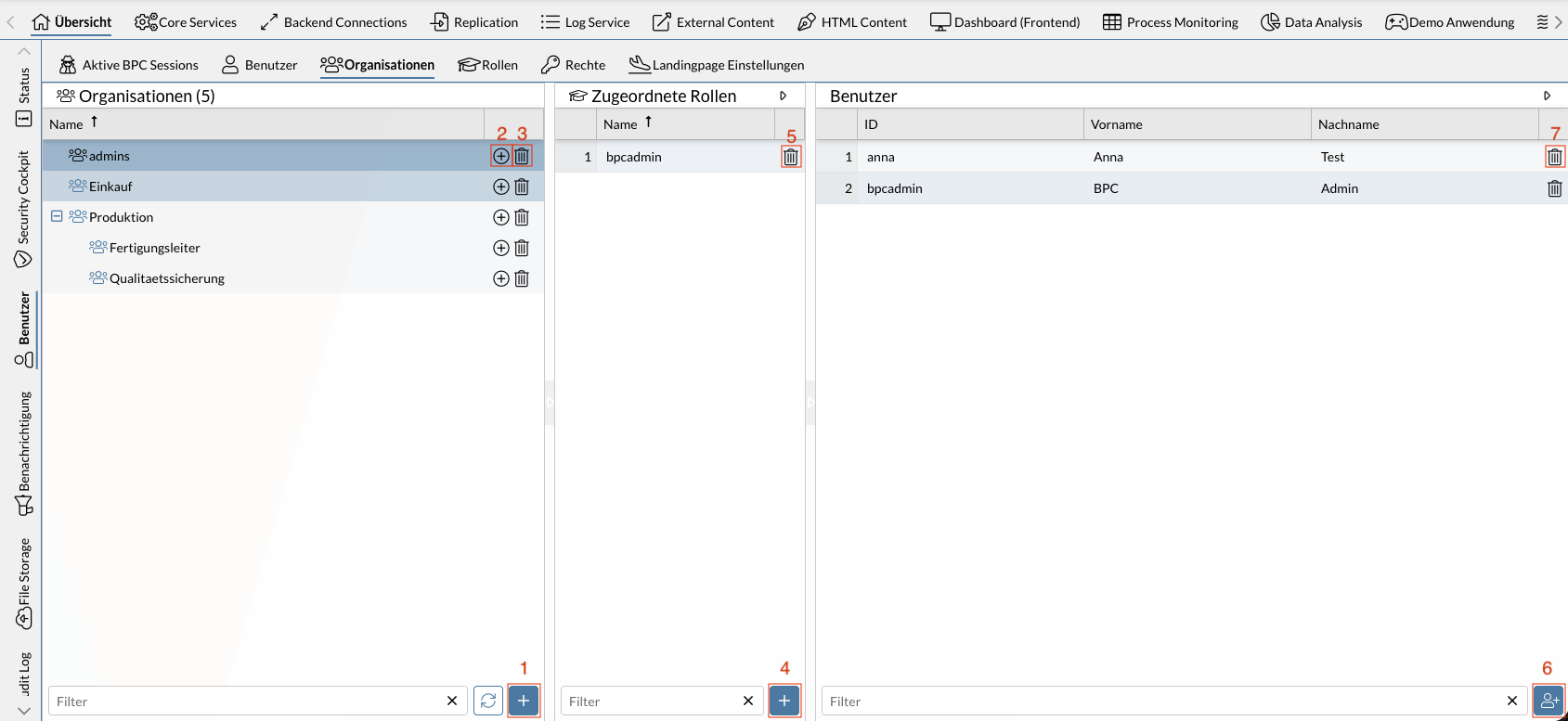
The screenshot shown displays five organizations. The organizations “Production Manager” and “Quality Assurance” are part of the “Production” organization. The selected organization “admins” contains the assigned role “bpcadmin.” The users “Anna” and “bpcadmin” belong to this organization.
The numbers in the screenshot correspond to the following functions:
| 1 | |
| 2 | |
| 3 | |
| 4 | |
| 5 | |
| 6 | |
| 7 |
Only direct role assignments and users are displayed in the overview. A user in an organization may have more roles through parent organizations than are displayed in the role assignment.
Implicitly, more users may possess the attributes of an organization than are displayed as members if there are users in a sub-organization who are not direct members of the parent organization.
Functions
The following sections describe the individual functions and the required permissions (in the BPC) needed to use them in more detail. If multiple required permissions are listed, only at least one of them is needed—not all of them together.
You may need to configure additional permissions in your identity provider. This is particularly necessary for Keycloak. See Keycloak permissions.
The functions described are also available via API; see Identity Management API.
Listing organizations in the identity provider
Lists all organizations stored in the identity provider.
When using Keycloak as the identity provider, if the setting identityProvider_keycloak_onlyShowBpcGroups is enabled, only organizations (Keycloak groups) that have set the attribute bpcgroup to true are listed.
This applies to all organizations created via the BPC.
Required BPC permissions
-
No additional permissions required
Create organizations
Using the Add button () or the icon, you can create organizations or suborganizations.
Required BPC permissions
-
Role
bpcadmin, -
Role
IDENTITY_MANAGER_ADMIN, -
Permission
IDENTITY_MANAGER_ORGANISATIONS_ADD
Deleting Organizations
You can delete an organization using the icon.
In Keycloak, all sub-organizations are also deleted.
Required BPC permissions
-
Role
bpcadmin, -
Role
IDENTITY_MANAGER_ADMIN, -
Permission
IDENTITY_MANAGER_ORGANISATIONS_UPDATE
View role assignments
Lists all roles assigned to the organization.
Required BPC Permissions
-
Role
bpcadmin, -
Role
IDENTITY_MANAGER_ADMIN, -
Permission
IDENTITY_MANAGER_ORGANISATION_READ
Expand Role Assignments
Using the Add button (), you can assign an additional role to the selected organization*.*
Required BPC permissions
-
Role
bpcadmin, -
Role
IDENTITY_MANAGER_ADMIN, -
Permission
IDENTITY_MANAGER_ORGANISATIONS_UPDATE
Remove role assignments
You can remove the selected role assignment using the icon.
Required BPC permissions
-
Role
bpcadmin, -
Role
IDENTITY_MANAGER_ADMIN, -
Permission
IDENTITY_MANAGER_ORGANISATIONS_UPDATE
View organization users
Lists all users who are part of the selected organizations.
Required BPC permissions
-
Role
bpcadmin, -
Role
IDENTITY_MANAGER_ADMIN, -
Permission
IDENTITY_MANAGER_ORGANISATIONS_USERS_READ
