Role Management
User management can be accessed in the administration area () under the Overview > Users > Roles tab.
It lists all available roles of the identity provider. The following functions are also available:
-
to create and delete roles,
-
to adjust role assignments (Keycloak only), and
-
to edit users who have this role.
Role management is available for the identity providers Karaf and Keycloak . In the case of an OIDCidentity provider or a database as an IdP , this feature is not available.
When using Keycloak as the identity provider, additional roles can be assigned to a role. If a user has a specific role, they automatically receive all assigned roles as well.
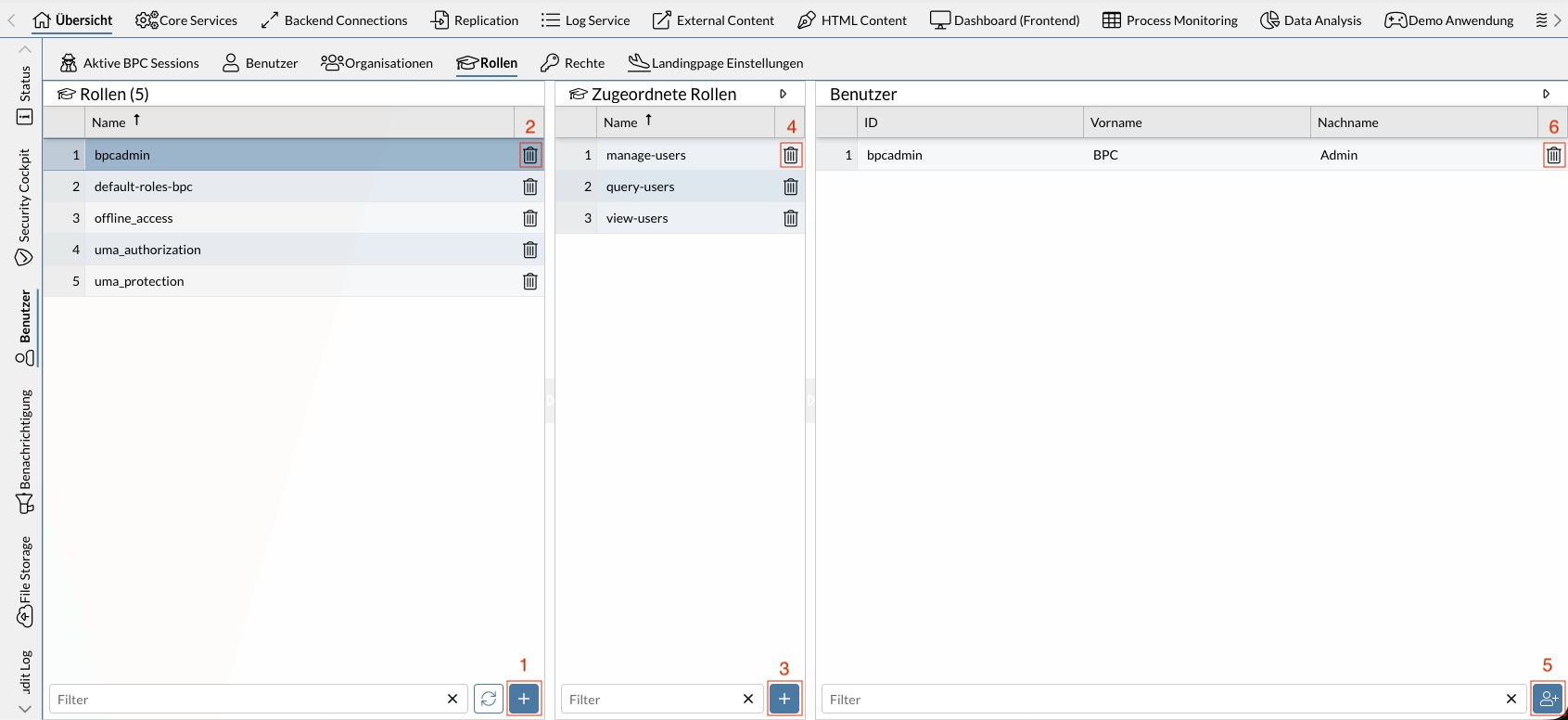
The screenshot shown displays five roles (some of which are Keycloak default roles). The selected role, bpcadmin, contains three assigned roles and the user of the same name, bpcadmin.
The numbers in the screenshot correspond to the following functions:
Functions
The following sections describe the individual functions and the required permissions (in BPC) needed to use them in more detail. If multiple required permissions are listed, only at least one of them is needed—not all of them together.
You may need to configure additional permissions in your identity provider. This is particularly necessary with Keycloak. See Keycloak permissions.
The functions described are also available via API; see Identity Management API.
Listing roles in the identity provider
Lists all roles stored in the identity provider.
Required BPC permissions
-
No additional permissions required
Creating roles
Using the Add button (), roles can be created in the identity provider.
In Keycloak, these are created as realm or client roles, depending on the Keycloak setting identityProvider_keycloak_addRolesToRealm.
In Karaf, a role cannot be created explicitly. A new role can be created by assigning a role that does not yet exist to a user or an organization; see User Management and Organization Management for more information*.*
Required BPC permissions
-
Role
bpcadmin, -
Role
IDENTITY_MANAGER_ADMIN, -
Permission
IDENTITY_MANAGER_ROLES_ADD
Deleting roles
Roles can be deleted from the Identity Provider using the icon.
Required BPC permissions
-
Role
bpcadmin, -
Role
IDENTITY_MANAGER_ADMIN, -
Permission
IDENTITY_MANAGER_ROLES_UPDATE
View role assignments
Lists all roles assigned to the role.
Required BPC permissions
-
Role
bpcadmin, -
Role
IDENTITY_MANAGER_ADMIN, -
Permission
IDENTITY_MANAGER_ROLES_READ
Expand role assignments
Using the button Add button (), you can assign an additional role to the selected role.
Required BPC permissions
-
Role
bpcadmin, -
Role
IDENTITY_MANAGER_ADMIN, -
Permission
IDENTITY_MANAGER_ROLES_UPDATE
Remove role assignments
You can remove the selected role assignment using the icon.
Required BPC permissions
-
Role
bpcadmin, -
Role
IDENTITY_MANAGER_ADMIN, -
Permission
IDENTITY_MANAGER_ROLES_UPDATE
View users who have the role
Lists all users who have the selected role.
Required BPC permissions
-
Role
bpcadmin, -
Role
IDENTITY_MANAGER_ADMIN, -
Permission
IDENTITY_MANAGER_ROLES_USERS_READ
