Log Service
Among other things, this module provides a REST endpoint to receive monitor data and write it to OpenSearch and, optionally, to a database. The relevant monitor "clients" are immediately notified of new data via a WebSocket event.
|
If data is also to be written to a database, the database tables must already be created. These are not created automatically and are not automatically updated if the data structure changes. |
|
If data is being written to a database, a DB transaction is used to first write the data to the database (which is typically more prone to errors) and only then to OpenSearch.
When writing to the database, a DB update (see the |
|
As mentioned above, the Log Service data is typically displayed via the monitor.
This uses a process index (= parent data) and a history index (= child data). |
Log Service Module Configuration Parameters
Required parameters are highlighted in bold.
| Setting (Key) | Group | Description |
|---|---|---|
Security_ClientCertificateAuthMandatory |
security |
Specifies whether the Log Service endpoints can only be accessed via Client Certificate Authentication. |
OpenSearch_DataCountLimit |
opensearch |
Maximum number of documents that can be queried. |
OpenSearch_DataViewLimit |
opensearch |
OpenSearch should return precise information about the number of documents (trackTotalHitsUpTo) up to this value. |
Configuration parameters for each Log Service component
Values highlighted in bold are required parameters.
| Setting (Key) | Group | Description | ||
|---|---|---|---|---|
MaintenanceEnabled |
config |
If changes need to be made to the database or the OpenSearch index, the endpoint for this instance can be set to maintenance mode.
In this case, the caller of the endpoint receives an HTTP status 503 (Service Unavailable) in response. |
||
Keys |
config |
The key fields are defined here. These are used for the database update when writing to the database. In OpenSearch, this is used to define document IDs. If multiple fields are affected, they must be separated by commas. Default: |
||
Fields |
config |
Here, among other things, fine-tuning of the data types can be performed (mapping for the OpenSearch indices). DefaultExample
By default, all fields are written to OpenSearch and to the database. If you do not want individual fields to be written, you can specify them here.
true = the field is not written to OpenSearch false = the field is written to OpenSearch (default)
true = the field is not written to the database false = the field is written to the database (default) |
||
OpenSearch_LoggingEnabled |
opensearch |
Data is written to OpenSearch only if this is enabled. |
||
OpenSearch_Indices |
opensearch |
Specifies which indices the parent/child data should be written to. The indices are created automatically. The specified ‘Fields’ types are taken into account.
Optional:
Example: |
||
Joins |
config |
Can be used to automatically enrich the logged documents with additional data. For example, if the data to be logged contains only a partner ID and the partner’s name, etc., is still required in the monitor. This is the same configuration as for the “Lookup Joins” of the replication service. Example: |
||
DB_RDMSLoggingEnabled |
rdms |
Data is written to the database only if this is enabled. |
||
DB_RDMS |
rdms |
Specifies the database tables to which the parent/child data should be written. The database tables must already exist and are not created automatically.
Example: |
Endpoints
To use the endpoints, a logged-in user or API key with the appropriate roles/permissions is required.
As an additional security measure, the " Client Certificate Authentication " can be enabled for all Log Service endpoints via the "Log Service" module setting Security_ClientCertificateAuthMandatory.
| Method | Endpoint | |||||||||
|---|---|---|---|---|---|---|---|---|---|---|
|
||||||||||
Description Get a compact overview of the available log service instances. Only the following data is returned for each instance:
|
||||||||||
Returns The log service instances as JSON. HTTP Status Code
Content-Type
|
||||||||||
Required Access Rights The logged in user or API Key must have either the following role or right.
|
||||||||||
|
||||||||||
Description Get the current configuration of the log service instance. |
||||||||||
Path Parameter
|
||||||||||
Returns The requested config as JSON. HTTP Status Code
Content-Type
|
||||||||||
Required Access Rights The logged in user or API Key must have either the following role or right.
|
||||||||||
|
||||||||||
Description Gets the data of a log service instance. |
||||||||||
Path Parameter
|
||||||||||
Query Parameter
|
||||||||||
Returns The requested data as JSON. HTTP Status Code
Content-Type
|
||||||||||
Required Access Rights The logged in user or API Key must have either the following role or right.
|
||||||||||
|
||||||||||
Description Get the data of a log service entry with its child entries. |
||||||||||
Path Parameter
|
||||||||||
Query Parameter
|
||||||||||
Returns The requested data as JSON. HTTP Status Code
Content-Type
|
||||||||||
Required Access Rights The logged in user or API Key must have either the following role or right.
|
||||||||||
|
||||||||||
Description Get the data of a log service child entry. |
||||||||||
Path Parameter
|
||||||||||
Returns The requested data as JSON. HTTP Status Code
Content-Type
|
||||||||||
Required Access Rights The logged in user or API Key must have either the following role or right.
|
||||||||||
|
||||||||||
Description Writes the data provided in the body to OpenSearch and/or the database. For calls from Iguasu the following HTTP headers are used and their values written to the following 'externalReference' object fields of all 'parent' related documents:
|
||||||||||
Consumes
|
||||||||||
Path Parameter
|
||||||||||
Query Parameter
|
||||||||||
Returns HTTP Status Code
Content-Type
|
||||||||||
Required Access Rights The logged in user or API Key must have either the following role or right.
|
||||||||||
|
||||||||||
Description Deletes log service entries and their child entries from OpenSearch and the database. Attention: When you use 'childQuery' and/or 'childFilter' only those children get deleted, not the parent itself. |
||||||||||
Path Parameter
|
||||||||||
Query Parameter
|
||||||||||
Returns HTTP Status Code
Content-Type
|
||||||||||
Required Access Rights The logged in user or API Key must have either the following role or right.
|
||||||||||
|
||||||||||
Description Deletes log service child entries from OpenSearch and the database. |
||||||||||
Path Parameter
|
||||||||||
Returns HTTP Status Code
Content-Type
|
||||||||||
Required Access Rights The logged in user or API Key must have either the following role or right.
|
||||||||||
|
||||||||||
Description Deletes log service entries and their child entries from OpenSearch by query. Deletion from database is not supported. |
||||||||||
Consumes
|
||||||||||
Path Parameter
|
||||||||||
Query Parameter
|
||||||||||
Returns HTTP Status Code
Content-Type
|
||||||||||
Required Access Rights The logged in user or API Key must have either the following role or right.
|
||||||||||
|
||||||||||
Description Deletes only log service child entries from OpenSearch by query. Deletion from database is not supported. |
||||||||||
Consumes
|
||||||||||
Path Parameter
|
||||||||||
Query Parameter
|
||||||||||
Returns HTTP Status Code
Content-Type
|
||||||||||
Required Access Rights The logged in user or API Key must have either the following role or right.
|
||||||||||
|
||||||||||
Description Deletes/drops the parent and child indices of a log service instance. |
||||||||||
Path Parameter
|
||||||||||
Returns HTTP Status Code
Content-Type
|
||||||||||
Required Access Rights The logged in user or API Key must have either the following role or right.
|
||||||||||
|
||||||||||
Description Creates a BPC deeplink to redirect the caller to the admin page of a log service instance. |
||||||||||
Path Parameter
|
||||||||||
Returns The requested data as JSON. HTTP Status Code
Content-Type
|
||||||||||
Required Access Rights Can be used without a user session. |
||||||||||
|
||||||||||
Description Redirects the user to the monitor using the OpenSearch indices of the log service instance. All provided query params are used to build a monitor filter on fields of the 'externalReference' object. For Iguasu the following query parameters can be used to access the HTTP header values when the entry has been created.
|
||||||||||
Path Parameter
|
||||||||||
Query Parameter
|
||||||||||
Returns The requested data as JSON. HTTP Status Code
Content-Type
|
||||||||||
Required Access Rights Can be used without a user session. |
Response in Case of an Error
For every error (status != 200), a JSON response with the following sample structure is returned:
{
  "error": {
    "code": 301,
    "name": "MODULE_INSTANCE_NOT_FOUND",
    "message": "Did not found the instance 'of_test2' of the module 'logservice'.",
    "properties": {
      "instanceId": "of_test2",
      "moduleId": "logservice"
    }
  }
}
Possible error codes
Error Code |
|
Info |
1 |
|
should not occur |
20 |
|
the 'Log Service' module was not found |
21 |
|
the ''Log Service' instance was not found |
10000 |
|
No data was provided for logging |
10010 |
|
The provided data is not valid JSON or does not conform to the structure specified here |
20000 |
|
The login credentials do not match the stored ones (Log Service module setting) |
20001 |
|
The Log Service is currently in maintenance mode, or DB and OpenSearchlogging are disabled |
20002 |
|
A service required by the Log Service is not available |
20100 |
|
An error occurred during DB logging |
20101 |
|
An error occurred while deleting DB entries |
20102 |
|
An invalid table name was specified |
20103 |
|
The database table used could not be found |
20104 |
|
The databasecolumn does not exist |
20105 |
|
The database metadata could not be retrieved |
20106 |
|
The requested functionality is not available for relational databases |
20201 |
|
An error occurred while accessing OpenSearch |
20202 |
|
The required data for the documentkey, the required data is missing from the document to be logged |
20203 |
|
A problem occurred while writing data to OpenSearch |
20204 |
|
An error occurred while deleting documents from the OpenSearch index |
20205 |
|
More data was requested than is available |
POST: Structure of the JSON message to be sent
Create/update
{
    "entries": [
        {
            "parent": {
                "keyname_parent": keywertparent1,
            	"feldname1": wert1,
            	"feldname2": wert2,
                ...
            },
            "childs": [
                {
                    "keyname_parent": keywertparent1,
                    "keyname_child": keywertchild1,
                    "feldname1": wert1,
                    "feldname2": wert2,
                    "datei_binary": base64_3,
                    ...
                },
                {
                    "keyname_parent": keywertparent1,
                    "keyname_child": keywertchild2,
                    "feldname1": wert3,
                    "feldname2": wert4,
                    "datei_binary": base64_5,
                    ...
                },
                ...
            ]
        },
        ...
    ]
}
Update individual fields (partial update)
{
    "entries": [
        {
            "partialUpdate": true,
            "parent": {
                "keyname_parent": keywertparent1,
                "feldname1": wert1,
                "feldname2": wert2
            },
            ...
        },
        ...
    ]
}
Information on partial updates
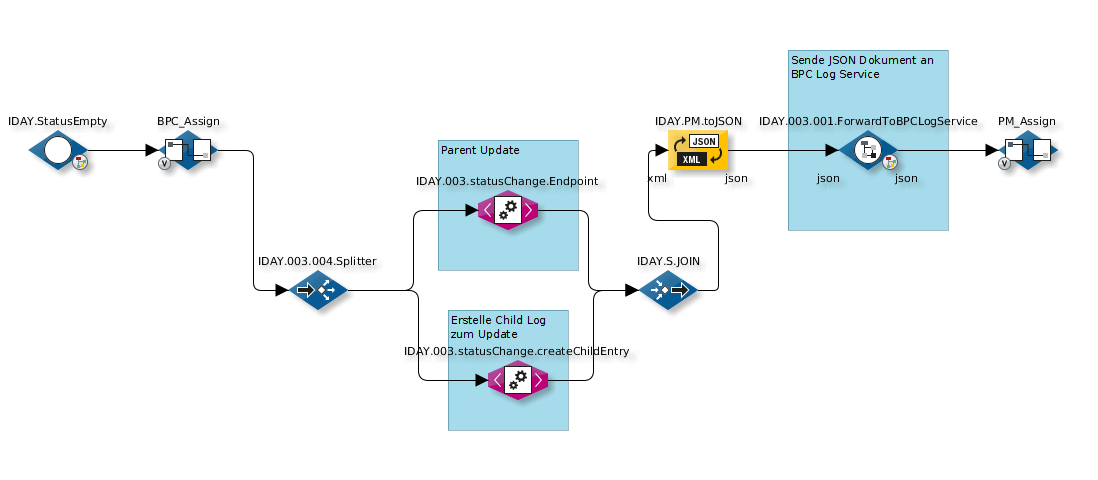
The partial update applies to the parent entry and the child entries. This means that if you want to update a parent entry, you should not create a “new” child log in the same JSON document. If you want to create a new child log while updating a parent entry, this should be implemented using two separate log service calls. For example, it might look like this (see INFOBLOCK 1 and 2):
In the following example, the "REQUEST_NUMBER" fields correspond to the "keyname_parent" and "CHILDID" to the "keyname_child" from earlier.
Values of the JSON fields
| Type | Value range |
|---|---|
Boolean |
true / false without quotation marks |
Date |
as ISO-8601 with quotation marks, e.g., "2017-05-17T15:28:23.181Z".
In the database, create the field as |
Numbers |
Value without quotation marks |
Binary |
Base64-encoded.
Create in the database as |
Text |
Value with quotation marks |
Field Name Convention
The data types for each field can be defined via the module instance setting fields (see below).
This is not strictly necessary for binary types and can also be achieved using the field name convention FIELDNAME_binary (with _binary as a suffix).
Background: In OpenSearch, we store binary data as Base64-encoded strings (so this is also how it must be formatted in the JSON data passed to OpenSearch). However, as with replication, we want to store this data under the specific type 'attachment'. Since both are treated as strings by OpenSearch, we need to be aware of this and perform a special mapping.
Example: If we have a field named 'datei' and can assign names freely, this could become 'datei_binary,' and OpenSearch will store the data as 'attachment' or create the mapping for it.
Example Call
curl -H "X-ApiKey: 1f697af5-c147-3d94-c529-e06f3f15bb87" \
     -H "Content-Type: application/json" \
     -XPOST 'localhost:8181/cxf/bpc-logservice/log/of_test' \
     -d @logservice.json
Explanation:
| Option | Description |
|---|---|
|
The API key with the appropriate role or permission |
|
The Content-Type must be set to |
|
HTTP POST is required |
|
|
|
The JSON to be posted (see below) |
logservice.json (Create/update entry)
{
    "entries": [
        {
            "parent": {
                "processid": 40,
                "name": "hello world",
                "city": "Berlin",
                "lastupdate": "2017-05-17T15:28:23.181Z"
            },
            "childs": [
                {
                    "processid": 40,
                    "childid": 1,
                    "ersteller": "Oliver",
                    "kommentar": "Bild und langer Text",
                    "datei": "iVBORw0KGgoAAAANSUhEUgAAAAIAAAACAQMAAABIeJ9nAAAABlBMVEUAAAD///+l2Z/dAAAADElEQVQIHWNwYGgAAAFEAMGoX3f9AAAAAElFTkSuQmCC",
                    "langertext": "Dieser Text ist aber ziemlich .................... lang. :-)",
                    "lastupdate": "2017-05-17T15:28:23.181Z"
                }
            ]
        }
    ]
}