Data Management Access Management
This page describes the organizations, roles, and permissions that provide access to various data and functions in this module.
For more information, see Authentication and Authorization in BPC.
|
Case is not relevant for organizations, roles, and permissions.
For example, the BPC does not distinguish between |
In order for a user to use this module, they must first have the loadModule_vam permission.
See also loadModule_MODULE_ID
In addition, the " loadModule_backendconnection " permission is required for both module administrators and module users.
Organization
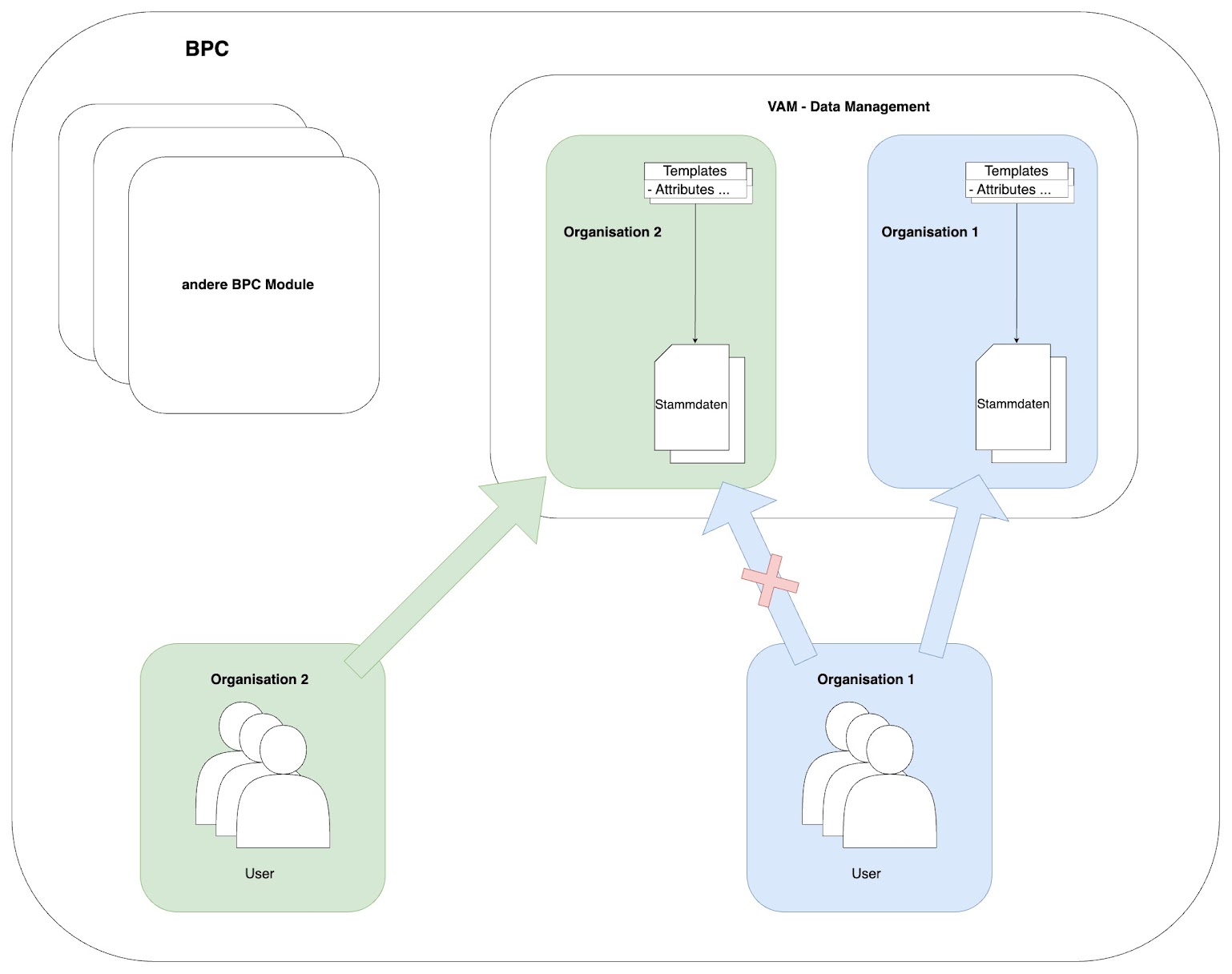
If a user is a member of an organization in BPC, they have corresponding access to that organization in Data Management.
The organization refers to the business and technical environment within which templates and assets are assigned and stored. Specifically, the OrganizationID defines the storage location where templates and assets are stored together and can be found.
Roles and Permissions
- VAM_organization_$ID
-
A role defined in the template that grants read/write access to the template with the specified ID and all derived templates.
As an alternative to assignment to the organization ID in BPC.
- VAM-administrator
-
Universal administrator for all organizations, templates, and assets in Data Management.
|
The "VAM-administrator" role cannot make configurations in the BPC "Data Management" module.
To make changes to the entire Data Management module,“bpcadmin”is required. |
Templates
For templates, the respective permissions and roles must be defined on the template itself at use.
The permission must be assigned to the corresponding roles.
The definition of use on the template is saved unchanged (abbreviations are not expanded).
Additionally, there is computedUse —here, “write” and “any” are expanded, and all additional implied roles are included.
Possible permissions at use:
-
read
Open and view templates/assets -
create
Create templates/assets, automatically impliesread -
update
Edit templates/assets, automatically impliesread -
delete
Delete templates/assets, automatically impliesread -
write
Union ofcreate,update, anddelete -
executeAction
Perform actions in templates/assets, automatically impliesread -
any
Union ofwriteandexecuteAction, or the union of all possible permissions
Example:
<use>
    <read>
        <role>DM_reader</role>
    </read>
    <write>
        <role>DM_writer</role>
    </write>
</use>
Actions
For actions, the rights/roles associated with the respective action must be defined via executeUse.
At least one role is required.
Application Examples and Fallback Solutions
-
Grant permissions to "all"
-
Assign the "VAM-administrator" role to all users
Problem: does not allow treating two different VAM organizations differently -
Use the “bpcuser” role
Every BPC user has this role, so it can be used when something should be allowed for everyone (provided they can access the organization in question at all).
-
-
Organization-specific permissions
Define an “any” role at the organization level and assign it to all potential users:<use> <any> <role>MCS-administrator</role> </any> </use> -
Some users should only have read access
Define an “any” role at the organization level or on the templates:<use> <read> <role>MCS-read</role> </read> <any> <role>MCS-administrator</role> </any> </use> -
Set permissions the same for all templates
useSet this in INUBIT under Organization Configuration:Permissions defined there automatically apply to all templates—as if the roles had been added individually at each location.
Actions
-
Enable specific roles for all actions
It is possible to define roles in the templateuse/executeActionso that these roles apply to all actions in this template.
|
In this case, the template is also automatically visible to these roles, because the permission |
-
Enable roles for all actions in all templates + set
use/executeActionin the organization configuration (INUBIT):
Example Diagram
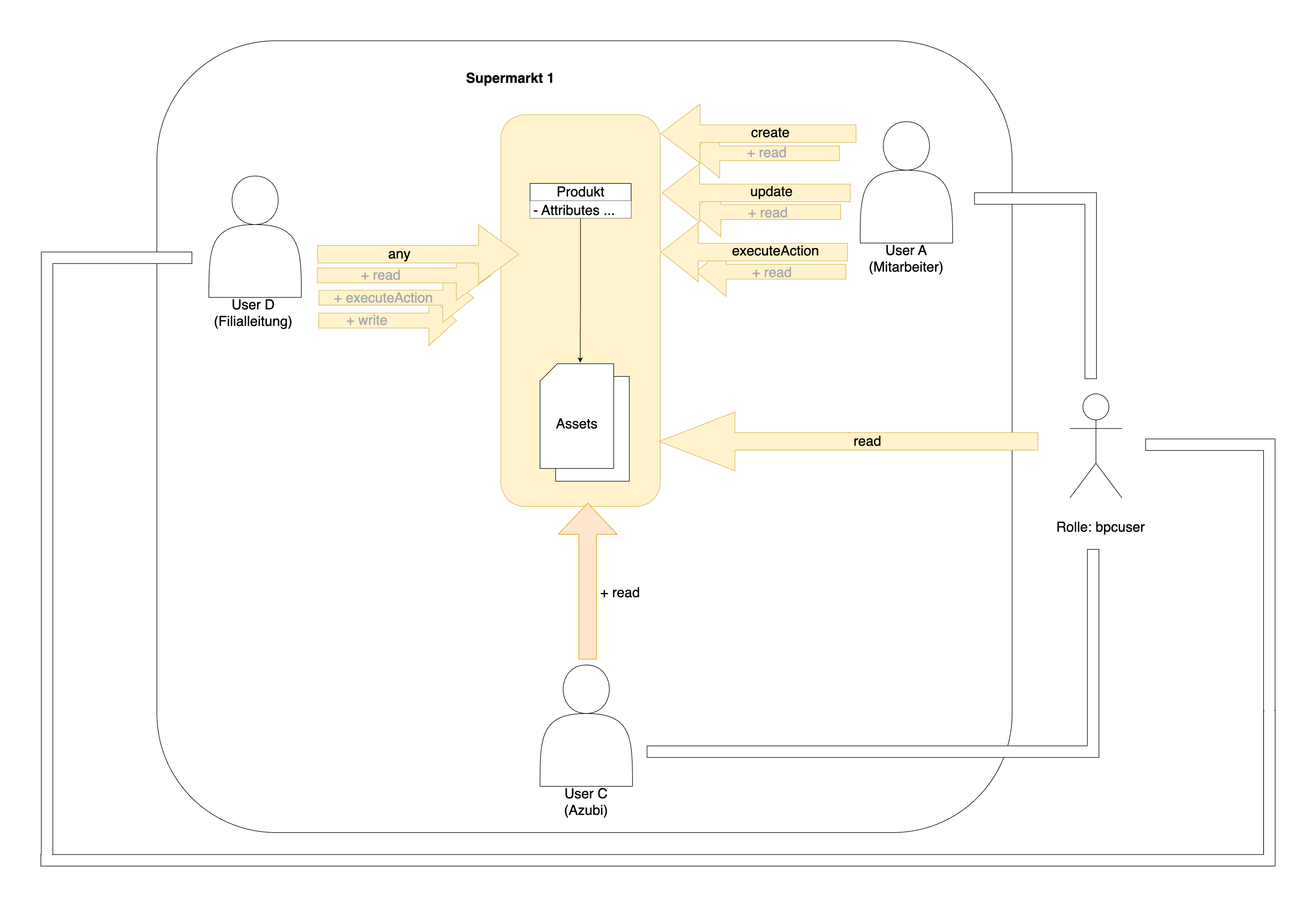
The following example explains the distribution of permissions within the “Supermarket 1” organization.
Every user shown in the Diagram is part of the “Supermarket 1” organization.
User A, who represents an employee, is granted the rights create, update, and executeAction on the Product template.
With any of these rights, the user implicitly receives the read permission read for the assets (Leader data objects) of the template.
The store manager, also referred to as User D in this case, has been granted the right any for the Product template.
This right encompasses all existing rights.
This right is compiled in the background from the other rights read, executeAction, and write.
The stick figure representing the role bpcuser was defined in the product template for the read permission read.
Every new user in BPC is automatically assigned the role bpcuser upon creation, which is represented in this Diagram by the lines emanating from the stick figure.
Since every user has the role “ bpcuser,” any user who is part of the “Supermarket 1” organization can now read the Leader data objects in the template—as is the case here with User C, who represents a trainee.
