Flow
Flow is a specialized variant of http_proxy Backend Connections and is used to establish Connections to process engines (IGUASU and INUBIT). Detailed documentation on connecting to IGUASU can be found here.
The various configuration options for Flow are presented and described below.
Create a New Flow Component
In the Flow tab, add a new component.
The type of flow is selected using the “Type” input field. Depending on the type selected, the specific configuration options are displayed.
Settings
| Setting (Key) | Group | Type | Description |
|---|---|---|---|
ModuleHeader |
Module |
bool |
Enables/disables the ModuleHeader |
Module_Description |
Module |
text |
Allows you to enter a short description of the module. Can be displayed, for example, in the ModuleHeader. |
Module_Icon |
Module |
text |
The FontAwesome icon displayed for the Backend Connection instance. |
Module_Name |
Module |
text |
Name of the module |
Connection_Password |
Module |
text |
Password for connection authentication (BasicAuth on the target server) |
Connection_Username |
Connection |
text |
Username for connection authentication |
Connection_Timeout |
Connection |
number |
Maximum connection timeout. |
Security |
bool |
Enables or disables the CSRF token check. |
|
Connection_FilterBpcSession |
Security |
bool |
Enables or disables the session filter. |
Connection_InjectUserSessionJWT |
Security |
bool |
A JWT containing the session information is set in the header. Example callGET /?_dc=1569249450661 HTTP/1.1 X-Bpc-Session: SESSIONID. Cookie: oidc.userInfoJWT=eyJhbGciOiJIUzUxMiIsInR5cCIgOiAiSldUIiwia2lkIiA6ICIyODA0MTg3MS00M2EzLTQ0NDAtYWUyZS1hNGFiZTM1NDViMzIifQ.eyJzdWIiOiI3ZmEwMWYxYS0wNzY5LTQ4Y2UtOTQzMS1hODU4Yjk5Y2ExN2EiLCJhdWQiOiJicGMtY29yZSIsImFkZHJlc3MiOnt9LCJlbWFpbF92ZXJpZmllZCI6dHJ1ZSwiYnBjX3JvbGVzIjpbImJwY2FkbWluIiwiYnBjdXNlciIsImFDbGllbnRSb2xlIl0sIm5hbWUiOiJUaW1vIFZpcnQiLCJpc3MiOiJodHRwOi8vZGV2MDYudmlydGltby5uZXQ6ODA5MS9hdXRoL3JlYWxtcy9icGMiLCJwcmVmZXJyZWRfdXNlcm5hbWUiOiJicGNhZG1pbiIsImdpdmVuX25hbWUiOiJUaW1vIiwiZmFtaWx5X25hbWUiOiJWaXJ0IiwiZW1haWwiOiJicGNhZG1pbkBleGFtcGxlLmNvbSJ9.tP3jJo86ONW0lbM47ne_Z0KgMIXCt645hkwK1Why4MtB1Z8e9Lxw4I76n-4zYkLGgADka1G6LkWI4nCDjbtJ7g; oidc=7fa01f1a-0769-48ce-9431-a858b99ca17a Accept: */*,* Accept-Language: de-DE,de;q=0.9,en;q=0.8,en-US;q=0.7 accept-encoding: gzip, deflate, br Host: xyz.local:1234 Connection: keep-alive In this configuration, we have two different pieces of user session information:
|
Connection_UntrustedCertificates |
Security |
text |
All certificates are trusted, and the Common Name (CN) check is skipped. |
Http_Header_Filter |
Proxy |
json |
List of header names to be filtered out.
For security reasons, the BPC API key header ( Default: |
ProxyServer_Port |
Proxy |
number |
The Port on which the proxy server is accessible. |
ProxyServer_URL |
Proxy |
text |
The address of the proxy server to be used. Leave blank if a direct connection to the target server is possible. |
Service URL |
Target |
text |
This parameter defines the base URL for the target system and is prepended to every request if no frontend URL is defined. |
FrontendURL |
Target |
text |
If the Flow frontend is accessible via a different URL, it can be configured here. This is relevant for jumps from BPC to Flow. |
Flow Manager
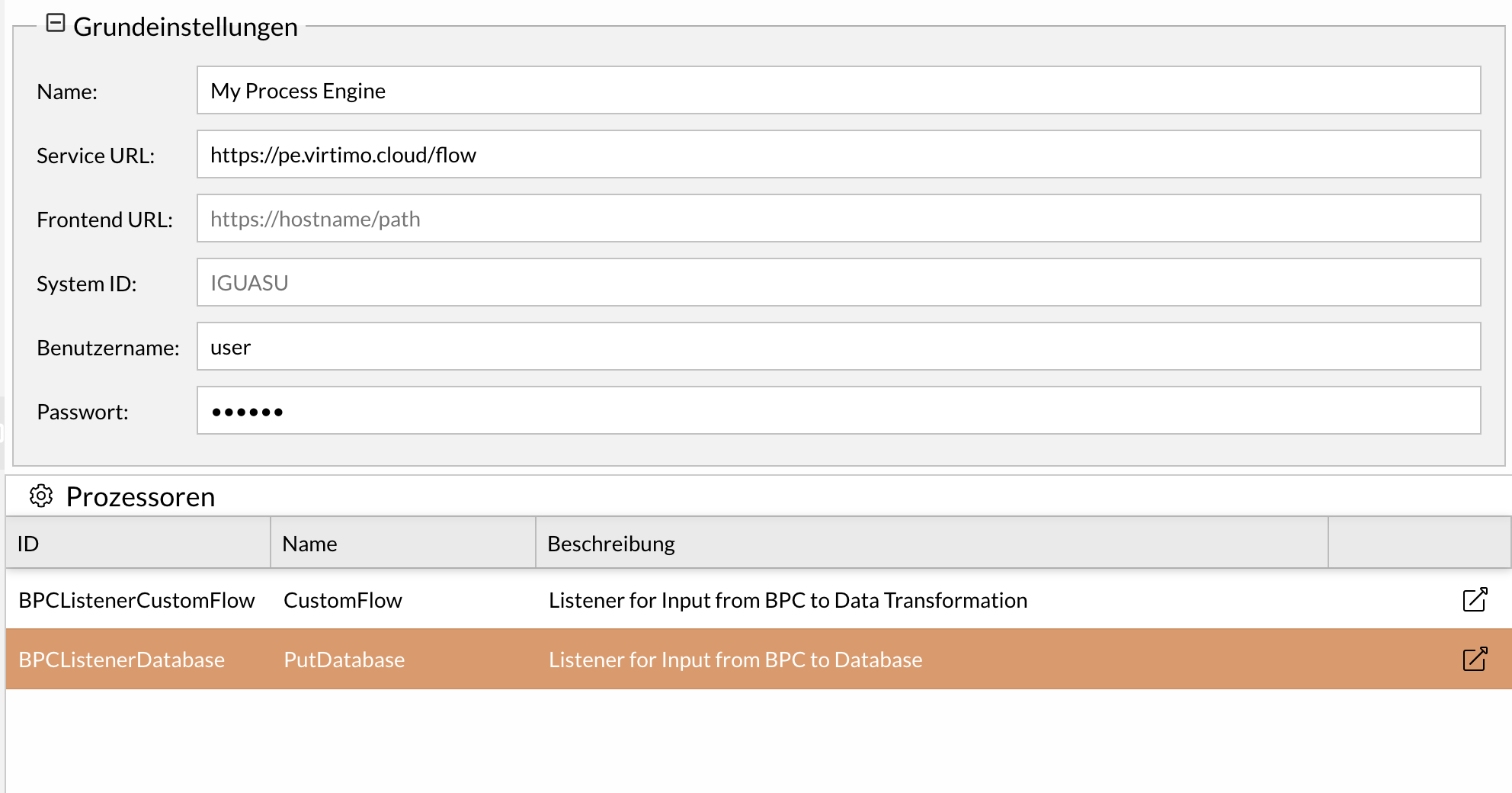
The Flow Manager includes the most important basic settings of a flow component for quick and clear configuration. It contains the additional “Processors” section, which lists in a table the processors with which the BPC can communicate to start a flow. This table includes information about the ID, name, and description of the processors that have been configured in the respective process engine (IGUASU or INUBIT). You can jump directly to a processor using the “Jump” column.
|
The link only works if an external URL has been set as the Service URL or Frontend URL. If you use an internal URL as the Service URL because both are located in the same system, a Frontend URL must be set. If they are not in the same system and the Service URL is an external URL, a Frontend URL does not need to be set additionally. |
Flow in Process Monitoring
If a user wants to jump from a monitor to IGUASU, a flow component must be set up. This allows the user to navigate directly to the respective process or Service in IGUASU via a defined link. For this jump to work, the monitor view must contain a column that provides the corresponding link. This is done via the “ externalReference ” column, which is configured with a so-called “ flowId.” The “ flowId ” is the ID of the Flow component and can be specified when creating the component.
Prerequisite: A Flow component must have been created beforehand. The flowId for this component must then be entered in the column configuration (Monitor_ColumnConfig).
For detailed information, see Jumping from BPC to IGUASU.
