Die BPC Version 4.1 wird nicht mehr gewartet.

Sollten Sie diese BPC Version nutzen, empfehlen wir Ihnen eine Migration auf eine aktuelle Version. Die Dokumentation zur neusten BPC Version finden Sie hier. Sollten Sie Fragen haben, wenden Sie sich bitte an unseren Support.

Log Service

Among other things, this module provides a REST endpoint to receive monitor data and write it to OpenSearch and, optionally, to a database. The relevant monitor "clients" are immediately notified of new data via a WebSocket event.

If data is also to be written to a database, the database tables must already be created. These are not created automatically and are not automatically updated if the data structure changes.

If data is being written to a database, a DB transaction is used to first write the database data (which is typically more prone to errors) and only then write the data to OpenSearch. When writing to the database, a DB update (see the keys setting) is performed first, and if that fails, a DB insert is performed.

As mentioned above, the Log Service data is typically displayed via the monitor. This uses a process index (= parent data) and a history index (= child data).
However, if you do not want to transfer any history/child data, simply omit these elements from the JSON being transmitted (the 'child' elements) and leave out all 'child' elements in the configurations (see below).

Log Service Module Configuration Parameters

Required parameters are highlighted in bold.

Setting (Key) Group Description

Security_ClientCertificateAuthMandatory
(clientCertificateAuthMandatory)

security

Specifies whether the Log Service endpoints can only be accessed via Client Certificate Authentication.
Default: false

OpenSearch_DataCountLimit
(es_data_count_limit)

opensearch

Maximum number of documents that can be queried.
Default: 100000

OpenSearch_DataViewLimit
(es_data_view_limit)

opensearch

OpenSearch should return precise information about the number of documents (trackTotalHitsUpTo) up to this value.
Default: 100000

Configuration parameters for each Log Service component

Values highlighted in bold are required parameters.

Setting (Key) Group Description

MaintenanceEnabled
(maintenanceEnabled)

config

If changes need to be made to the database or the OpenSearch index, the endpoint for this instance can be set to maintenance mode. In this case, the caller of the endpoint receives an HTTP status 503 (Service Unavailable) in response.
Default: false

Keys
(keys)

config

The key fields are defined here. These are used for the database update when writing to the database. In OpenSearch, this is used to define document IDs. If multiple fields are affected, they must be separated by commas.

Default:

{
  "parent": {
    "idColumns": "PROCESSID"
  },
  "child": {
    "idColumns": "PROCESSID,CHILDID"
  }
}

Fields
(fields)

config

Here, among other things, fine-tuning of the data types can be performed (mapping for the OpenSearch indexes).

Default
{
  "parent": {
    "fieldname": {
      "type": "binary/text/timestamp/...",
      "skipOS": false,
      "skipDB": false
    }
  },
  "child": {
    "fieldname": {
      "type": "binary/text/timestamp/...",
      "skipOS": false,
      "skipDB": false
    }
  }
}
Example
{
  "parent": {},
  "child": {
    "datei": {
      "type": "binary",
      "skipOS": true,
      "skipDB": false
    },
    "kommentar": {
      "type": "text"
    }
  }
}

type

  • binary = are created in OpenSearch as 'binary'

  • text = are created in OpenSearch as 'raw' and 'lowercase', just as in replication

  • timestamp = are created in OpenSearch as 'date'. If the placeholder 'SYSDATE' is used in the message to be logged instead of a UTC date, the log service sets the current timestamp instead.

  • date:iso8601_millis = are stored in OpenSearch as ‘date’ with the format ‘strict_date_optional_time||epoch_millis’

  • integer = are stored in OpenSearch as ‘integer’

  • long = are stored in OpenSearch as ‘long’

  • float = are stored in OpenSearch as ‘float’

  • double = are stored as ‘double’ in OpenSearch

  • boolean = are stored as ‘boolean’ in OpenSearch

By default, all fields are written to OpenSearch and the database. If you do not want individual fields to be written, you can specify them here.

skipOS

true = the field is not written to OpenSearch

false = the field is written to OpenSearch (default)

skipDB

true = the field is not written to the database

false = the field is written to the database (default)

OpenSearch_LoggingEnabled
(openSearchLoggingEnabled)

opensearch

Data is written to OpenSearch only if this is enabled.
Default: true

OpenSearch_Indices
(openSearch)

opensearch

Specifies which indexes the parent/child data should be written to. The indexes are created automatically. The specified ‘Fields’ types are taken into account.

The index name must be written entirely in lowercase.

parent.index = Name of the target index containing the parent/main data

child.index = Name of the target index containing the child/detail data

Optional:

backup.intervalInSeconds = Interval at which backups/snapshots are created (specified in seconds)

backup.keepBackupsDurationInSeconds = Backups older than this value are automatically deleted (specified in seconds)

Example:

{
  "parent": {
    "index": "of_test_main"
  },
  "child": {
    "index": "of_test_child"
  },
  "backup": {
    "intervalInSeconds": 86400,
    "keepBackupsDurationInSeconds": 2592000
  }
}

Joins
(joins)

config

Can be used to automatically enrich the logged documents with additional data. For example, if the data to be logged contains only a partner ID and the partner’s name, etc., is still required in the monitor. This is the same configuration as for the “Lookup Joins” of the replication service.

Example:

[
  {
    "keyField": "partner",
    "lookupIndex": "lookup-partner",
    "lookupKeyField": "ID.raw",
    "resultFieldsPrefix": "partner_",
    "resultFieldsExcluded": [
      "ID",
      "LASTUPDATE"
    ]
  }
]

DB_RDMSLoggingEnabled
(rdmsLoggingEnabled)

rdms

Data is written to the database only if this is enabled.
Default: false

DB_RDMS
(rdms)

rdms

Specifies the database tables to which the parent/child data should be written. The database tables must already exist and are not created automatically.

rdmsDataSourceName = Name of the data source (database connection) that has already been created under 'Core Services.data_rdms'

parent.table = Name of the target table containing the parent/main data

child.table = Name of the target table containing the child/detail data

rdmsTimeZone (optional) = Target time zone for date fields (uses ZoneId internally)

Example:

{
  "rdmsDataSourceName": "oracle-xe-vpma",
  "rdmsTimeZone": "America/Los_Angeles",
  "parent": {
    "table": "OF_TEST_MAIN"
  },
  "child": {
    "table": "OF_TEST_CHILD"
  }
}

Endpoints

To use the endpoints, a logged-in user or API key with the appropriate roles/permissions is required.

As an additional security measure, the " Client Certificate Authentication " can be enabled for all Log Service endpoints via the "Log Service" module setting Security_ClientCertificateAuthMandatory.

Method Endpoint

GET

/cxf/bpc-logservice/log/instances

Description

Get a compact overview of the available log service instances.

Only the following data is returned for each instance:

  • module instance ID

  • name

  • description

  • flag indicating whether the instance is in maintenance mode

Returns

The log service instances as JSON.

HTTP Status Code

  • 200: OK

  • 401: Authentication could not be performed

  • 503: BPC is currently in maintenance mode

Content-Type

  • application/json

Required Access Rights

The logged-in user or API key must have either the following role or permission.

  • Role: LOG_SERVICE_USER

  • Right: LOG_SERVICE_CONFIG_GET_INSTANCES

GET

/cxf/bpc-logservice/log/instances/{instanceIdOrName}

Description

Get the current configuration of the log service instance.

Path Parameter

instanceIdOrName

This can be either the ID or a unique name of the module instance

Returns

The requested configuration as JSON.

HTTP Status Code

  • 200: OK

  • 401: Authentication could not be performed

  • 404: Module instance was not found

  • 503: BPC is currently in maintenance mode

Content-Type

  • application/json

Required Access Rights

The logged-in user or API key must have either the following role or permission.

  • Role: LOG_SERVICE_USER

  • Right: LOG_SERVICE_CONFIG_GET_INSTANCE

GET

/cxf/bpc-logservice/log/{instanceIdOrName}

Description

Retrieves the data for a log service instance.

Path Parameter

instanceIdOrName

This can be either the ID or a unique name of the module instance

Query Parameter

timezoneOffset

time zone offset, such as GMT+2 (optional). Used if a date field is accessed in the parentFilter with a range operator such as "gt", "gte", "lt", "lte", ">", ">=", ",<,", ",<,=". UTC is the default. timezoneName is used before timezoneOffset if both are set.

timezoneName

timezone name like Europe/Berlin (optional). Is used if a date field is accessed in the parentFilter with a range operator like "gt", "gte", "lt", "lte", ">", ">=", ",<,", ",<,=". UTC is the default. timezoneName is used before timezoneOffset if both are set.

start

first record to be read (optional, default = 0)

limit

number of records to read (optional, default = 100, max. 10.000)

parentQuery

simple search (optional). Example city:berlin. Additional information of the Lucene Query String Syntax.

parentFilter

complex filter format like done from the monitor endpoint (optional). Example: [{"property":"processid","operator":"gte","value":1000,"source":"raw","invert":false}]

parentSort

determination by which field the parent entries should be sorted (optional, default = parent key descending). Format: fieldname|[ASC|DESC]. Example: processid|DESC. Multiple sorting instructions can be specified comma separated.

childSort

determination by which field the child entries should be sorted (optional, default = child key ascending). Format: fieldname|[ASC|DESC]. Example: childid|ASC. Multiple sorting instructions can be specified comma separated.

addChilds

should the response contain the log service child entries?. Default is true.

Returns

The requested data as JSON.

HTTP Status Code

  • 200 : OK

  • 401 : Authentication could not be performed

  • 404 : Module instance was not found

  • 503 : BPC or instance are currently in maintenance mode

Content-Type

  • application/json

Required Access Rights

The logged-in user or API key must have either the following role or permission.

  • Role : LOG_SERVICE_USER

  • Right : LOG_SERVICE_READ_DATA

GET

/cxf/bpc-logservice/log/{instanceIdOrName}/{parentId}

Description

Get the data of a log service entry with its child entries.

Path Parameter

instanceIdOrName

this can be either the ID or a unique name of the module instance

parentId

the ID of the requested log service entry

Query Parameter

timezoneOffset

timezone offset like GMT+2 (optional). Is used if a date field is accessed in the childFilter with a range operator like "gt", "gte", "lt", "lte", ">", ">=", ",<,", ",<,=". UTC is the default. timezoneName is used before timezoneOffset if both are set.

timezoneName

timezone name like Europe/Berlin (optional). Is used if a date field is accessed in the childFilter with a range operator like "gt", "gte", "lt", "lte", ">", ">=", ",<,", ",<,=". UTC is the default. timezoneName is used before timezoneOffset if both are set.

childQuery

simple search (optional). Example city:berlin. Additional information of the Lucene Query String Syntax.

childFilter

complex filter format like done from the monitor endpoint (optional). Example: [{"property":"processid","operator":"gte","value":1000,"source":"raw","invert":false}]

Returns

The requested data as JSON.

HTTP Status Code

  • 200 : OK

  • 401 : Authentication could not be performed

  • 404 : Module instance was not found

  • 503 : BPC or instance are currently in maintenance mode

Content-Type

  • application/json

Required Access Rights

The logged-in user or API key must have either the following role or permission.

  • Role : LOG_SERVICE_USER

  • Right : LOG_SERVICE_READ_DATA

GET

/cxf/bpc-logservice/log/{instanceIdOrName}/{parentId}/{childId}

Description

Get the data of a log service child entry.

Path Parameter

instanceIdOrName

this can be either the ID or a unique name of the module instance

parentId

the ID of the requested log service entry

childId

the ID of the requested child entry

Returns

The requested data as JSON.

HTTP Status Code

  • 200 : OK

  • 401 : Authentication could not be performed

  • 404 : Module instance was not found

  • 503 : BPC or instance are currently in maintenance mode

Content-Type

  • application/json

Required Access Rights

The logged-in user or API key must have either the following role or permission.

  • Role : LOG_SERVICE_USER

  • Right : LOG_SERVICE_READ_DATA

/cxf/bpc-logservice/log/{instanceIdOrName}

Description

Writes the data provided in the body to OpenSearch and/or the database.

For calls from IGUASU the following HTTP headers are used and their values written to the following 'externalReference' object fields of all 'parent' related documents:

HTTP Header 'externalReference' field

IGUASU-System-ID

externalReference.system

IGUASU-Instance-ID

externalReference.instance

IGUASU-Processor-ID

externalReference.processor

IGUASU-Service-ID

externalReference.service

Consumes

  • application/json

Path Parameter

instanceIdOrName

this can be either the ID or a unique name of the module instance

Query Parameter

async

'true' to perform the log asynchronously. 'false' to perform synchronously. Default is false.

Returns

HTTP Status Code

  • 200 : Data has been written

  • 400 : None or invalid data to log given

  • 401 : Authentication could not be performed

  • 404 : Module instance was not found

  • 500 : Failed to write the data

  • 503 : Maintenance mode is active or OpenSearch and database are not activated

Content-Type

  • application/json

Required Access Rights

The logged-in user or API key must have either the following role or permission.

  • Role : LOG_SERVICE_USER

  • Right : LOG_SERVICE_WRITE_DATA

/cxf/bpc-logservice/log/{instanceIdOrName}/{parentId}

Description

Deletes log service entries and their child entries from OpenSearch and the database. Attention: When you use 'childQuery' and/or 'childFilter' only those children get deleted, not the parent itself.

Path Parameter

instanceIdOrName

this can be either the ID or a unique name of the module instance

parentId

the ID of the log service entry to delete, multiple entries can be provided and must be separated by comma

Query Parameter

timezoneOffset

timezone offset like GMT+2 (optional). Is used if a date field is accessed in the childFilter with a range operator like "gt", "gte", "lt", "lte", ">", ">=", ",<,", ",<,=". UTC is the default. timezoneName is used before timezoneOffset if both are set.

timezoneName

timezone name like Europe/Berlin (optional). Is used if a date field is accessed in the childFilter with a range operator like "gt", "gte", "lt", "lte", ">", ">=", ",<,", ",<,=". UTC is the default. timezoneName is used before timezoneOffset if both are set.

childQuery

simple search (optional). Example city:berlin. Additional information of the Lucene Query String Syntax.

childFilter

complex filter format like done from the monitor endpoint (optional). Example: [{"property":"processid","operator":"gte","value":1000,"source":"raw","invert":false}]

Returns

HTTP Status Code

  • 200 : Data has been deleted

  • 401 : Authentication could not be performed

  • 404 : Module instance was not found

  • 500 : Delete failed

  • 503 : Maintenance mode is active or OpenSearch and database are not activated

Content-Type

  • application/json

Required Access Rights

The logged-in user or API key must have either the following role or permission.

  • Role : LOG_SERVICE_USER

  • Right : LOG_SERVICE_DELETE_DATA

/cxf/bpc-logservice/log/{instanceIdOrName}/{parentId}/{childId}

Description

Deletes log service child entries from OpenSearch and the database.

Path Parameter

instanceIdOrName

this can be either the ID or a unique name of the module instance

parentId

the ID of the log service entry to delete the child entries from

childId

the ID of the child entry to delete, multiple entries can be provided and must be separated by comma

Returns

HTTP Status Code

  • 200 : Data has been deleted

  • 401 : Authentication could not be performed

  • 404 : Module instance was not found

  • 500 : Delete failed

  • 503 : Maintenance mode is active or OpenSearch and database are not activated

Content-Type

  • application/json

Required Access Rights

The logged-in user or API key must have either the following role or permission.

  • Role : LOG_SERVICE_USER

  • Right : LOG_SERVICE_DELETE_DATA

/cxf/bpc-logservice/log/{instanceIdOrName}

Description

Deletes log service entries and their child entries from OpenSearch by query. Deletion from database is not supported.

Consumes

  • application/json

Path Parameter

instanceIdOrName

this can be either the ID or a unique name of the module instance

Query Parameter

timezoneOffset

timezone offset like GMT+2 (optional). Is used if a date field is accessed in the parentFilter with a range operator like "gt", "gte", "lt", "lte", ">", ">=", ",<,", ",<,=". UTC is the default. timezoneName is used before timezoneOffset if both are set.

timezoneName

timezone name like Europe/Berlin (optional). Is used if a date field is accessed in the parentFilter with a range operator like "gt", "gte", "lt", "lte", ">", ">=", ",<,", ",<,=". UTC is the default. timezoneName is used before timezoneOffset if both are set.

parentQuery

simple search (optional). Example city:berlin. Additional information of the Lucene Query String Syntax.

parentFilter

complex filter format like done from the monitor endpoint (optional). Example: [{"property":"processid","operator":"gte","value":1000,"source":"raw","invert":false}]

Returns

HTTP Status Code

  • 200 : Data has been deleted

  • 401 : Authentication could not be performed

  • 404 : Module instance was not found

  • 500 : Delete failed

  • 503 : Maintenance mode is active or OpenSearch and database are not activated

Content-Type

  • application/json

Required Access Rights

The logged-in user or API key must have either the following role or permission.

  • Role : LOG_SERVICE_USER

  • Right : LOG_SERVICE_DELETE_DATA

/cxf/bpc-logservice/log/{instanceIdOrName}/children

Description

Deletes only log service child entries from OpenSearch by query. Deletion from database is not supported.

Consumes

  • application/json

Path Parameter

instanceIdOrName

this can be either the ID or a unique name of the module instance

Query Parameter

timezoneOffset

timezone offset like GMT+2 (optional). Is used if a date field is accessed in the childFilter with a range operator like "gt", "gte", "lt", "lte", ">", ">=", ",<,", ",<,=". UTC is the default. timezoneName is used before timezoneOffset if both are set.

timezoneName

timezone name like Europe/Berlin (optional). Is used if a date field is accessed in the childFilter with a range operator like "gt", "gte", "lt", "lte", ">", ">=", ",<,", ",<,=". UTC is the default. <INLINE_CODE_179/> is used before <INLINE_CODE_180/> if both are set.<NL/><INLINE_CODE_181/>:: simple search (optional). Example <INLINE_CODE_182/>. Additional information on the <URL_4>Lucene Query String Syntax</URL_4>.<NL/><INLINE_CODE_183/>:: complex filter format similar to that used by the monitor endpoint (optional). Example: <INLINE_CODE_184/><NL/><NL/>1+a<PIPE/><BOLD><BOLD>Returns</BOLD></BOLD><NL/><NL/>HTTP Status Code<NL/><NL/>- <INLINE_CODE_185/> : Data has been deleted<NL/>- <INLINE_CODE_186/> : Authentication could not be performed<NL/>- <INLINE_CODE_187/> : Module instance was not found<NL/>- <INLINE_CODE_188/> : Delete failed<NL/>- <INLINE_CODE_189/> : Maintenance mode is active or OpenSearch and the database are not activated<NL/><NL/>Content-Type<NL/><NL/>- <INLINE_CODE_190/><NL/><NL/>1+a<PIPE/><BOLD><BOLD>Required Access Rights</BOLD></BOLD><NL/><NL/><INCLUDE_9/><NL/><NL/>- Role: <INLINE_CODE_191/><NL/>- Right: <INLINE_CODE_192/><NL/><NL/><NL/>// ================================================================================================<NL/><NL/><BLOCK_TITLE/>5+<PIPE/> <ADMONITION_10> <INLINE_CODE_193/></ADMONITION_10><PIPE/> <INLINE_CODE_194/><NL/><NL/>1+a<PIPE/><BOLD><BOLD>Description</BOLD></BOLD><NL/><NL/>Deletes/drops the parent and child indexes of a log service instance.<NL/><NL/>1+a<PIPE/><BOLD><BOLD>Path Parameter</BOLD></BOLD><NL/><NL/><INLINE_CODE_195/>:: this can be either the ID or a unique name of the module instance<NL/><NL/>1+a<PIPE/><BOLD><BOLD>Returns</BOLD></BOLD><NL/><NL/>HTTP Status Code<NL/><NL/>- <INLINE_CODE_196/> : Indexes deleted<NL/>- <INLINE_CODE_197/> : Authentication failed<NL/>- <INLINE_CODE_198/> : Module instance not found<NL/>- <INLINE_CODE_199/> : Delete failed<NL/>- <INLINE_CODE_200/> : Maintenance mode is active or OpenSearch and the database are not enabled<NL/><NL/>Content-Type<NL/><NL/>- <INLINE_CODE_201/><NL/><NL/>1+a<PIPE/><BOLD><BOLD>Required Access Rights</BOLD></BOLD><NL/><NL/><INCLUDE_10/><NL/><NL/>- Role : <INLINE_CODE_202/><NL/>- Right: <INLINE_CODE_203/><NL/><NL/><NL/>// ================================================================================================<NL/><NL/><BLOCK_TITLE/>5+<PIPE/> <ADMONITION_11> <INLINE_CODE_204/></ADMONITION_11><PIPE/> <INLINE_CODE_205/><NL/><NL/>1+a<PIPE/><BOLD><BOLD>Description</BOLD></BOLD><NL/><NL/>Creates a BPC deeplink to redirect the caller to the admin page of a log service instance.<NL/><NL/>1+a<PIPE/><BOLD><BOLD>Path Parameter</BOLD></BOLD><NL/><NL/><INLINE_CODE_206/>:: This can be either the ID or a unique name of the log service module instance<NL/><NL/>1+a<PIPE/><BOLD><BOLD>Returns</BOLD></BOLD><NL/><NL/>The requested data as JSON.<NL/><NL/>HTTP Status Code<NL/><NL/>- <INLINE_CODE_207/> : OK<NL/>- <INLINE_CODE_208/> : Authentication could not be performed<NL/>- <INLINE_CODE_209/> : Module instance was not found<NL/>- <INLINE_CODE_210/> : BPC or instance are currently in maintenance mode<NL/><NL/>Content-Type<NL/><NL/>- <INLINE_CODE_211/><NL/><NL/>1+a<PIPE/><BOLD><BOLD>Required Access Rights</BOLD></BOLD><NL/><NL/><INCLUDE_11/><NL/><NL/><NL/>// ================================================================================================<NL/><NL/><BLOCK_TITLE/>6+<PIPE/> <ADMONITION_12> <INLINE_CODE_212/></ADMONITION_12><PIPE/> <INLINE_CODE_213/><NL/><NL/>1+a<PIPE/><BOLD><BOLD>Description</BOLD></BOLD><NL/><NL/>Redirects the user to the monitor using the OpenSearch indices of the log service instance.<NL/><NL/>All provided query parameters are used to build a monitor filter on fields of the 'externalReference' object.<NL/><NL/>For IGUASU, the following query parameters can be used to access the HTTP header values from when the entry was created.<NL/><NL/>!===<NL/>!Query parameter !HTTP header<NL/><NL/>!system !IGUASU-System-ID<NL/>!instance !IGUASU-Instance-ID<NL/>!processor !IGUASU-Processor-ID<NL/>!service !IGUASU-Service-ID<NL/>!===<NL/><NL/>1+a<PIPE/><BOLD><BOLD>Path Parameter</BOLD></BOLD><NL/><NL/><INLINE_CODE_214/>:: this can be either the ID or a unique name of the log service module instance<NL/><NL/>1+a<PIPE/><BOLD><BOLD>Query Parameter</BOLD></BOLD><NL/><NL/><INLINE_CODE_215/>:: optional URL parameter. Text or language key for the window title<NL/><INLINE_CODE_216/>:: optional URL parameter. Text or language key for the prompt text<NL/><NL/>1+a<PIPE/><BOLD><BOLD>Returns</BOLD></BOLD><NL/><NL/>The requested data as JSON.<NL/><NL/>HTTP Status Code<NL/><NL/>- <INLINE_CODE_217/> : OK<NL/>- <INLINE_CODE_218/> : Authentication could not be performed<NL/>- <INLINE_CODE_219/> : Module instance was not found<NL/>- <INLINE_CODE_220/> : BPC deep link could not be created<NL/>- <INLINE_CODE_221/> : BPC or instance is currently in maintenance mode<NL/><NL/>Content-Type<NL/><NL/>- <INLINE_CODE_222/><NL/><NL/>1+a<PIPE/><BOLD><BOLD>Required Access Rights</BOLD></BOLD><NL/><NL/><INCLUDE_12/><NL/><NL/><NL/><TABLE/><NL/>

Response in Case of an Error

For every error (status != 200), a JSON response with the following sample structure is returned:

{
  "error": {
    "code": 301,
    "name": "MODULE_INSTANCE_NOT_FOUND",
    "message": "Did not found the instance 'of_test2' of the module 'logservice'.",
    "properties": {
      "instanceId": "of_test2",
      "moduleId": "logservice"
    }
  }
}

Possible error codes

|Error Code |Error Name | Info |1 | UNEXPECTED | should not occur |20 | MODULE_NOT_FOUND | the 'Log Service' module was not found |21 | MODULE_INSTANCE_NOT_FOUND | the ''Log Service' instance was not found |10000 | VALIDATION_MISSING_INPUT | No data was passed for logging |10010 | VALIDATION_INVALID_INPUT | The data passed is not valid JSON or does not conform to the structure specified here |20000 | LOG_SERVICE_UNAUTHORIZED | The login credentials do not match the stored ones (Log Service module setting) |20001 | LOG_SERVICE_MAINTENANCE | The Log Service is currently in maintenance mode, or DB and OpenSearchlogging are disabled |20002 | LOG_SERVICE_MISSING_SERVICE | A Service required by the Log Service is not available |20100 | LOG_SERVICE_DB_LOGGING_FAILED | An error occurred during DB logging |20101 | LOG_SERVICE_DB_DELETE_FAILED | An error occurred while deleting DB entries |20102 | LOG_SERVICE_DB_WRONG_TABLE_NAME | An invalid table name was specified |20103 | LOG_SERVICE_DB_TABLE_MISSING | The database table used could not be found |20104 | LOG_SERVICE_DB_COLUMN_MISSING | The databasecolumn does not exist |20105 | LOG_SERVICE_DB_GET_METADATA_FAILED |The database metadata could not be retrieved |20106 | LOG_SERVICE_DB_NOT_SUPPORTED | The requested functionality is not available for relational databases |20201 | LOG_SERVICE_OS_FAILURE | An error occurred while accessing OpenSearch |20202 | LOG_SERVICE_OS_FIELD_MISSING | The required data for the documentkey, the required data is missing from the document to be logged |20203 | LOG_SERVICE_OS_LOGGING_FAILED | A problem occurred while writing data to OpenSearch |20204 | LOG_SERVICE_OS_DELETE_FAILED | An error occurred while deleting documents from the OpenSearch index |20205 | LOG_SERVICE_OS_QUERY_RANGE_LIMIT | More data was requested than is available

== POST: Structuring the JSON message to be sent

=== Create/update

[source,json] ---- { "entries": [ { "parent": { "keyname_parent": keywertparent1, "feldname1": wert1, "feldname2": wert2, …​ }, "childs": [ { "keyname_parent": keywertparent1, "keyname_child": keywertchild1, "feldname1": wert1, "feldname2": wert2, "datei_binary": base64_3, …​ }, { "keyname_parent": keywertparent1, "keyname_child": keywertchild2, "feldname1": wert3, "feldname2": wert4, "datei_binary": base64_5, …​ }, …​ ] }, …​ ] } ----

=== Update individual fields (partial update)

[source,json] ---- { "entries": [ { "partialUpdate": true, "parent": { "keyname_parent": keywertparent1, "feldname1": wert1, "feldname2": wert2 }, …​ }, …​ ] } ----

==== Information on partial updates

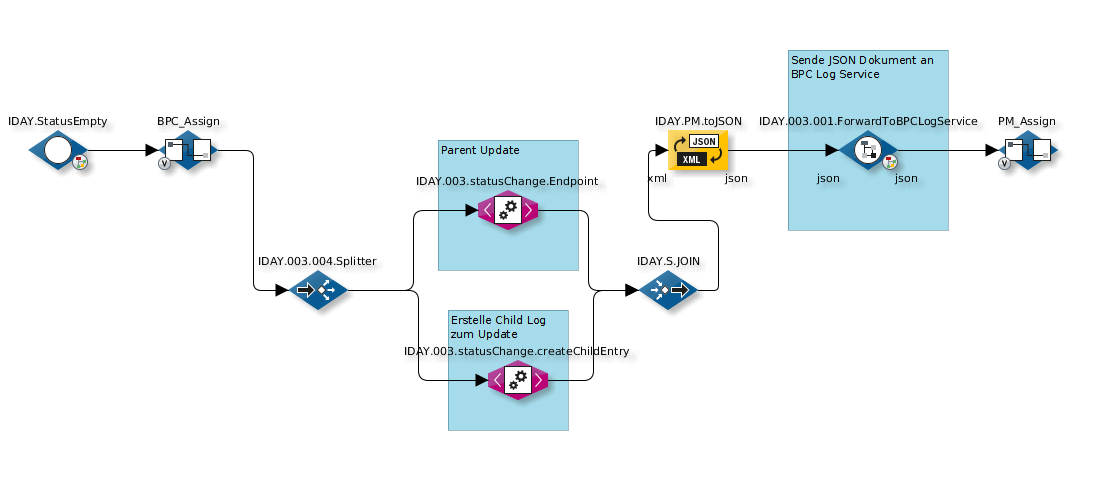
The partial update applies to the parent entry and the child entries. This means that if you want to update a parent entry, you should not create a “new” child log in the same JSON document. If you want to create a new child log while updating a parent entry, this should be implemented using two separate log service calls. For example, it might look like this (see INFOBLOCK 1 and 2):

In the following example, the “ANFRAGENUMMER” fields correspond to “keyname_parent” and “CHILDID” to “keyname_child” from earlier.

===== INFOBLOCK 1 - Example Parent

[source,json] ---- { "entries" : [ { "partialUpdate" : true, "parent" : { "ANFRAGENUMMER" : "16", "ANFRAGESTATUS" : "Offen", "ANFRAGEDATUM" : "2018-01-23T14:35:41.884+0200" } } ] } ----

===== INFOBLOCK 2 - Example Child

[source,json] ---- { "entries" : [ { "childs" : [ { "ANFRAGENUMMER" : "16", "CHILDID" : 309, "PROZESSBESCHREIBUNG" : "Status wurde geändert auf Offen", "STATUS" : "OK", "TIMESTAMP" : "2018-01-23T14:35:41.927+0200" } ] } ] } ----

In the workflow, it looks like this:

log service workflow

== Values of the JSON fields

[%autowidth,cols="a,a"]

|Type |Value range

|Boolean |true / false without quotation marks

|Date |as ISO-8601 with quotation marks, e.g., "2017-05-17T15:28:23.181Z". In the database, create the field as java.sql.Types.TIMESTAMP

|Numbers |Value without quotation marks

|Binary |Base64-encoded. Create in the database as java.sql.Types.BLOB.

|Text |Value with quotation marks

[#fields] === Field Name Convention

The data types for each field can be specified via the module instance setting fields (see below). This is not strictly necessary for binary types and can also be implemented using the field name convention FIELDNAME_binary (with _binary as a suffix).

Background: In OpenSearch, we store binary data as Base64-encoded strings (so this is also how it must be formatted in the JSON being passed). However, as with replication, we want to store this data under the specific type 'attachment'. Since both are treated as strings by OpenSearch, we need to be aware of this and perform a special mapping.

Example: If we have a field named 'datei' and can assign names freely, this could become 'datei_binary,' and OpenSearch will store the data as 'attachment' or create the mapping for it.

=== Example Call

[source] ---- curl -H "X-ApiKey: 1f697af5-c147-3d94-c529-e06f3f15bb87" \ -H "Content-Type: application/json" \ -XPOST 'localhost:8181/cxf/bpc-logservice/log/of_test' \ -d @logservice.json ----

Explanation:

[cols="50a,50a"]

|Option | Description

|-H "X-ApiKey: 1f697af5-c147-3d94-c529-e06f3f15bb87" |The API key with the appropriate role or permission |-H "Content-Type: application/json" |The Content-Type must be set to application/json |-XPOST | HTTP POST is required |localhost:8181/cxf/bpc-logservice/log/of_test |of_test is a unique instance name. Alternatively, the module instance ID can be used |-d @logservice.json |The JSON to be posted (see below)

==== logservice.json (Create/update entry)

[source,json] ---- { "entries": [ { "parent": { "processid": 40, "name": "hello world", "city": "Berlin", "lastupdate": "2017-05-17T15:28:23.181Z" }, "childs": [ { "processid": 40, "childid": 1, "ersteller": "Oliver", "kommentar": "Bild und langer Text", "datei": "iVBORw0KGgoAAAANSUhEUgAAAAIAAAACAQMAAABIeJ9nAAAABlBMVEUAAAD///+l2Z/dAAAADElEQVQIHWNwYGgAAAFEAMGoX3f9AAAAAElFTkSuQmCC", "langertext": "Dieser Text ist aber ziemlich …​…​…​…​…​…​.. lang. :-)", "lastupdate": "2017-05-17T15:28:23.181Z" } ] } ] } ----

==== logservice.json (Update individual fields (partial update))

[source,json] ---- { "entries": [ { "parent": { "processid": 40, "name": "hello world (aktualisiert)", "lastupdate": "2018-01-02T14:45:18.421Z" } } ] } ----


Keywords: