Performance Monitoring
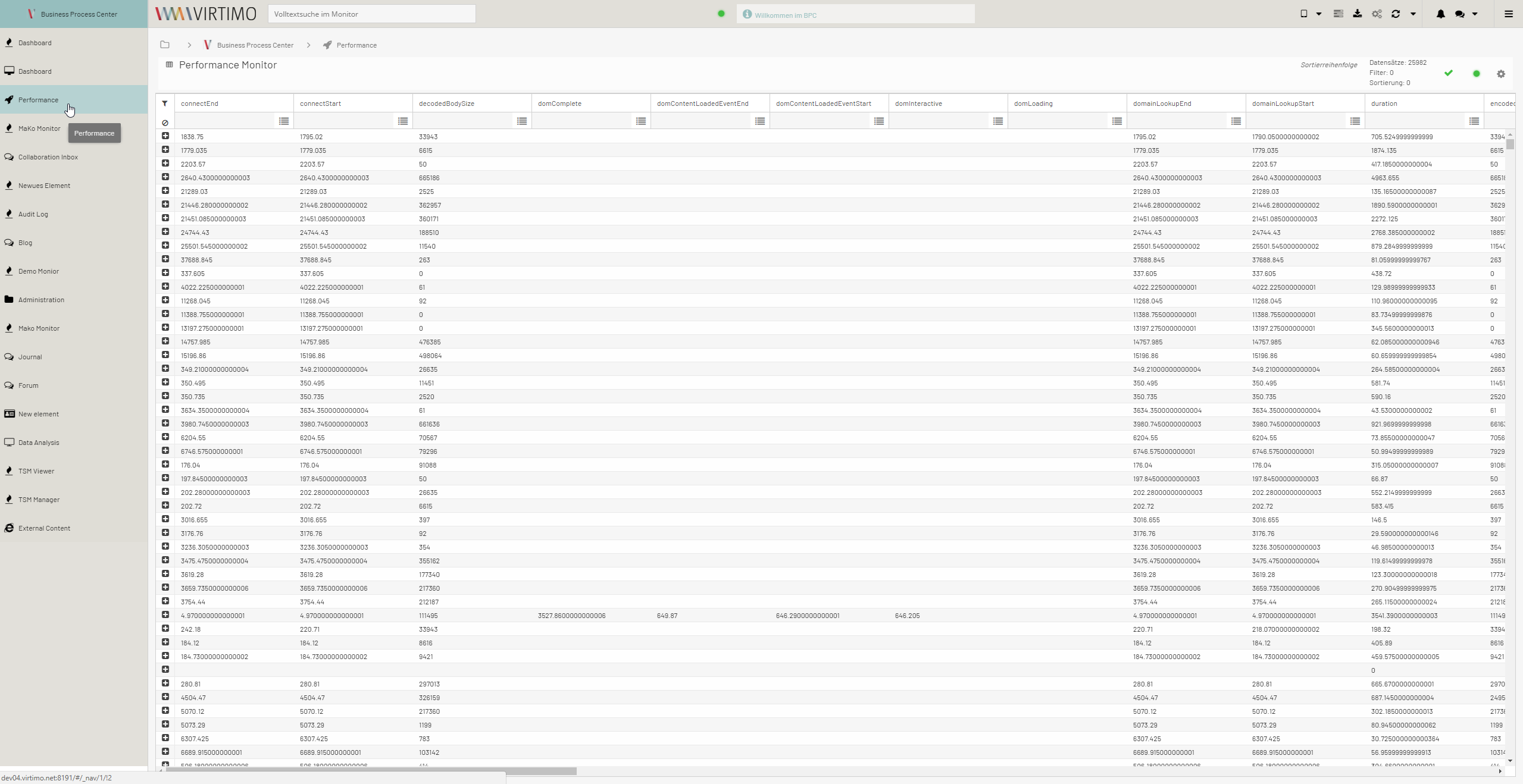
This feature allows you to collect runtime data in the user interface and persist the data for further analysis. Performance metrics and information are displayed using a BPC monitor.
General Information
Standardized performance measurement functions are available for measuring and monitoring the performance of a BPC-based application. When performance measurement is enabled, these functions record various parameters that can be analyzed. Additionally, these functions can also be used in custom-developed function modules by integrating the corresponding API.
Enable/Disable
By default, no performance data is collected.
To enable this feature, the parameter performanceTracing must be enabled in the Core Service parameters.
Cleanup
The performance data is written to the OpenSearch index with the alias bpc-performance.
To prevent this index from growing indefinitely, old data is periodically deleted.
The frequency and retention period can be adjusted in the configuration file <BPC-INSTALL-DIR>/karaf/etc/de.virtimo.bpc.core.cfg (a Core Bundle restart is required afterward).
It is recommended to configure the frequency and retention period via environment variables in the central configuration file bpc.env:
-
Unix-based systems (bpc.env.sh)
-
Windows-based systems (bpc.env.cmd)
# Data older than 4 weeks is deleted every 60 minutes
export DE_VIRTIMO_BPC_CORE_DE_VIRTIMO_BPC_CORE_PERFORMANCE_CLEANUPPERIODINMINUTES="60"
export DE_VIRTIMO_BPC_CORE_DE_VIRTIMO_BPC_CORE_PERFORMANCE_DELETEENTRIESOLDERTHAN="4 weeks ago"
:: Data older than 4 weeks is deleted every 60 minutes
SET DE_VIRTIMO_BPC_CORE_DE_VIRTIMO_BPC_CORE_PERFORMANCE_CLEANUPPERIODINMINUTES=60
SET DE_VIRTIMO_BPC_CORE_DE_VIRTIMO_BPC_CORE_PERFORMANCE_DELETEENTRIESOLDERTHAN=4 weeks ago|
It is strongly recommended not to make configuration changes directly in the Karaf configuration files under |
Alternatively, the values can be adjusted directly in the configuration file <BPC-INSTALL-DIR>/karaf/etc/de.virtimo.bpc.core.cfg (a Core Bundle restart is required afterward).
These are the default settings in the file:
# Data older than 4 weeks is deleted every 60 minutes
de.virtimo.bpc.core.performance.cleanupPeriodInMinutes=60
de.virtimo.bpc.core.performance.deleteEntriesOlderThan=4 weeks ago
Displaying Performance Information
Performance information can be viewed in the administration area; see Performance Monitor.
It is also possible to create the AuditLog as a monitor module and make it available in the navigation bar.
Interface (API)
The API provides functions for marking specific points on the timeline. Two points can then be used for a measurement (the time difference between the two points). The API handles the collection of individual measurements and the persistence of the measurements.
This generally results in the following procedure:
-
Mark the start time
-
Run the application
-
Mark the end time
-
Create a measurement based on the two marks
The API offers the option to combine the last two steps into a single call.
The API is provided by the BPC frontend at BpcCommon.performance.
Marking a Point in Time
When marking a point in time, you must always specify an ID that identifies that point in time.
The call looks like this:
BpcCommon.Performance.mark(ID);

//Beispiel
BpcCommon.Performance.mark("PSI_LOAD_BUSINESSPARTNER_FORM_START");
(...)
BpcCommon.Performance.mark("PSI_LOAD_BUSINESSPARTNER_FORM_END");
Please note that an existing marker will be overwritten if the same ID is used.
Creating a Measurement
Two markers are specified to create a measurement.
In addition, a unique identifier is defined for the measurement.
The call looks like this:
BpcCommon.Performance.measure(BEZEICHNER, START_MARKIERUNGS_ID, END_MARKIERUNGS_ID);

//Beispiel
BpcCommon.Performance.measure("PSI_LOAD_BUSINESSPARTNER_FORM","PSI_LOAD_BUSINESSPARTNER_FORM_START","PSI_LOAD_BUSINESSPARTNER_FORM_END");
Unlike markers, a repeated call does not cause existing measurements to be lost.
Combination of End Marker and Measurement
Since a measurement is typically created when the end time is marked, the following combined call can also be used:
BpcCommon.Performance.markAndMeasure(BEZEICHNER, START_MARKIERUNGS_ID, END_MARKIERUNGS_ID);

//Beispiel
BpcCommon.Performance.markAndMeasure("PSI_LOAD_BUSINESSPARTNER_FORM","PSI_LOAD_BUSINESSPARTNER_FORM_START","PSI_LOAD_BUSINESSPARTNER_FORM_END");
With this call, the end time marker is automatically created and the measurement is generated.
Persistence
The BPC automatically handles the persistence of the collected data. To minimize overhead and avoid hindering the actual application, the data is buffered and sent to the backend in blocks. This means that measurements taken after the last submission to the backend are lost when the browser is closed.
The backend provides a REST Service that receives the information and stores it in OpenSearch. The following information is recorded for each measurement:
-
MEASUREMENT ID
-
Start time
-
Duration
-
USER_AGENT 1)
-
Browser session ID 2)
1) USER_AGENT HTTP header—contains information about the browser and operating system.
2) Does not correspond to the session. Opening a new browser window or tab while reusing an existing session creates a new browser session.
