Configuring Process Monitoring
The various configuration options for process monitoring are presented and described below.
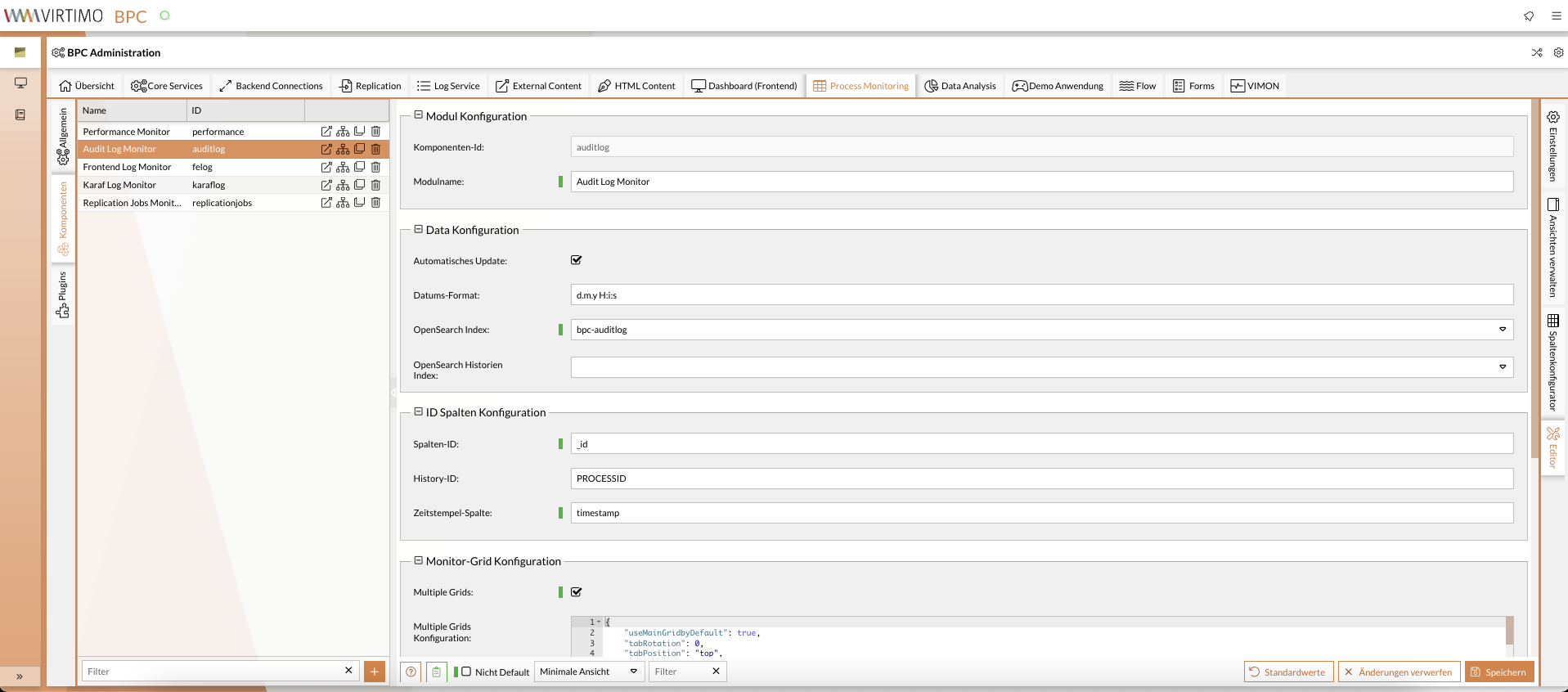
General Module Configuration
You can access the settings via the administration area under the Process Monitoring > Generaltab.
| Setting (ID) | Type | Description |
|---|---|---|
Group: module |
||
Module_DataCountLimit |
Integer |
Maximum amount of data loaded into the monitor module. |
Module_DataViewLimit |
Integer |
Maximum number of results that can be displayed and scrolled through in the monitor module. |
Module_ForceLoad |
Boolean |
Forces the initial load even with the onDemand loading strategy so that loading dependencies can be taken into account. |
Module_Icon |
Text |
Defines the default icon used for the Dashboard module type. |
Module_QueryBufferLimitInMB |
Integer |
Maximum result set size in MB when querying data from OpenSearch. |
Module_RestrictInstanceAccess |
Boolean |
Enables/disables access restriction for this module type via a specific permission. This must be explicitly assigned to a user. |
Module_URL |
Text |
Specifies the module-specific base path of the REST interface for the Monitor module. |
Group: plugin |
||
PluginConfiguration |
Json |
If the module supports plugins, the plugin configuration can be entered or refined here. |
Group: security |
||
SanitizeHTML |
bool |
When enabled, JavaScript and invalid elements are automatically removed. See HTML Sanitizing. |
Component Configuration
You can access the settings via the administration area under the tab Process Monitoring > Components.
| Setting (ID) | Type | Description |
|---|---|---|
Group: module |
||
FunctionToolbar_LeftContent |
json |
|
FunctionToolbar_RightContent |
json |
|
ModuleHeader_Content |
json |
|
Module_CustomViews |
bool |
Enables/disables the "Views menu" for the monitor. |
Module_Description |
text |
Description text for the module header |
Module_Header |
bool |
Enables/disables the module header. |
Module_Icon |
text |
Icon used in the module header |
Module_Name |
text |
Name of the monitor |
Group: security |
||
SanitizeHTML |
bool |
When enabled, JavaScript and invalid elements are automatically removed. See HTML Sanitizing. |
Group: data |
||
Data_Filter |
json |
Option to restrict monitoring data based on user permissions. Default: |
Data_Filter_Operator |
list |
Logical operator for combining multiple data filters for organizations, roles, permissions, and users. |
Data_HistoryIndex |
text |
OpenSearch index name for process history. |
Data_ProcessIndex |
text |
OpenSearch index name for processes. |
Data_ProcessExcludedFields |
json |
List of data fields excluded from monitor data. Example
|
Data_RefreshBuffer |
integer |
Defines the time period over which change events are collected by the monitor backend,
before an update event is triggered for display in the monitor. |
Monitor_DataCountLimit |
integer |
Limits the number of data points displayed. The value should be less than or equal to |
Monitor_DataViewLimit |
integer |
Limits the amount of data to be loaded. The value should not be set below 300. |
Group: configuration |
||
Monitor_AutoUpdate |
bool |
Enables/disables automatic data updates. |
Monitor_CascadingDynamicFilter |
bool |
If this value is enabled, existing filters are taken into account in the suggestion lists within the filters. |
Monitor_Collaboration |
json |
This controls the integration of the Process Collaboration module, if available. Default: |
Monitor_ColumnConfig |
json |
Configuration of the view and filter settings for the monitor columns. |
Monitor_ColumnHistoryConfig |
json |
Configuration of the columns in the process history table. |
Monitor_ColumnList |
json |
View of the column model for the monitor data and the defined index settings. |
Monitor_CountFilteredColumns |
bool |
Counts the filters by affected columns, not by the number of filters themselves. This may vary if multiple filters have been applied to a single column. |
Monitor_CustomRenderer |
json |
Definition of the custom renderer to customize the display of column values.
|
Monitor_DateFormat |
text |
Default format for displaying dates and times. |
Monitor_DefaultMimeType |
text |
Defines the default MIME type for displaying attached documents. |
Monitor_DynamicRowStyle |
bool |
Enables/disables the function for customizing the display of a monitor row based on its content. |
Monitor_DynamicRowStyleConfig |
json |
Enables the coloring/styling of entire rows depending on their values. Example:
|
Monitor_FileReferenceColumn |
text |
Name of the field that contains a reference to binary data within the dataset. |
Monitor_GridTextSelection |
bool |
Enables text selection in the table. This can be disruptive when selecting multiple rows. |
Monitor_HideDefaultTableHeaderTooltip |
bool |
Prevents the tooltip display of the technical field name underlying the current column. |
Monitor_HistoryID |
text |
Name of the field in the (historical) detail data that establishes the foreign key relationship to the primary data. |
Monitor_HistoryList |
json |
View of the column model for the history data and the defined index settings. |
Monitor_HistorySubID |
text |
Name of the field that, in addition to column_historyId, forms the primary key. |
Monitor_InitialGroupColumn |
text |
Field by which the display should be initially grouped. |
Monitor_GroupDirection |
text |
Initial sort order of the grouping (ASC or DESC). |
Monitor_InteractionColumn |
text |
Name of the field containing the reference values for manual interventions via the Process Interaction module. |
Monitor_InteractionColumnValue |
text |
Defines the value for displaying the Process Interaction forms or functions. |
Monitor_MainSortColumn |
text |
Column by which the data is initially sorted. |
Monitor_MainSortDirection |
||
Monitor_MimeTypeColumn |
text |
Name of the field that contains the MIME type of a document in the data record. |
Monitor_MultipleGrids |
bool |
Enables or disables the ability to create multiple grids with filtered datasets. |
Monitor_MultipleGridsConfig |
json |
Configuration of the various monitor grids and the data filters used. Default: |
Monitor_MultiSort |
bool |
Enables sorting by multiple columns |
Monitor_MultiSortCount |
integer |
Maximum number of columns by which sorting is allowed. |
Monitor_MultiSortReverseOrder |
bool |
Enables or disables reverse sorting order. |
Monitor_ProcessID |
text |
Name of the field containing the unique ID of the record. |
Monitor_ShowFilterBar |
bool |
Enables the filter bar at the top of the table. |
Monitor_ShowGridHeader |
bool |
Shows an additional header for each monitor grid. |
Monitor_ShowLoadingMask |
bool |
Displays a loading mask while new data is being loaded |
Monitor_StatusColumn |
text |
Name of the field that contains the status of the data record. |
Monitor_TimestampColumn |
text |
Name of the field that defines the reference to the timeline. This is important for sorting and widgets. |
Navigation via States |
bool |
Changes to the monitor state (filters, sorting, etc.) are reflected in the URL. This allows you to navigate through these states using the browser’s forward and back buttons. |
Group: detailView (see also Configuring Monitor Detail Views) |
||
DetailView_East |
bool |
Show split-view option in the context menu See also Configuring Monitor Detail Views. |
DetailView_EastConfig |
json |
Configuration of the detail view for process data in split view. See also Configuring Monitor Detail Views. Default: |
DetailView_EastInitialShow |
bool |
Automatically display the detailed split view when the monitor is opened See also Configuring Monitor Detail Views. |
DetailView_Inline |
bool |
Show expand button to open the InlineDetailView See also Configuring Monitor Detail Views. |
json |
Configuration of the detail view for process data in the inline view. See also Configuring Monitor Detail Views. Default: |
|
DetailView_Popup |
bool |
Show DetailPopUp when double-clicking on a process entry (row) See also Configuring Monitor Detail Views. |
DetailView_PopupConfig |
json |
Configuration of the detail view for process data in the popup view. See also Configuring Monitor Detail Views. Default: |
Group: function |
||
Function_ChangeState |
bool |
Enable/disable the manual status change function. |
Function_ChangeStateConfig |
json |
Configuration of function parameters for the state change. Default: |
Function_ChangeStateEndpoint |
text |
Name of the REST endpoint for the status change |
Function_ContrlAperakViewEndpoint |
text |
Name of the REST endpoint for the APERAL view |
Function_FileDownloadEndpoint |
text |
Name of the REST endpoint for file download |
Function_InubitBackendConnection |
text |
The ID of the corresponding backend connection must be specified here; this is the connection through which the relevant INUBIT server can be reached. |
Function_InubitBaseURL |
text |
Path to the INUBIT HTTP Services |
Function_InubitDBGridID |
text |
Defines the grid ID for querying the correct database. (Bosch PM Legacy Parameter) |
Function_InubitDBTablePrefix |
text |
Defines the table prefix for querying the correct database table. (Bosch PM Legacy Parameter) |
Function_InubitPMMandant |
text |
Defines the client name for querying client-specific data. (Bosch PM Legacy Parameter) |
Function_ProcessActions |
bool |
Enable process actions |
Function_ProcessActionsEndpoint |
text |
Name of the REST endpoint for process actions |
Function_ProcessActionsParallel |
bool |
Allow the user to trigger multiple process actions at once. |
Function_ProcessActionsPrefix |
text |
Prefix used as an indicator for fields containing process actions. |
Function_ProcessActionsSeperator |
text |
Separator for multiple process actions in a single field |
Function_ProcessStarter |
bool |
Enable/disable process starter |
Function_ProcessStarterConfig |
json |
Configuration for the process starter function. |
Function_ProcessStarterEndpoint |
text |
Name of the REST endpoint for the Process Starter (see Process Starter Configuration). |
Maximum file size for preview |
number |
The maximum size (in characters) of a file for the preview function. If the actual file size exceeds this configuration, no preview will be provided and a download will be required. Files that are too large can cause performance issues. Default: 300000 |
Monitor_ResourceSavingMode |
bool |
In resource-saving mode, aggregation accesses to the index are prevented to conserve RAM on the system. |
Function_FileDownloadMultiple |
bool |
Enables the download of multiple attachments as a ZIP file by selecting multiple monitor rows. The download option is available via the BPC toolbar or the context menu. |
Function_ProcessExportCSV |
bool |
Enable export to CSV format. |
Function_ProcessExportCSVHiddenColumns |
bool |
Include hidden columns in the CSV export. |
Function_ProcessExportCSVSeperator |
text |
CSV separator. |
Function_ProcessExportCSVCustomHeader |
bool |
Use column labels from column_config (text). |
Function_ProcessExportJSONUseUTCDateFormat |
bool |
Output date fields in JSON/UTC format. |
Function_ProcessExportXLSX |
bool |
Enable export to Excel format. |
Function_ProcessExportXLSXAutoResize |
bool |
Determine column width automatically. |
Function_ProcessExportXLSXHiddenColumns |
bool |
Include hidden columns in the Excel export. |
Function_ProcessExportXLSXCustomHeader |
bool |
Use column labels from column_config (text). |
Function_FileDownload |
bool |
Enables/disables the display of a download column for attachments in the main grid. |
Function_ProcessStar |
bool |
Enables or disables the process starter function for manually triggering defined automated processes. |
Function_FileDownloadZIPEndpoint |
text |
Name of the REST endpoint for multi-file downloads |
Function_ProcessNotificationDisplayMode |
text |
Notification mode for process starters and actions.
Can be "Toast" (brief pop-up), "PopUp" (window, requires confirmation), or "Silent" (no visual notification). |
Group: export |
||
Function_ProcessExport |
bool |
Enables/disables the monitor export functions. |
Function_ProcessExportDialogDefaults |
json |
Sets the default values in the export window. Default: |
Maximum export limit |
integer |
Maximum export limit for Excel. Default: 1000 |
Group: export_csv |
||
Group: export_xlsx |
||
Group: export_json |
||
Dynamically style rows based on their content
You can use the monitor setting row_style to define CSS styles for each row based on its data.
With the additional setting row_styleEnabled, you can enable or disable this feature globally—for all defined views.
[
  {
    "columnList": ["STATUS"],
    "rowClasses": ".-STATUS-ERROR {background-color: rgba(255, 211, 211, 0.2);}",
    "views": ["viewA", "viewB"]
  },
  {
    "columnList": ["STATUS"],
    "rowClasses": ".-STATUS-ERROR {background-color: green;}",
    "views": ["viewC", "viewD"]
  }
]
On the one hand, columnList lists the columns whose contents are relevant for styling.
This is necessary to avoid creating unnecessary CSS class assignments that can impact browser performance.
For each listed column, a CSS class following the pattern "MONITORID-COLUMNNAME-COLUMNVALUE" is generated for each row.
The CSS string in the " rowClasses " field is generated as a stylesheet in the document.
No monitor IDs need to be entered; they are inserted automatically, or ".-" is replaced with ".MONITORID-".
The column value is always specified in UPPERCASE.
If multiple CSS rules apply and specifications overlap (e.g., background color), the browser decides which specification to use.
However, you can prioritize individual settings.
This is done using the standard CSS directive !important.
Finally, under views, you should specify in which views the style should be applied (if function_gridMultipleViews is enabled).
A monitor can be styled using multiple style rules.
If no views are specified, the rules are applied to all views in the monitor.
