Starting and Stopping BPC
For BPC to work, the two system components OpenSearch and Karaf must be started. These can be started and stopped together using a script or individually.
Start and Stop Scripts
The provided scripts start both OpenSearch and Karaf.
Information on installing the scripts can be found in the installation guide.
Prerequisites
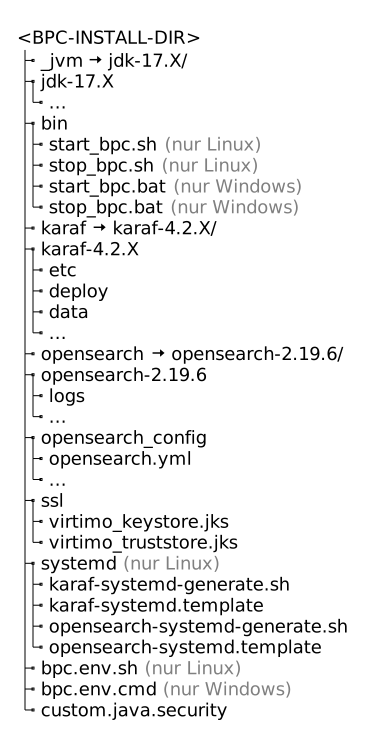
To use the scripts, the BPC directory structure must comply with the specifications in the installation guide.
Directory Structure According to the Installation Guide
Usage
The following examples demonstrate how to use the scripts.
-
Unix Systems
-
Windows systems
start_bpc.shstart_bpc.sh -h
start_bpc.sh --helpstart_bpc.sh --console|
If the Karaf console is active, Karaf will be terminated as soon as the console is closed. |
stop_bpc.shstart_bpc.batstart_bpc.bat -h
start_bpc.bat --helpstart_bpc.bat --console|
If the Karaf console is active, Karaf will be terminated as soon as the console is closed. |
stop_bpc.batOpenSearch
You can start OpenSearch directly from your terminal:
-
Unix systems
-
Windows systems
<BPC-INSTALL-DIR>/opensearch/bin/opensearch -d<BPC-INSTALL-DIR>\opensearch\bin\opensearch -dTo stop the component, you can terminate the corresponding process:
-
Unix systems
-
Windows systems
kill PROZESS_IDtaskkill /pid PROZESS_ID|
The process should not be forcefully terminated. A "hard" termination of the process can lead to data loss. |
For more information, visit OpenSearch.
Karaf
You can start Karaf directly from your terminal:
-
Unix systems
-
Windows systems
<BPC-INSTALL-DIR>/karaf/bin/start<BPC-INSTALL-DIR>\karaf\bin\startTo stop the component, you can run the following:
-
Unix systems
-
Windows systems
<BPC-INSTALL-DIR>/karaf/bin/stop<BPC-INSTALL-DIR>\karaf\bin\stopSee also the official Karaf documentation
For more information, visit Karaf.
