Configuring the Monitor Data Export
|
Automatic downloads must be enabled. |
For the monitor export to work correctly at the corresponding URL, automatic downloads for the BPC must be explicitly enabled in the Google Chrome browser. By default, Chrome blocks multiple consecutive downloads unless the BPC URL has been marked as trusted.
The data from the displayed monitor can currently be exported in CSV, XLSX (Excel), and JSON formats.
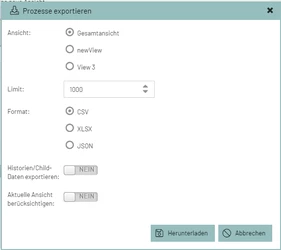
Options
The export settings are configured in the 'Process Monitoring' settings for each individual monitor component. The column formatting options (numbers/dates) vary depending on the format.
Custom renderers defined in the monitor are also applied during export (see Custom Renderers)
The monitor columns support the following formatters:
Any formatters that differ from these are not processed.
Export Dialog
The default settings for the export dialog can be controlled via the option function_exportDialogDefaults.
Example:
{
  "exportChildrenDisable": "true",  (1)
  "title": {                        (2)
	"de": "Export Daten",
	"en": "Export data"
  },
  "exportChildren": false,          (3)
  "currentView": true,              (4)
  "format": "csv",                  (5)
}| 1 | Enable/disable export of history data. If not configured, it is automatically disabled if no "Dataindex" history is available, and vice versa. |
| 2 | Title of the export window in various languages |
| 3 | Default value of the exportChildren field |
| 4 | Default value of the currentView field |
| 5 | Default value of the format field |
CSV
The size of the export should not matter, since the data is sent to the client in packets (stream). The 'Limit' can be set to '0' to export all existing records.
| Setting (Key) | Type | Description |
|---|---|---|
Function_ProcessExportCSV |
boolean |
Determines whether the CSV export should appear in the export dialog or not. |
Function_ProcessExportCSVCustomHeader |
boolean |
Determines whether the column names from the database or the customized monitor column names (Monitor instance → column_config → text) should be used. |
function_exportConfigCsvInclHidden |
boolean |
Determines whether fields marked as 'hidden' in 'column_config' should be included in the export or not. |
Function_ProcessExportCSVSeperator |
string |
Sets the CSV column separator. |
XLSX
Unlike CSV and JSON exports, the data cannot be streamed to the client because a workbook object containing all the data must first be created on the server side. Therefore, it must be ensured on the server side that memory is not overloaded.
Internally, the Apache POI project is used to generate the XLSX file.
| Setting (Key) | Type | Description |
|---|---|---|
Function_ProcessExportXLSX |
boolean |
Determines whether the JSON export should appear in the export dialog or not. |
Function_ProcessExportXLSXAutoResize |
boolean |
Automatically determine column width. See Configuring the Monitor Data Export. |
Function_ProcessExportXLSXCustomHeader |
boolean |
Specifies whether the column names from the database or the customized monitor column names (Monitor Instance → column_config → text) should be used as element names. |
Function_ProcessExportXLSXHiddenColumns |
boolean |
Include hidden columns in the Excel export. See Configuring the Monitor Data Export. |
Record limit |
number |
Maximum number of records included in the export. This value can be changed in the export dialog. A high value can negatively impact the server’s RAM usage when dealing with large datasets. Default: 10,000 |
If JSON is not available as an option in the export window, it must be configured separately as shown in the table above.
The configuration parameter responsible for this is function_exportConfigJson.
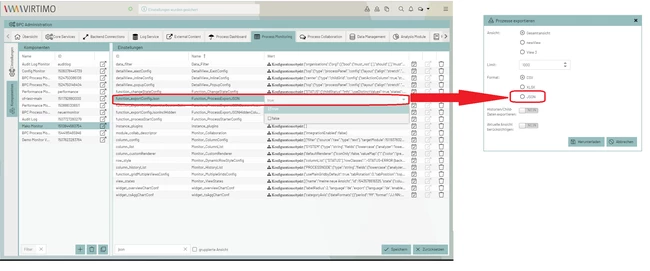
JSON
| Setting (Key) | Type | Description |
|---|---|---|
Function_ProcessExportJSON |
bool |
|
Function_ProcessExportJSONCustomHeader |
boolean |
|
Function_ProcessExportJSONHiddenColumns |
boolean |
Determines whether fields marked as 'hidden' in 'column_config' should be included in the export or not. |
Function_ProcessExportJSONUseUTCDateFormat |
boolean |
Determines whether date fields should be output in JSON/UTC format or in the format "yyyy-MM-dd HH:mm:ss" using the user’s or browser’s time zone. |
