Module and Module Instance Settings
Each module and each module instance (component) can specify which configuration options it requires. As the module’s developer, you define these using JSON files. The BPC backend then provides persistence, and the BPC frontend provides editing capabilities. Even modules that consist solely of a frontend module and do not have or require their own backend module implementation can define configuration options.
Backend
It is recommended to use JSON files to define module and instance configurations. While this is not strictly necessary, it saves a significant amount of code and speeds up implementation. Therefore, this documentation will focus exclusively on this approach. To read the configuration files, the following two methods must be implemented in the module implementation.
|
The code from the |
public class TemplateModule extends AbstractInstantiableModule {
...
    @Override
    public ModuleConfiguration getDefaultConfiguration() {
        return ModuleConfigurationBuilder.newInstance()
                .withModuleId(getModuleId())
                .addSortableGroupedSettingsFromFile(getModuleBundle(), "defaults/default_module_settings.json")
                .build();
    }

    @Override
    public ModuleConfiguration getDefaultInstanceConfiguration() {
        return ModuleConfigurationBuilder.newInstance()
                .withModuleId(getModuleId())
                .withInstanceId(null)
                .addSortableGroupedSettingsFromFile(getModuleBundle(), "defaults/default_instance_settings.json")
                .build();
    }
...
}
The method getDefaultConfiguration() provides the module’s configuration, and getDefaultInstanceConfiguration() provides the configuration for module instances.
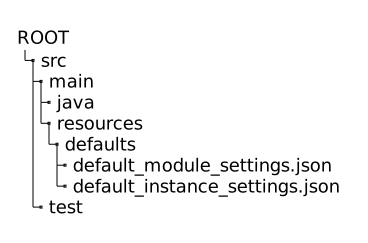
The two referenced JSON files are stored in the module’s own backend code as follows:
Frontend
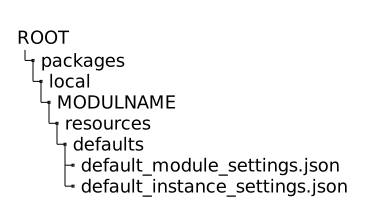
If the module does not have its own backend implementation, the JSON files should be stored here in the frontend code.
Structure of the JSON-based configuration files
The structure of the two JSON files for modules and module instances is identical. The individual settings are organized into groups. These groups help with better organization when there are many configuration options and also serve to distinguish your own settings from the default settings provided by BPC. This applies not only to the JSON but also to the BPC frontend, where these groups are used.
{
  "gruppenname1": {
    "sortPriority": 10,
    "settings": [ ... ]
  },
  "gruppenname2": {
    "sortPriority": 20,
    "settings": [ ... ]
  },
  "gruppenname3": {
    "sortPriority": 30,
    "settings": [ ... ]
  }, ...
}
The JSON object consists of the group names along with the sortPriority and the settings.
The sortPriority is used by the BPC frontend to display the groups in a specific order.
The BPC default group module has the sortPriority of 1, so this group is always displayed first in the table.
The BPC creates various settings for each module and each module instance.
If you want your own settings to be included in the groups created by the BPC, you must use a name such as module as the group name.
Your own settings will then be added to the group.
For existing settings, you can specify different default values. The name and type must match those of the existing setting.
In the settings array, the settings and configuration options for your own module are defined, including name, type, default value, and read/write permissions.
{
    "name": "server_url",
    "value": "https://www.example.com",
    "type": "text",
    "_writeableByRoles": [ "bpcadmin" ],
    "_readableByRoles": [ "bpcadmin", "bpcuser" ],
    "_label": "CUSTOM_MODULE_SETTING_SERVER_URL_LABEL"
}
Erklärung der Felder eines Settings:
-
name
Name der Einstellung, dieser wir zur Referenzierung sowie zur Persistierung verwendet. -
value
Den Default-Wert, welcher das Setting haben soll. -
type
Den Typ der Einstellung. Je nach Typ kommen im Frontend zum Editieren unterschiedliche Editoren zum Einsatz. Die möglichen Typen wietext,boolean,jsonetc. sind unter 'Die möglichen Typen' aufgelistet. -
_writeableByRoles
Legt die Rollen der Benutzer fest, welche die Einstellung editieren und löschen können. -
_readableByRoles
Legt die Rollen der Benutzer fest, welche den Wert der Einstellung auslesen können. -
_label
Der Key welcher für die Übersetzung des Namen verwendet werden soll. Siehe Multiple Language Support -
_tooltip: Ein Verweis auf einen Sprachschlüssel für einen Hilfetext, der als Tooltip neben der Einstellung angezeigt wird.
Die möglichen Typen
Im Folgenden werden die verwendbaren Typen aufgelistet und auf deren Verwendung eingegangen.
|
An den welcher in Zukunft die Liste aktualisiert: Die Typen/Editoren der Ext JS Komponenten müssen den Alias-Prefix |
Typ text
Ein einfaches Texteingabefeld für einzeilige Zeichenketten.
{
  "name": "url",
  "value": "jdbc:oracle:thin:@example.com:1521:XE",
  "type": "text",
  "_writeableByRoles": [ "bpcadmin" ],
  "_readableByRoles": [ "bpcadmin"],
  "_label": "CORE_SETTING_DATASOURCE_URL_LABEL",
  "_tooltip": "CORE_SETTING_DATASOURCE_URL_TOOLTIP",
  "disableEncoding": false
}
The HTML encoding, which is enabled by default, can be disabled using the option disableEncoding.
This should only be used or disabled if the data is not being saved and retrieved as intended. For example, this can occur with regular expressions.
Type icon
Allows you to select an icon from the Font Awesome library. The frontend provides a selection window with a preview.
{
  "name": "module_iconCls",
  "value": "x-fal fa-database",
  "type": "icon",
  "_label": "CORE_SETTING_MODULE_ICONCLS_LABEL",
  "_tooltip": "CORE_SETTING_MODULE_ICONCLS_TOOLTIP"
}
Type boolean or bool
A boolean value that represents a checkbox and can take the values true or false.
{
  "name": "allowUntrustedConnections",
  "value": false,
  "type": "boolean",
  "_writeableByRoles": ["bpcadmin"],
  "_readableByRoles": ["bpcadmin"],
  "_label": "CORE_SETTING_DEPLOYMENT_SYSTEM_ALLOW_UNTRUSTED_CONNECTIONS_LABEL",
  "_tooltip": "CORE_SETTING_DEPLOYMENT_SYSTEM_ALLOW_UNTRUSTED_CONNECTIONS_TOOLTIP"
}
Type number or integer or int
Numeric value, also known as a number.
{
  "name": "sortPriority",
  "value": 1000,
  "type": "int",
  "_writeableByRoles": [ "bpcadmin" ],
  "_readableByRoles": [ "bpcadmin", "bpcuser" ],
  "_label": "CORE_SETTING_DEPLOYMENT_SYSTEM_SORT_PRIORITY_LABEL",
  "_tooltip": "CORE_SETTING_DEPLOYMENT_SYSTEM_SORT_PRIORITY_TOOLTIP"
}
Type password
A special input field for passwords. The input is masked (e.g., with asterisks) and the value is stored encrypted on the server.
{
  "name": "password",
  "value": "",
  "type": "password",
  "_writeableByRoles": [ "bpcadmin" ],
  "_readableByRoles": [ "bpcadmin"],
  "_label": "CORE_SETTING_DATASOURCE_PASSWORD_LABEL",
  "_tooltip": "CORE_SETTING_DATASOURCE_PASSWORD_TOOLTIP"
}
Type list
Creates a dropdown list with predefined values. The available options are defined in the _valueList attribute as an array of strings.
{
  "name": "identityProvider",
  "value": "karaf",
  "type": "list",
  "_valueList": [ "karaf", "jdbc", "keycloak", "oidc" ],
  "_writeableByRoles": [ "bpcadmin" ],
  "_readableByRoles": [ "bpcadmin" ],
  "_label": "CORE_SETTING_IDENTITYPROVIDER_LABEL",
  "_tooltip": "CORE_SETTING_IDENTITYPROVIDER_TOOLTIP"
}{
"type": "list",
"value": "table",
"_valueList": [
{"value": "columns", "label": "DASHBOARD_SETTING_LAYOUT_CONFIG_DEFAULT_LABEL"},
{"value": "table", "label": "DASHBOARD_SETTING_LAYOUT_CONFIG_TABLE_LABEL"}
]
}Type date
Creates a date picker that allows the user to select a specific date from a calendar.
{
  "name": "validFrom",
  "value": "2025-10-01T00:00:00.000Z",
  "type": "date",
  "_writeableByRoles": [ "bpcadmin" ],
  "_readableByRoles": [ "bpcadmin", "bpcuser" ],
  "_label": "CORE_SETTING_VALID_FROM_LABEL",
  "_tooltip": "CORE_SETTING_VALID_FROM_TOOLTIP"
}
Type language
For selecting an available language.
{
  "name": "fallback_language",
  "value": "de",
  "type": "language",
  "_writeableByRoles": [ "bpcadmin" ],
  "_readableByRoles": [ "bpcadmin", "bpcuser" ],
  "_label": "CORE_SETTING_HTML_CONTENT_FALLBACK_LANGUAGE_LABEL",
  "_tooltip": "CORE_SETTING_HTML_CONTENT_FALLBACK_LANGUAGE_TOOLTIP"
}
Type json
For JSON objects or arrays. Smaller default values can be set directly (see Inline JSON Object Example). For larger objects, it is recommended to externalize them (see External Example). The path to the resources file is specified as a string. The BPC then reads and sets the value from this JSON file.
|
JSON is particularly well-suited for dynamic or unknown structures, e.g., user-specific metadata. If a fixed and known set of attributes needs to be configured, it is strongly recommended to split them into several individual settings. This improves clarity, maintainability, and data integrity, as each value is assigned the appropriate setting type ( |
{
  "name": "configuration",
  "value": {
    "pool": "dbcp2",
    "xa": "true",
    "pool.maxTotal": "10",
    "pool.maxIdle": "5",
    "pool.minIdle": "2"
  },
  "type": "json",
  "_writeableByRoles": [ "bpcadmin" ],
  "_readableByRoles": [ "bpcadmin"],
  "_label": "CORE_SETTING_DATASOURCE_CONFIGURATION_LABEL",
  "_tooltip": "CORE_SETTING_DATASOURCE_CONFIGURATION_TOOLTIP"
}{
"type": "json",
"value": [
"red",
"green",
"blue"
]
}{
"type": "json",
"value": "defaults/pool_settings.json"
}{
"pool": "dbcp2",
"pool.minIdle": "2",
"pool.maxIdle": "5",
"pool.maxTotal": "10"
}Type sql
A multi-line text field intended for entering SQL queries, which provides appropriate formatting and syntax highlighting in the frontend.
{
  "name": "sourceCommonTableExpressionQuery",
  "value": "SELECT * FROM articles;",
  "type": "sql",
  "_writeableByRoles": [ "bpcadmin" ],
  "_readableByRoles": [ "bpcadmin" ],
  "_label": "CORE_SETTING_REPLICATION_SOURCE_COMMON_TABLE_EXPRESSION_QUERY_LABEL",
  "_tooltip": "CORE_SETTING_REPLICATION_SOURCE_COMMON_TABLE_EXPRESSION_QUERY_TOOLTIP"
}
Type xml
Provides a multi-line text field specifically designed for entering XML data. The front end offers syntax highlighting and validation to ensure the correctness of the XML document.
{
  "name": "legacy_system_config",
  "value": "<config>\n  <user role=\"admin\">\n    <id>user01</id>\n  </user>\n  <options>\n    <timeout>30</timeout>\n    <retries enabled=\"true\">5</retries>\n  </options>\n</config>",
  "type": "xml",
  "_writeableByRoles": [ "bpcadmin" ],
  "_readableByRoles": [ "bpcadmin" ],
  "_label": "CORE_SETTING_LEGACY_SYSTEM_CONFIG_LABEL",
  "_tooltip": "CORE_SETTING_LEGACY_SYSTEM_CONFIG_TOOLTIP"
}
Type css
A multi-line text field specifically intended for entering CSS code and capable of providing corresponding syntax highlighting.
{
    "name": "editorStyles",
    "value": ".custom1{color : blue } .custom2{ color: green }",
    "type": "css",
    "_writeableByRoles": [ "bpcadmin","htmlcontent_editor" ],
    "_readableByRoles": [ " bpcadmin", "bpcuser" ],
    "_label": "CORE_SETTING_CSS_EDITOR_STYLES"
}
Type code
For code snippets. A generic setting type that represents an input field; when activated, it opens a separate, large code editor window. The language can be configured using ` editorLangauge `. If not specified, no language validation takes place.
{
  "name": "processing_script",
  "value": "function process(data) {\n  // Implementierung hier\n  return data.value * 1.1;\n}",
  "type": "code",
  "_editorLanguage": "javascript",
  "_writeableByRoles": [ "bpcadmin" ],
  "_readableByRoles": [ "bpcadmin" ],
  "_label": "CORE_SETTING_PROCESSING_SCRIPT_LABEL",
  "_tooltip": "CORE_SETTING_PROCESSING_SCRIPT_TOOLTIP"
}
Type dataSourceCombo
For specifying or selecting an existing database data source.
{
  "name": "rdmsDataSourceName",
  "value": "",
  "type": "dataSourceCombo",
  "_writeableByRoles": [ "bpcadmin" ],
  "_readableByRoles": [ "bpcadmin" ],
  "_label": "CORE_SETTING_REPLICATION_RDMS_DATASOURCE_NAME_LABEL",
  "_tooltip": "CORE_SETTING_REPLICATION_RDMS_DATASOURCE_NAME_TOOLTIP"
}
Type index
For specifying or selecting an OpenSearch index.
{
  "name": "data_index",
  "value": "",
  "type": "index",
  "_writeableByRoles": ["bpcadmin"],
  "_readableByRoles": ["bpcadmin", "bpcuser"],
  "_label": "MONITOR_SETTING_DATA_INDEX_LABEL",
  "_tooltip": "MONITOR_SETTING_DATA_INDEX_TOOLTIP"
}
Type datasourcefactoryselector
Provides a drop-down list for selecting an available "Datasource Factory" to define drivers for database connections.
{
  "name": "driverName",
  "value": "",
  "type": "datasourcefactoryselector",
  "_writeableByRoles": [ "bpcadmin" ],
  "_readableByRoles": [ "bpcadmin"],
  "_label": "CORE_SETTING_DATASOURCE_DRIVERNAME_LABEL",
  "_tooltip": "CORE_SETTING_DATASOURCE_DRIVERNAME_TOOLTIP"
}
Type linkedModuleInstance or moduleInstance
Enables linking to another, individual module instance. Filters the selectable instances based on _linkedModuleId and _linkedInstanceType. The value stores the ID of the linked instance.
{
  "name": "identityProviderBackendConnection",
  "value": "idp_karaf",
  "type": "linkedModuleInstance",
  "_linkedModuleId": "backendconnection",
  "_linkedInstanceType": "identity_provider",
  "_writeableByRoles": [ "bpcadmin" ],
  "_readableByRoles": [ "bpcadmin" ],
  "_label": "CORE_SETTING_IDENTITYPROVIDER_BACKENDCONNECTION"
}
Type coreLogLevelSelector
A specialized dropdown list for selecting a log level (e.g., DEBUG, INFO, WARN, ERROR).
{
  "name": "logLevel",
  "type": "coreLogLevelSelector",
  "value": "warn",
  "_writeableByRoles": [ "bpcadmin" ],
  "_readableByRoles": [ "bpcadmin", "bpcuser" ],
  "_label": "CORE_SETTING_LOG_LEVEL"
}
Type corethemeselector
A dropdown list for selecting an available BPC theme for the frontend.
{
  "name": "theme_name",
  "value": "Default",
  "type": "corethemeselector",
  "_writeableByRoles": [ "bpcadmin" ],
  "_readableByRoles": [ "bpcadmin", "bpcuser" ],
  "_label": "CORE_SETTING_THEME_NAME"
}
Type tag
Provides an input field that allows the user to enter multiple separate text values.
{
  "name": "content_tags",
  "value": [
    "wichtig",
    "abrechnung",
    "q3_2025"
  ],
  "type": "tag",
  "_writeableByRoles": [ "bpcadmin", "editor" ],
  "_readableByRoles": [ "bpcadmin", "bpcuser" ],
  "_label": "CORE_SETTING_CONTENT_TAGS_LABEL",
  "_tooltip": "CORE_SETTING_CONTENT_TAGS_TOOLTIP"
}
Accessing module settings from the backend module
Access to module and module instance settings is provided via the method getConfiguration(), which returns a de.virtimo.bpc.api.ModuleConfiguration.
The best way to access the value of a setting is via getSettingValue(settingName).
import de.virtimo.bpc.api.ModuleConfiguration;
import de.virtimo.bpc.module.AbstractInstantiableModule;

public class ExampleModule extends AbstractInstantiableModule {
    public static final String MODULE_SETTING_DATABASE_PREFIX = "databasePrefix";

    private String getDatabasePrefix() {
        ModuleConfiguration moduleConfig = getConfiguration();
        return moduleConfig.getSettingValue(MODULE_SETTING_DATABASE_PREFIX).asString();
    }
}import de.virtimo.bpc.api.ModuleConfiguration;
import de.virtimo.bpc.module.AbstractModuleInstance;
public class ExampleModuleInstance extends AbstractModuleInstance {
private static final String MODULE_INSTANCE_SETTING_WRITE_TO_DATABASE_ENABLED = "writeToDatabaseEnabled";
private boolean isWriteToDatabaseEnabled() {
ModuleConfiguration moduleInstanceConfig = getConfiguration();
return moduleInstanceConfig.getSettingValue(MODULE_INSTANCE_SETTING_WRITE_TO_DATABASE_ENABLED).asBoolean();
}
private String getDatabasePrefixFromParentModule() {
ModuleConfiguration moduleConfig = getParentModule().getConfiguration();
return moduleConfig.getSettingValue(ExampleModule.MODULE_SETTING_DATABASE_PREFIX).asString();
}
}Access from the frontend module
Access to a setting in the module and module instance settings is performed using the method BpcCommon.Api.getSetting.
This method returns the value or the data model of the setting.
The data model is required, among other things, to enable write access to settings.
The following parameters must be passed: . Module or instance ID (in the case of a core setting, "_core") . Setting name . getModel (Default: false; controls whether the data model is returned) .Example access from an ExtJS class in BPC
// Lesezugriff auf ein Core-Setting
BpcCommon.Api.getSetting("_core", "browser_title")

// Lesezugriff auf ein Monitor-Modul-Setting
BpcCommon.Api.getSetting("monitor", "moduleUrl")

// Lesezugriff auf ein Setting der Monitorinstanz "auditlog"
BpcCommon.Api.getSetting("auditlog", "module_name")

// Lesezugriff (über das Datenmodell) auf Inhalte einer Modulinstanz mit der Instanz-ID "myhtmlcontent"
BpcCommon.Api.getSetting("myhtmlcontent", "content", true).get("value")

// Schreibzugriff (über das Datenmodell) auf Inhalte einer Modulinstanz mit der Instanz-ID "myhtmlcontent"
BpcCommon.Api.getSetting("myhtmlcontent", "content", true).set("value", [])