Migration from BPC 4.0 to BPC 4.1
This page describes how to migrate an existing BPC 4.0 installation to BPC 4.1.
If you are planning a migration from BPC 3.*, please first perform the Migration from BPC 3.* to BPC 4.1.
Initial Situation
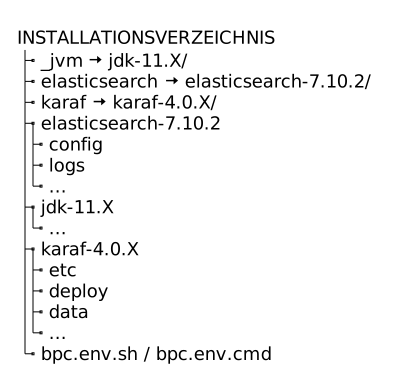
You have installed BPC 4.0 and it is running.
The INSTALLATIONSVERZEICHNIS looks something like this:
Backup
The existing installation will not be modified during the migration; however, it is recommended that you create a backup of the existing installation.
Preparation
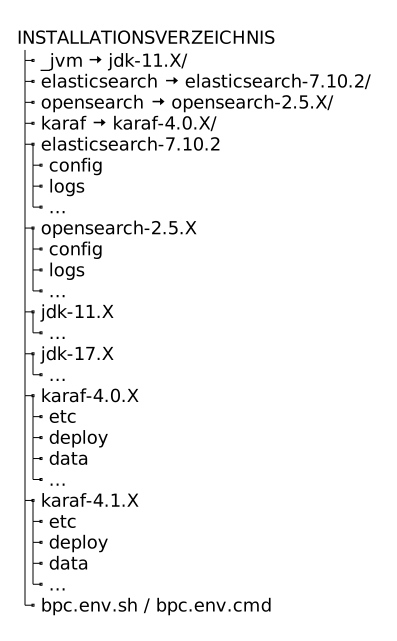
Install BPC 4.1 as described in the Installation, without changing any existing symlinks and without starting the newly installed components (OpenSearch and Karaf).
The INSTALLATIONSVERZEICHNIS looks something like this:
Migration
The migration involves transferring the existing data (including the configuration) from Elasticsearch to OpenSearch.
Proceed as follows:
-
Stop Karaf (Elasticsearch must continue to run)
e.g., via
karaf/bin/stop -
Create a snapshot of all indices in Elasticsearch:
-
Unix systems
-
Windows systems
curl -X PUT 'localhost:9200/_snapshot/bpc_backup/migration?wait_for_completion=true'curl -X PUT "localhost:9200/_snapshot/bpc_backup/migration?wait_for_completion=true"You can also specify a selection of indices at this point. For the exact syntax and all options, see https://www.elastic.co/guide/en/elasticsearch/reference/7.10/snapshots-take-snapshot.html. You must include at least the index
bpc-configuration. -
-
Stop Elasticsearch
-
Start OpenSearch
-
Create a backup repository
-
Unix systems
-
Windows systems
curl -X PUT -H 'Content-Type: application/json' -k -u admin:admin 'https://localhost:9200/_snapshot/bpc_backup' -d '{ "type": "fs", "settings": { "location": "bpc_backup" } }'curl -X PUT -H "Content-Type: application/json" -k -u admin:admin "https://localhost:9200/_snapshot/bpc_backup" -d "{ ""type"": ""fs"", ""settings"": { ""location"": ""bpc_backup"" } }" -
-
Stop OpenSearch
-
Copy the Elasticsearch backup to OpenSearch
Copy the directory
INSTALLATIONSVERZEICHNIS/elasticsearch/data/bpc_backuptoINSTALLATIONSVERZEICHNIS/opensearch_data/bpc_backup -
Start OpenSearch
-
Load backups
-
Unix systems
-
Windows systems
curl -X POST -H "Content-Type: application/json" -k -u admin:admin 'https://localhost:9200/_snapshot/bpc_backup/migration/_restore' -d '{ "indices": "*,-.opendistro_security", "include_global_state": false }'curl -X POST -H "Content-Type: application/json" -k -u admin:admin "https://localhost:9200/_snapshot/bpc_backup/migration/_restore" -d "{ ""indices"": ""*,-.opendistro_security"", ""include_global_state"": false }" -
-
Delete snapshots that are no longer needed
-
Unix systems
-
Windows systems
curl -X DELETE -k -u admin:admin 'https://localhost:9200/_snapshot/bpc_backup/migration'curl -X DELETE -k -u admin:admin "https://localhost:9200/_snapshot/bpc_backup/migration" -
Follow-up
-
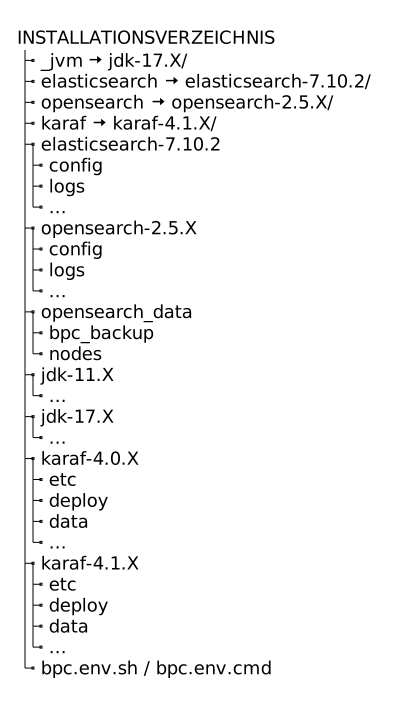
The symlinks
_jvmandkarafshould now be updated to point to the new directories.BPC 4.1 remains compatible with Java 11. However, support for Java 11 expired in 2023. A migration to Java 17 is recommended.
When used in conjunction with INUBIT, you can continue to use the Java version shipped with INUBIT.
-
The existing BPC license must be copied to the directory
INSTALLATIONSVERZEICHNIS/karaf/deploy. -
The required database drivers must be installed.
-
The new Karaf and OpenSearch (if not already done) can now be started.
|
Please note that the old BPC installation is no longer started automatically (e.g., via systemd). |
The INSTALLATIONSVERZEICHNIS looks something like this:
The old installation can now be deleted if necessary.
