Routing / Deep Links
The BPC supports the use of deep links. To do this, it uses the URL’s hash (MDN Docs Location).
There, the BPC stores routes separated by &.
Each route is broken down into further components by /.
https://COMPANY.COM/BPC#/one/part&second/part
Navigation Route
The part of the route that begins with /_nav is the navigation route.
This is an optional component that refers to an element of the navigation.
Since modules in the BPC can be placed in different locations within the navigation at the same time, this part points to the current position in the Navigation Settings.
This ensures that the correct state of the navigation elements is restored if the page is reloaded.
|
If the BPC is loaded only with [_navigations_route] and without [_modul_route], the module is activated and then configured after the addressed part of the navigation. |
Syntax
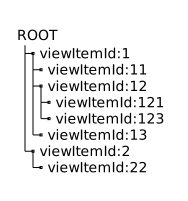
The navigation has a tree structure.
To address an element in this tree, the viewItemId of the respective nodes are concatenated.
The route /1/12/123 addresses the element with the viewItemId 123
| The [_navigations_route] should not be used directly by the module developer. Only [_modul_route] should be used for addressing and configuring BPC modules. |
Module Route
A segment begins with /module and addresses a module in the BPC.
This URL may contain additional Parameters for the target module.
The module itself is responsible for evaluating these Parameters.
Syntax
/module/MODULE-ID/INSTANCE-ID/RESERVED/ENCODED-MODULE-OPTIONS/ADDITIONAL-ROUTE-ELEMENT-1/ADDITIONAL-ROUTE-ELEMENT-n
INSTANCE-ID
The ID of the respective module instance. If the module offers a general module GUI in addition to instances, the module ID is specified here again.
ENCODED-MODULE-OPTIONS
A query string (key=value&foo=bar) or JSON ({"key":"value","foo":"bar"}) can be specified at this position.
These are passed directly to the module and can be evaluated there.
The supported options should be specified in the respective module documentation.
ADDITIONAL-ROUTE-ELEMENT
Any sequence of elements can be appended at the end. These can be handled programmatically by the respective module ([_programmatisches_routing]) or used for the [_deklaratorisches_routing] (see [_routing_innerhalb_von_modulen]).
Routing Within Modules
Declarative Routing
Declarative routing is strongly based on the arrangement of interface elements (Ext.Components). In general, all elements are arranged in a tree structure. Routing can be used to control which path from the root to a branch should be active.
The route controller automatically determines the active route based on the visible elements and sets the path in the URL. If an element is to be included in routing, it must be provided with at least one piece of path information. Since the order of elements is typically defined top-down, the path should always be set by the “parent element.” If an element requires its own routing, it can define an additional path.
It is possible for parallel paths to be visible in the tree structure. In this case, the route in the URL is enclosed in square brackets. Bracketed elements are equivalent and are resolved in parallel.
If the BPC is loaded with a route, the route controller attempts to locate and activate the elements one by one according to the route.
When locating the target elements, potential asynchronous creation of elements is taken into account.
The application of the route can be handled entirely or only partially by modules.
See applyRoute and applySubRoute for more information.
|
The BPC generates a route for the MainView of each module (see [_modul_route]). |
The configuration is set on the elements (which must extend from Ext.Component ) via an route object.
route optionsExt.define({
// ...
route: {
path: "demo",
subPath: ":getSubPath",
applySubRoute: "",
applyRoute: "",
name: "",
subRouteOrder : ["bpcInstanceManagerInstanceGrid"]
}
//...
});path
(String). Name to be set in the route path for this element.
If the path begins with :, it is assumed that this refers to an attribute or a function on the element.
An attempt is made to resolve this and set it in place.
Example: :getId causes the function getId() to be called on the element, and the result is set in place of the path.
Alternatively, the path can also be set directly on the element using the routePath attribute.
routePath to route.pathExt.define({
// ...
routePath: "demo"
//...
});The information in route.path is synchronized with the routePath attribute.
|
The |
subPath
(String; Optional). Describes a path for routing within the current element. For example, a grid can pass the path to the selection of its rows.
If the value begins with :, it is evaluated as described at path.
|
Unless ` |
applyRoute
(String|Function; Optional). A function or reference to a function (which may also reside in the ViewController) to which the activation of the target component is delegated. The function is executed in the context in which it is defined (e.g., ViewController). The route still to be resolved is passed to the function as an array. Typically, only the first element in the array is evaluated, but the function can also take over the rest of the routing process from this point on. The function must return a Promise that resolves as soon as routing is complete. The Promise must return an object in the following format:
{
  "remainingRouteArray": "{string[]}",
  "currentRoot": "{Ext.Component}",
  "gotoSubRoute": "{boolean}"
}
remainingRouteArray
(Array; Optional). An array containing the routes still to be processed. This is processed further by the route controller. If no array or an empty array is returned here, the routing process ends.
currentRoot
(Ext.Component; Optional).
Element from which the remaining route (remainingRouteArray) is to be resolved.
gotoSubRoute
(Boolean; Optional).
If this value is true, an attempt is made to resolve the subPath in the subsequent routing.
applySubRoute
(String|Function; Optional).
This function works similarly to applyRoute, but refers to subPath.
Example
Ext.define("BPCMODULE.view.Main", {
   extend : "Ext.tab.Panel",

   title : "Main View - I'm a TabPanel",

   items : [{
      // this tab will produce the route .../child1
      title     : "1",
      html      : "Child 1",
      routePath : "child1"
   },
   {
      // this tab will produce the route .../child2/[/child21,/child2n]
      title     : "2",
      xtype     : "panel",
      routePath : "child2",
      layout    : "hbox",
      items     : [{
         title     : "2.1",
         html      : "Child 2.1",
         routePath : "child21"
      },
      {
         title     : "2n",
         html      : "Child 2n",
         routePath : "child2n"
      }]
   }, {
      // this tab will produce the route .../child3/child31
      title     : "3",
      html      : "Child 3",
      routePath : "child3",
      items     : [
         {
            title     : "31",
            html      : "Child 31",
            routePath : "child31"
         }
      ]
   },
   {
      // this tab will produce the route .../childn
      title     : "n",
      html      : "Child n",
      routePath : "childn"
   }]

});Ext.define("BPCMODULE.view.Main", {
extend : "Ext.container.Container",
controller : "mainController",
title : "Main View - I'm a Card Layout",
layout : {
type : "card",
},
items : [
{
xtype : "container",
routePath : "start", // this card will produce the route .../start
items : [
{
xtype : "button",
itemId : "newPageBtn",
routeTarget : "page1" // routeTarget is the same as xtype of view we want to show
}
]
},
{
xtype : "page1",
routePath : "newPage"
}
]
});
Ext.define("BPCMODULE.view.NewPage", {
extend : "Ext.container.Container",
alias : "widget.page1",
controller : "mainController",
title : "Page1 - Card Layout",
layout : {
type : "card"
},
items : [
{
xtype : "container",
routePath : "overview", // this card will produce the route .../overview/newPage
items : [
{
}
]
}
]
});
Ext.define("BPCMODULE.view.MainController", {
extend : "Ext.app.ViewController",
alias : "controller.mainController",
control : {
"button[routeTarget]" : {
click : "showTargetView"
}
},
showTargetView : function (button, event) {
event.stopPropagation();
event.stopEvent();
const routeTarget = button.routeTarget;
if (routeTarget) {
const layout = this.getView().getLayout();
const targetView = Ext.ComponentQuery.query(routeTarget)[0];
layout.setActiveItem(targetView);
}
return false;
}
});