Deployment Constraints
When deploying settings to a target system, certain settings may cause unintended behavior on that system. To help keep track of these critical settings during deployment, they can be marked with an exclamation point in the deployment dialog, and the user is notified that they are in the process of deploying critical settings.
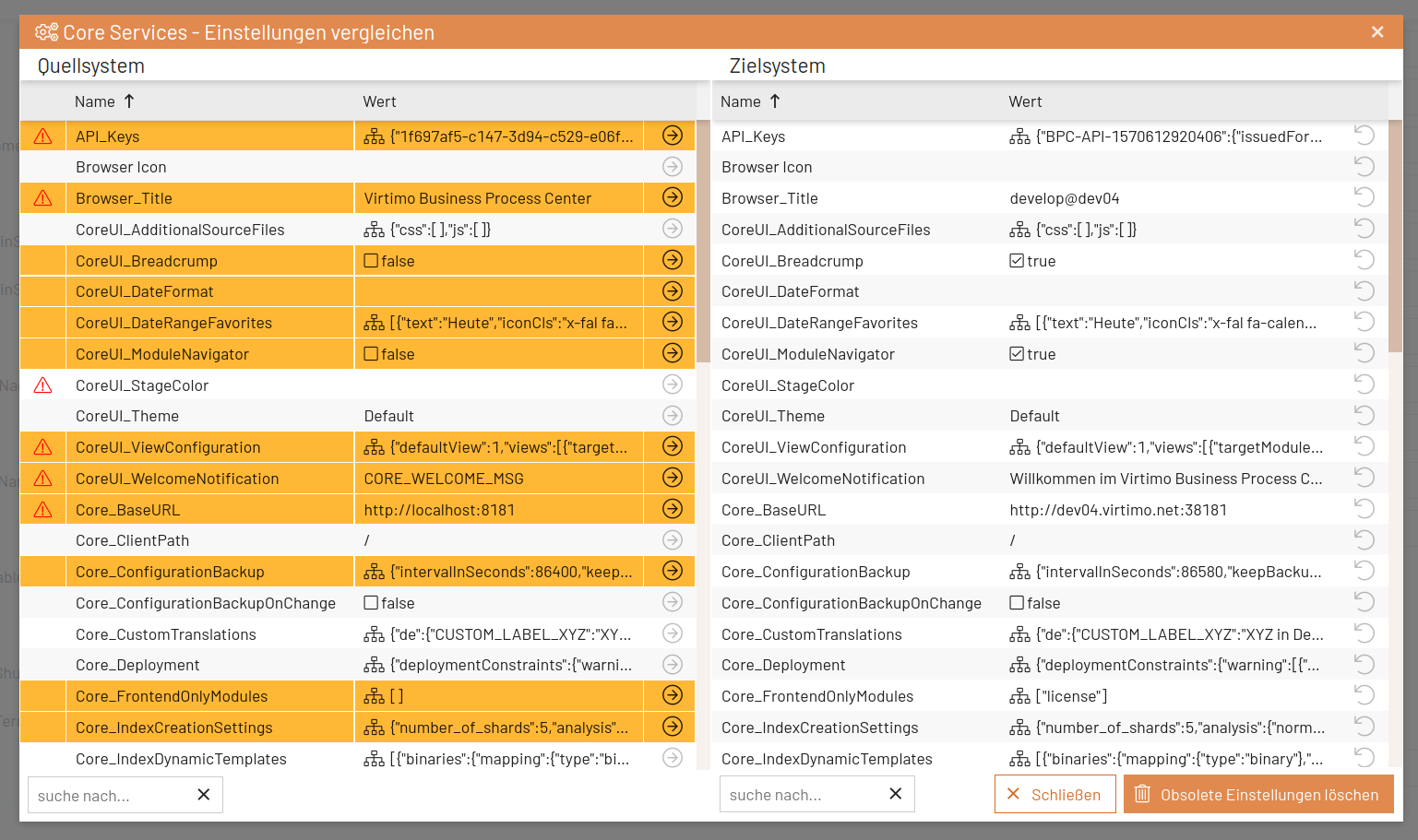
Customization via Core Setting
We have already identified a few settings as critical and stored them in the "Core Services" setting "Core_Deployment." At runtime, this list can be expanded to include additional settings, as well as settings that are NOT Core-specific, such as the Monitor, Dashboard, etc.
{
  "deploymentConstraints": {
    "warning": [
      {
        "module": "_core",
        "settings": [ "apiKeys", "browser_title", "bpcBaseUrl", "gui_stageColor", "viewConfiguration", "welcomeNotification", "login_title" ]
      },
      {
        "module": "backendconnection",
        "instanceType": "identity_provider",
        "settings": ["identityProvider_mappings", "identityProvider_configuration"]
      },
      {
        "module": "backendconnection",
        "instanceType": "http_proxy",
        "settings": ["connectionBaseUrl", "connectionUsername", "connectionPassword"]
      }
    ]
  }
}{
"deploymentConstraints": {
"warning": [
{
...
},
{
"module": "monitor",
"instanceType": "none",
"settings": [ "inubit_dbTablePrefix" ]
}
]
}
}Specify in 3rd-Party Modules
If you want to specify deployment constraints in your own or other modules without storing them in the Core setting mentioned above, create a setting named "deployment" in your module and store a deployment constraints JSON there.
Add the "deployment" module setting
In the module settings (default_module_settings.json
{
  "beispielGruppenName": {
    "sortPriority": 100,
    "settings": [
      {
        "name": "deployment",
        "value": "defaults/deployment.json",
        "type": "json",
        "_writeableByRoles": [ "bpcadmin" ],
        "_readableByRoles": [ "bpcadmin", "bpcuser" ]
      },
      ...
    ]
  }
...
}
JSON for the “deployment” module setting
Here is a file to create: resources/defaults/deployment.jsondata_index
{
  "deploymentConstraints": {
    "warning": [
      {
        "module": "monitor",
        "settings": [ "monitor_data_view_limit" ]
      },
      {
        "module": "monitor",
        "instanceType": "none",
        "settings": [ "data_index", "data_historyIndex" ]
      }
    ]
  }
}|
The JSON must have exactly this structure with “deploymentConstraints → warning []”! |
