BPC Cluster
A BPC cluster consists of an OpenSearch cluster and a network of Karaf installations.
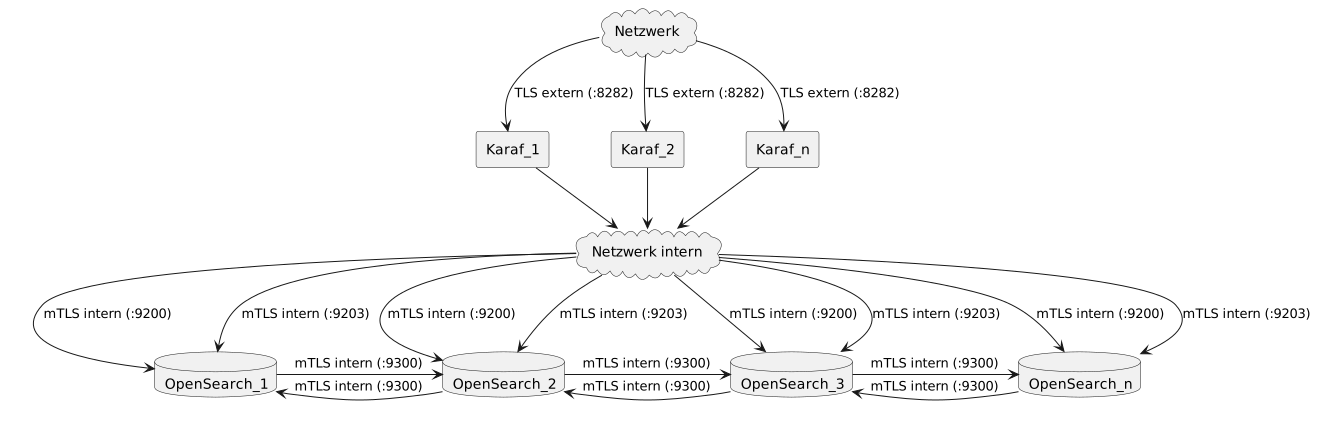
Preparations
On the available servers, follow the installation instructions to install the desired number of OpenSearch nodes and Karaf instances that will form the BPC cluster. The OpenSearch cluster should consist of at least 3 nodes. The Karaf federation should consist of at least 2 instances.
OpenSearch Cluster
The following are the necessary settings for setting up an OpenSearch cluster. Changes to these settings require a restart of the affected Karaf and OpenSearch installations.
Further information on setting up an OpenSearch cluster can be found in the OpenSearch documentation.
|
In an OpenSearch cluster, if the “ If this is not easily feasible, S3 can also be set as the backup repository type for an on-premises installation by installing and using an S3-compatible solution such as MinIO. See MinIO as an S3 Backup for OpenSearch for more information. The backup repository to be used is specified via the Core Services setting |
OpenSearch-ClusterName
OpenSearch uses a cluster name to identify nodes that belong together. By default, OpenSearch binds only to local network interfaces, so instances installed on different servers cannot see each other and can therefore be operated with the same cluster name without complications. However, if multiple separate instances are running on a single server, or if the listeners are intentionally bound to more than just localhost (e.g., to deliberately set up clusters), and the resulting clusters are intended to be separate from one another (e.g., multiple stages), the cluster names must be changed.
This is done in the file <OS_Root>/config/opensearch.yml:
cluster.name: opensearch_virtimo
OpenSearch Node Name
Giving the respective nodes in the cluster a descriptive name is optional but recommended. If no name is specified, OpenSearch assigns an automatically generated name, which makes monitoring and troubleshooting the node more difficult.
This is done in the file <OS_Root>/config/opensearch.yml:
node.name=BPC-opensearch-node1
OpenSearch Node Roles
Different roles can be assigned to the nodes in the cluster. By default, a node is assigned all roles: cluster_manager, data, ingest, remote_cluster_client
If you have many nodes (> 3) available, you can, for example, designate one node as the cluster manager. This node then does not store any data and can focus solely on managing the cluster.
This is configured in the file <OS_Root>/config/opensearch.yml:
node.name: BPC-opensearch-cluster_manager
node.roles: [ cluster_manager ]
The default configuration is as follows:
node.roles=cluster_manager,data,ingest,remote_cluster_client
OpenSearch Network Interface
If you want OpenSearch to listen on more than just the local network interfaces, this can also be configured in the file <OS_Root>/config/opensearch.yml (for example, by setting it to _global_):
network.host: _global_
Here, you can specify IP addresses, hostnames, or specific placeholders. Possible special parameters here are:
-
_local_→ Local interfaces only -
_[NetzwerkInterfaceName]_→ A specific network interface such as eth0 → _[eth0]_ -
_site_→ Locally assigned addresses of the host -
_global_→ Globally assigned addresses of the host
A combination of these is also possible:
network.host: ["192.168.1.3", "unserbpchost.Virtimo.net", _"[tun0]"]_
|
If an IP address is set under |
OpenSearch Discovery Hosts
However, to ensure it can establish contact with other cluster nodes, at least one other node (preferably all others) must be specified.
This is done in the file <OS_Root>/config/opensearch.yml:
discovery.seed_hosts: ["<opensearch-1>", "<opensearch-2>", "<opensearch-3>"]
OpenSearch-InitialClusterManagerNode
Initially, a Cluster Manager Node must be specified:
This is configured in the file <OS_Root>/config/opensearch.yml:
cluster.initial_cluster_manager_nodes: ["BPC-opensearch-node1"]
Firewall
If a firewall is in use, at least the following connections must be open.
-
Karaf → OpenSearch: HTTP Port (opensearch/config/opensearch.yml | http.port)
-
Karaf → OpenSearch: WebSocket Port (opensearch/config/opensearch.yml | os-BPC-plugin.websocket.port)
-
OpenSearch → OpenSearch: Transport Port (opensearch/config/opensearch.yml | transport.tcp.port)
Karaf Cluster
For each Karaf instance, specify the URLs of the individual nodes in the OpenSearch cluster in the ` BPC Configuration File ` file using the ` de.virtimo.bpc.core.opensearch.hosts ` option, separated by commas.
This ensures that all nodes are recognized, and there will be no issues if one of them happens to be unavailable.
