Automatic Creation of Module Components
It often happens that when delivering or deploying your bundle or module, you want to provide a module component right away that the end user can start working with or using immediately, without having to create it themselves first.
Quick Guide
-
Create a `
irgend_ein_name.json` file in the `resources/autocreate/moduleinstances` directory of your bundle -
This JSON file must include, among other things, all settings for the module component to be created
|
This works with both backend and frontend bundles. The recommended location is to place the JSON file in the backend bundle. |
Background Info
Your bundle/module is loaded by the BPC Core, which searches for JSON files in the resources/autocreate/moduleinstances directory. If one is found, it is loaded and the module instance is created if it does not already exist. This happens every time your bundle is loaded or started.
Implementation
First, make sure that the directory structure autocreate/moduleinstances is present in your bundle under resources. This means you must create the directory autocreate under resources, and the directory moduleinstances under that.
In the moduleinstances directory, create a JSON file containing the information for the component to be created.
It is clearest to use the ID of the module component to be created as the filename. And the file must have the file extension .json.
Otherwise, it will be ignored.
If multiple module components are to be created, then multiple JSON files must be created.
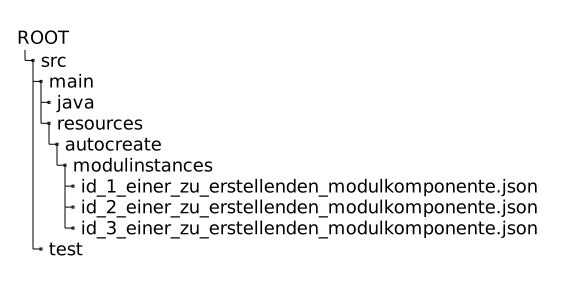
The content of the JSON files must have the following structure.
{
  "moduleId": "<ID deines Moduls>",
  "instanceId": "<ID der anzulegenden Modulkomponente>",
  "settings": {
    "internalInstance": true,
    "module_name": "Performance Monitor",
    "module_iconCls": "x-fal fa-fighter-jet",
    ...
    "<Name deines Setting>": <Wert deines Setting>
    ...
}-
moduleId- the ID you defined in yourModule.getModuleId()implementation -
instanceId- the ID of the module component to be created. Please ensure these are unique. -
settings- Here, you define the values for each individual setting that will be used to create the module component.
