API Keys
An API key corresponds to a static session in BPC. Like a UserSession, it contains attributes such as assigned organizations, roles, and permissions. Each API key has a defined validity period. Additionally, it is possible to specify who issued this API key and for whom.
Using the API Key
API keys are used both when calling API endpoints and when configuring deployment systems.
Calling an API Endpoint
In addition to the standard user login, you can also use an API key to access the BPC API. This allows for direct authentication when calling the API. Without an API key, a separate authentication request must be made before accessing an API function.
For the BPC to accept the API key for authentication, it must be included in the HTTP header X-APIKey.
curl --header "X-APIKey: bed3a955ce73feb7186bd3f4a689a6f46b7b6264c30d0236dde87a26fc5acdbf" 'http://localhost:8181/cxf/bpc-core/status'Deployment System
To use the deployment function, deployment systems must be created as Backend Connections of the type deployment_system (see Backend Connections).
An API key must be stored for each of these deployment systems.
Managing API Keys
API keys are managed via a system setting where both the technical parameters and individual access permissions are defined. An editor is available for convenient editing.
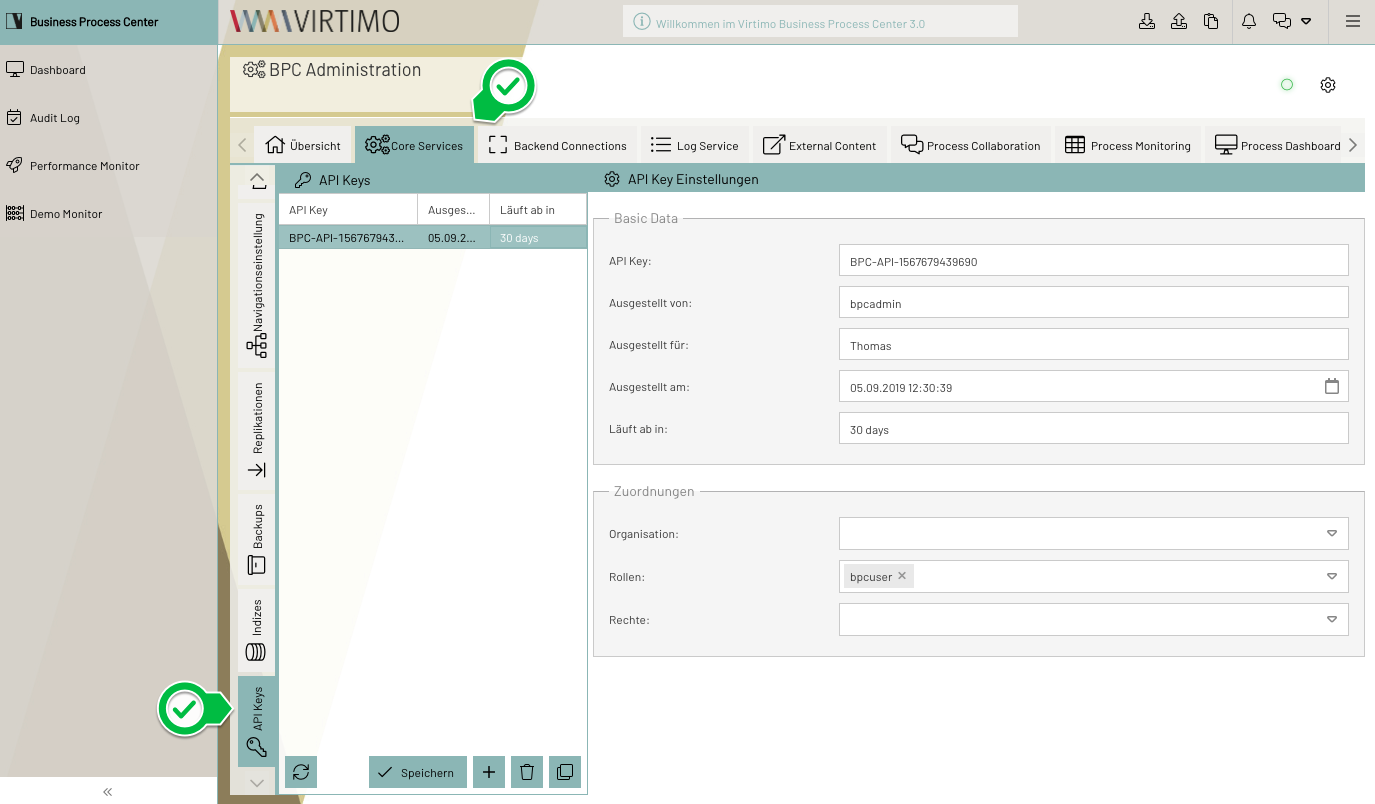
Setting
API keys can also be configured directly via the core setting API_Keys.
[
  {
    "id": "API-5d5a67b",
    "apiKey": "bed3a955ce73feb7186bd3f4a689a6f46b7b6264c30d0236dde87a26fc5acdbf",
    "name": "Beispiel API Key",
    "issuedBy": "bpcadmin",
    "issuedFor": "",
    "issuedOn": "2025-10-17T11:08:34Z",
    "expiresOn": "2026-10-17T09:46:12Z",
    "description": "Das ist ein Beispiel-API-Key",
    "assignedOrganisations": [],
    "assignedRoles": [
      "bpcuser"
    ],
    "assignedRights": []
  }
]
Configuration parameters of an API key
The various parameters and their associated functions are described below.
| Setting (Key) | Type | Description |
|---|---|---|
ID |
text |
The ID of the API key. |
API Key |
text |
The API key, which must be used, for example, when calling an API endpoint. |
Name |
text |
A freely assignable name, e.g., for the intended use. |
Issued by |
text |
Name of the user who created the API key. |
Issued for |
text |
Name of the user for whom the API key was issued. |
Issued on |
text |
Date on which the API key was issued. Date format "yyyy-MM-dd’T’HH:mm:ssZ" |
Valid until |
text |
Date on which the API key becomes invalid. Date format "yyyy-MM-dd’T’HH:mm:ssZ" |
Comment |
text |
Additional information about the API key. |
Assignments / Organizations |
array |
The API key belongs to this organization. |
Assignments / Roles |
array |
The API key belongs to these roles. |
Assignments / Permissions |
array |
The API key has these permissions. |
|
After the date specified at |
Mappings
Using the mappings assignedOrganisations, assignedRoles, and assignedRights, you can assign fine-grained access rights to API keys.
For example, according to the API documentation, either the role BACKUPS_ADMIN or the permission BACKUPS_CREATE is required to call this backup API endpoint.
If you want the API key user to be able to call only this single API endpoint, set only the permission BACKUPS_CREATE under assignedRights.
If, instead, all backup endpoints should be accessible, set the role BACKUPS_ADMIN under assignedRoles.
