*
-
http(s)://<portal hostname>:<port>http(s)://localhost:8181/= Installation :page-aliases: admin/install_module.adoc, inubit_webapp:admin/install-module.adoc, inubit_webapp:admin/install_module.adoc
The following instructions outline the steps required to install the INUBIT WebApp module.
Prerequisites
-
BPC Server installed, configured, and running.
-
INUBIT Process Engine running.
-
BPC configured as a portal server in INUBIT. If BPC is not installed on the same computer as the INUBIT Process Engine,
localhost:8181should be replaced with the name and port of the computer on which BPC is installed. -
WebApp modules have been deployed from INUBIT to BPC.
*
-
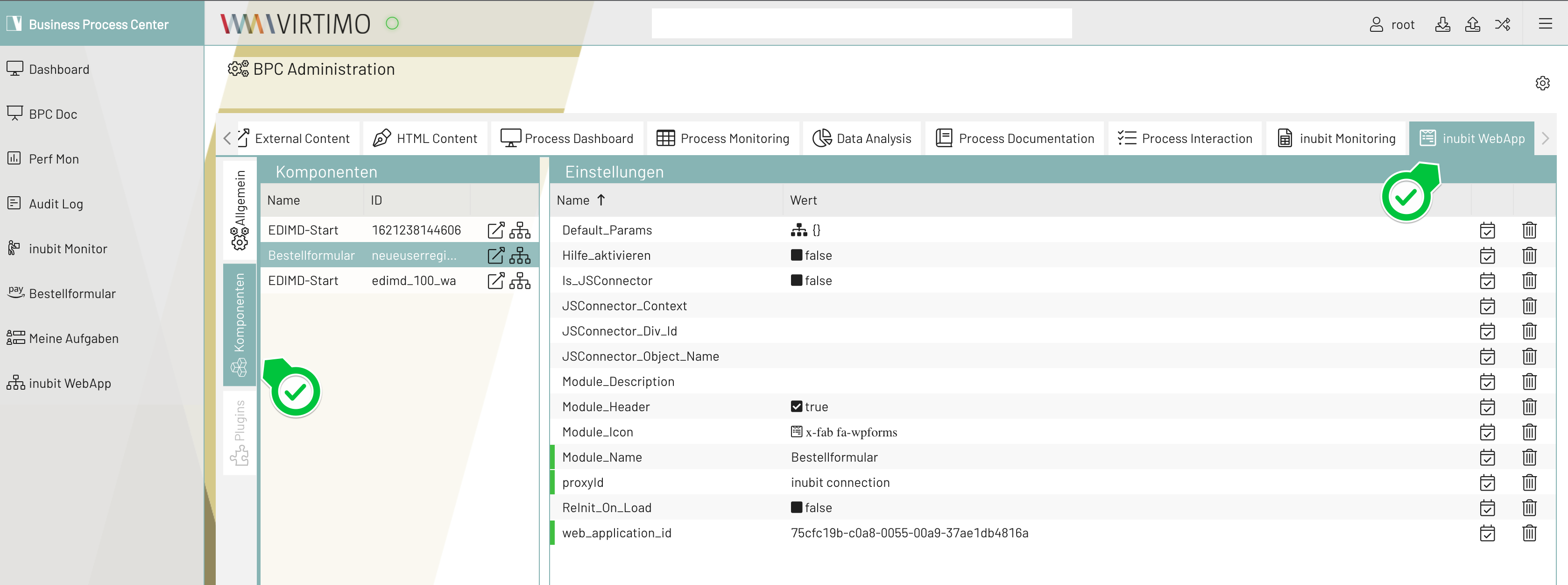
After logging in, navigate to the administration area and select the INUBIT WebApp tab. The deployed WebApp modules are located under Components.
-
In the components list, click the icon in the Actions column to preview the component. For regular use, it can be added as a navigation bar element (see Navigation Settings).
-
The "Reinit_On_Load" property creates a new web application instance in INUBIT each time the component is loaded in BPC. By default, it is disabled.
