User Management
User management can be accessed in the administration area () under the Overview > Users > Users tab.
It lists all users of the identity provider and allows you to create new users directly from the BPC or delete existing users. In addition, users’ organizations, roles, and permissions can be listed and modified.
User management is available for the identity providers Karaf, Keycloak and Database as an IdP are available. In a pure OIDCidentity provider, this feature is not available.
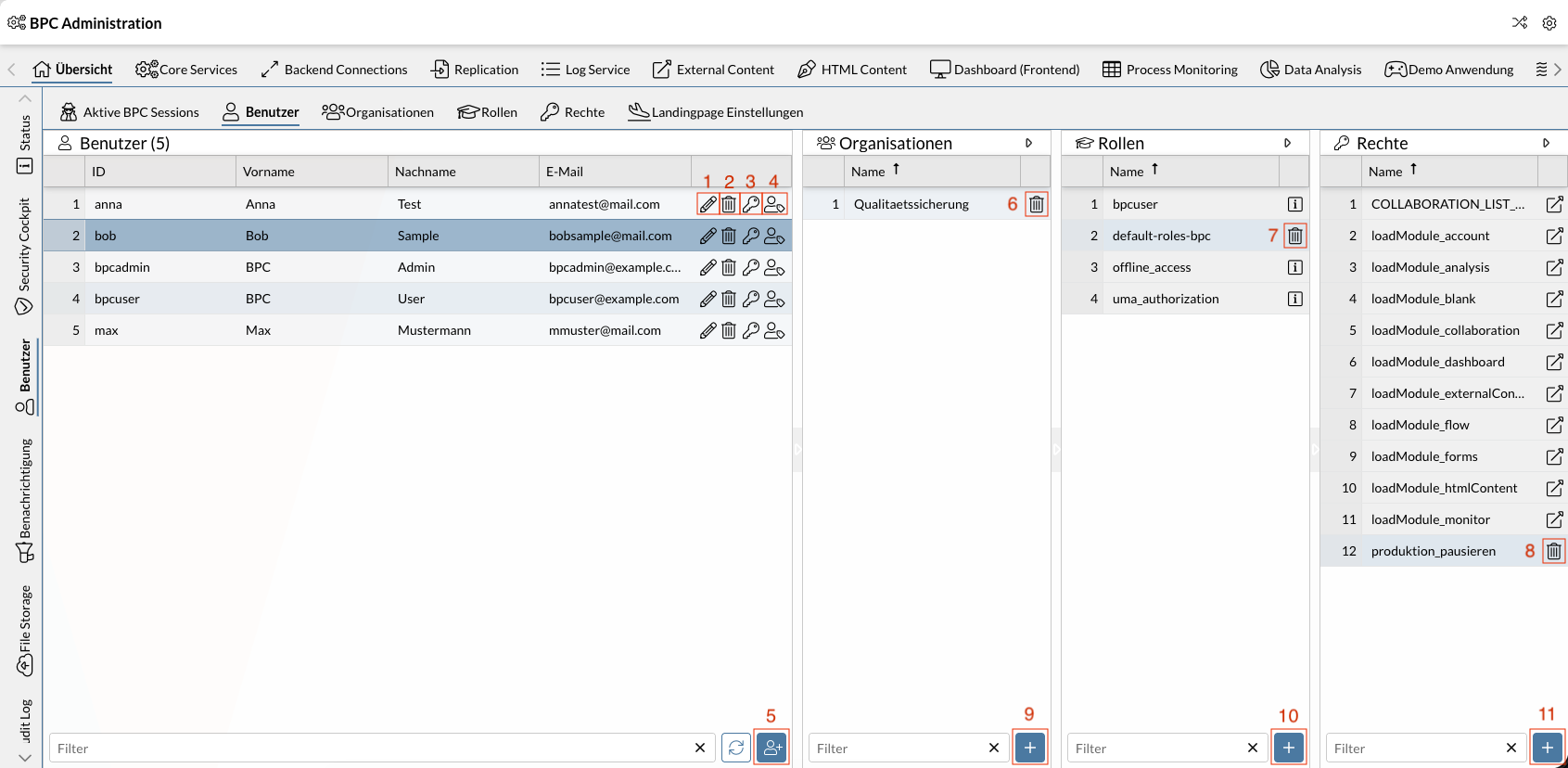
The screenshot shown displays five BPC users.
The selected user, Bob, is part of the Quality Assurance organization, has the role ` default_roles_bpc , and holds the permission ` `produktion_pausieren`.
The numbers in the screenshot correspond to the following functions:
| 1 | |
| 2 | |
| 3 | |
| 4 | |
| 5 | |
| 6–9 | |
| 10–11 |
Organizations, roles, and rights for the respective users that are not directly assigned to them are also displayed.
These can be added, for example, through a role assignment from an organization or another role, or through the setting identityProvider_Mappings in the IdP backend connection.
These indirect permissions are marked as such and cannot be removed.
Functions
The following sections describe the individual functions and the required permissions (in the BPC) needed to use them in more detail. If multiple required permissions are listed, only at least one of them is needed—not all of them together.
You may need to configure additional permissions in your identity provider. This is particularly necessary for Keycloak. See Keycloak permissions.
The functions described are also available via API; see Identity Management API.
Listing users of the identity provider
Lists all users stored in the identity provider. The name and email address are displayed, if available.
Required BPC Permissions
-
Role
bpcadmin, -
Role
IDENTITY_MANAGER_ADMIN, -
Right
IDENTITY_MANAGER_USERS_READ
Displaying User Permissions
Displays all organizations, roles, and rights for a user when that user is selected from the list of all users.
Required BPC Permissions
-
Role
bpcadmin, -
Role
IDENTITY_MANAGER_ADMIN, -
Permission
IDENTITY_MANAGER_USER_ORGANISATIONS_READ(for organizations), -
Permission
IDENTITY_MANAGER_USER_ROLES_READ(for roles), -
Permission
IDENTITY_MANAGER_USER_RIGHTS_READ(for permissions)
Editing User Data
The icon allows you to edit user profile information, such as first name, last name, and email address.
Required BPC permissions
-
Role
bpcadmin, -
Role
IDENTITY_MANAGER_ADMIN, -
Permission
IDENTITY_MANAGER_USERS_UPDATE
Delete a user
A user can be deleted from the identity provider using the icon.
Required BPC permissions
-
Role
bpcadmin, -
Role
IDENTITY_MANAGER_ADMIN, -
Permission
IDENTITY_MANAGER_USERS_UPDATE
Set Password
Users can change their passwords using the icon.
Required BPC permissions
-
Role
bpcadmin, -
Role
IDENTITY_MANAGER_ADMIN, -
Permission
IDENTITY_MANAGER_USERS_UPDATE
Impersonate a user
You can impersonate another person in the system using the icon. You will then be logged into BPC with that person’s permissions and identity.
This feature is only available for the KeycloakIdentity Provider; see also Impersonating Users with Keycloak.
Required BPC permissions
-
Role
bpcadmin, -
Role
IDENTITY_MANAGER_ADMIN, -
Permission
IDENTITY_MANAGER_USER_IMPERSONATE
Creating new users
You can create new users in the identity provider using the Add button.
Required BPC permissions
-
Role
bpcadmin, -
Role
IDENTITY_MANAGER_ADMIN, -
Permission
IDENTITY_MANAGER_USERS_ADD
Add/Remove Permissions
This feature allows you to assign or remove organizations, roles, and permissions for users.
If you assign an organization, role, or permission that does not yet exist, it will be created in the identity provider.
If this results in a new Keycloak role being added, it will be created as either a realm role or a client role, depending on the Keycloak setting identityProvider_keycloak_addRolesToRealm.
Required BPC permissions
-
Role
bpcadmin, -
Role
IDENTITY_MANAGER_ADMIN, -
Permission
IDENTITY_MANAGER_USERS_UPDATE
