Exporting Diagrams as PDFs
To export diagrams as PDFs, the adjustments described below are necessary.
Prerequisites
-
All prerequisites listed at Installation are met.
-
The BusinessProcessCenter user group has been imported into the INUBIT Process Engine. It contains, among other things, the workflows for Diagram export from the Process Documentation module.
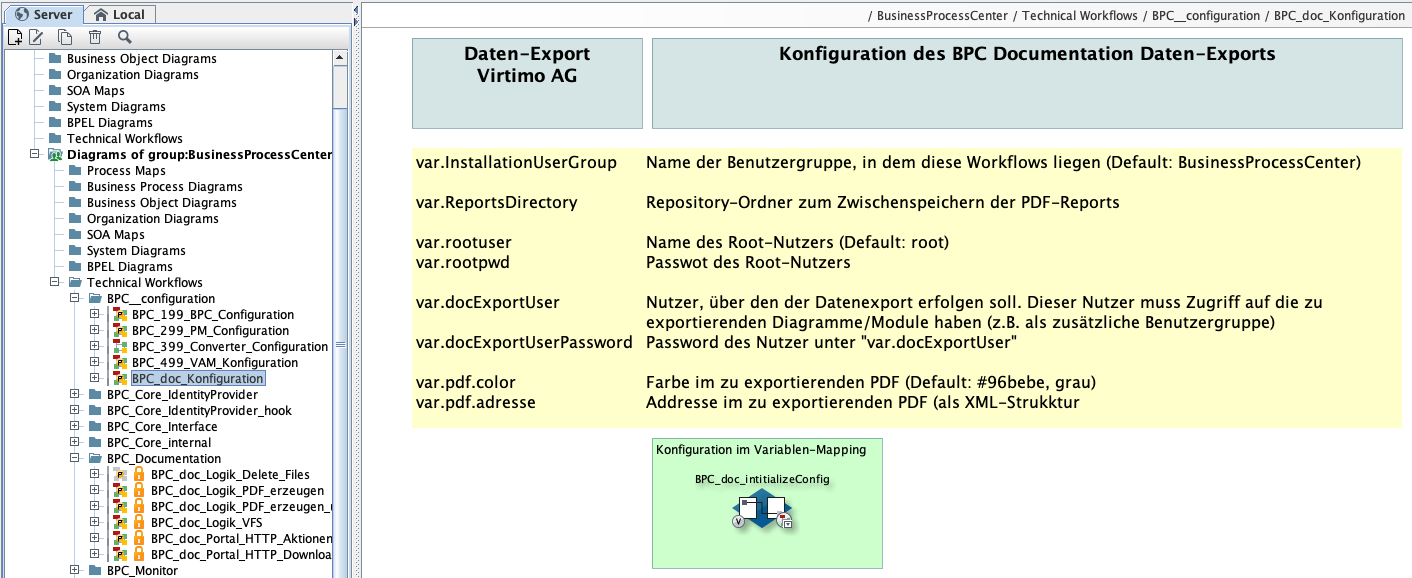
Configuration in INUBIT
Configuration is performed in the technical workflow BPC_doc_Konfiguration. The individual configuration parameters are set via variable mapping. The following settings are mandatory for PDF export:
-
var.docExportUser -
var.docExportUserPassword
The chart data required to generate the PDF is retrieved via this user. Therefore, this user must have access to all displayed charts. This is typically achieved by storing the charts in this user’s group or in their additional user groups.
Additionally, adjust the parameters var.rootuser and var.rootpwd if you change the root user’s credentials.
Configuration in BPC
No administrative configuration is required for PDF export in BPC.
The export functionality can now be used in the BPC Process Documentation module.
