Advanced Search
Dynamic Placeholders
Dynamic placeholders can be used in all of the Monitor’s filters and search fields. These are automatically replaced with the corresponding values when data is retrieved.
| Placeholders | Example replacement | Description |
|---|---|---|
|
max.mustermann |
The current user’s login name. |
Full-Text Search in the Monitor
The full-text search is the central search function across all fields of the selected monitor. In addition to individual search terms, operators can be used to formulate complex search queries.

The search spans all columns of the monitoring data. Optionally, the search can be configured to include process details and referenced messages.
To use this feature, enter the desired term in the full-text search field in the toolbar. If multiple terms are entered without an operator, the system automatically links them with an AND condition.
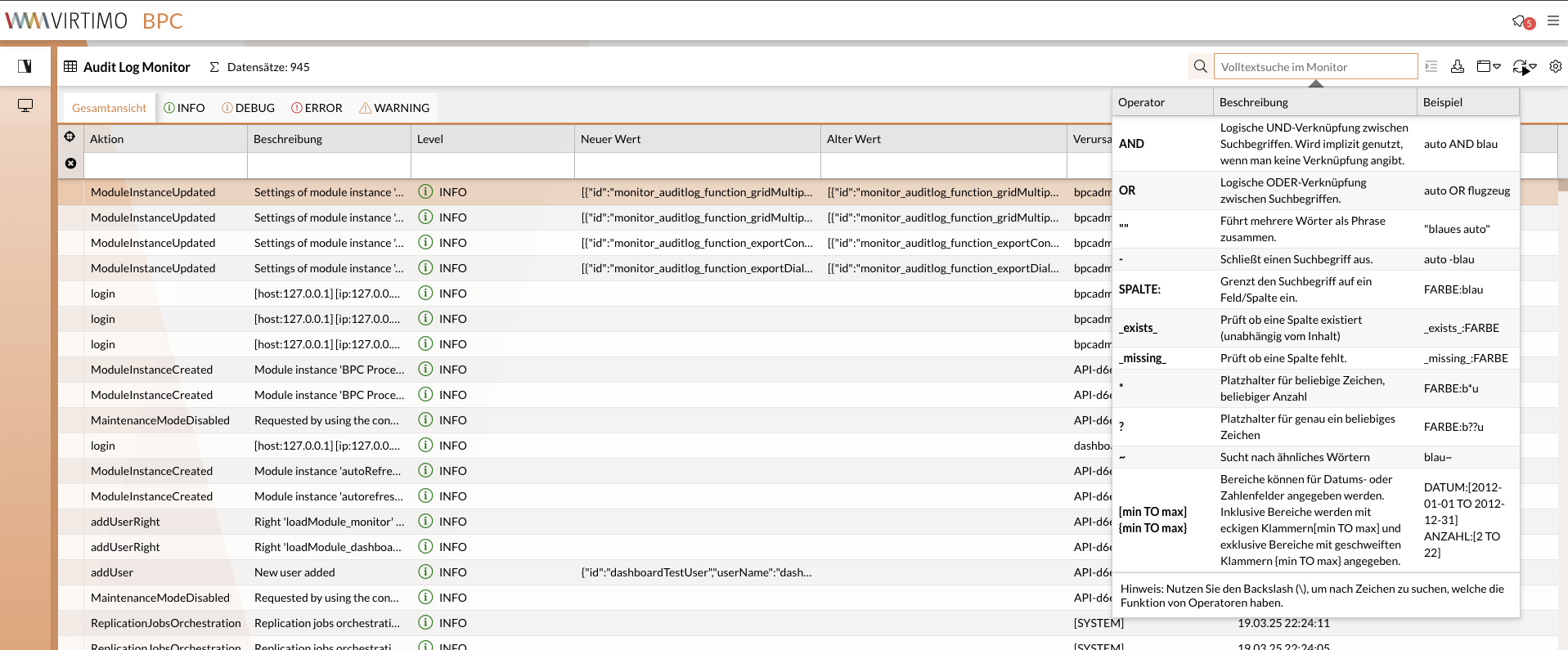
Combining Search Terms
Without quotation marks ("), a space serves as a separator between two terms.
In this case, the logical AND operator (AND) is used by default.
If terms are to be searched for as alternatives, the logical OR (OR) must be explicitly specified.
| Example | Explanation |
|---|---|
|
Searches for documents that contain “car” in any field and “blue” in one (possibly different) field. |
|
Searches for documents that contain “car” or “blue” in any field. |
|
For more complex logical operators, you can use parentheses. |
Limiting the Search Scope
To limit the search to a specific field, prefix the respective field name (column name) with a colon.
| Example | Explanation |
|---|---|
|
Searches for documents in which the value "auto" appears in the VEHICLE_TYPE field and the value "blue" appears in the COLOR field. |
Excluding Search Terms
Search terms or entire subqueries can be specifically excluded from the results by using negation.
| Example | Explanation |
|---|---|
|
Searches for documents where the "auto" value appears in the VEHICLE_TYPE field and the "blue" value does not appear in the COLOR field. |
Searching for (non-)existing fields
To filter records based on the presence of certain fields, the keywords _exists_ and _missing_ are available.
| Example | Explanation |
|---|---|
|
Searches for documents containing the KAEUFER field (regardless of its content) but lacking the SONDERAUSSTATTUNG field. |
Wildcard Search
Wildcard searches are supported for text fields:
-
?– Replaces exactly one arbitrary character. -
*– Replaces any number of characters.
| Example | Explanation |
|---|---|
|
Searches for colors that begin with "gr," such as "green," "gray," and "gray-blue." |
|
This search would also find "green" and "gray," but not "gray-blue." |
Search for Similar Words / Fuzzy Search
Text fields support searching for “similar” words. This allows you to find, for example, words that contain typos.
| Example | Explanation |
|---|---|
|
Also finds the color “blua.” |
|
Modifies the distance value after the operator. |
Range Search
Date and number fields support range searches:
-
<,>,<=,>=– One-sided restriction. -
[min TO max]– Inclusive intervals (include the boundaries). -
{min TO max}– Exclusive intervals ( do not include the endpoints).
Curly and square brackets can be combined.
| Example | Explanation |
|---|---|
|
All days in 2012 |
|
Numbers 1 through 5 |
|
Numbers 10 and up |
|
Dates before 2012 |
|
Numbers 1 through 4 |
|
Ranges with a single side and no upper limit |
Special characters in the search term
Special characters that should be treated as normal text rather than as operators must be escaped using \.
| Example | Explanation |
|---|---|
|
Uses the entire sentence as the search term and ignores |
Limitations for complex search queries
By default, OpenSearch limits the number of concatenated search terms to 1024.
A text search that does not refer to a specific field internally generates one search term per field.
For indices with many fields and multiple logical operators (AND, OR), the limit of 1,024 terms can therefore be reached quickly.
In this case, the following error message appears: too_many_nested_clauses.
If this error occurs, the search query should be optimized by using a targeted field search (column search).
If it is absolutely necessary to use more complex search queries, the limit can be adjusted in the configuration file <OPENSEARCH-CONFIG-DIR>/opensearch.yml by adding the following line:
indices.query.bool.max_clause_count: 2048The value (2048 in this case) can be adjusted as needed. After making the change, OpenSearch must be restarted.
|
Increasing this limit is not recommended, as very complex search queries can significantly impact system performance. |
Overview of Search Parameters/Operators
| Operator | Function | Example |
|---|---|---|
|
combines multiple words into a phrase |
|
|
groups operators to combine them with other searches using AND/OR |
|
|
Indicates a substring search with any number of variable characters |
|
|
Indicates a substring search with one variable character |
|
|
Fuzzy search |
|
|
Treats reserved operators as normal text. |
|
|
Boolean AND function |
|
|
Boolean OR function |
|
|
excludes phrase |
|
|
Column search |
|
|
Entries without a value in Column1 |
|
|
Entries with a value in Column1 |
|
|
Interval search with inclusive boundaries for numeric and date fields |
|
|
Interval search with exclusive boundaries for numeric and date fields |
|
|
Filter operators for numerical comparisons: less than, greater than, less than or equal to, greater than or equal to |
|
