Backups of OpenSearch indices
In BPC, you can configure the system to create regular backups of OpenSearch indices. Depending on the configuration, the backups are stored on the local file system or in cloud storage. Alternatively, a backup can also be stored on a local Minio instance; see MinIO as an S3 Backup for OpenSearch.
Backups are configured via Backup-Einstellungen under Core Services -> General. The configured backups can then be managed via Backup-UI under Core Services -> Backups.
Backup Configuration
By default, backups are performed for the indices bpc-configuration, bpc-auditlog, bpc-forms, and the indices of the Storage Service.
The following settings under Core Services -> General are responsible for the index backups. For example, you can configure the system to also create backups for Log Service indices, or to exclude Storage Service indices from the backup.
Name (ID) |
Description |
|---|---|
Automatically Backups |
If this option is active, the entire configuration index is backed up before each individual change is made. |
Backup Configuration for Log Service Indices |
Default Backup Configuration for Log Service Indices. |
Backup Configuration for Storage Service Indices |
Backup Configuration for Storage Service Indices. |
Backups |
List of backup jobs. These periodically back up OpenSearch indices. |
Repository |
Configuration of the storage location for OpenSearch indices. This configuration is passed directly to OpenSearch. Details can be found in the OpenSearch documentation for the Snapshot Repository API. |
Storage Location
The storage location for the backup snapshots can be configured via the setting backupRepository.
By default, the local file system ("type": "fs") is configured; the snapshots are then stored in the configured directory (settings.location).
This setting is passed directly to OpenSearch.
Refer to the documentation for the specific OpenSearch version you are using for configuration details. (Keyword: OpenSearch Snapshot Repository)
If OpenSearch is running in a cluster, the storage location must be either cloud storage or a shared file system that all OpenSearch nodes can access.
In this case, it makes sense to store the backups in Minio; see MinIO as an S3 Backup for OpenSearch.
Backup UI
The Backup UI allows you to view and configure existing backup jobs. The interface can be accessed via Core Services -> Backups.
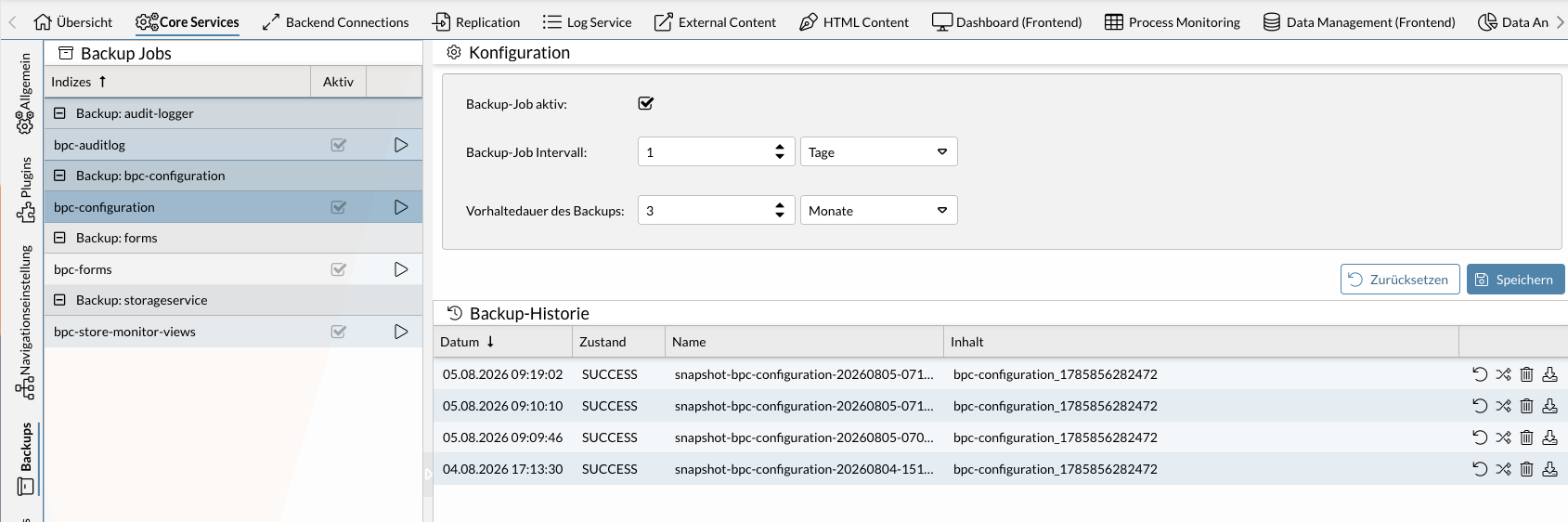
Backup Jobs
On the left side of the interface is a list of configured backup jobs. Each entry shows directly which indices it affects and whether the backup job is enabled. You can create a manual backup snapshot directly using the button.
Clicking on an entry displays a detailed view for that job on the right-hand side.
Backups created by a reindexing process are grouped under “ reindex-backups.”
Detailed View
The following backup job settings can be configured in the detailed view:
-
Enable or disable the backup job
-
Backup job interval
-
Retention period
A backup snapshot is automatically created for the configured index at the configured backup job interval, provided that the backup job is enabled. Snapshots older than the retention period are removed from the BPC. Manual snapshots can also be created for deactivated jobs.
The table below lists the available backup snapshots. The following functions are available:
-
Restore backup: Restores the backup to the index
-
Restore partial state: Allows you to restore individual settings via the deployment UI (only possible for the configuration index)
-
Delete backup: Deletes the backup snapshot
-
Download: Downloads the backup as a JSON file
