Starting the INUBIT Workbench and Logging In
Prerequisites
-
The Process Engine is running
-
You have access to the Process Engine
-
The locally installed JDK suites the Workbench
If an incompatible Java runtime version is detected, the Workbench reports this after startup. The detected Java runtime version is displayed, and a dialog indicates that this version is not supported (refer to Software Requirements).
In this case, using the workbench may produce unexpected behavior.
Proceed as follows
-
Start the Workbench:
-
Via Windows start menu: Start > [All] Programs > INUBIT > Workbench
-
Via terminal:
-
Windows
-
Linux
<SUITE-INSTALL-DIR>/inubit/client/bin/start_workbench.bat<SUITE-INSTALL-DIR>/inubit/client/bin/start_workbench.shAfter startup the following dialog is displayed:
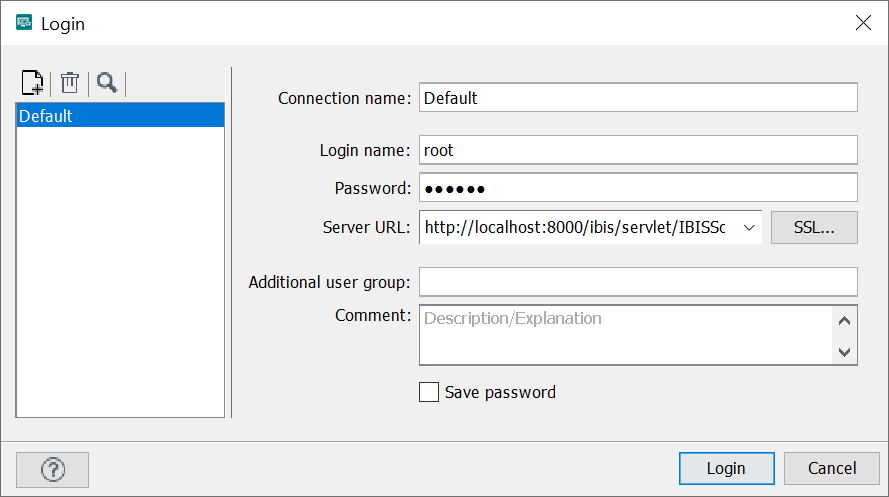
At the login, you can choose a direct user group or an additional user group in the User group field, refer to Assigning Users to Additional User Groups and Editing the Assignment. Both the username and the user group can be entered case-insensitive.
-
-
-
To connect the Workbench with a Process Engine, specify the URL as follows:
https://<hostname>:<port>/ibis/servlet/IBISSoapServlet-
LoadBalancer
Host name or IP address of the system on which the load balancer runs.
-
Port
Port through which the load balancer can be reached.
-
-
To login as system administrator, enter
rootas login name. The initialrootpassword is randomly generated and provided on the Process Engine in the<SUITE-INSTALL-DIR>/inubit/server/ibis_root/conf/ibis.xmlfile:<Property name="initialRootUserPassword"><!-- Random 20 character string --></Property>Change the initial
rootpassword immediately after logging in for the first time via the Workbench. This immediately invalidates the generated password inibis.xml.If the property entry for the initial
rootpassword is missing inibis.xmlduring the first login, the Process Engine start is being aborted. -
To use different credentials, you can create multiple login profiles. Therefore, refer to Creating and Deleting Login Profiles or call the appropriate help in the login window with
 .
. -
Click Login.
If the maintenance mode was activated for the Process Engine, a message is displayed. With the checkbox in this dialog, you can decide whether this warning should be displayed again. The same is true for the warning message that is displayed when the Workbench version is lower than the Process Engine version.
The INUBIT Workbench opens.
For security reasons, change the root user password after the first login. For this purpose, open user menu > Change password from the menu bar in the INUBIT Workbench.
