DynamoDB Tutorial
Introduction
This article describes how to connect to an AWS DynamoDB database using the following Processors.
-
PutDynamoDB (or PutDynamoDBRecord) to insert data into a table.
-
GetDynamoDB to retrieve data from a table.
-
DeleteDynamoDB to delete data from a table.
Prerequisites
To use the DynamoDB Processors, you first need an existing AWS DynamoDB table. To establish a connection to this table, the following prerequisites must be met or known:
-
The name/address of the DynamoDB table to be accessed.
-
A form of authentication for AWS
-
The names of the table’s hash and range keys.
Authentication
For authentication, we recommend using the AWSCredentialsProviderControllerService.
Alternatively, the authentication credentials can also be specified directly in the individual Processors.
|
Even if authentication for the Processors runs through the AWSCredentialsProviderControllerService, the correct value for the "Region" property must always be specified in the Processors. |
Basic Put and Get Operations
This section explains the basic functionality of the PutDynamoDB and GetDynamoDB Processors. To illustrate this, let’s look at the following simple example.
|
DynamoDB is a NoSQL database. Data is stored here using a primary (hash key) and a secondary (range key). |
Given a DynamoDB table in which user information is to be stored. The table has a hash key and a range key:
-
Hash key:
User -
Range key:
Range
Now we want to use the PutDynamoDB Processor to insert basic information about our users into the table. In this example, we assume that the information is provided in the form of a JSON object:
{
"name" : "Max",
"surname" : "Mustermann",
"email" : "max.muster@mustermail.com",
"phone": "+49 (0)123 456789"
}
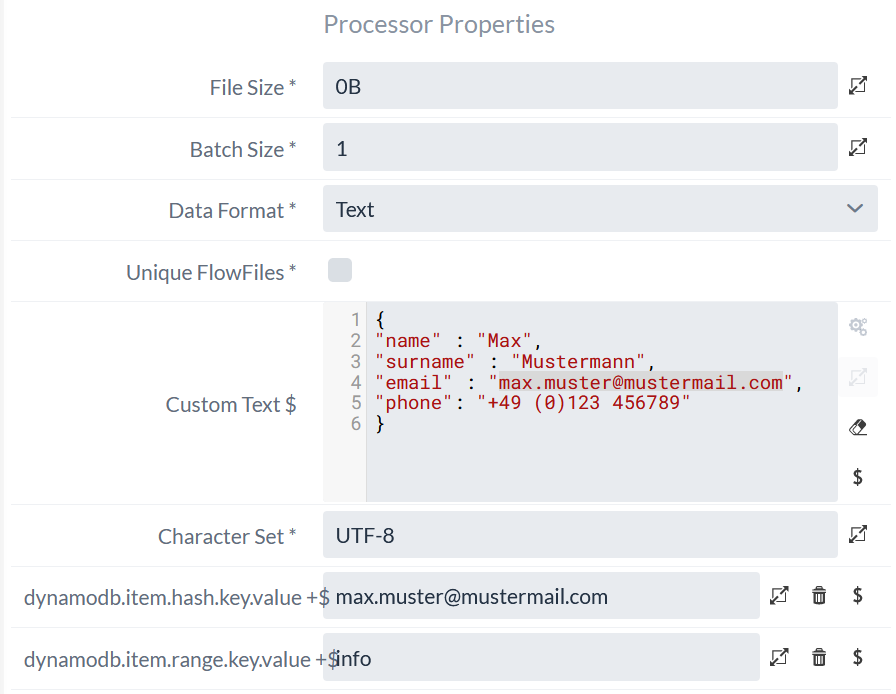
To store this data in the DynamoDB table, we set this object as the content of a FlowFile. Additionally, the FlowFile requires the following attributes for the hash and range keys:
-
dynamodb.item.hash.key.value -
dynamodb.item.range.key.value
In this example, we use the user’s email address as the hash key and the string info as the range key.
Here you can see how to generate a corresponding FlowFile using an GenerateFlowFile Processor.
Now we need to configure the PutDynamoDB Processor.
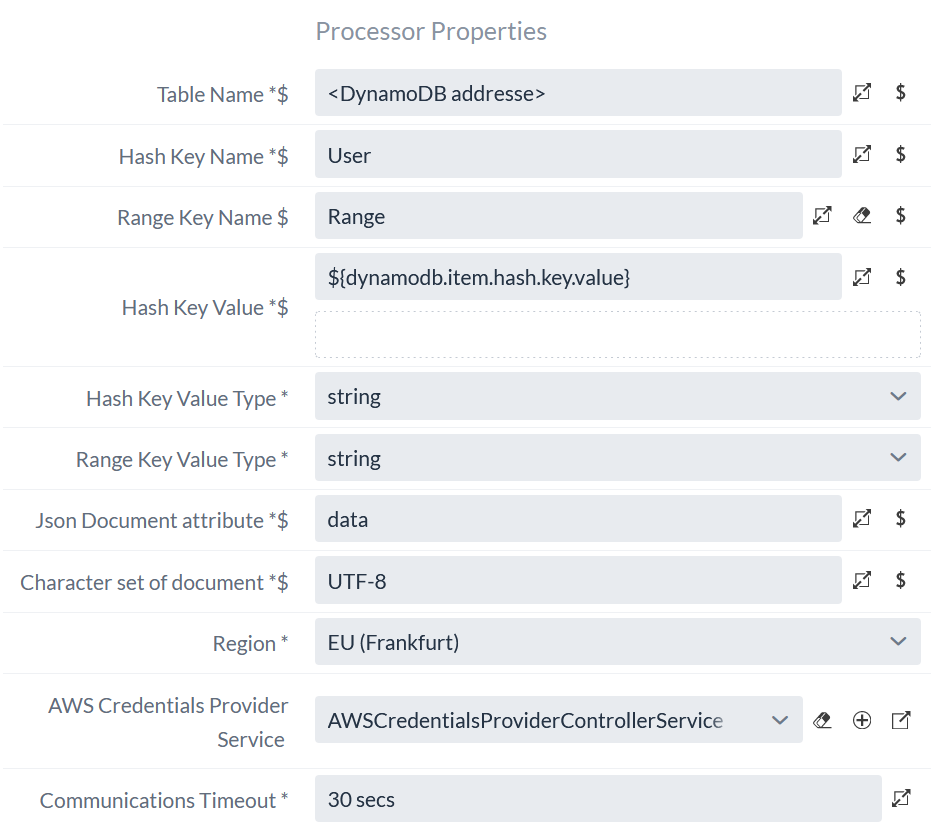
To do this, in addition to the properties we’ve already covered, we must also specify the name of the attribute under which the incoming data should be stored.
This is done using the ` `Json Document Attribute property.
In this example, we name this attribute ` `data.
|
Both ` PutDynamoDB ` and ` |
PutDynamoDB
A configuration for a PutDynamoDB Processor might look like this:
If you use this configuration in a flow as follows, together with the previously generated FlowFile, the data will be inserted into the table (or updated if it already exists).
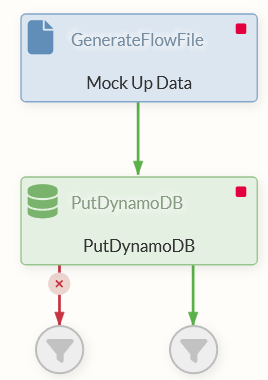
If the execution is successful, the FlowFile is forwarded to the Success Relation without any changes.
After execution, the table might look like this:
| User | Range | data |
|---|---|---|
info |
|
GetDynamoDB
The GetDynamoDB Processor works in the same way as the PutDynamoDB Processor. A configuration might look like this.
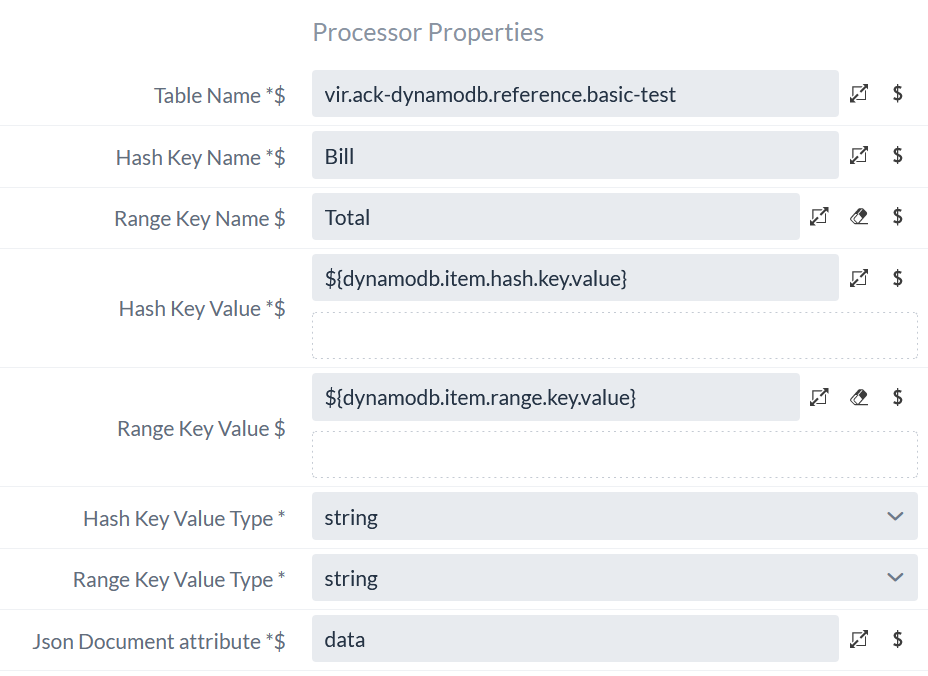
As before, the hash key, range key, and attribute are read from the (FlowFile) attributes of an incoming FlowFile.
If the corresponding data is present in the table, it is inserted into the FlowFile as content, and the FlowFile is routed to the Success relation.
If the data cannot be found in the table, the FlowFile is instead routed to the “ not found ” relation.
|
The “ |
Deleting Data from the Database
To delete data from the table, use the DeleteDynamoDB Processor. As before, the attributes of an incoming FlowFile specify the hash key and range key of the data to be deleted. In this case, all attributes of the corresponding data are deleted.
The configuration is analogous to that of the GetDynamoDB Processor.
Special Case: PutDynamoDBRecord
The PutDynamoDBRecord Processor allows multiple records (in record format) to be written to the database at once.
Data with different range keys as well as different attributes can be written simultaneously.
To do this, the data must be in a format that can be read by a Record Reader and must be in the correct format depending on the application.
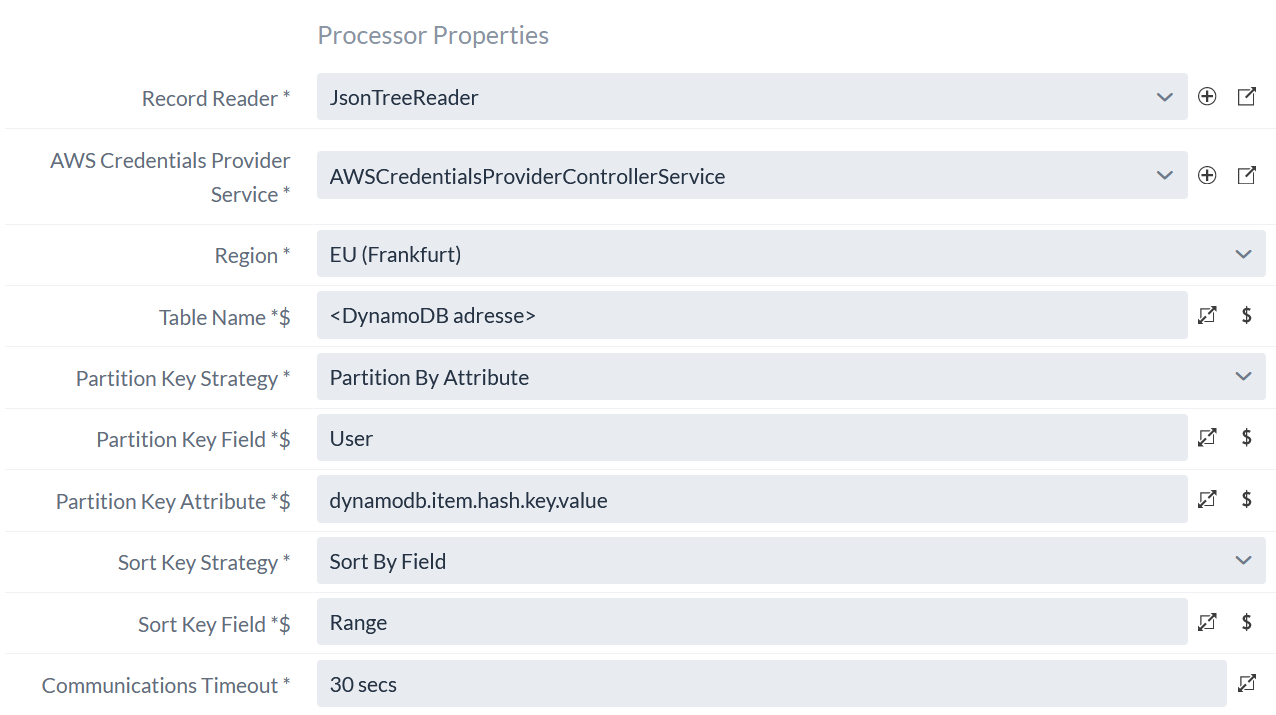
Since the properties of this Processor differ significantly from the conventions of the previously explained Processors, the following applies:
-
Partition Key Fieldis the name of the table’s hash key. In our case, this isUser. -
Sort Key Fieldis the name of the table’s range key. In our case, this isRange.
For both keys, it is possible to determine them dynamically using different strategies.
-
The hash key can either be specified as a FlowFile attribute as before, read as a field from the incoming record, or generated dynamically from a UUID.
-
The range key can either be omitted (only possible for tables without a range key), read from a field in the incoming record, or generated using a counter.
Example
As before, we’re using a table with:
-
Hash key:
User -
Range key:
Range
In this example, we want to store payment information for our user in addition to basic information. So we have not just one, but two JSON objects that we want to store. In order to use these with the PutDynamoDBRecord Processor, we need to format them correctly:
[
{
"Range" : "info",
"data" : {
    "name" : "Max",
    "surname" : "Mustermann",
    "email" : "max.muster@mustermail.com",
    "phone": "+49 (0)123 456789"
    }
},
{
"Range" : "payment",
"paymentMethod" : "credit card",
"data" : {
    "paymentMethod": "credit card",
    "lastFourDigits": "5678",
    "expirationDate": "12/28",
    "billingZip": "54321"
    }
}
]
This is a list of two records, both of which are to be inserted into the table.
Since both records have the same hash key, we’ll specify this using an attribute in the FlowFile.
To do this, we’ll use the dynamodb.item.hash.key.value attribute again and set its value to the email address max.muster@mustermail.com.
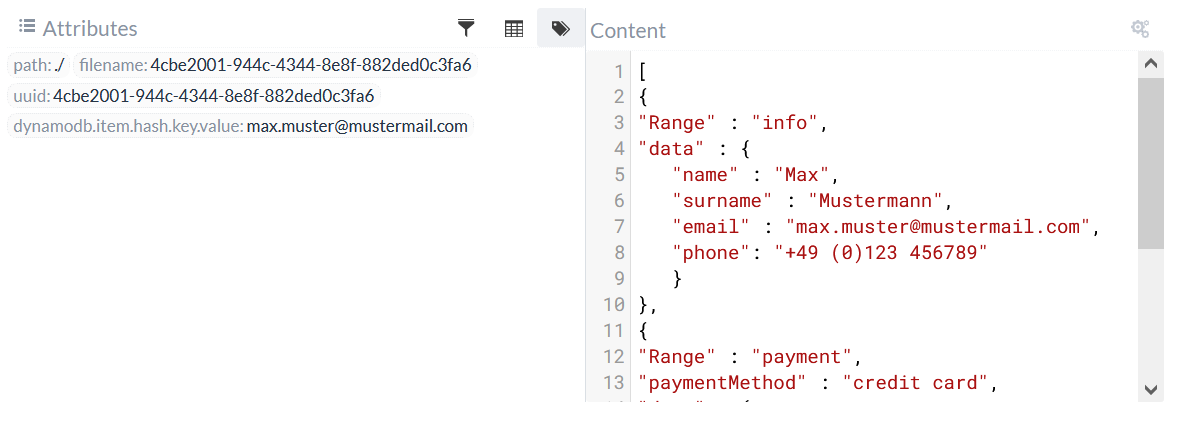
The range key is specified here by the fields Range in the records, and each additional record field is used as an attribute.
(The name of this field must match the name of the Sort Key Field property)
In this example, that means:
The first record in the list is inserted into the database with the hash key max.muster@mustermail.com and range key info and will have an attribute named data.
For the second record with the range key payment, the attribute paymentMethod is inserted in addition to the data attribute.
The corresponding configuration for the PutDynamoDBRecord processor: