Windows exporter
|
|
The Windows exporter is the Windows counterpart to both the node exporter and the process exporter.
It exposes status values of the Windows host, for example:
-
CPU utilization
-
RAM utilization
-
Hard disk utilization
-
Network throughput
-
IO load
In addition, it also provides statistics at process/service level.
Collectors
The collectors are activated in the file. A basic range of collectors is already activated in the standard configuration.
A complete list of all possible collectors can be found at GitHub - Prometheus collectors. The collectors themselves are also configured here, such as the Services and processes for reporting individual processes.
Processes and Services
Processes and Services can be monitored under Windows in the same way as Process-Exporter.
However, simple grouping is not possible here.
The relevant processes are determined via the collector configuration, whereby wildcards can also be used, for example:
collector:
  service:
    services-where: "Name='vimon_windows_exporter' OR Name='inubit-7.4' OR Name='bpc-elasticsearch' OR Name='bpc-karaf'"
  process:
    whitelist: "java+|karaf+|elasticsearch+"
The name of a process can be determined via the task manager. The file extension is not part of the name:
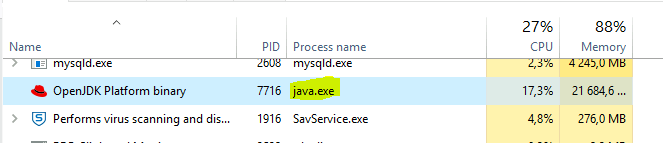
The following metric is obtained with the above configuration, for example:
windows_process_cpu_time_total{creating_process_id="4640", instance="xxxxx:9191", job="wmi", mode="privileged", process="java", process_id="7716"}As the process name java does not necessarily have to be unique, the queries should be made via the PID - however, these change with every Service restart.
However, you can achieve a link via the Service collector:
windows_process_cpu_time_total * on (process_id) group_left (name) windows_service_info{name="inubit bpm 7.4 service"}|
If the INUBIT service was installed via NSSM, this does not work. The NSSM service has its own process, which in turn starts the Java process (with a separate PID). |
