JMX-Term-Exporter
|
|
This exporter can connect to Java processes via JMX and provide internal metrics, for example Tomcat threads or DB Connection Pooling information.
It is also used to read bean information from the INUBIT Tomcat.
The exporter is based on the JMX term JAR and an adaptation of the script exporter to connect to the running INUBIT Tomcat.
It can read any beans from there.
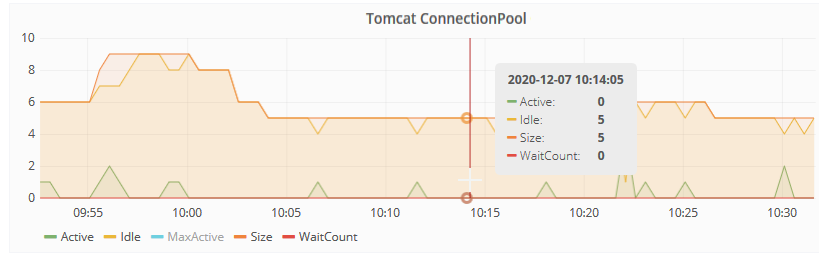
Example:
Prerequisites
-
Linux OS
-
JMX Remote Accessis activated in INUBIT and the Port is set to 3333The following must be inserted in the file
<tomcat-install-dir>/bin/setenv.sh:#JMX: JVM_PARAMS="$JVM_PARAMS -Dcom.sun.management.jmxremote" JVM_PARAMS="$JVM_PARAMS -Dcom.sun.management.jmxremote.port=3333" JVM_PARAMS="$JVM_PARAMS -Dcom.sun.management.jmxremote.authenticate=true" JVM_PARAMS="$JVM_PARAMS -Dcom.sun.management.jmxremote.ssl=false" JVM_PARAMS="$JVM_PARAMS -Dcom.sun.management.jmxremote.host=localhost" JVM_PARAMS="$JVM_PARAMS -Dcom.sun.management.jmxremote.access.file=$CATALINA_BASE/bin/jmxremote.access" JVM_PARAMS="$JVM_PARAMS -Dcom.sun.management.jmxremote.password.file=$CATALINA_BASE/bin/jmxremote.password" JVM_PARAMS="$JVM_PARAMS -Djava.rmi.server.hostname=localhost"Set write permissions to the file
<tomcat-install-dir>/bin/jmxremote.access:chmod 600 jmxremote.accessInhalt der Datei
<tomcat-install-dir>/bin/jmxremote.accessanpassen:vimon readonly controlRoleUser readwrite \ create javax.management.monitor.*,javax.management.timer.* \ unregisterSchreibrechte auf der Datei
<tomcat-install-dir>/bin/jmxremote.accessentziehen:chmod 400 jmxremote.password
|
If the JMX Port should also be accessible outside of |
Configuration
The configuration for the JMX term exporter can be found in the file vimon/config/jmxterm_exporter/jmxterm_exporter.conf
#!/bin/bash
EXPORTERPORT=9470
BINDADDRESS=0.0.0.0

# INUBIT instance name. Used as job name parameter in the metric
SERVERNAME=VIRTIMO

# Prefix for the metric (for reference in prometheus)
METRIC_PREFIX=IBIS_Tomcat_ConnectionPool-
Check whether the Port is free.
If not, specify a free Port.
-
Set a name (server name) of the system to be monitored.
-
Change the prefix, if desired.
You can change/customize the desired JMX metrics in this file:
vimon/config/jmxterm_exporter/jmxterm_exporter.jmx
open localhost:3333 -u vimon -p <password1>

domain tomcat.jdbc
bean tomcat.jdbc:class=org.apache.tomcat.jdbc.pool.DataSource,engine=Catalina,host=localhost,name="jdbc/IBISDB",path=/ibis,type=ConnectionPool
get Active
get Idle
get Size
get MaxActive
get WaitCount
get RemoveAbandonedCount
For more information, see JMX-Term.
You can also set certain Parameters via set, for example:
vimon/config/jmxterm_exporter/jmxterm_exporter_tomcatThreads.jmx
open localhost:3333 -u vimon -p <password1>

domain Catalina
bean Catalina:name="http-nio-8000",type=ThreadPool
get -f currentThreadCount
get -f maxThreads
get -f currentThreadsBusy

# Uncomment, if HTTPS is activated. Both ports have their own thread pool
#bean Catalina:name="https-nio-8443",type=ThreadPool
#get -f currentThreadCount
#get -f maxThreads
#get -f currentThreadsBusy
Prometheus configuration
The metrics from the scripts must be retrieved in the file prometheus.yml.
The path to be retrieved must be set in this case as for Script exporter.
It differs from the path of the other exporters:
<server>:9470/probe?script=[script-name]Example for display in Grafana:
Grafana Board
{
  "id": 42,
  "gridPos": {
    "h": 7,
    "w": 12,
    "x": 0,
    "y": 72
  },
  "type": "graph",
  "title": "Tomcat ConnectionPool $Server",
  "repeat": "Server",
  "datasource": "lokaler Prometheus",
  "thresholds": [],
  "pluginVersion": "8.1.2",
  "links": [],
  "legend": {
    "avg": false,
    "current": false,
    "max": false,
    "min": false,
    "show": true,
    "total": false,
    "values": false
  },
  "aliasColors": {},
  "bars": false,
  "dashLength": 10,
  "dashes": false,
  "fill": 1,
  "fillGradient": 0,
  "hiddenSeries": false,
  "lines": true,
  "linewidth": 1,
  "nullPointMode": "null",
  "options": {
    "alertThreshold": true
  },
  "percentage": false,
  "pointradius": 5,
  "points": false,
  "renderer": "flot",
  "seriesOverrides": [
    {
      "alias": "RemoveAbandonedCount",
      "yaxis": 2
    }
  ],
  "spaceLength": 10,
  "stack": false,
  "steppedLine": false,
  "targets": [
    {
      "expr": "IBIS_Tomcat_ConnectionPool{job=\"$Server\"}",
      "format": "time_series",
      "intervalFactor": 2,
      "legendFormat": "{{item}}",
      "refId": "A"
    }
  ],
  "timeFrom": null,
  "timeRegions": [],
  "timeShift": null,
  "tooltip": {
    "shared": true,
    "sort": 0,
    "value_type": "individual"
  },
  "xaxis": {
    "buckets": null,
    "mode": "time",
    "name": null,
    "show": true,
    "values": []
  },
  "yaxes": [
    {
      "format": "none",
      "label": null,
      "logBase": 1,
      "max": null,
      "min": null,
      "show": true
    },
    {
      "format": "short",
      "label": "Abandoned",
      "logBase": 1,
      "max": null,
      "min": null,
      "show": true
    }
  ],
  "yaxis": {
    "align": false,
    "alignLevel": null
  },
  "scopedVars": {
    "Server": {
      "text": "Prod",
      "value": "Prod",
      "selected": true
    }
  }
}
DB Connection Pool
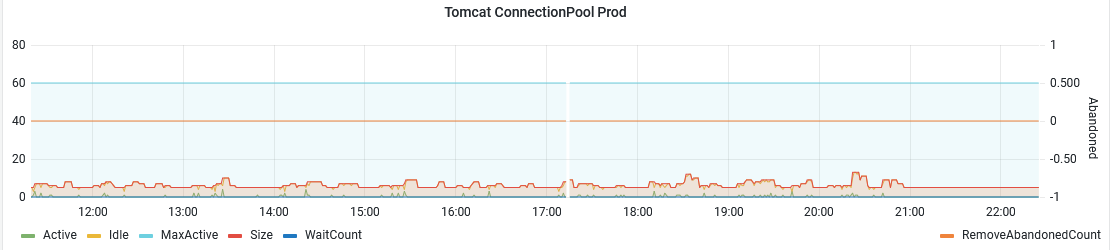
The JMX term exporter can be used, for example, to read Tomcat.jdbc DB ConnectionPooling information. This allows you to monitor the JDBC Connection Pool from INUBIT or BPC live in VIMON:
-
Active
-
Idle
-
MaxActive (static)
-
WaitCount
-
RemoveAbandonedCount
-
…
Since INUBIT 8.0.9 this is already integrated in INUBIT.
However, you could also set the RemoveAbandoned settings at runtime via the exporter and therefore heal an INUBIT with a clogged Connection Pool without restarting or query/set other JMX Parameters.
Tomcat Thread Status
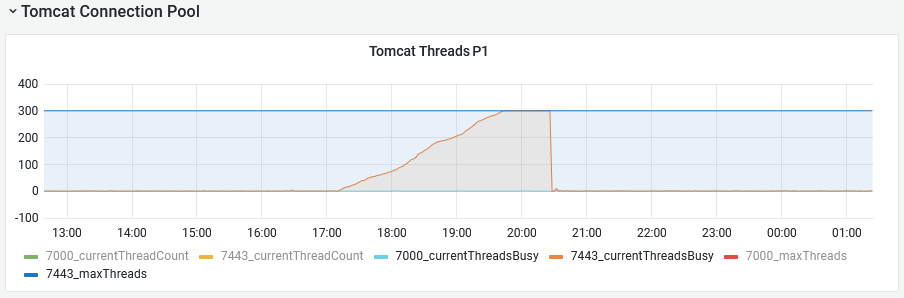
You can use the JMX term exporter to read out the status of the Tomcat threads, which can be helpful when troubleshooting performance problems:
-
Current Thread Count
-
Threads Busy
-
Max Threads
The following image shows that the Tomcat has reached its thread limit:
Interactive configuration
You can also connect to the system interactively via the shell (INUBIT, BPC, ….) to implement further information/actions via this exporter.
To do this, navigate to the vimon directory via SSH and proceed as follows:
Console log
virtimo@vimon-dev:~/vimon$ java11/bin/java -jar drivers/jmxterm-1.0.2-uber.jar
$>open localhost:3333
$>domains
#following domains are available
Catalina
IBIS
JMImplementation
Users
com.sun.management
com.sun.metro
java.lang
java.nio
java.util.logging
jdk.management.jfr
org.apache.camel
org.infinispan
tomcat.jdbc
$>domain tomcat.jdbc
#domain is set to tomcat.jdbc
$>beans
#domain = tomcat.jdbc:
tomcat.jdbc:class=org.apache.tomcat.jdbc.pool.DataSource,connections=PooledConnection[0],engine=Catalina,host=localhost,name="jdbc/IBISDB",path=/ibis,type=ConnectionPool
tomcat.jdbc:class=org.apache.tomcat.jdbc.pool.DataSource,connections=PooledConnection[1],engine=Catalina,host=localhost,name="jdbc/IBISJCRDB",path=/ibis,type=ConnectionPool
tomcat.jdbc:class=org.apache.tomcat.jdbc.pool.DataSource,connections=PooledConnection[2],engine=Catalina,host=localhost,name="jdbc/IBISDB",path=/ibis,type=ConnectionPool
tomcat.jdbc:class=org.apache.tomcat.jdbc.pool.DataSource,connections=PooledConnection[4],engine=Catalina,host=localhost,name="jdbc/IBISLOGSDB",path=/ibis,type=ConnectionPool
tomcat.jdbc:class=org.apache.tomcat.jdbc.pool.DataSource,connections=PooledConnection[5],engine=Catalina,host=localhost,name="jdbc/IBISLOGSDB",path=/ibis,type=ConnectionPool
tomcat.jdbc:class=org.apache.tomcat.jdbc.pool.DataSource,connections=PooledConnection[6],engine=Catalina,host=localhost,name="jdbc/IBISLOGSDB",path=/ibis,type=ConnectionPool
tomcat.jdbc:class=org.apache.tomcat.jdbc.pool.DataSource,connections=PooledConnection[7],engine=Catalina,host=localhost,name="jdbc/IBISJCRDB",path=/ibis,type=ConnectionPool
tomcat.jdbc:class=org.apache.tomcat.jdbc.pool.DataSource,engine=Catalina,host=localhost,name="jdbc/IBISDB",path=/ibis,type=ConnectionPool
tomcat.jdbc:class=org.apache.tomcat.jdbc.pool.DataSource,engine=Catalina,host=localhost,name="jdbc/IBISJCRDB",path=/ibis,type=ConnectionPool
tomcat.jdbc:class=org.apache.tomcat.jdbc.pool.DataSource,engine=Catalina,host=localhost,name="jdbc/IBISLOGSDB",path=/ibis,type=ConnectionPool
$>bean tomcat.jdbc:class=org.apache.tomcat.jdbc.pool.DataSource,engine=Catalina,host=localhost,name="jdbc/IBISDB",path=/ibis,type=ConnectionPool
#bean is set to tomcat.jdbc:class=org.apache.tomcat.jdbc.pool.DataSource,engine=Catalina,host=localhost,name="jdbc/IBISDB",path=/ibis,type=ConnectionPool
$>info
The following list shows all possible metrics for the default settings:
JMX metrics
  %0   - AbandonWhenPercentageFull (int, rw)
  %1   - AccessToUnderlyingConnectionAllowed (boolean, rw)
  %2   - Active (int, r)
  %3   - AlternateUsernameAllowed (boolean, rw)
  %4   - BorrowedCount (long, r)
  %5   - CommitOnReturn (boolean, rw)
  %6   - ConnectionProperties (java.lang.String, rw)
  %7   - CreatedCount (long, r)
  %8   - DataSource (java.lang.Object, rw)
  %9   - DataSourceJNDI (java.lang.String, rw)
  %10  - DbProperties (java.util.Properties, rw)
  %11  - DefaultAutoCommit (java.lang.Boolean, rw)
  %12  - DefaultCatalog (java.lang.String, rw)
  %13  - DefaultReadOnly (java.lang.Boolean, rw)
  %14  - DefaultTransactionIsolation (int, rw)
  %15  - DriverClassName (java.lang.String, rw)
  %16  - FairQueue (boolean, rw)
  %17  - Idle (int, r)
  %18  - IgnoreExceptionOnPreLoad (boolean, rw)
  %19  - InitSQL (java.lang.String, rw)
  %20  - InitialSize (int, rw)
  %21  - JdbcInterceptors (java.lang.String, rw)
  %22  - JdbcInterceptorsAsArray ([Lorg.apache.tomcat.jdbc.pool.PoolProperties$InterceptorDefinition;, r)
  %23  - JmxEnabled (boolean, rw)
  %24  - LogAbandoned (boolean, rw)
  %25  - LogValidationErrors (boolean, rw)
  %26  - MaxActive (int, rw)
  %27  - MaxAge (long, rw)
  %28  - MaxIdle (int, rw)
  %29  - MaxWait (int, rw)
  %30  - MinEvictableIdleTimeMillis (int, rw)
  %31  - MinIdle (int, rw)
  %32  - Name (java.lang.String, rw)
  %33  - NumActive (int, r)
  %34  - NumIdle (int, r)
  %35  - NumTestsPerEvictionRun (int, rw)
  %36  - Password (java.lang.String, rw)
  %37  - PoolName (java.lang.String, r)
  %38  - PoolSweeperEnabled (boolean, r)
  %39  - PropagateInterruptState (boolean, rw)
  %40  - ReconnectedCount (long, r)
  %41  - ReleasedCount (long, r)
  %42  - ReleasedIdleCount (long, r)
  %43  - RemoveAbandoned (boolean, rw)
  %44  - RemoveAbandonedCount (long, r)
  %45  - RemoveAbandonedTimeout (int, rw)
  %46  - ReturnedCount (long, r)
  %47  - RollbackOnReturn (boolean, rw)
  %48  - Size (int, r)
  %49  - SuspectTimeout (int, rw)
  %50  - TestOnBorrow (boolean, rw)
  %51  - TestOnConnect (boolean, rw)
  %52  - TestOnReturn (boolean, rw)
  %53  - TestWhileIdle (boolean, rw)
  %54  - TimeBetweenEvictionRunsMillis (int, rw)
  %55  - Url (java.lang.String, rw)
  %56  - UseDisposableConnectionFacade (boolean, rw)
  %57  - UseEquals (boolean, rw)
  %58  - UseLock (boolean, rw)
  %59  - UseStatementFacade (boolean, rw)
  %60  - Username (java.lang.String, rw)
  %61  - ValidationInterval (long, rw)
  %62  - ValidationQuery (java.lang.String, rw)
  %63  - ValidationQueryTimeout (int, rw)
  %64  - Validator (org.apache.tomcat.jdbc.pool.Validator, rw)
  %65  - ValidatorClassName (java.lang.String, rw)
  %66  - WaitCount (int, r)
# operations
  %0   - void checkAbandoned()
  %1   - void checkIdle()
  %2   - java.lang.Boolean isDefaultAutoCommit()
  %3   - java.lang.Boolean isDefaultReadOnly()
  %4   - void purge()
  %5   - void purgeOnReturn()
  %6   - void resetStats()
  %7   - void testIdle()
# notifications
  %0   - javax.management.Notification(INIT FAILED,CONNECTION FAILED,CONNECTION ABANDONED,SLOW QUERY,FAILED QUERY,SUSPECT CONNECTION ABANDONED,POOL EMPTY,SUSPECT CONNECTION RETURNED)