Installation Folder Structure
After a successful installation of the INUBIT software, you will find the following folder structure, depending on the selected components:
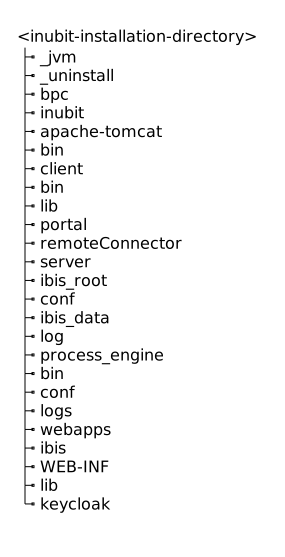
| Folder | What’s there? | What can I do here? |
|---|---|---|
|
Installation folder of the included Java runtime environment, used by BPC, the Process Engine, Workbench, and others. |
Modifications to the |
|
Installation folder of the included Tomcat, used by the Process Engine. |
No intervention is necessary. |
|
Installation folder |
|
|
Start and stop scripts of the INUBIT Process Engine |
No intervention is necessary. |
|
All configuration files of the INUBIT Process Engine. |
The INUBIT license is also stored here. |
|
Location for all libraries (JARs) required by the INUBIT Process Engine |
Plugin-specific JAR files are also stored here. |
