Cluster manager
|
The use of the cluster manager requires a license. A separate license must be purchased for each INUBIT instance within a cluster. |
Usage
With the Virtimo Cluster Manager it is possible to merge several INUBIT instances into a cluster, add or remove new instances at runtime.
In this way, for example, a high availability of an INUBIT system can be achieved or a targeted reaction to high loads can be achieved.
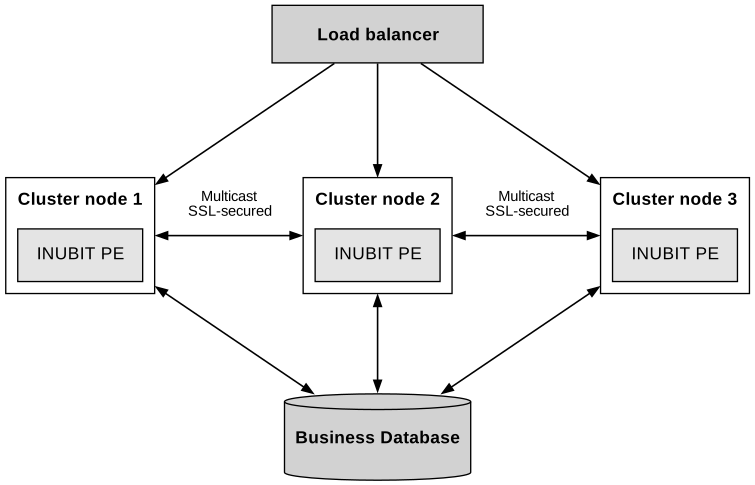
Capabilities of the Virtimo Cluster Manager
-
The individual nodes running the Cluster Manager form a group
-
All nodes in the group are aware of one another
-
Security settings allow only specific nodes to join the cluster
-
The node group ensures that exactly one node always acts as the leader
-
The leader node is marked via a file
Limitations of the Virtimo Cluster Manager
-
No INUBIT data is distributed or shared within the cluster
-
Modifications made to one cluster node are not applied to the other cluster nodes
Workflow Design in a Cluster
Workflow design in a cluster differs from workflow design on a single INUBIT instance (non-clustered).
Workflow design within a cluster must account for two aspects that can be disregarded on a single instance:
-
Processes that can be executed in parallel without restriction
-
Processes that must be executed exactly once within the cluster
Parallel process execution ensures high scalability. Ideally, processes operate independently of data that must be accessible to all nodes. Unavoidable data dependencies are managed in a central business database accessible to all cluster nodes.
Within INUBIT workflows, the leader status can serve as a switch to ensure specific processes run on exactly one node within the entire cluster.
Prerequisites
The following components are necessary for the complete implementation of a clustered system:
-
INUBIT instances: at least 2 INUBIT installations including license for using the cluster manager
-
Network infrastructure: INUBIT instances must be able to communicate with each other via Multicast.
-
Load-Balancer: to distribute the incoming requests to the INUBIT instances of the cluster
The cluster manager controls which nodes belong to the cluster and who is the current leader. The load balancer takes care of the distribution of incoming requests to the individual INUBIT instances in the cluster.
This separation of responsibilities must be taken into account during configuration.
Multicast
The clustering is based on Multicast, a special network address range and port. All nodes that have the same multicast address and port configured join together to form a cluster.
Architecture
A cluster always consists of a leader node and any number of backup nodes. If INUBIT instances are to work together in a cluster, this must be taken into account when implementing the technical workflows.
Leader node
The leader node takes over all tasks that are to be carried out within the system on a single node, e.g. scheduled workflows.
Backup node
All nodes (leader and backup) take over the tasks that can be technically executed in parallel.
An additional workflow is used to check whether the current INUBIT instance is a leader or backup node.
Application status
The cluster manager also runs on every INUBIT instance and checks independently at regular intervals whether the instance is still available. If the INUBIT can no longer be reached, the instance is logged off from the cluster. Logging off in the load balancer is not the task of the cluster manager.
The following INUBIT REST-API endpoints can be used to check the status:
Configuration
Activation of the cluster manager
The cluster manager can be activated via the file <SUITE-INSTALL-DIR>/inubit/server/ibis_root/conf/ibis.xml:
<Properties>
     ...
     <!-- Cluster Manager configuration -->
     <Property name="ActivateClusterManager" type="Boolean">false</Property>
</Properties>-
Stop Process Engine
-
Set property
ActivateClusterManagertotrue -
Start Process Engine
Configuration of the cluster manager
The actual configuration details for the cluster manager are controlled via the file <SUITE-INSTALL-DIR>/inubit/server/ibis_root/conf/clustermanager/clusterManagerConfig.xml.
All the settings required for network communication are made here.
<?xml version="1.0" encoding="UTF-8"?>
<!--
    INUBIT Cluster Manager configuration file

    Virtimo AG
-->
<properties>
    <!--
        A multicast address is a specific IP address used for multicast communication.
        type: IPV4 Address
        range: 224.0.0.0 to 239.255.255.255
    -->
    <multicastAddress>239.255.187.1</multicastAddress>
    <!--
        In multicast communication, a multicast port is used to identify the specific application or service.
        type: Integer
        range: 0 to 65535
    -->
    <multicastPort>49155</multicastPort>
    <!--
        Set the time-to-live for multicast packets sent out on this multicast socket in order to control the scope of the multicasts.
        type: Integer
        range: 0 to 255
    -->
    <multicastTtl>1</multicastTtl>
    <!--
        Network Interface Name for multicast socket communication
        type: String
        range: NA
    -->
    <interface>enp0s3</interface>
    <!--
        Prioritize to select Master node in same cluster. The higher the number the higher the priority.
        The node with the highest priority will be elected as leader node.
        type: Integer
        range: 0 to 2147483647
    -->
    <priority>10</priority>
    <!--
        Heartbeat URL to check the INUBIT connection status, whether INUBIT is up and running.
        type: URL
        range: NA
    -->
    <applicationHeartbeatUrl>http://localhost:8000/ibis/rest/ready</applicationHeartbeatUrl>
    <!--
        INUBIT application port currently running
        type: Integer
        range: 0 to 65535
    -->
    <applicationPort>8000</applicationPort>
    <!--
        Proxy port for INUBIT application directly communicate to master in cluster manager.
        type: Integer
        range: 0 to 65535
    -->
    <masterProxyPort>9000</masterProxyPort>
    <!--
        File path to place master / backup status file
        type: File path
        range: any exisiting folder
    -->
    <statusFilePath>PLACEHOLDER_STATUSFILEPATH</statusFilePath>
    <!--
        Read timeout value, after specified time consider as timeout for any read.
        type: Time in milliseconds
        range: 0 to 2147483647
    -->
    <readTimeout>3000</readTimeout>
    <!--
        Interval to wait between checks of the heartbeat url.
        type: Time in milliseconds
        range: 0 to 2147483647
    -->
    <checkInterval>1000</checkInterval>
    <!--
        Connection timeout value, after specified time consider as timeout for connecting to cluster
        type: Time in milliseconds
        range: 0 to 2147483647
    -->
    <connectTimeout>1000</connectTimeout>
    <!--
        After N number of consecutive successful communication, consider connection is up
        type: Integer
        range: 0 to 2147483647
    -->
    <rise>2</rise>
    <!--
        After N number of consecutive communication failure, consider connection is down
        type: Integer
        range: 0 to 2147483647
    -->
    <fall>3</fall>
    <!--
        Master node heartbeat interval in Milli seconds
        type: Time in milliseconds
        range: 0 to 2147483647
    -->
    <masterHeartbeatIntervalMillis>1000</masterHeartbeatIntervalMillis>
    <!--
        After N number of consecutive communication failure, consider Master node connection is down
        type: Integer
        range: 0 to 2147483647
    -->
    <masterMissedHeartbeatsToFail>3</masterMissedHeartbeatsToFail>
    <!--
        Backup node heartbeat interval in Milli seconds
        type: Time in Milliseconds
        range: 0 to 2147483647
    -->
    <backupHeartbeatIntervalMillis>3000</backupHeartbeatIntervalMillis>
    <!--
        After N number of consecutive communication failure, consider backup node connection is down
        type: Integer
        range: 0 to 2147483647
    -->
    <backupMissedHeartbeatsToFail>3</backupMissedHeartbeatsToFail>
</properties>
Migrating an existing configuration of the non-integrated cluster manager
If you are already using the non-integrated version of the Virtimo Cluster Manager, you can continue using your existing configuration file. Proceed as follows:
-
Stop the Process Engine
-
Place your existing configuration file at
<SUITE-INSTALL-DIR>/inubit/server/ibis_root/conf/clustermanager/inubitClusterManager.conf -
Remove the file
<SUITE-INSTALL-DIR>/inubit/server/ibis_root/conf/clustermanager/clusterManagerConfig.xml -
Start the Process Engine
Your existing configuration is read and written back to the file system as <SUITE-INSTALL-DIR>/inubit/server/ibis_root/conf/clustermanager/clusterManagerConfig.xml.
From now on, use only the clusterManagerConfig.xml file.
You can remove your previous configuration file from the file system.
Defining the leader node
The priority setting determines which node should be active as the laster in the cluster.
Specify the highest integer value for exactly one instance in the configuration.
As soon as this instance joins the cluster, it is set as the leader.
If the leader fails, a new leader is selected based on the priority of the other instances. This is the instance with the currently highest priority.
|
Configure a different priority for each INUBIT instance in the cluster. This is the safest way to control the choice of leader node. |
Checking for the leader node
A file is stored in the file system on the instance that is active as the leader. The path to the storage can be adjusted via the configuration. An additional workflow checks for the existence of this file. This can be used to determine at runtime whether the respective INUBIT instance is the leader node or not.
The workflow can be found at: <SUITE-INSTALL-DIR>/inubit/server/ibis_root/conf/clustermanager/inubit-cluster-manager-workflow.zip.
Enable custom logging
To redirect the logging output of the cluster manager into a separate file, proceed as follows:
-
Login with a Workbench
-
Go to Administrator tab and select General Settings
-
In the tree navigate to Logging > Trace
-
On the right side panel select Custom server trace and click "…" button
-
Logger dialog opens
-
Right click to open the context menu and select Add
-
Enter the name
de.virtimo.inubit.clustermanager, chooseRolling file loggerand click OK -
If you want to update log file name, select the newly added entry in the table and click "…" button
-
Select "Output file" and adjust to value to something like
$ibis.root.directory$/log/clustermanager.log -
Close the "Rolling file logger" dialog with OK
-
Close the "Logger" dialog with OK
-
Save the general settings by clicking on the save icon in the global toolbar
